0. 资料
1. 问题集锦
- android自定义通知栏被压缩解决
测试系统:andriod 6.0
问题:通过builder.setContent(remoteViews)
解决办法:
notification = builder.build()
notification.bigContentView = remoteViews
- Android通知栏详解 解决自定义通知栏显示不全问题
- Android通知栏踩坑记
- android Notification的自定义和实现通知栏的展开和收起
- setContent()方法获得的Notification是定高的 如何实现wrap_content
- 安卓仿网易云音乐通知栏控制音乐,默认显示Notification bigView 实验下来实际无效果
- Android 7.0消息通知超过3条合并引发的问题
- [Android]展开/收起通知栏 Android Studio会报错
1. NotificationChannel
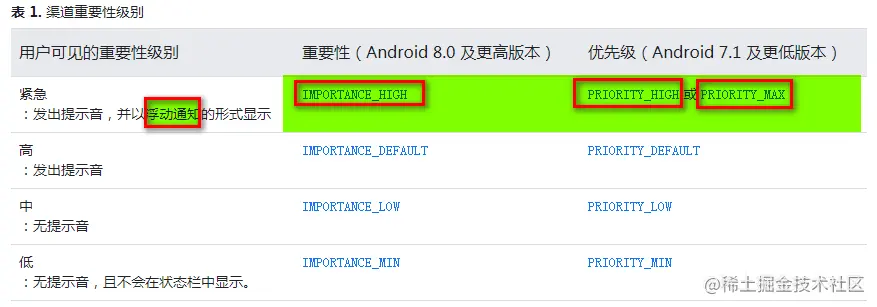
2. NotificationManager.IMPORTANCE_**
- IMPORTANCE_NONE 关闭通知
- IMPORTANCE_MIN 开启通知,不会弹出,但没有提示音,状态栏中无显示
- IMPORTANCE_LOW 开启通知,不会弹出,不发出提示音,状态栏中显示
- IMPORTANCE_DEFAULT 开启通知,不会弹出,发出提示音,状态栏中显示
- IMPORTANCE_HIGH 开启通知,会弹出,发出提示音,状态栏中显示
3. RemoteViews支持的控件类型
- RemoteViews只支持4种根布局:
- FrameLayout
- LinearLayout
- RelativeLayout
- GridLayout
- 根布局下只支持如下控件:
- AnalogClock
- Button
- Chronometer
- ImageButton
- ImageView
- ProgressBar
- TextView
- ViewFlipper
- ListView
- GridView
- StackView
- AdapterViewFlipper
1. RemoteViews的根布局下,可以使用 TextClock .TextClock 可以将当前日期和/或时间显示为格式化字符串,用于在通知栏内显示时间. Android基础到进阶UI TextClock 使用+实例| 8月更文挑战
4. RemoteViews中的 setInt, setLong, setFloat, set** 方法 :
5. Android 8.0 及更高版本的设备中:
- 使用 NotificationChannel.setImportance(),而非 NotificationCompat.Builder.setPriority()
7. 自定义通知栏布局高度限制
- 因为抽屉式通知栏中的空间非常有限。自定义通知布局的可用高度取决于通知视图。通常情况下,收起后的视图布局的 高度上限为 64 dp,展开后的视图布局的 高度上限为 256 dp