前提条件,需求:
使用vue element UI 的table
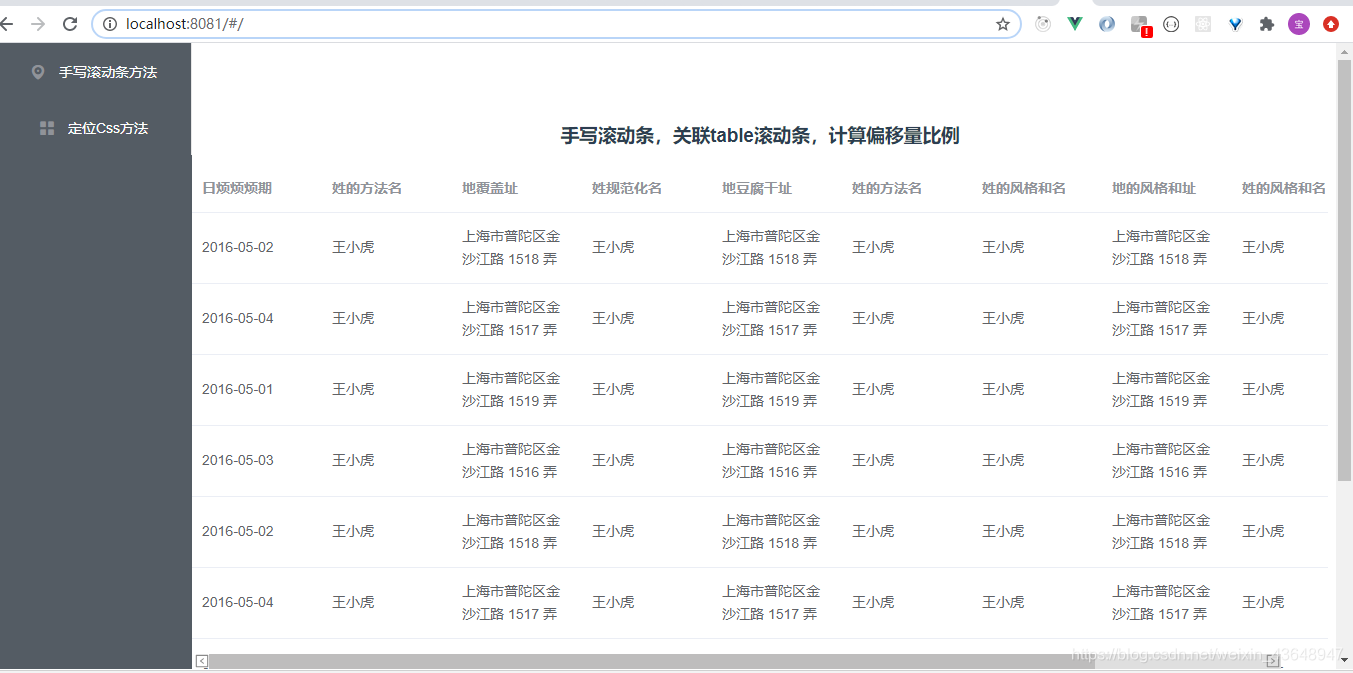
 由于横向数据比较长,小屏幕电脑会出现水平滚动条,假如每页20条数据,那么我想对第一条数据进行操作,我得先滚动到table最下面,再拉动水平滚动条到最右边,再回滚到最上面,对末尾的操作进行点击。
这样操作太繁琐,所以提出需求:屏幕过小出现水平滚动条时候,将table的水平滚动条固定再屏幕底部。 element ui 的table并没有办法实现,我采用的是window.onresize
思路一、手写滚动条关联table
1.手写一个固定底部的滚动条,与table的滚动条绑定实现联动,并隐藏table的滚动条.。 2.用window.onresize对浏览器窗口进行监听,用来判断滚动条显示隐藏。 3.计算滑动位移距离和对应比例。
熟悉思路看代码
一、手写个滚动条并定位到底部绑定上事件,设置好初始化参数,用处已经注释好了
	data(){
	return{
 		//滚动条参数
      newx: "", // 第一次坐标
      oldx: "", // 移动的坐标
      outBoxWidth: "", // 滚动条长度
      moveWidth: "", // 可移动的长度
      old_new: {
        // 滚动条偏移量
        left: 0
      },
      windowWidth: document.body.clientWidth - 280, //table宽度
      f: 0,
      leftstr:'',
      //滚动条参数
      }
     }
<!-- 滚动条 -->
//img是两端的小箭头
<div class="out_box" ref="out_box">
     <img style="margin-left:-20px;position:fixed;bottom:0px;" src="http://img.s.youfenba.com/material_thumb/74NGnHkeQs.png">
     <div class="in_box" @mousedown="mouseDown" @mouseup="mouseUp" @mouseout="mouseUp"  :style="old_new" ref="in_box" > </div>
     //用ref对里边的灰色滚动条进行绑定,写上对应的事件
     <img style="position:fixed;bottom:0px;right:40px;" src="http://img.s.youfenba.com/material_thumb/WTzsMr6RSX.png">
 </div>
 需要解释下为什么我绑定三个事件
mousedown :在鼠标点击的时候获取初始坐标,并根据鼠标移动距离使滚动条偏移。
mouseout:鼠标移出滚动条的时候,停止计算鼠标坐标,滚动条停止滚动。
mouseup:鼠标抬起的时候,也停止计算鼠标坐标,滚动条停止滚动。
需要解释下为什么我绑定三个事件
mousedown :在鼠标点击的时候获取初始坐标,并根据鼠标移动距离使滚动条偏移。
mouseout:鼠标移出滚动条的时候,停止计算鼠标坐标,滚动条停止滚动。
mouseup:鼠标抬起的时候,也停止计算鼠标坐标,滚动条停止滚动。
二、设置window.onresize监听浏览器窗口
 mounted() {
    const that = this;
    window.onresize = function() {
      //监听浏览器窗口
      that.ifmove();
    };
    this.ifmove();//页面进来先判断
    }
 ifmove() {
      let that = this;
      that.windowWidth = document.body.clientWidth - 280;
      if (that.windowWidth < 1230) {
        that.$refs.out_box.style.display = "block";
        that.$refs.in_box.style.width =
          (that.windowWidth / 1230) * that.windowWidth + "px"; //显示区域占百分比,在滚动条显示
        that.moveWidth = (1 - that.windowWidth / 1230) * that.windowWidth; //可移动宽度
      } else {
        that.$refs.out_box.style.display = "none";
      }
    },
三、按照比例计算
这一步的会比较复杂一些,原理就是将table的滚动条按比例对应到手写的滚动条,滚动条拖拽的偏移量,通过比例赋值到table上,完成模拟滚动
  //滚动条事件
    mouseDown(event) {
      let e = event || window.event;
      let _self = this;
      this.f = 1;
      this.newx = e.clientX;
      this.leftstr = this.old_new.left
      this.$refs.in_box.addEventListener("mousemove", function(event) {
        let e = event || window.event;
        _self.oldx = e.clientX;
        _self.moveWidth = (1 - _self.windowWidth / 1230) * _self.windowWidth-parseFloat(_self.leftstr); //模拟滚动条可移动长度
        if (_self.f) {
          _self.old_new.left =
            _self.oldx - _self.newx <= -parseFloat(_self.leftstr)
              ? "0px"
              : _self.oldx - _self.newx >= _self.moveWidth
                ? _self.moveWidth + parseFloat(_self.leftstr) + "px"
                : _self.oldx - _self.newx + parseFloat(_self.leftstr) + "px"; //模拟滚动条偏移量
          _self.$refs.scroll.scrollLeft =
             _self.oldx - _self.newx <= -parseFloat(_self.leftstr)
              ? 0
              : _self.oldx - _self.newx >= _self.moveWidth
                ?(_self.moveWidth + parseFloat(_self.leftstr))* (1230 / _self.windowWidth)
                : (_self.oldx - _self.newx + parseFloat(_self.leftstr) ) * (1230 / _self.windowWidth); //实际滚动条偏移量
        }
      });
    },
    mouseUp() {
      this.f = 0;
    },
需要注意的:
1.这里取的1230数值,是table出现滚动条的那个值。
2.因为自己写的滚动条跟table的不一样长,所以不能根据写的滚动条偏移距离移动table的滚动条,需要按照比例计算
思路二、利用css控制
整体思路: 1.div包裹table,必须定位整个div在可视窗口内
.next-content {
  /* 这一步是必须的 */
  position: absolute;
  top: 0px;
  left: 210px;
  bottom: 0px;
  width: auto;
  right: 0px;
  overflow-y: auto;
}
2.table设置最小宽,并超出隐藏,防止出现两层滚动条
.next-content-table {
  /* 这一步是必须的 */
  min-width: 1350px;
  overflow: hidden;
}
目前方法二已经在项目中大量使用,实测最优解
Github 写的两个方法demo,点点star:https://github.com/babybrotherzb/VUE-table-scroll