1.git目录解析及存储结构
git的目录结构如下
- hook:存放一些shell脚本
- info:存放仓库的一些信息
- logs:保存所有更新的引用记录
- objects:存储对象的目录,本地仓库,git中对象分为三种:commit对象,tree对象(多叉树),blob对象
- refs:存储指向branch的最近一次commit对象的指针
- COMMIT_EDITMSG:最新提交的一次Commit Message,git系统不会用到,给用户一个参考
- config: git仓库配置文件
- description:仓库的描述信息,主要给gitweb等git托管系统使用
- gitk.cache
- HEAD:该文件表示当前本地签出的分支
- index: 暂存区(stage),一个二进制文件
- packed-refs: 当ref文件过多时会打包到packed-refs
工作区到暂存区
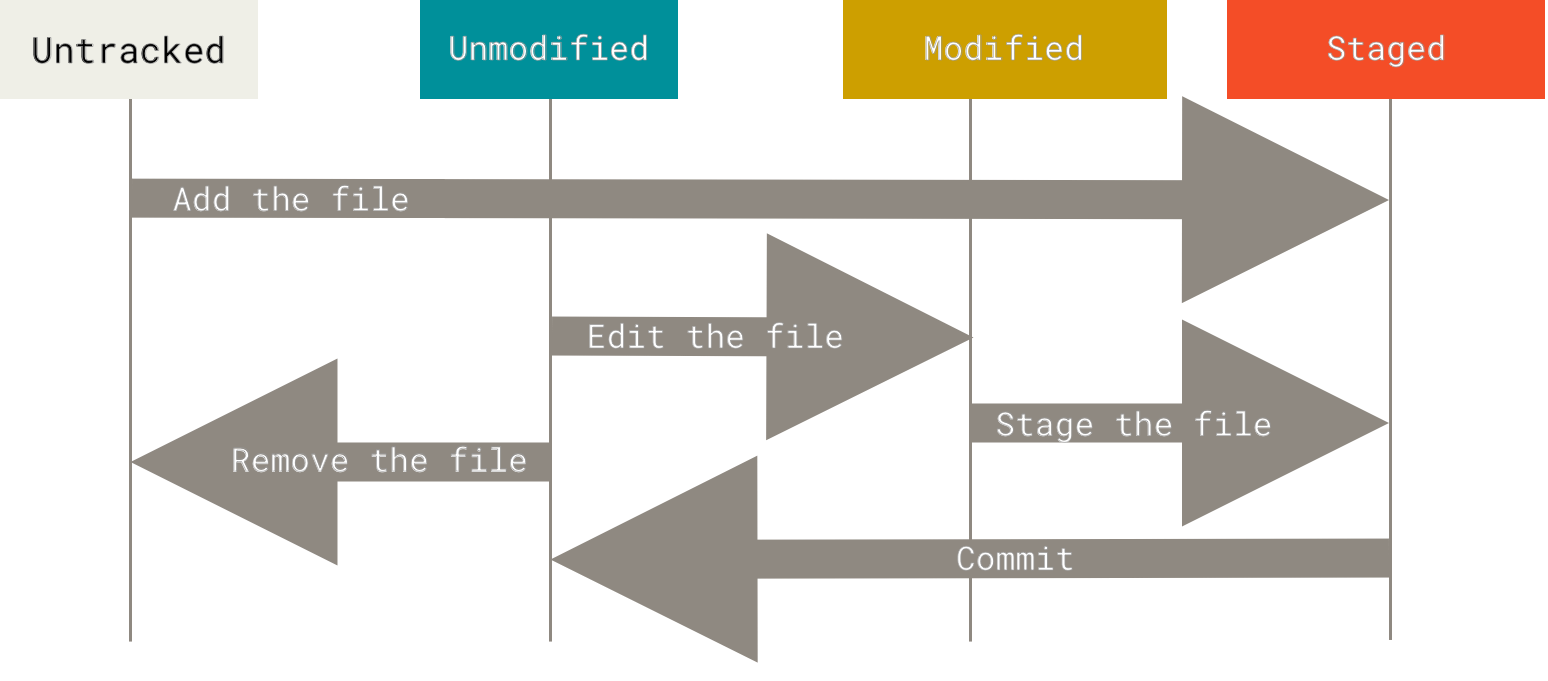
你工作目录下的每一个文件都不外乎这两种状态:已跟踪或未跟踪。 从工作区到暂存区无疑有4种状态
- 未跟踪
- 未修改
- 已修改
- 暂存区
暂存区提交到版本库
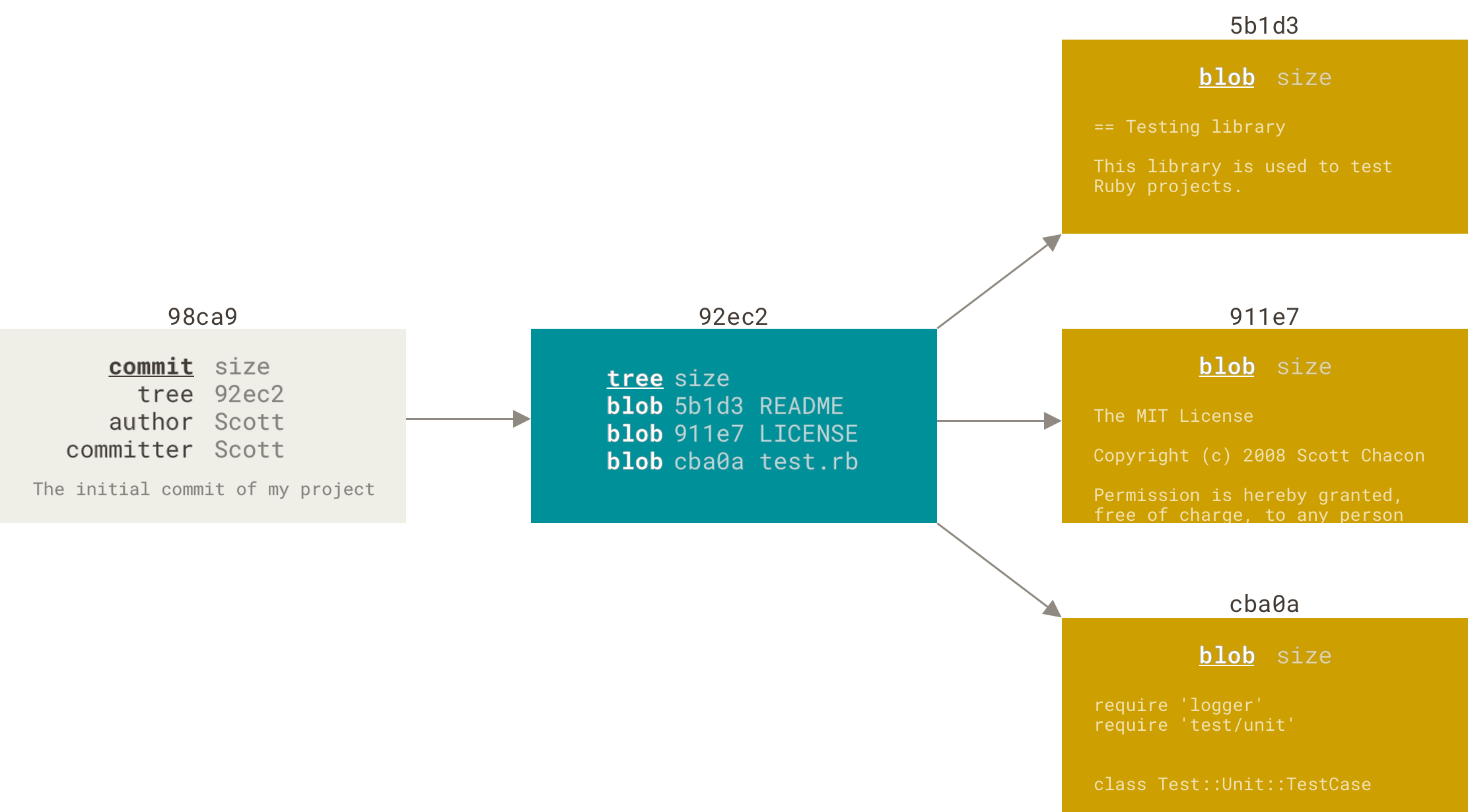
如图所示:
Git 仓库中主要有3类对象
- commit:提交时间的快照,包含1个树和提交信息
- tree:树里边可以包含树和二进制,图中只包含文件
- blob:二进制文件
2.git的help操作
要学会git,一是了解git原理,二是要学会git help学会不懂的时候查询
 git help
 git help -a        //git命令的帮助列表
 git help -g        //git概念的帮助列表
 git help --web log //网页查看log帮助文档
git help
//输入这个命令的时候git帮我们分了这么大致几类

项目的新建(创建一个工作区)
clone      Clone a repository into a new directory
init       Create an empty Git repository or reinitialize an existing one

当前工作区的操作
 add        Add file contents to the index
 mv         Move or rename a file, a directory, or a symlink
 reset      Reset current HEAD to the specified state
 rm         Remove files from the working tree and from the index

检查提交历史和状态
 bisect     Use binary search to find the commit that introduced a bug
 grep       Print lines matching a pattern
 log        Show commit logs
 show       Show various types of objects
 status     Show the working tree status
分支,标记和调整公共历史
branch     List, create, or delete branches
checkout    Switch branches or restore working tree files
commit     Record changes to the repository
diff       Show changes between commits, commit and working tree, etc
merge      Join two or more development histories together
rebase     Reapply commits on top of another base tip
tag        Create, list, delete or verify a tag object signed with GPG
远程操作(工作流)
fetch      Download objects and refs from another repository
pull       Fetch from and integrate with another repository or a local branch
push       Update remote refs along with associated objects
git help -a git常用命令
   add                  Add file contents to the index
   am                   Apply a series of patches from a mailbox
   archive              Create an archive of files from a named tree
   bisect               Use binary search to find the commit that introduced a bug
   branch               List, create, or delete branches
   bundle               Move objects and refs by archive
   checkout             Switch branches or restore working tree files
   cherry-pick          Apply the changes introduced by some existing commits
   citool               Graphical alternative to git-commit
   clean                Remove untracked files from the working tree
   clone                Clone a repository into a new directory
   commit               Record changes to the repository
   describe             Give an object a human readable name based on an available ref
   diff                 Show changes between commits, commit and working tree, etc
   fetch                Download objects and refs from another repository
   format-patch         Prepare patches for e-mail submission
   gc                   Cleanup unnecessary files and optimize the local repository
   gitk                 The Git repository browser
   grep                 Print lines matching a pattern
   gui                  A portable graphical interface to Git
   init                 Create an empty Git repository or reinitialize an existing one
   log                  Show commit logs
   merge                Join two or more development histories together
   mv                   Move or rename a file, a directory, or a symlink
   notes                Add or inspect object notes
   pull                 Fetch from and integrate with another repository or a local branch
   push                 Update remote refs along with associated objects
   range-diff           Compare two commit ranges (e.g. two versions of a branch)
   rebase               Reapply commits on top of another base tip
   reset                Reset current HEAD to the specified state
   revert               Revert some existing commits
   rm                   Remove files from the working tree and from the index
git help -g git指南
   attributes          Defining attributes per path
   cli                 Git command-line interface and conventions
   core-tutorial       A Git core tutorial for developers
   cvs-migration       Git for CVS users
   diffcore            Tweaking diff output
   everyday            A useful minimum set of commands for Everyday Git
   glossary            A Git Glossary
   hooks               Hooks used by Git
   ignore              Specifies intentionally untracked files to ignore
   modules             Defining submodule properties
   namespaces          Git namespaces
   repository-layout    Git Repository Layout
   revisions           Specifying revisions and ranges for Git
   tutorial            A tutorial introduction to Git
   tutorial-2          A tutorial introduction to Git: part two
   workflows           An overview of recommended workflows with Git
3.config配置命,init新建和clone克隆仓库
config配置
config全局配置
git config --global user.name 'Men-HuLu'
git config --global user.email '15705850186@163.com'

config作用域配置
git config --local   //local只对某个仓库
git config --global  //global当前用户全局有效
git config --system  //系统所有登录用户有效

显示当前的Git配置
git config --list --local
git config --list --global
git config --list --system
新建仓库git init
1.把已有项目代码纳入git管理
cd 项目代码所在文件夹
git init

2.新建的项目直接用Git管理
git init your_project
cd your_project
克隆仓库git clone
默认使用版本库文件名
 git clone https://github.com/Men-HuLu/git_learning.git

使用自定义名称
 git clone https://github.com/Men-HuLu/git_learning.git learing
4.basic增删修查操作 工作区到暂存区
工作区到暂存区操作,代码操作无疑是增删修查,工作区到暂存区操作git代码操作也是同理也是增删修查
1.查
git status //c查看文件状态
2.增
git add index.html      //添加指定文件
git add *               //添加所有文件
git add *.css           //添加所有匹配的文件

以下是新增也是修改
git add -A              //提交所有变化
git add -u              //已经被跟踪的文件保存到暂存区
git add .               //提交新文件(new)和被修改(modified)文件,不包括被删除(deleted)文件
3.删
git rm readme           //删除指定文件
git rm --cached [file]  //停止追踪指定文件,但该文件会保留在工作区
4.改
1.文件内容修改
git add -A              //提交所有变化
git add -u              //已经被跟踪的文件保存到暂存区
git add .               //提交新文件(new)和被修改(modified)文件,不包括被删除(deleted)文件

2.文件名修改
mv readme readme.md
git add readme.md
git rm readme
等于
git mv readme readme.md
5.commit操作 暂存区到版本库
1.暂存区到版本库
git commit -m'版本提交信息'
git commit [file1] [file2] ... -m [message]     //提交暂存区的指定文件到仓库区

git commit -a                       //提交工作区自上次commit之后的变化,直接到仓库区
git commit -a -m'版本提交信息'      //保存到暂存区,并且提交版本库
git commit -am'版本提交信息'        //保存到暂存区,并且提交版本库

git commit -v      //提交时显示所有diff信息
2.修改最新的提交信息
git commit --amend      //修改后:wq保存
git commit --amend -m [message]       //使用一次新的commit,替代上一次提交,改写上一次commit的提交信息
git commit --amend [file1] [file2] -m [message]
6.branch分支操作
查看分支
git branch          //查看分支
git branch -v       //查看本地分支
git branch -a       //查看线上线下所有分支
git branch -vv      //查看本地和线上分支关联
切换分支
git checkout [branch-name]      //切换branch-name
git checkout -                  //切换到上一分支
新增分支
git branch [branch-name]    //新建一个分支


git checkout -b new_branch  //建新分支new_branch并切换到new_branch
等于
git branch new_branch
git checkout new_branch


git checkout -b new_branch old_branch    //基于old_branch创建新分支new_branch
等于
git checkout old_branch
git branch new_branch
git checkout new_branch
合并分支
git merge [branch]              //合并指定分支到当前分支
git cherry-pick [commit]        //选择一个commit,合并进当前分支


合并分支的三种方式
1.fast-forward
git merge [branch]
2.--no-ff
git merge --no-ff -m "merge with no-ff" dev
3.--squash
git merge --squash -m "merge with --squash"


全部使用一端
git merge -Xours develop
git merge -Xtheirs develop
删除分支
git branch -d [branch-name]     //删除分支
git branch -D [branch-name]

git push origin --delete [branch-name]  //删除远端分支
git push origin :master
git branch -dr [remote/branch]
追踪分支
git branch [branch-name]        //新建一个分支,与指定的远程分支建立追踪关系
git branch --set-upstream [branch] [remote-branch]      //建立追踪关系,在现有分支与指定的远程分支之间
分离头指针
git branch 具体commit哈希值
进行修改提交没有分支,时间长了会被git当垃圾处理掉
7.local同步GitHub 本地同步远端
创建SSH公私钥
ssh-keygen -t rsa -b 4096 -C "your_email@example.com"
为了github实现ssh同步
查看远端库
git remote -v
git remote show <主机名>        //详细信息
添加远端库
git remote add 路径             //默认为origin
git remote add origin git@github.com:Men-HuLu/ReactApp.git
git remote add github 路径      //
删除远端库
git remote rm github
重命名远端库
git remote rename <原主机名> <新主机名>
拉去远端
git pull origin
等于
git fetch origin 或 git fetch <远程主机名> <分支名>
git merge master origin/master 或 git rebase origin/master

1.fetch
git fetch origin master     //git fetch <远程主机名> <分支名>
git branch -r               //查看远端分支
git checkout -b newBrach origin/master  //创建newBrach分支基于origin/master
git merge master origin/master 或 git rebase origin/master

2.pull
git pull origin next:master     //git pull <远程主机名> <远程分支名>:<本地分支名>
//远程分支是与当前分支合并,则冒号后面的部分可以省略


如果合并需要采用rebase模式,可以使用--rebase选项
git pull --rebase <远程主机名> <远程分支名>:<本地分支名>


加上参数 -p 就会在本地删除远程已经删除的分支
git pull -p
等同于下面的命令
git fetch --prune origin
git fetch -p
推送远端
git push origin master      //git push <远程主机名> <本地分支名>:<远程分支名>
git push origin --all       //所有分支推送到远端
git push -u origin master   //使用-u选项指定一个默认主机,这样后面就可以不加任何参数

git push origin --tags      //git push不会推送标签(tag),除非使用--tags选项

git push origin :master             //删除远端分支
git push origin --delete master   //删除远端分支

git push origin        //存在追踪关系,本地分支和远程分支省略。

远程主机的版本比本地版本更新,推送时Git会报错,
先在本地做git pull合并差异,然后再推送到远程主机

如果你一定要推送,可以使用--force选项(不建议)
git push --force origin

存在关联时省略写分支名
git push origin 分支    //完整的git语句
git push origin         //存在关联,忽略分支名
git push                //默认origin可以不写
本地分支关联远程分支(追踪关系)
查看
git branch -vv                                  //查看本地和线上分支关联

都已存在,在关联
git branch -u origin/分支名                     //本地当前分支关联远端分支
git branch --set-upstream-to=origin/分支名      //本地当前分支关联远端分支

远端存在
git checkout --track origin/branch_name         //本地没有,这时候本地会新建一个分支名叫branch_name,本地跟踪origin/branch_name
git checkout -b new_branch_name branch_name     //branch_name如果是远端分支,可以取不一样的new_branch_name名称track跟踪远端分支

本地存在
git push --set-upstream origin branch_name      //远端没有,这时候远端会新建一个分支名叫branch_name,本地跟踪origin/branch_name
8.commit操作rebase操作
amend其实也是rebase操作
git commit --amend      //修改后:wq保存
git commit --amend -m [message]       //使用一次新的commit,替代上一次提交,改写上一次commit的提交信息
git commit --amend [file1] [file2] -m [message]
commit历史提交信息修改(实际上是变基操作)
步骤一
git rebase -i  变基的父亲   //实际上就是变基重新提交commit

会显示如下
pick 1d2a4a0 分离头指针

# Rebase 640a1e3..1d2a4a0 onto 640a1e3 (1 command)
#
# Commands:
# p, pick <commit> = use commit
# r, reword <commit> = use commit, but edit the commit message
# e, edit <commit> = use commit, but stop for amending
# s, squash <commit> = use commit, but meld into previous commit
# f, fixup <commit> = like "squash", but discard this commit's log message
# x, exec <command> = run command (the rest of the line) using shell
# b, break = stop here (continue rebase later with 'git rebase --continue')
# d, drop <commit> = remove commit
# l, label <label> = label current HEAD with a name
# t, reset <label> = reset HEAD to a label
# m, merge [-C <commit> | -c <commit>] <label> [# <oneline>]
# .       create a merge commit using the original merge commit's
# .       message (or the oneline, if no original merge commit was
# .       specified). Use -c <commit> to reword the commit message.
#
# These lines can be re-ordered; they are executed from top to bottom.
#


步骤二
reword 1d2a4a0 commitInfo
:wq

步骤三
修改commitInfo

# Please enter the commit message for your changes. Lines starting
# with '#' will be ignored, and an empty message aborts the commit.
#
# Date:      Wed Feb 6 21:17:58 2019 +0800
#
# interactive rebase in progress; onto 640a1e3
# Last command done (1 command done):
#    reword 4da30d2 分离头指针1
# No commands remaining.
# You are currently editing a commit during a rebase.
#
# Changes to be committed:
#       new file:   .gitignore
#       deleted:    0.txt
#       modified:   index.html
#
~
:wq
把几个连续的commit合并成1个
git rebase -i parent

要合并的pick不改
被合并的改为squash
:wq

写上要合并的原因
:wq
选取几个commit合并成1个
git rebase -i parent

改变顺序,如:

pick ds4554
pick d24sds
pick dsa343
pick 34344f
=>
pick ds4554
s    dsa343
s    34344f
pick d24sds

git rebase --continue
对父commit进行合并,父commit又有分支,这时会有两个父commit
9.tag标签
查看提交历史版本记录
提交历史
git status              //显示有变更的文件

git log                 //显示当前分支的版本历史
git log --all           //所有的分支记录
git log --all --graph   //图形化分支
git log -n2 --oneline   //最近2个提交记录
git log --oneline --all -n4 --graph

git log --stat          //显示commit历史,以及每次commit发生变更的文件
git log -S [keyword]    //搜索提交历史,根据关键词


//文件
git log -p [file]       //显示指定文件相关的每一次diff

git log --follow [file] //显示某个文件的版本历史,包括文件改名
git whatchanged [file]

git blame [file]        显示指定文件是什么人在什么时间修改过
图形查看版本历史
gitk            //图形查看当前分支
gitk  --all     //图形查看所有分支
10.log和gitk操作
查看标签
git tag                 //显示已有标签
git tag -l 'v1.8*'      //符合条件的标签
git show [tag]          //查看tag信息
新建标签
git tag [tag]               //新建一个tag在当前commit
git tag [tag] [commit]      //新建一个tag在指定commit
删除标签
git tag -d [tag]            //例子git tag -d v1.4-lw
git push origin :refs/tags/[tagName]
检出标签
git checkout 2.0.0 迁出标签         //不创建新分支,分离头指针
git checkout -b [branch] [tag]      //git checkout -b version2 v2.0.0,新建一个分支,指向某个tag
提交标签
git show [tag]              //查看tag信息
git push [remote] [tag]     //提交指定tag
11.stash紧急任务
1.先保存到贮藏区
git add -u  //保存
git stash   //存放到贮藏区
2.贮藏区查看
git stash list
3.从贮藏区拿出
git stash apply             //不删除stash
git stash apply stash@{1}   //取出第二个(索引为1),不删除stash
git stash pop               //删除stash
4.从贮藏区删除
git stash clear                 //贮藏区全部清空
git stash drop stash@{$num}     //丢弃stash@{$num}存储,从列表中删除这个存储
12.checkout和reset文件恢复
变工作区(工作区复原到暂存区)
git checkout -- 文件名
git checkout [commit] [file]        //恢复某个commit的指定文件到暂存区和工作区
git checkout .                      //恢复暂存区的所有文件到工作区
变暂存区(暂存区复原版本库)
复原到暂存区
git reset HEAD 将暂存区复原到HEAD
git reset --hard HEAD 将工作区和暂存区复原到HEAD

撤销提交
git reset [commit](工作区不变)
git reset --hard [commit]

重置
git reset --keep [commit]           //重置当前HEAD为指定commit,但保持暂存区和工作区不变

新建一个commit,用来撤销指定commit
后者的所有变化都将被前者抵消,并且应用到当前分支
git revert [commit]
要复原暂存区使用reset,要变工作区使用checkout
13.diff差异和show查看文件
1.工作区与暂存区的差异
git diff
git diff  -- 文件名  //指定具体文件
2.暂存区与HEAD的差异
git diff --cached
3.提交版本比较差异
git diff 77rgr834 3fre8uej //两个版本的差异
git diff 77rgr834 3fre8uej --文件

git diff HEAD           //显示暂存区和工作区的差异
git diff HEAD HEAD^     //HEAD和HEAD父亲比较
git diff HEAD HEAD~1

git diff HEAD HEAD^^    //HEAD和HEAD父亲的父亲比较
git diff HEAD HEAD~2
4.show查看文件看
git show                //显示某次提交的元数据和内容变化
git show --name-only [commit] //显示某次提交发生变化的文件
git show [commit]:[filename]    //显示某次提交时,某个文件的内容
git reflog      //显示当前分支的最近几次提交
14.gitignore忽略跟踪文件
文件 .gitignore 的格式规范如下:
- 所有空行或者以 # 开头的行都会被 Git 忽略。
- 可以使用标准的 glob 模式匹配。
- 匹配模式可以以(/)开头防止递归。
- 匹配模式可以以(/)结尾指定目录。
- 要忽略指定模式以外的文件或目录,可以在模式前加上惊叹号(!)取反。
.gitignore 文件的例子:
# no .a files
*.a

# but do track lib.a, even though you're ignoring .a files above
!lib.a

# only ignore the TODO file in the current directory, not subdir/TODO
/TODO

# ignore all files in the build/ directory
build/

# ignore doc/notes.txt, but not doc/server/arch.txt
doc/*.txt

# ignore all .pdf files in the doc/ directory
doc/**/*.pdf