

cache2go 源码解读
什么是cache2go?
cache2go是一个开源的应用内缓存库,保证并发安全,提供 key-value 存储以及带过期时间控制。 key 与 value 可以是任意数据类型。在源码中,我们可以学习这个库是如何维护数据,如何利用锁保证并发安全,如何对数据进行过期处理。
主要 API 说明
- Cache(): 返回已经存在的给定名称的缓存表,类型为 *CacheTable ,如果不存在,则创建一个新的缓存表。
- Add(): 向缓存表添加新的 key/value 对。可以同时指定该 key 的过期时间。如果为 0,则表示一直有效。
- Value(): 根据 key 返回缓存中对应的 value ,类型为 *CacheItem 。如果 key 存在,则同时更新它的访问计数和最后访问时间;如果不存在,则尝试调用事先注册的回调函数 loadData 初始化数据到缓存表。
- Delete(): 从缓存表中删除指定 key 。
- Exists(): 检查 key 是否存在于缓存中, 存在返回 true 。不会更新缓存项的最后访问时间
- Foreach(): 遍历缓存,对每个缓存项,调用自定义的回调函数进行处理。
- SetDataLoader(): 针对缓存设置数据加载回调函数,用于从缓存检索不存在的 key 时自动从其他地方如数据库、文件加载该 key/value 对到缓存中。
- SetAddedItemCallback(): 针对缓存设置新增 key/value 对到缓存时自动触发的回调函数。
- SetAboutToDeleteItemCallback(): 针对缓存设置删除 key 时自动触发的回调函数。
- SetAboutToExpireCallback(): 针对特定的 key 设置过期提醒回调函数。
源码分析
cache2go主要的代码包括cache.go,cacheitem.go,cachetable.go三个文件。
其数据结构 为key-value形式。类似redis那样,先画一张表,然后在表中存放n个key-value
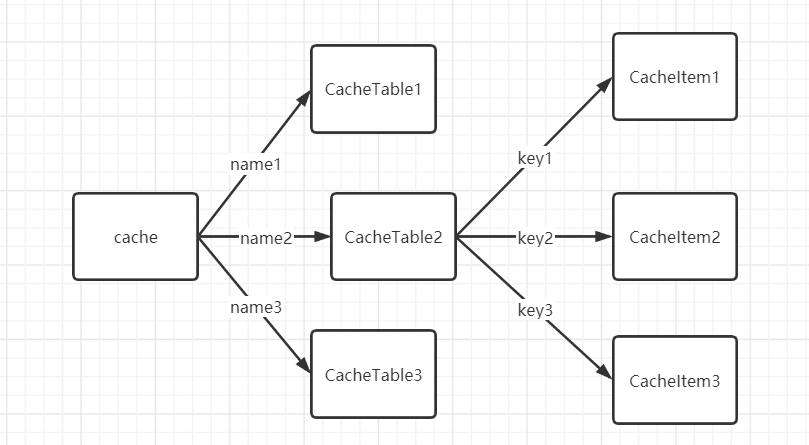
cache.go只有一个方法用于创建CacheTable对象,维护CacheTable对象集合
var (
	cache = make(map[string]*CacheTable)
	mutex sync.RWMutex
)

//返回具有给定名称的现有缓存表,或者如果表不存在则创建一个新的缓存表
func Cache(table string) *CacheTable {
	mutex.RLock()
	t, ok := cache[table]
	mutex.RUnlock()

	if !ok {
		mutex.Lock()
		t, ok = cache[table]
		// 再次检查该表是否存在
		if !ok {
			t = &CacheTable{
				name:  table,
				items: make(map[interface{}]*CacheItem),
			}
			cache[table] = t
		}
		mutex.Unlock()
	}

	return t
}
由源代码可知,cache.go定义了一个全局的私有变量cache=map[string]*CacheTable,此对象保存所有的CacheTable的指针,通过CacheTable的name属性来获取对象,并通过上锁保证并发安全。在Cache方法中,很容易理解其先是判断是否有这个对象,如果没有,就新建一个。cache.go里做二次检查是为了“并发安全”,因为可能被别的并发Cache函数创建了CacheTable
cacheitem.go定义了具体保存的数据项(CacheTable这个集合里保存的每一个数据项)内容
// CacheItem是一个单独的缓存项
// 参数数据包含缓存中的用户设置值
type CacheItem struct {
	sync.RWMutex

	// The item's key.
	key interface{}

	// The item's data.
	data interface{}

	// How long will the item live in the cache when not being accessed/kept alive.
	// 此项目保存的持续时间
	lifeSpan time.Duration

	// Creation timestamp.
	// 创建的时间
	createdOn time.Time

	// Last access timestamp.
	// 最后访问的时间
	accessedOn time.Time

	// How often the item was accessed.
	// 访问的次数
	accessCount int64

	// Callback method triggered right before removing the item from the cache
	// 删除时触发的方法列表
	aboutToExpire []func(key interface{})
}
每一个对象,其key 和 data可以为任意值interface{},其每一个数据项都可以定义自己的生命周期及回调函数。
其函数比较简单,不做过多介绍
// 传入key,存活时间lifeSpan,data,创建一个CacheItem对象,当lifeSpan为0,则表示不过期。
func NewCacheItem(key interface{}, lifeSpan time.Duration, data interface{}) *CacheItem {
	t := time.Now()
	return &CacheItem{
		key:           key,
		lifeSpan:      lifeSpan,
		createdOn:     t,
		accessedOn:    t,
		accessCount:   0,
		aboutToExpire: nil,
		data:          data,
	}
}

// 刷新数据项状态,通过改变accessedOn延迟过期时间(是否过期是通过 当前时间-accessedOn>lifeSpan 来进行判断的)
// 并增加其访问次数
func (item *CacheItem) KeepAlive() {
	item.Lock()
	defer item.Unlock()
	item.accessedOn = time.Now()
	item.accessCount++
}

// 返回lifeSpan,因为lifeSpan不可改变,故不需上锁
func (item *CacheItem) LifeSpan() time.Duration {
	// immutable
	return item.lifeSpan
}

// 返回accessedOn,最后访问的时间
func (item *CacheItem) AccessedOn() time.Time {
	item.RLock()
	defer item.RUnlock()
	return item.accessedOn
}

// 返回createdOn创建时间,也不需上锁
func (item *CacheItem) CreatedOn() time.Time {
	// immutable
	return item.createdOn
}

// 返回accessCount,访问次数
func (item *CacheItem) AccessCount() int64 {
	item.RLock()
	defer item.RUnlock()
	return item.accessCount
}

// 返回key
func (item *CacheItem) Key() interface{} {
	// immutable
	return item.key
}

// 返回data
func (item *CacheItem) Data() interface{} {
	// immutable
	return item.data
}

// 设置删除该数据时触发的方法,如果有方法存在,会清空之前的方法
func (item *CacheItem) SetAboutToExpireCallback(f func(interface{})) {
	if len(item.aboutToExpire) > 0 {
		item.RemoveAboutToExpireCallback()
	}
	item.Lock()
	defer item.Unlock()
	item.aboutToExpire = append(item.aboutToExpire, f)
}

// 增加删除该数据时触发的方法
func (item *CacheItem) AddAboutToExpireCallback(f func(interface{})) {
	item.Lock()
	defer item.Unlock()
	item.aboutToExpire = append(item.aboutToExpire, f)
}

// 清除其回调函数
func (item *CacheItem) RemoveAboutToExpireCallback() {
	item.Lock()
	defer item.Unlock()
	item.aboutToExpire = nil
}
整体来说这个文件里只是定义了一下CacheItem的数据结构,设置了一些访问方法,并无复杂的逻辑。
cachetable.go
cachetable.go是这个库的核心,重点对数据过期进行了处理
先看下每一张表的数据结构
// CacheTable is a table within the cache
type CacheTable struct {
	// 互斥锁
	sync.RWMutex
	// 表名
	name string
	// 其所有的缓存数据项
	items map[interface{}]*CacheItem
	// 对数据项进行删除的定时器,定时器触发后,会扫描数据项,对过期的数据进行删除
	cleanupTimer *time.Timer
	// 定时器触发的时间,(此项不由用户定义,是由代码自动进行更新)
	cleanupInterval time.Duration
	// logger对象
	logger *log.Logger

	// 当访问了一个不存在的函数此函数会进行调用,通常为更新缓存,即查询数据库将结果加入缓存
	loadData func(key interface{}, args ...interface{}) *CacheItem
	// 当增加一个对象会调用此列表里的方法
	addedItem []func(item *CacheItem)
	// 当删除一个对象会调用此列表里的方法
	aboutToDeleteItem []func(item *CacheItem)
}
cachetable.go有许多的方法,重点讲一下对数据过期的处理。追简单的方法就是为每一个数据项都开一个定时器去处理,但是这样过于消耗性能,cache2go只用一个定时器来维护。在expirationCheck方法中,每次调用此方法都会遍历一遍对象,检查其是否过期并确定下次检查的时间。在expirationCheck中,先是停止其定时器(因为可能有部分代码主动调用此方法,不是有定时器自动调用,为防止触发错误,故先停止定时器),然后遍历数据项,通过now.Sub(accessedOn) >= lifeSpan来判断是否要删除数据,并记录下smallestDuration最小触发时间,即距离现在最进的要进行删除的数据的删除时间,最后设置定时器在smallestDuration 秒后再次触发此函数进行数据更新。
// 到期检查循环,由自调整计时器触发。
func (table *CacheTable) expirationCheck() {
	table.Lock()
	if table.cleanupTimer != nil {
		table.cleanupTimer.Stop()
	}
	if table.cleanupInterval > 0 {
		table.log("Expiration check triggered after", table.cleanupInterval, "for table", table.name)
	} else {
		table.log("Expiration check installed for table", table.name)
	}

	// To be more accurate with timers, we would need to update 'now' on every
	// loop iteration. Not sure it's really efficient though.
	now := time.Now()
	smallestDuration := 0 * time.Second
	for key, item := range table.items {
		// Cache values so we don't keep blocking the mutex.
		item.RLock()
		lifeSpan := item.lifeSpan
		accessedOn := item.accessedOn
		item.RUnlock()

		if lifeSpan == 0 {
			continue
		}
		if now.Sub(accessedOn) >= lifeSpan {
			// Item has excessed its lifespan.
			table.deleteInternal(key)
		} else {
			// Find the item chronologically closest to its end-of-lifespan.
			if smallestDuration == 0 || lifeSpan-now.Sub(accessedOn) < smallestDuration {
				smallestDuration = lifeSpan - now.Sub(accessedOn)
			}
		}
	}

	// Setup the interval for the next cleanup run.
	table.cleanupInterval = smallestDuration
	if smallestDuration > 0 {
		// 起一个smallestDuration后触发的定时器,到时后触发函数
		table.cleanupTimer = time.AfterFunc(smallestDuration, func() {
			go table.expirationCheck()
		})
	}
	table.Unlock()
}
我们可以发现在addInternal函数中也调用了expirationCheck,这是因为可能新加入的数据的过期时间比下次要进行删除的时间要小,如果不进行更新,就好导致该数据项不能及时删除。其触发条件为item.lifeSpan > 0 && (expDur == 0 || item.lifeSpan < expDur) 如果新加的数据项的过期时间不为0(为0表示不删除),并且,定时器的过期时间为0(说明当前table没有定时器在运行)或者其过期时间小于定时器的触发事件,调用expirationCheck方法,更新定时器触发时间。
func (table *CacheTable) addInternal(item *CacheItem) {
	// Careful: do not run this method unless the table-mutex is locked!
	// 小心:不要在没有给table加锁的情况下调用这个方法
	// It will unlock it for the caller before running the callbacks and checks
	// 它将在运行后对table解锁
	table.log("Adding item with key", item.key, "and lifespan of", item.lifeSpan, "to table", table.name)
	table.items[item.key] = item

	// Cache values so we don't keep blocking the mutex.
	expDur := table.cleanupInterval
	addedItem := table.addedItem
	table.Unlock()

	// Trigger callback after adding an item to cache.
	if addedItem != nil {
		for _, callback := range addedItem {
			callback(item)
		}
	}

	// If we haven't set up any expiration check timer or found a more imminent item.
	if item.lifeSpan > 0 && (expDur == 0 || item.lifeSpan < expDur) {
		table.expirationCheck()
	}
}
后记
通过阅读理解别人的代码,加强了锁的理解与使用,因为太多的锁是会造出性能的损失,故在获取完数据或者修改数据后要及解锁,不然程序会对其他携程进行堵塞。同时理解一种好的定时维护数据的方法,,通过更新最小触发时间来定时触发更新,用较小的资源维护大量数据。同时,作为一个可扩展的缓存库,其为可扩展性设计了许多方面,例如数据项的key和data的类型都为interface{},设计了许多回调方法,方便对数据进行维护,引入日志......这些方面都值得我们学习。

