提前生成并运行今日项目包:
ng new ngprong s -o
复习
Angular属于前端三大框架之一:
- vue
- 就业中最重要!
- 侧重: web和手机端开发
- react
- 重点: 手机端App开发
- angular
- 重点: 手机端App开发
本阶段使用面向对象编程写法 比较多, 所以尽量复习 东哥 JS高级部分
- 1, 2, 3阶段 : 基本的就业
- 4,5阶段: 高薪
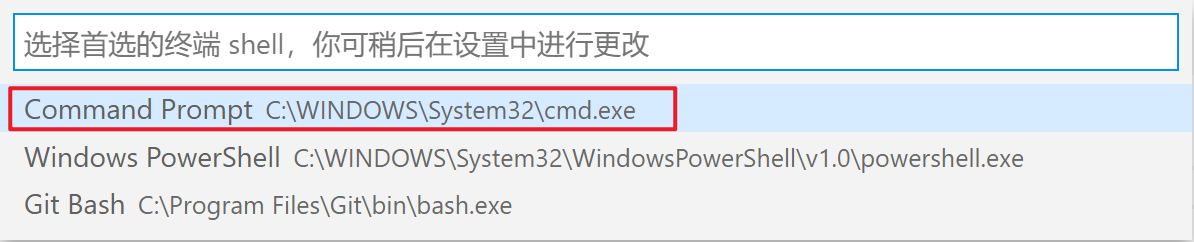
VSCode自带终端工具

应该确保终端是 cmd 方式

选择 cmd.exe 栏目即可!
作业1

work01.component.html
<p>work01 works!</p>

<table>
  <tr>
    <td>商品名:</td>
    <td>{{ name }}</td>
  </tr>
  <tr>
    <td>价格:</td>
    <td>
      <!-- Form 模块默认不加载, 无法使用双向数据绑定, 必须手动到 app.module.ts 中加载! -->
      <input type="text" [(ngModel)]="price" />
    </td>
  </tr>
  <tr>
    <td>数量:</td>
    <td>
      <button (click)="count = count - 1" [disabled]="count == 1">-</button>
      <input
        type="text"
        [(ngModel)]="count"
        style="width: 40px; text-align: center;"
      />
      <button (click)="count = count + 1">+</button>
    </td>
  </tr>
  <tr>
    <td>总价:</td>
    <td>{{ price * count }}</td>
  </tr>
</table>
work01.component.ts
import { Component, OnInit } from '@angular/core';

@Component({
  selector: 'app-work01',
  templateUrl: './work01.component.html',
  styleUrls: ['./work01.component.css'],
})
export class Work01Component implements OnInit {
  // 面向对象写法:  属性名 = 值;
  name = 'iPhone';
  price = 7999;
  count = 5;

  constructor() {}

  ngOnInit(): void {}
}
app.module.ts
import { BrowserModule } from '@angular/platform-browser';
import { NgModule } from '@angular/core';

//引入
import { FormsModule } from '@angular/forms';

import { AppComponent } from './app.component';
import { Work01Component } from './work01/work01.component';

@NgModule({
  declarations: [AppComponent, Work01Component],
  // 添加
  imports: [BrowserModule, FormsModule],
  providers: [],
  bootstrap: [AppComponent],
})
export class AppModule {}
作业2

import { Component, OnInit } from '@angular/core';

@Component({
  selector: 'app-work02',
  templateUrl: './work02.component.html',
  styleUrls: ['./work02.component.css'],
})
export class Work02Component implements OnInit {
  images = ['01.jpg', '02.jpg', '03.jpg', '04.jpg', '05.jpg'];

  // 辅助属性: 当前页
  curP = 0;

  constructor() {}

  ngOnInit(): void {}
}
<p>work02 works!</p>

<!--
  相对路径共有三种:
  * ../  代表上级目录
  * ./   代表当前目录
  * /    代表根目录, 此处代表src
 -->

<!-- 当前页序号 = 当前序号==0 ? 变为最后一页 : 上一页 -->
<button (click)="curP = curP == 0 ? images.length - 1 : curP - 1">
  上一页
</button>
<!-- 序号的最大值 = 数组长度 - 1 -->
<!-- 当前页已经是最大页数, 则变为0 -->
<!-- 序号 = 序号==最大序号 ? 0 : 序号+1 -->
<!-- 优先级: 先进行三元运算符的判断, 再赋值 -->
<button (click)="curP = curP == images.length - 1 ? 0 : curP + 1">
  下一页
</button>
<br />
<img
  [src]="'../../assets/images/' + images[curP]"
  alt=""
  style="width: 300px; height: 150px;"
/>
<br />
<!-- [src]="js代码"  js代码中的字符串必须是单引号, 因为双引号与外层双引号冲突! -->
<img
  [src]="'/assets/images/' + images[curP]"
  alt=""
  style="width: 300px; height: 150px;"
/>
样式属性
新建组件: myc01
ng g c myc01
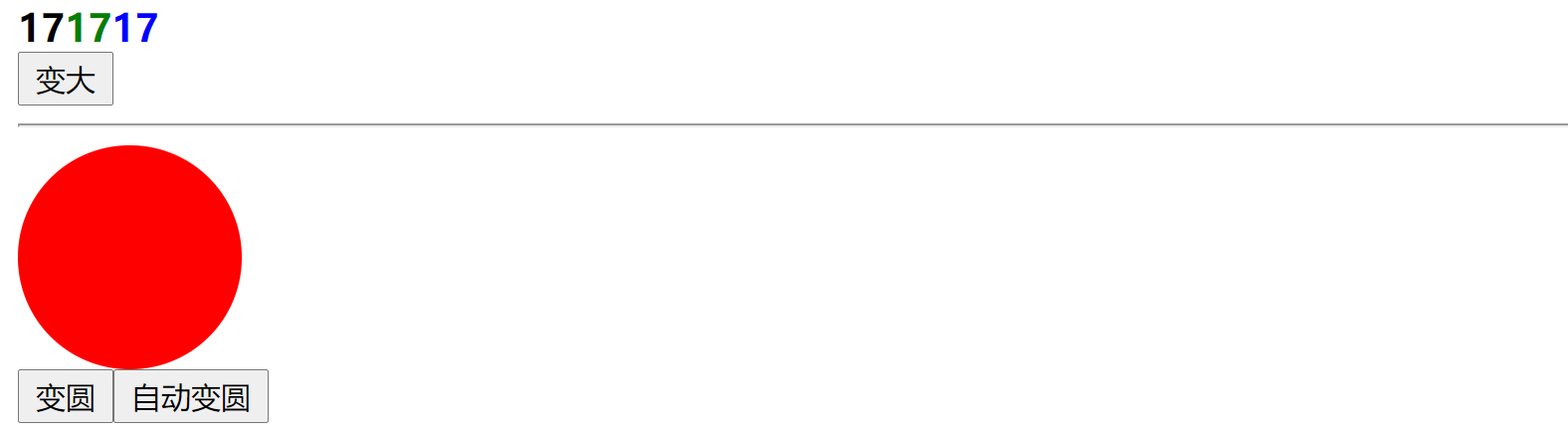
<p>myc01 works!</p>

<b style="font-size: 17px;">{{ num }}</b>

<!-- 动态变更的内联样式写法:  [ngStyle]="{样式名: 值}" -->
<!-- 对象类型: {属性名:值}  属性名的格式: 只能是 数字 字母 _   或 字符串 -->
<b [ngStyle]="{ color: 'green', 'font-size': num + 'px' }">{{ num }}</b>
<b [ngStyle]="{ color: 'blue', fontSize: num + 'px' }">{{ num }}</b>
<br />
<button (click)="num = num + 1">变大</button>

<hr />

<div
  [ngStyle]="{
    'background-color': 'red',
    width: '100px',
    height: '100px',
    'border-radius': radius + 'px'
  }"
></div>
<button (click)="radius = radius + 5">变圆</button>

<button (click)="doCircle()">自动变圆</button>
import { Component, OnInit } from '@angular/core';

@Component({
  selector: 'app-myc01',
  templateUrl: './myc01.component.html',
  styleUrls: ['./myc01.component.css'],
})
export class Myc01Component implements OnInit {
  num = 17;

  radius = 0;

  doCircle() {
    setInterval(() => {
      this.radius++;
    }, 100);
  }

  constructor() {}

  ngOnInit(): void {}
}
class样式
创建组件: myc02
ng g c myc02
import { Component, OnInit } from '@angular/core';

@Component({
  selector: 'app-myc02',
  templateUrl: './myc02.component.html',
  styleUrls: ['./myc02.component.css'],
})
export class Myc02Component implements OnInit {
  num = 1;

  constructor() {}

  ngOnInit(): void {}
}
<p>myc02 works!</p>

<!--
与vue相同的解决方案
class = "{样式名: true/false}"
true代表样式生成, false代表样式无效

 -->
<button
  (click)="num = num + 1"
  [ngClass]="{ success: num >= 10, danger: num > 5 && num < 10 }"
>
  {{ num }}
</button>
循环指令
组件: myc03
import { Component, OnInit } from '@angular/core';

@Component({
  selector: 'app-myc03',
  templateUrl: './myc03.component.html',
  styleUrls: ['./myc03.component.css'],
})
export class Myc03Component implements OnInit {
  names = ['亮亮', '然然', '东东', '华哥', '小新'];

  emps = [
    { name: '亮亮', age: 33, phone: '18787877777' },
    { name: '然然', age: 32, phone: '18787855577' },
    { name: '东东', age: 31, phone: '18787866677' },
    { name: '华哥', age: 30, phone: '18787888877' },
    { name: '小新', age: 29, phone: '18787899977' },
  ];

  constructor() {}

  ngOnInit(): void {}
}
<p>myc03 works!</p>

<!--
vue中的循环
v-for="(item,index) in items" :key="index"

v-for="item of items" :key="index"
 -->
<ul>
  <!-- 快捷: ng-for -->
  <li *ngFor="let item of names">{{ item }}</li>
</ul>

<ul>
  <!-- ng-for-index -->
  <li *ngFor="let item of names; let i = index">
    <span>{{ i }}</span>
    <b>{{ item }}</b>
  </li>
</ul>

<table border="1">
  <tr>
    <th>序号</th>
    <th>姓名</th>
    <th>年龄</th>
    <th>手机号</th>
  </tr>
  <tr *ngFor="let item of emps; let i = index">
    <td>{{ i + 1 }}</td>
    <td>{{ item.name }}</td>
    <td>{{ item.age }}</td>
    <td>{{ item.phone }}</td>
  </tr>
</table>
条件判断
组件: myc04
ng g c myc04
import { Component, OnInit } from '@angular/core';

@Component({
  selector: 'app-myc04',
  templateUrl: './myc04.component.html',
  styleUrls: ['./myc04.component.css'],
})
export class Myc04Component implements OnInit {
  score = 40;

  constructor() {}

  ngOnInit(): void {}
}
<p>myc04 works!</p>

<h3>面试分数: {{ score }}</h3>
<button (click)="score = score + 10">加分</button>

<!-- 不同的分数显示不同的提示 -->
<div *ngIf="score < 60">很遗憾, 未通过面试!</div>
<div *ngIf="score >= 60">恭喜, 通过面试!</div>

<hr />
<!-- if else -->
<!-- ng-if-else 代码块 -->
<ng-container *ngIf="score < 60; else abc">
  <b>很遗憾....</b>
</ng-container>
<!-- # 类似于 css的id选择器.  用来简化标识id -->
<!-- #标识名 -->
<ng-template #abc>
  <b>恭喜!!!</b>
</ng-template>
switch方式
组件: myc05
import { Component, OnInit } from '@angular/core';

@Component({
  selector: 'app-myc05',
  templateUrl: './myc05.component.html',
  styleUrls: ['./myc05.component.css'],
})
export class Myc05Component implements OnInit {
  vip = 1;

  constructor() {}

  ngOnInit(): void {
    let type = 1;
    switch (type) {
      case 1:
        console.log('111');
        break;
      case 2:
        console.log('222');
        break;
      default:
        break;
    }
  }
}
<p>myc05 works!</p>

<h4>当前vip等级: {{ vip }}</h4>
<button (click)="vip = vip + 1">升级</button>

<!-- ng-switch -->
<span [ngSwitch]="vip">
  <p *ngSwitchCase="1">
    欢迎, 黑铁会员
  </p>
  <p *ngSwitchCase="2">
    欢迎你, 白银会员
  </p>
  <p *ngSwitchCase="3">
    欢迎您, 黄金会员
  </p>
  <p *ngSwitchCase="4">
    欢迎您, 尊贵的钻石会员
  </p>
  <p *ngSwitchDefault>会员等级错误!</p>
</span>
自定义指令
指令: <tag 指令>, 例如 *ngIf *ngFor
创建组件: myc06
新的命令: 创建指令命令
ng generate directive 指令名
- generate 生成
- directive 指令,命令

简写: ng g d 指令名

<p>myc06 works!</p>

<!--
  如果是原生DOM 怎么做?
  1. 查询到此span标签, 然后读取内容 innerText
  2. 把内容变大写之后, 重新赋值给 span的 innerText
 -->
<input type="text" value="hello" appUpper />
<!-- 生成指令: ng g d upper -->

<div>
  <input type="text" />
</div>
<div>
  <input type="text" appFocus />
</div>
<div>
  <input type="text" />
</div>
指令文件:
import { Directive, ElementRef } from '@angular/core';

@Directive({
  selector: '[appUpper]',
})
export class UpperDirective {
  // 构造方法: 对象实例化时自动触发! -- 忘了的看东哥的JS高级部分
  constructor(e: ElementRef) {
    console.log(e);
    // e.nativeElement 就是当前指令所在的元素.  即原生DOM

    e.nativeElement.value = e.nativeElement.value.toUpperCase();
  }
}
焦点指令
import { Directive, ElementRef } from '@angular/core';

@Directive({
  selector: '[appFocus]',
})
export class FocusDirective {
  constructor(e: ElementRef) {
    console.log(e);
    e.nativeElement.focus();
  }
}
<div>
  <input type="text" appFocus />
  <!-- ng g d focus -->
</div>
管道 pipe
与vue中的过滤器, filter
Vue.filter(过滤器名,  方法名)

使用时:
<tag> {{ 内容 | 过滤器 }} </tag>
- 指令通常是修改标签的属性
- 管道/过滤器 通常修改双标签的内容
创建新的组件: myc07
Angular与vue不同之处是: 比较贴心
- vue 需要程序员自己定制过滤器
- angular 默认提供了一些常用的过滤器!
import { Component, OnInit } from '@angular/core';

@Component({
  selector: 'app-myc07',
  templateUrl: './myc07.component.html',
  styleUrls: ['./myc07.component.css'],
})
export class Myc07Component implements OnInit {
  // 当前时间戳: 当前时间距离1970/1/1 的秒数
  now = new Date().getTime();

  url = 'http://xxxx/xx/x/xxx.x.x.x.x.xczxczczxczxc';

  constructor() {}

  ngOnInit(): void {}
}
<p>myc07 works!</p>

<ul>
  <li>大写: {{ "name" | uppercase }}</li>
  <li>小写: {{ "HELLO" | lowercase }}</li>
  <li>百分数: {{ 0.55555 | percent }}</li>
  <!-- percent: "整数最少位数.小数最大位数" -->
  <li>百分数: {{ 0.55555 | percent: "2.2" }}</li>
  <li>百分数: {{ 0.55555 | percent: "2.1" }}</li>
  <li>百分数: {{ 0.05555 | percent: "2.1" }}</li>

  <li>钱: {{ 123456.789 | currency }}</li>
  <li>钱: {{ 123456.789 | currency: "¥" }}</li>

  <li>时间戳: {{ now }}</li>
  <li>日期: {{ now | date }}</li>
  <!--
    year  年  y
    month 月  M
    day   日  d
    hour  时  h 12进制,   H 24进制
    minute 分 m
    second 秒 s
   -->
  <li>自定义: {{ now | date: "yyyy-MM-dd hh:mm:ss" }}</li>
  <li>自定义: {{ now | date: "yyyy-MM-dd HH:mm:ss" }}</li>
  <li>自定义: {{ now | date: "yyyy-M-d H:m:s" }}</li>
  <li></li>
  <!-- slice:起始序号:结束序号 -->
  <li>超长: {{ url | slice: 0:20 }}...</li>
  <li></li>
</ul>
自定义管道
创建组件: myc08
生成命令
ng generate pipe 管道名

简化
ng g p 管道名

import { Pipe, PipeTransform } from '@angular/core';

@Pipe({
  name: 'upper',
})
export class UpperPipe implements PipeTransform {
  // <p>{{ "hello" | upper }}</p>
  // 这是自动生成的代码, 官方也不知道 你的变量类型, 只能写 unknown
  transform(value: string) {
    // {{ value | upper }}
    // value 会自动传入此方法的参数1

    // 返回值 就是管道的处理结果
    return value.toUpperCase();
  }
}
<p>myc08 works!</p>

<!-- 自制一个 变大写 管道 -->
<p>{{ "hello" | upper }}</p>
<!-- ng g p upper -->

<!-- 自动算出 数字的平方, 使用的是 Math.pow(2, 10) 就代表2的10次方 -->
<p>{{ 2 | pow }}</p>
<!-- ng g p pow -->

<!-- 通过参数算10次方 -->
<p>{{ 2 | pow: 10 }}</p>
<!--
  pow.transform(2, 10)
 -->

<p>{{ 8 | pow: 8 }}</p>

<!-- 绝对值;  负数变正数, 正数还是正数,  小学 |-9| -->
<p>{{ -9 | abs }}</p>
<p>{{ 9 | abs }}</p>
<!-- 答案都是9 -->
pow.pipe.ts
import { Pipe, PipeTransform } from '@angular/core';

@Pipe({
  name: 'pow',
})
export class PowPipe implements PipeTransform {
  // <p>{{ 2 | pow }}</p>
  // <p>{{ 2 | pow: 10 }}</p>

  // 带有默认值的参数, 如果参数2不传, 则默认值是2
  transform(value: number, exp = 2) {
    return Math.pow(value, exp);
  }
}
upper.pipe.ts
import { Pipe, PipeTransform } from '@angular/core';

@Pipe({
  name: 'upper',
})
export class UpperPipe implements PipeTransform {
  // <p>{{ "hello" | upper }}</p>
  // 这是自动生成的代码, 官方也不知道 你的变量类型, 只能写 unknown
  transform(value: string) {
    // {{ value | upper }}
    // value 会自动传入此方法的参数1

    // 返回值 就是管道的处理结果
    return value.toUpperCase();
  }
}
import { Pipe, PipeTransform } from '@angular/core';

@Pipe({
  name: 'abs',
})
export class AbsPipe implements PipeTransform {
  // <p>{{ 9 | abs }}</p>

  transform(value: number) {
    return Math.abs(value);
  }
}
作业
重新生成项目来完成今日的作业!
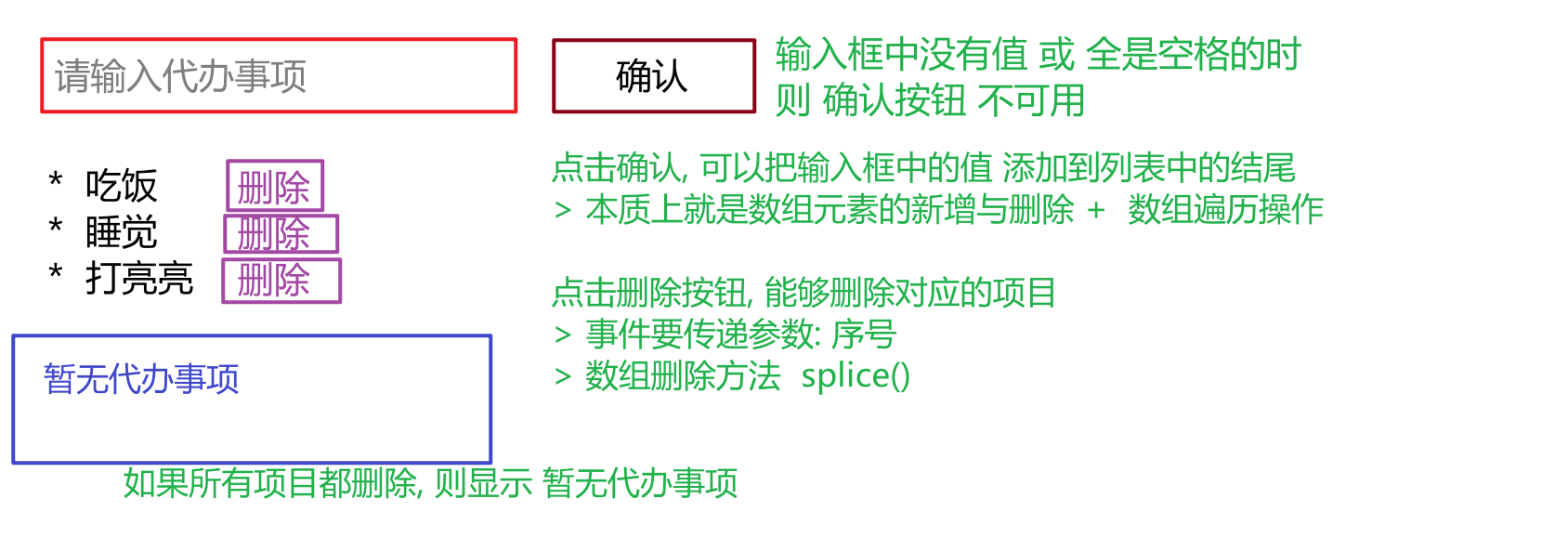
作业1: 待办事项
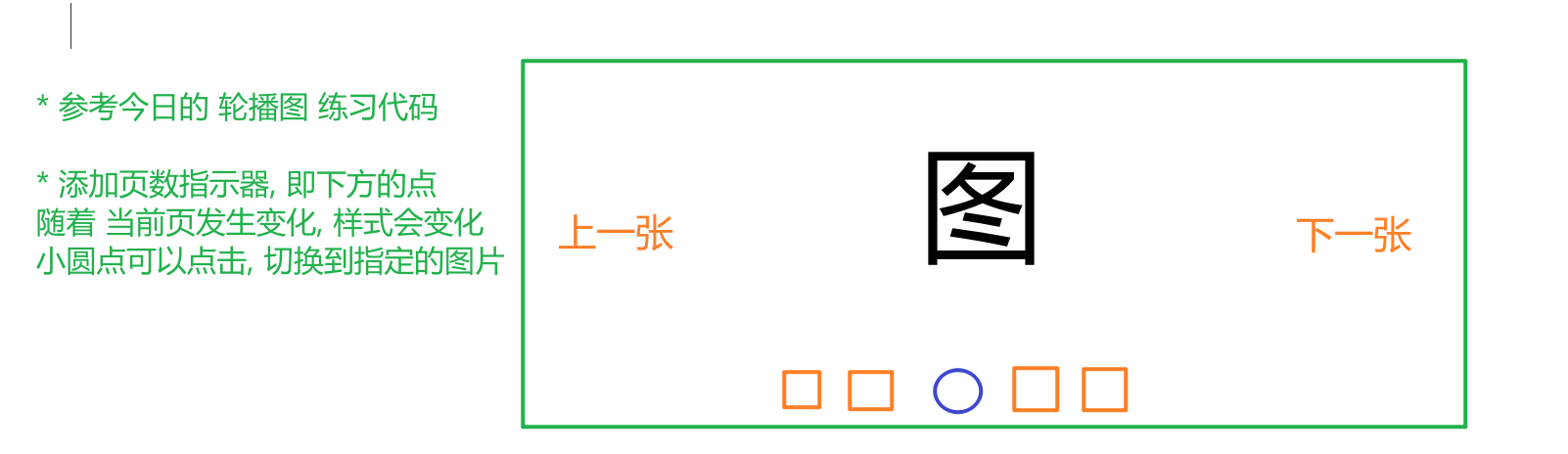
作业2:
作业3
自定义管道练习
手机号隐藏管道
{{ '18877889898' | phoneHide }}   则输出的是 188****9898

性别管道
{{ 1 | gender }}   输出 男
{{ 0 | gender }}   输出 女
{{ 1 | gender : 'en' }} 输出 Man
{{ 0 | gender : 'en }} 输出 Women
作业4:
自定义指令
<p appHide>123456</p>

通过 appHide 指令可以隐藏标签

提示 利用DOM 的 元素 style 的 display 属性 , none 代表不显示