常用shell操作
与Linux命令很接近,很多命令就是在前面加上Linux命令前面加上hdfs dfs。
hdfs dfs -ls /                                  # 查看根目录下面的文件
hdfs dfs -mkdir [-p] /xx/xx                     # 创建文件夹,加上-p就是递归的创建
hdfs dfs -moveFromLocal 本地文件路径 HDFS路径   # 把本地磁盘的文件放到HDFS上去
hdfs dfs -mv 源路径 目标路径                    # 将HDFS中的文件移动位置
hdfs dfs -put 本地文件路径 HDFS路径             # 将本地文件上传到HDFS上面
hdfs dfs -appendToFile 文件1 文件2              # 将多个小文件合并为一个大文件
hdfs dfs -cat /tmp/a.txt                        # 查看文件内容
hdfs dfs -cp 源路径 目的路径                    # 复制HDFS上的文件
hdfs dfs -rm [-r] 文件名                        # 删除文件,-r是递归的删除

hdfs dfs -chmod [-R] 777 文件或者文件夹         # 修改文件权限,-R是递归的改权限(文件夹下所有东西都改)
hdfs dfs -chown [-R] user:group 文件或者文件夹  # 修改文件的拥有者和拥有组,-R是递归的改
Java API操作
在此之前要先在Windows上配置Hadoop环境。
- 下载或者从Linux上将Hadoop包移到Windows。
- 使用sftp从Windows拿到Linux上的Hadoop包。
sftp hui@hadoop101 # 连接Linux,@后面可用IP get /opt/module/hadoop-3.2.1.tar.gz/ /e/Hadoop # 从Linux获取到本地E盘Hadoop目录下。 (因为Linux与Window文件夹路径显示不一样所以要用这种格式)- 解压到Windows上一个没有中文没有空格的路径下
- 在windows上配置环境变量。
- 新建系统变量
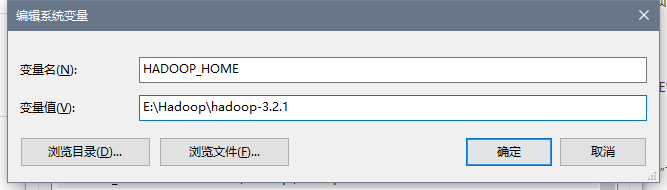
- 编辑Path变量
点击新建,添加%HADOOP_HOME%\bin;。
- 新建系统变量
- 将bin目录下的hadooo.dll文件和winutils.exe拷贝到系统盘
C:\Windows\System32里面。如果bin目录没有,点击下载,提取码:0039。(hadoop.dll防止报nativeio异常、winutils.exe避免报空指针异常。)
创建Maven
    <properties>
        <project.build.sourceEncoding>UTF-8</project.build.sourceEncoding>
        <hadoop.version>3.2.1</hadoop.version>
    </properties>

    <dependencies>

        <dependency>
            <groupId>org.apache.hadoop</groupId>
            <artifactId>hadoop-mapreduce-client-common</artifactId>
            <version>${hadoop.version}</version>
        </dependency>

        <dependency>
            <groupId>org.apache.hadoop</groupId>
            <artifactId>hadoop-mapreduce-client-jobclient</artifactId>
            <version>${hadoop.version}</version>
            <scope>provided</scope>
        </dependency>

        <dependency>
            <groupId>org.apache.hadoop</groupId>
            <artifactId>hadoop-client</artifactId>
            <version>${hadoop.version}</version>
        </dependency>

        <dependency>
            <groupId>org.apache.hadoop</groupId>
            <artifactId>hadoop-yarn-common</artifactId>
            <version>${hadoop.version}</version>
        </dependency>

        <dependency>
            <groupId>org.apache.hadoop</groupId>
            <artifactId>hadoop-mapreduce-client-core</artifactId>
            <version>${hadoop.version}</version>
        </dependency>

        <dependency>
            <groupId>org.apache.hadoop</groupId>
            <artifactId>hadoop-hdfs</artifactId>
            <version>${hadoop.version}</version>
        </dependency>

        <dependency>
            <groupId>jdk.tools</groupId>
            <artifactId>jdk.tools</artifactId>
            <version>1.8</version>
            <scope>system</scope>
            <systemPath>E:/Program Files/Java/jdk-8u261/lib/tools.jar</systemPath>
        </dependency>

        <dependency>
            <groupId>junit</groupId>
            <artifactId>junit</artifactId>
            <version>RELEASE</version>
            <scope>compile</scope>
        </dependency>

    </dependencies>

    <build>
        <plugins>
            <plugin>
                <groupId>org.apache.maven.plugins</groupId>
                <artifactId>maven-compiler-plugin</artifactId>
                <configuration>
                    <source>1.8</source>
                    <target>1.8</target>
                </configuration>
            </plugin>
        </plugins>
    </build>
</project>
配置log4j
新建log4j.properties文件放到resources下面,内容如下:
log4j.rootLogger=INFO, stdout
log4j.appender.stdout=org.apache.log4j.ConsoleAppender
log4j.appender.stdout.layout=org.apache.log4j.PatternLayout
log4j.appender.stdout.layout.ConversionPattern=%d %p [%c] - %m%n
log4j.appender.logfile=org.apache.log4j.FileAppender
log4j.appender.logfile.File=target/spring.log
log4j.appender.logfile.layout=org.apache.log4j.PatternLayout
log4j.appender.logfile.layout.ConversionPattern=%d %p [%c] - %m%n
编写代码
获取文件系统
        // 第一种方式
        // 获取Configuration对象
        Configuration configuration = new Configuration();
        // 设置Configuration对象,指定要操作的文件系统
        configuration.set("fs.defaultFS","hdfs://hadoop101:8020");
        // 获取指定的文件系统,相当于获取了主节点种所有的元数据信息
        FileSystem fileSystem = FileSystem.get(configuration);

        // 第二种方式,可以传入第三个参数——访问的用户
        FileSystem fileSystem = FileSystem.get(new URI("hdfs://hadoop101:8020"), new Configuration(),"root");
获取目录信息
// 获取指定目录下的所有文件信息,第二个参数为是否递归的查询
        RemoteIterator<LocatedFileStatus> it = fileSystem.listFiles(new Path("/"), true);
        while(it.hasNext()){
            // 获取每个文件详细信息
            LocatedFileStatus fileStatus = it.next();
            // 获取每个文件的存储路径
            System.out.println(fileStatus.getPath() + "——" + fileStatus.getPath().getName());
            // 获取文件的block存储信息
            BlockLocation[] blockLocations = fileStatus.getBlockLocations();
            // 获取每个文件的
            System.out.println(blockLocations.length);
            for (BlockLocation blockLocation : blockLocations) {
                String[] hosts = blockLocation.getHosts();
                for (String host : hosts) {
                    // 每个存储了副本的主机
                    System.out.println(host + "——");
                }
            }
创建文件和文件夹
// 根目录下面递归的创建hello文件夹
fileSystem.mkdirs(new Path("/app/test/hello"));

// 根目录下面创建a.txt文件
fileSystem.create(new Path("/a.txt"));
下载文件
    方式一
        // 获取HDFS文件的输入流
        FSDataInputStream inputStream = fileSystem.open(new Path("/a.txt"));
        // 获取本地文件的输出流
        FileOutputStream outputStream = new FileOutputStream(new File("E://a.txt"));
        // 实现文件的复制(org.apache.commons.io.IOUtils)
        // 第一个参数输入流,第二个参数输出流
        IOUtils.copy(inputStream, outputStream);
        // 关闭流
        IOUtils.closeQuietly(inputStream);
        IOUtils.closeQuietly(outputStream);
        fileSystem.close();

    方式二
        // 第一个参数填HDFS路径,第二填本地路径
        fileSystem.copyToLocalFile(new Path("/a.txt"),new Path("E://a.txt"));
        fileSystem.close();
文件上传
        // 第一个参数填本地路径,第二填HDFS路径
        fileSystem.copyFromLocalFile(new Path("E://am.txt"),new Path("/"));
文件合并
// 在HDFS创建一个文件
        FSDataOutputStream outputStream = fileSystem.create(new Path("/bigFile.txt"));
        // 获取本地文件系统
        LocalFileSystem local = FileSystem.getLocal(new Configuration());
        // 获取本地文件夹下所有文件的信息
        FileStatus[] fileStatuses = local.listStatus(new Path("file:///E:\\input"));
        // 遍历数据,获取每一个文件的信息
        for (FileStatus fileStatus : fileStatuses) {
            FSDataInputStream inputStream = local.open(fileStatus.getPath());
            IOUtils.copy(inputStream,outputStream);
            IOUtils.closeQuietly(inputStream);
        }
        IOUtils.closeQuietly(outputStream);
        local.close();
        fileSystem.close();
所有文件都有一份元数据信息,存储在内存中,所以合并小文件可以减轻namenode压力。