

1、下载&校验
官网下载路径 dev.mysql.com/downloads/m…
Select Operating System : 选择 Linux - Generic 如图1-1
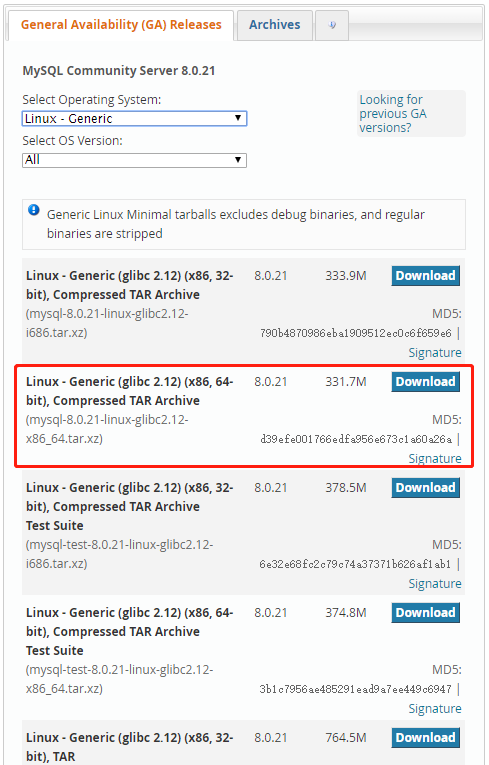
图1-1
本次展示的是mysql-8.0.21-linux-glibc2.12-x86_64.tar.xz
上传到服务器上,MD5校验
[root@localhost home]# md5sum mysql-8.0.21-linux-glibc2.12-x86_64.tar.xz
d39efe001766edfa956e673c1a60a26a  mysql-8.0.21-linux-glibc2.12-x86_64.tar.xz
在验证无误后,可以进行安装。此番校验是因为MySQL是开源的,可能有人加料打包让你安装,所以你懂得。
2、 MySQL 5.7安装
官方给出的安装步骤 dev.mysql.com/doc/refman/…
首先将包放在/home 目录下,进行如下操作
[root@localhost home]# groupadd mysql
[root@localhost home]# useradd -r -g mysql mysql
[root@localhost home]# cd /usr/local/
[root@localhost local]# tar zxvf /home/mysql-5.7.25-linux-glibc2.12-x86_64.tar.gz
[root@localhost local]# ln -s mysql-5.7.25-linux-glibc2.12-x86_64/ mysql
[root@localhost local]# cd mysql
[root@localhost mysql]# chown -R mysql .
[root@localhost mysql]# chgrp -R mysql .
[root@localhost mysql]# bin/mysqld --initialize --user=mysql --basedir=/usr/local/mysql --datadir=/data
2020-07-24T10:50:24.570102Z 0 [Warning] TIMESTAMP with implicit DEFAULT value is deprecated. Please use --explicit_defaults_for_timestamp server option (see documentation for more details).
2020-07-24T10:50:26.546019Z 0 [Warning] InnoDB: New log files created, LSN=45790
2020-07-24T10:50:26.712657Z 0 [Warning] InnoDB: Creating foreign key constraint system tables.
2020-07-24T10:50:26.773747Z 0 [Warning] No existing UUID has been found, so we assume that this is the first time that this server has been started. Generating a new UUID: 7bbb9509-cd9b-11ea-bc39-000c29c4f2c8.
2020-07-24T10:50:26.776911Z 0 [Warning] Gtid table is not ready to be used. Table 'mysql.gtid_executed' cannot be opened.
2020-07-24T10:50:26.778037Z 1 [Note] A temporary password is generated for root@localhost: *eok
[root@localhost mysql]# mkdir data
[root@localhost mysql]# bin/mysql_ssl_rsa_setup --datadir=/usr/local/mysql/data
Generating a 2048 bit RSA private key
...........................+++
...............................+++
writing new private key to 'ca-key.pem'
-----
Generating a 2048 bit RSA private key
................+++
..........+++
writing new private key to 'server-key.pem'
-----
Generating a 2048 bit RSA private key
.....................................+++
....+++
writing new private key to 'client-key.pem'
-----
修改配置文件
[root@localhost mysql]# vim /etc/my.cnf 更改配置文件内容,全文就这样
[mysqld]
basedir=/usr/local/mysql
datadir=/data
启动并添加软链接
[root@localhost bin]# cd /usr/local/mysql/support-files/
[root@localhost support-files]# cp mysql.server /etc/init.d/mysql
[root@localhost mysql]# ln -s /usr/local/mysql/bin/mysql /usr/bin
登录并更改密码,此处密码为初始化时日志产生 *eok<hL6%C0h ,详情见上文第15行
[root@localhost bin]# mysql -uroot -p
Enter password:
Welcome to the MySQL monitor.  Commands end with ; or \g.
Your MySQL connection id is 2
Server version: 5.7.25

Copyright (c) 2000, 2019, Oracle and/or its affiliates. All rights reserved.

Oracle is a registered trademark of Oracle Corporation and/or its
affiliates. Other names may be trademarks of their respective
owners.

Type 'help;' or '\h' for help. Type '\c' to clear the current input statement.

mysql> set password=password('root');
Query OK, 0 rows affected, 1 warning (0.00 sec)

mysql> grant all privileges on *.* to 'root'@'%' identified by 'root';
Query OK, 0 rows affected, 1 warning (0.00 sec)

mysql> flush privileges;

mysql> show databases;
+--------------------+
| Database           |
+--------------------+
| information_schema |
| mysql              |
| performance_schema |
| sys                |
+--------------------+
4 rows in set (0.00 sec)

mysql> quit;
Bye- information_schema :信息架构(源数据库)
- mysql :用户登陆信息
- performance_schema :性能监控(存放的表过于专业,不易读)
- sys MySQL 5.7 新加的库,将 performance_schema 下复杂的表整理成试图
开机自启动设置
[root@localhost bin]# cd /usr/local/mysql/support-files/
[root@localhost support-files]# vim /etc/profile
 # 开头处 添加
export PATH==/usr/local/mysql/bin:$PATH

[root@localhost support-files]# source /etc/profile
[root@localhost support-files]# cd /etc/init.d/
[root@localhost init.d]# chkconfig --add mysql
[root@localhost init.d]# chkconfig --level 345 mysql on
MySQL状态相关
[root@localhost ~]# service mysql status
 SUCCESS! MySQL running (2742)
[root@localhost ~]# service mysql stop
Shutting down MySQL.. SUCCESS!
[root@localhost ~]# service mysql start
Starting MySQL. SUCCESS!
远程访问防火墙
[root@localhost ~]# firewall-cmd --state
running
[root@localhost ~]# systemctl stop firewalld.service
[root@localhost ~]# systemctl disable firewalld.service
Removed symlink /etc/systemd/system/dbus-org.fedoraproject.FirewallD1.service.
Removed symlink /etc/systemd/system/basic.target.wants/firewalld.service.
配置文件相关
1、服务器内免密登录
[root@localhost ~]# vim /etc/my.cnf

[client]
# 免密登录
user=root
password=root

[root@localhost ~]# mysql
Welcome to the MySQL monitor.  Commands end with ; or \g.
Your MySQL connection id is 3
Server version: 5.7.25 MySQL Community Server (GPL)

Copyright (c) 2000, 2019, Oracle and/or its affiliates. All rights reserved.

Oracle is a registered trademark of Oracle Corporation and/or its
affiliates. Other names may be trademarks of their respective
owners.

Type 'help;' or '\h' for help. Type '\c' to clear the current input statement.

mysql>
2、展示操作用户即所在库
[root@localhost ~]# vim /etc/my.cnf
# 提示标签
[mysql]
prompt=(\\u@\\h)[\\d]>\\_

[root@localhost ~]# mysql
Welcome to the MySQL monitor.  Commands end with ; or \g.
Your MySQL connection id is 4
Server version: 5.7.25 MySQL Community Server (GPL)

Copyright (c) 2000, 2019, Oracle and/or its affiliates. All rights reserved.

Oracle is a registered trademark of Oracle Corporation and/or its
affiliates. Other names may be trademarks of their respective
owners.

Type 'help;' or '\h' for help. Type '\c' to clear the current input statement.

(root@localhost)[(none)]>
3、卸载
# 关闭 MySQL
# 删除安装时产生的文件 datadir=/data
3、 MySQL 5.6安装
官方给出的安装步骤 dev.mysql.com/doc/refman/…
安装步骤(前8步一致)
[root@localhost home]# groupadd mysql
[root@localhost home]# useradd -r -g mysql mysql
[root@localhost home]# cd /usr/local/
[root@localhost local]# tar zxvf /home/mysql-5.6.43-linux-glibc2.12-x86_64.tar.gz
[root@localhost local]# ln -s mysql-5.6.43-linux-glibc2.12-x86_64/ mysql
[root@localhost local]# cd mysql
[root@localhost mysql]# chown -R mysql .
[root@localhost mysql]# chgrp -R mysql .
# 更改配置文件,就以5.7的配置文件为主
[root@localhost mysql]# vim /etc/my.cnf
# 删除的是 /usr/local/mysql/my.cnf
[root@localhost mysql]# rm -rf my.cnf
[root@localhost mysql]# scripts/mysql_install_db --user=mysql
# 密码是配置文件中的
[root@localhost mysql]# mysql -uroot -p
Enter password:
Welcome to the MySQL monitor.  Commands end with ; or \g.
Your MySQL connection id is 2
Server version: 5.6.43 MySQL Community Server (GPL)

Copyright (c) 2000, 2019, Oracle and/or its affiliates. All rights reserved.

Oracle is a registered trademark of Oracle Corporation and/or its
affiliates. Other names may be trademarks of their respective
owners.

Type 'help;' or '\h' for help. Type '\c' to clear the current input statement.

(root@localhost)[(none)]> show databases;
+--------------------+
| Database           |
+--------------------+
| information_schema |
| mysql              |
| performance_schema |
| test               |
+--------------------+
4 rows in set (0.00 sec)

(root@localhost)[(none)]> quit;
Bye
#启动并添加软链接
[root@localhost bin]# cd /usr/local/mysql/support-files/
[root@localhost support-files]# cp mysql.server /etc/init.d/mysql
[root@localhost mysql]# ln -s /usr/local/mysql/bin/mysql /usr/bin
#开机自启动设置
[root@localhost bin]# cd /usr/local/mysql/support-files/
[root@localhost support-files]# vim /etc/profile
 # 开头处 添加
export PATH==/usr/local/mysql/bin:$PATH

[root@localhost support-files]# source /etc/profile
[root@localhost support-files]# cd /etc/init.d/
[root@localhost init.d]# chkconfig --add mysql
[root@localhost init.d]# chkconfig --level 345 mysql on
5.6安装可能遇到的问题
[root@localhost mysql]# scripts/mysql_install_db --user=mysql
FATAL ERROR: please install the following Perl modules before executing scripts/mysql_install_db:
Data::Dumper
# 缺少  autoconf
[root@localhost mysql]# yum -y install autoconf
4、 MySQL 8.0安装
官方给出的安装步骤 dev.mysql.com/doc/refman/…
实际上与5.7安装步骤一样
5、本篇涉及到的配置参数
[client]
# 免密登录
user=root
password=root

# 提示标签
[mysql]
prompt=(\\u@\\h)[\\d]>\\_

[mysqld]
basedir=/usr/local/mysql
datadir=/data