

vue-admin-template是一个开源的后台管理系统的基础框架,基于 vue 和 element-ui。项目中不仅利用Vue全家桶和UI搭建了BMS的整体架构和页面,还内置了 i18 国际化、动态路由、权限验证、多样化图标和mockjs解决方案。本篇主要讲述整体架构和页面的实现。
一、项目架构
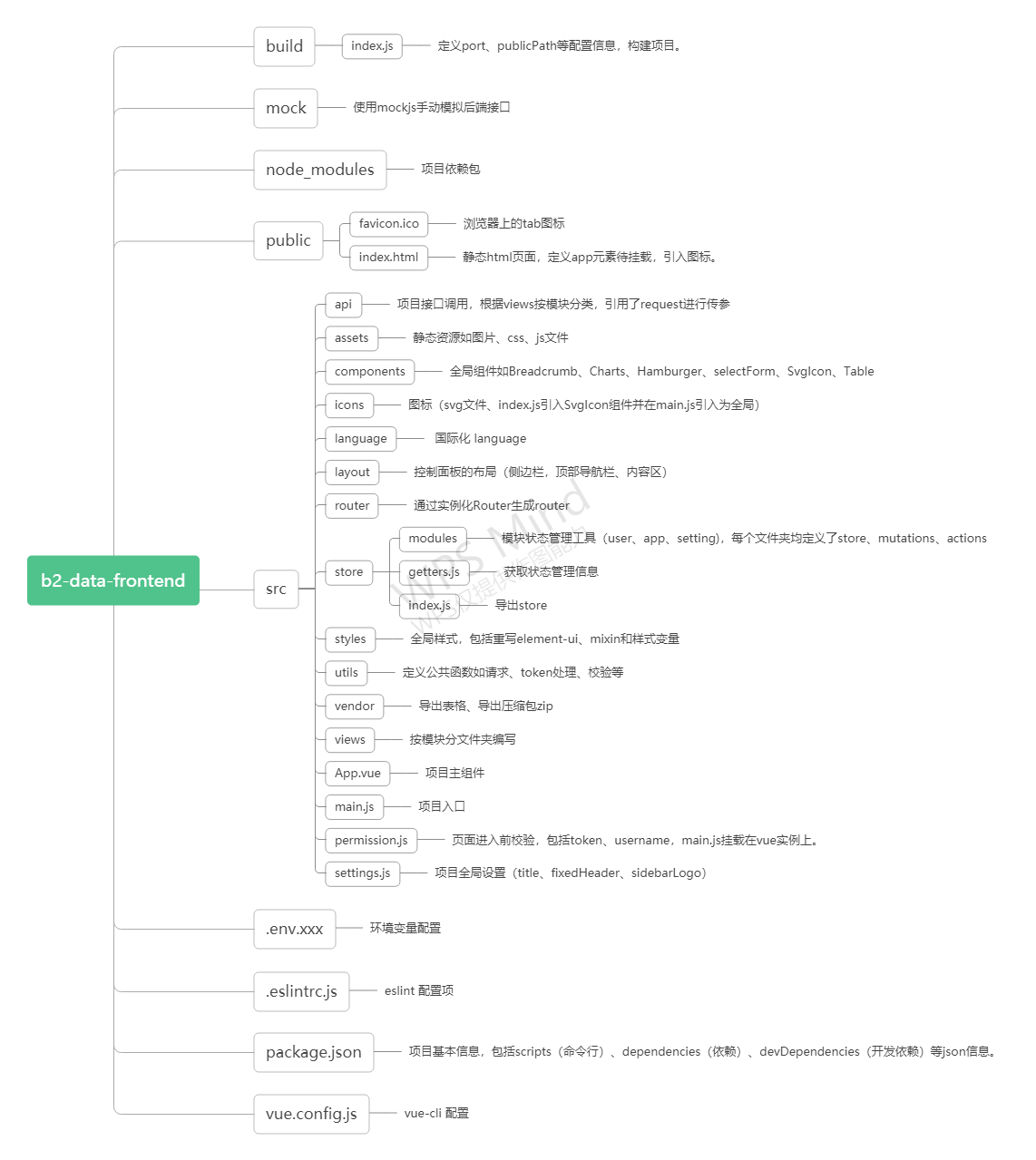
二、路由、权限
1、路由表配置项
// 当设置 true 的时候该路由不会在侧边栏出现 如401,login等页面,或者如一些编辑页面/edit/1
hidden: true // (默认 false)
//当设置 noRedirect 的时候该路由在面包屑导航中不可被点击
redirect: 'noRedirect'
// 当你一个路由下面的 children 声明的路由大于1个时,自动会变成嵌套的模式--如组件页面
// 只有一个时,会将那个子路由当做根路由显示在侧边栏--如引导页面
// 若你想不管路由下面的 children 声明的个数都显示你的根路由
// 你可以设置 alwaysShow: true,这样它就会忽略之前定义的规则,一直显示根路由
alwaysShow: true
name: 'router-name' // 设定路由的名字,一定要填写不然使用<keep-alive>时会出现各种问题
meta: {
  roles: ['admin', 'editor'] // 设置该路由进入的权限,支持多个权限叠加
  title: 'title' // 设置该路由在侧边栏和面包屑中展示的名字
  icon: 'svg-name' // 设置该路由的图标,支持 svg-class,也支持 el-icon-x element-ui 的 icon
  noCache: true // 如果设置为true,则不会被 <keep-alive> 缓存(默认 false)
  breadcrumb: false //  如果设置为false,则不会在breadcrumb面包屑中显示(默认 true)
  affix: true // 若果设置为true,它则会固定在tags-view中(默认 false)
  // 当路由设置了该属性,则会高亮相对应的侧边栏。
  activeMenu: '/article/list'
}
2、路由权限
具体思路:
- 登录:登录响应时服务端会返回一个token,前端再根据token拉取一个 user_info 的接口来获取用户的详细信息(如用户角色role等)。
- 权限验证:根据role动态计算出对应有权限的路由,通过 router.addRoutes 动态挂载这些路由。
- constantRoutes: 不需要动态判断权限的路由,如登录页等通用页面,在Vue实例化便挂载。
- asyncRoutes: 需要动态判断权限并通过 addRoutes 动态添加的页面。
router.beforeEach((to, from, next) => {
  if (store.getters.token) { // 判断是否有token
    if (to.path === '/login') {
      next({ path: '/' });
    } else {
      if (store.getters.roles.length === 0) { // 判断当前用户是否已拉取完user_info信息
        store.dispatch('GetInfo').then(res => { // 拉取info
          const roles = res.data.role;
          store.dispatch('GenerateRoutes', { roles }).then(() => { // 生成可访问的路由表
            router.addRoutes(store.getters.addRouters) // 动态添加可访问路由表
            next({ ...to, replace: true }) // hack方法 确保addRoutes已完成
          })
        }).catch(err => {
          console.log(err);
        });
      } else {
        next() //当有用户权限的时候,说明所有可访问路由已生成 如访问没权限的全面会自动进入404页面
      }
    }
  } else {
    if (whiteList.indexOf(to.path) !== -1) { // 在免登录白名单,直接进入
      next();
    } else {
      next('/login'); // 否则全部重定向到登录页
    }
  }
});
import { asyncRouterMap, constantRouterMap } from 'src/router';

function hasPermission(roles, route) {// 判断当前角色是否能进入该路由
  if (route.meta && route.meta.role) {
    return roles.some(role => route.meta.role.indexOf(role) >= 0)
  } else {
    return true
  }
}

const permission = {
  state: {
    routers: constantRouterMap,
    addRouters: []
  },
  mutations: {
    SET_ROUTERS: (state, routers) => {
      state.addRouters = routers;
      state.routers = constantRouterMap.concat(routers);// 将权限路由添加到普通路由上
    }
  },
  actions: {
    GenerateRoutes({ commit }, data) {// 计算权限路由
      return new Promise(resolve => {
        const { roles } = data;
        const accessedRouters = asyncRouterMap.filter(v => {
          if (roles.indexOf('admin') >= 0) return true;
          if (hasPermission(roles, v)) {
            if (v.children && v.children.length > 0) {
              v.children = v.children.filter(child => {
                if (hasPermission(roles, child)) {
                  return child
                }
                return false;
              });
              return v
            } else {
              return v
            }
          }
          return false;
        });
        commit('SET_ROUTERS', accessedRouters);
        resolve();
      })
    }
  }
};

export default permission;
三、layout
1、状态管理工具控制布局变量
-
app模块:侧边栏是否折叠opened(cookie上的sidebarStatus:打开为1,否则为0)、折叠与展开是否有动画withoutAnimation
-
settings模块:showSettings、fixedHeader、sidebarLogo(是否展示logo)
2、布局
    <!-- 左边-侧边栏 -->
    <sidebar class="sidebar-container" />
    <!-- 右边内容 -->
    <div class="main-container">
      <!-- 顶部导航栏 -->
      <div :class="{'fixed-header':fixedHeader}">
        <navbar />
      </div>
      <!-- 下方内容区 -->
      <app-main />
    </div>
四、侧边栏
- 不可再分的叶子节点:
- 可再分的非叶子节点:递归遍历层级
当路由的 children >1:自动会变成嵌套的模式;
当路由的 children =1:默认将子路由作为根路由显示在侧边栏中(如果想要展示父级,在根路由中设置alwaysShow: true)
<!-- 当节点无需隐藏时进入判断 -->
  <div v-if="!item.hidden">

    <!-- 叶子节点 -->
    <template v-if="hasOneShowingChild(item.children,item) && (!onlyOneChild.children||onlyOneChild.noShowingChildren)&&!item.alwaysShow">
      <app-link v-if="onlyOneChild.meta" :to="resolvePath(onlyOneChild.path)"  style="border-right:1px solid red">
        <el-menu-item :index="resolvePath(onlyOneChild.path)" :class="{'submenu-title-noDropdown':!isNest}">
          <item :icon="onlyOneChild.meta.icon||(item.meta&&item.meta.icon)" :title="onlyOneChild.meta.title" />
        </el-menu-item>
      </app-link>
    </template>

    <!-- 非叶子节点 -->
    <el-submenu v-else ref="subMenu" :index="resolvePath(item.path)" popper-append-to-body style="border-bottom:1px solid green">
      <!-- 显示非叶子节点 -->
      <template slot="title">
        <item v-if="item.meta" :icon="item.meta && item.meta.icon" :title="item.meta.title" />
      </template>
      <!-- 递归子级 -->
      <sidebar-item
        v-for="child in item.children"
        :key="child.path"
        :is-nest="true"
        :item="child"
        :base-path="resolvePath(child.path)"
        class="nest-menu"
      />
    </el-submenu>

  </div>
五、顶部导航栏
面包屑:处理当前点击路由得到数组levelList,末级不可点击跳转,其他层级处理点击跳转。
  <el-breadcrumb class="app-breadcrumb" separator="/">
    <transition-group name="breadcrumb">
      <el-breadcrumb-item v-for="(item,index) in levelList" :key="item.path">
        <span v-if="item.redirect==='noRedirect'||index==levelList.length-1" class="no-redirect">{{ item.meta.title }}</span>
        <a v-else @click.prevent="handleLink(item)">{{ item.meta.title }}</a>
      </el-breadcrumb-item>
    </transition-group>
  </el-breadcrumb>
六、内容区
    <transition name="fade-transform" mode="out-in">
      <router-view :key="key" />
    </transition>
computed: {
  key() {
    // 只要保证 key 唯一性就可以了,保证不同页面的 key 不相同
    return this.$route.fullPath
  }
 }
唯一的 key,来保证路由切换时都会重新渲染触发钩子
