Activity在onResume方法之后开始进行绘制(measure,layout,draw)setContentView中的内容。在measure之前是没有获取到控件的大小的。
绘制过程
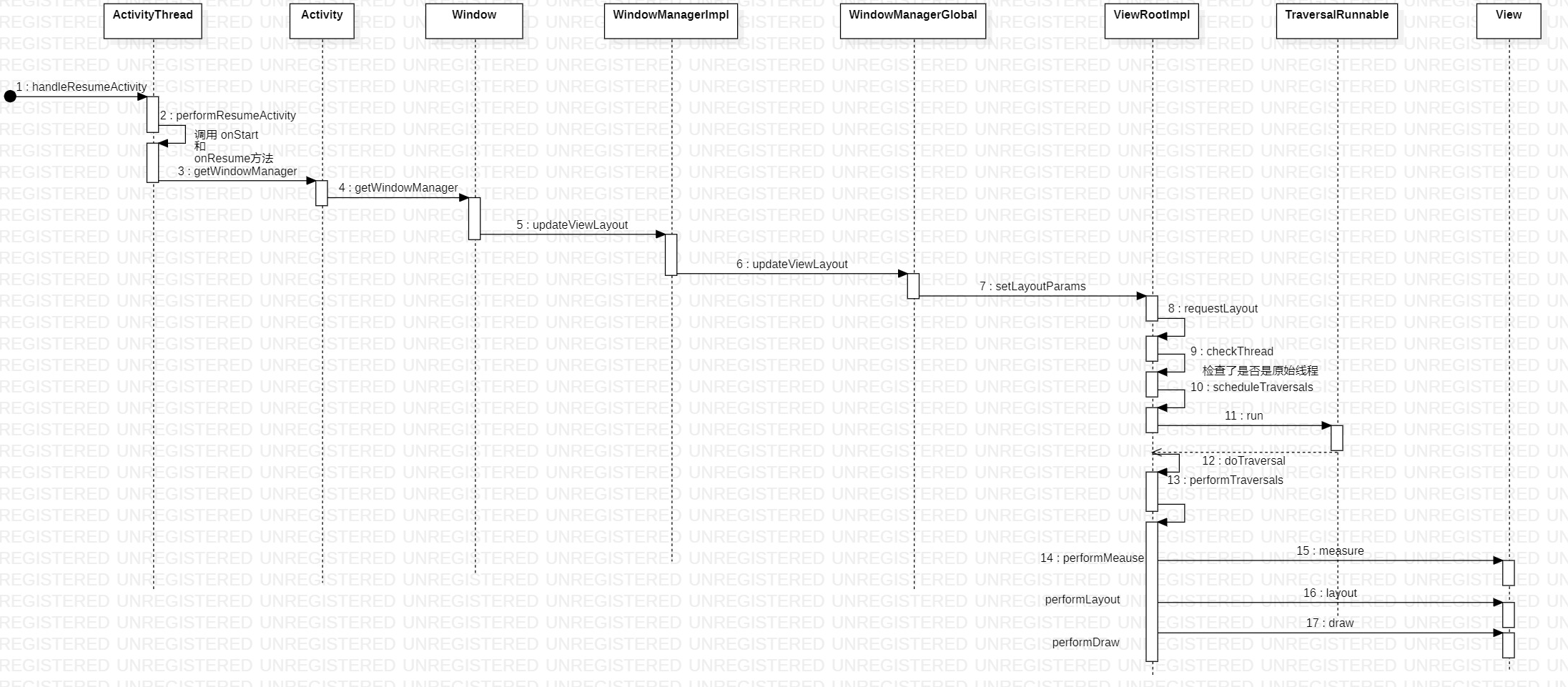
在上一篇中,走了一边Activity启动过程,在这里,继续分析下视图的加载过程。
在调用了onStart 和 onResume方法之后,通过Activity中的PhoneWindow(Window)获取到WindowManager,将PhoneWindow中的DectorView添加到WindowManager中。
final void handleResumeActivity(IBinder token, boolean clearHide, boolean isForward, boolean reallyResume) {
        unscheduleGcIdler();
        mSomeActivitiesChanged = true;

		// 调用 onStart 和 onResume方法
        ActivityClientRecord r = performResumeActivity(token, clearHide);

        if (r != null) {
            final Activity a = r.activity;
			// 开始将decor添加到WindowManager之中
			// view的绘制流程开始
            if (r.window == null && !a.mFinished && willBeVisible) {
                r.window = r.activity.getWindow();
                View decor = r.window.getDecorView();
                decor.setVisibility(View.INVISIBLE);
                ViewManager wm = a.getWindowManager();
                WindowManager.LayoutParams l = r.window.getAttributes();
                a.mDecor = decor;
                l.type = WindowManager.LayoutParams.TYPE_BASE_APPLICATION;
                l.softInputMode |= forwardBit;
                if (a.mVisibleFromClient) {
                    a.mWindowAdded = true;
                    wm.addView(decor, l); // 对ViewRootImpl 进行了初始化
                }
			}
        WindowManager.LayoutParams l = r.window.getAttributes();
        if ((l.softInputMode & WindowManager.LayoutParams.SOFT_INPUT_IS_FORWARD_NAVIGATION) != forwardBit) {
    l.softInputMode = (l.softInputMode& (~WindowManager.LayoutParams.SOFT_INPUT_IS_FORWARD_NAVIGATION))| forwardBit;
    if (r.activity.mVisibleFromClient) {
        ViewManager wm = a.getWindowManager();
        View decor = r.window.getDecorView();
        wm.updateViewLayout(decor, l);// 到底怎么搞的
    }
}
    }
    }
mWindowManager是在Window中创建,是一个WindowManagerImpl实例。那么.addView的方法,调用的也是WindowManagerImpl的方法。
    public void setWindowManager(WindowManager wm, IBinder appToken, String appName, boolean hardwareAccelerated) {
        mAppToken = appToken;
        mAppName = appName;
        mHardwareAccelerated = hardwareAccelerated
                || SystemProperties.getBoolean(PROPERTY_HARDWARE_UI, false);
        if (wm == null) {
            wm = (WindowManager)mContext.getSystemService(Context.WINDOW_SERVICE);
        }
        mWindowManager = ((WindowManagerImpl)wm).createLocalWindowManager(this);
    }
WindowManagerImpl中的.addView方法调用的是mGlobal的.addView的方法。在mGlobal的方法中对ViewRootImpl进行了初始化,ViewRootImpl实现了ViewParent接口。至此添加View完毕,接下来看看如何进行的绘制。
    @Override
    public void addView(@NonNull View view, @NonNull ViewGroup.LayoutParams params) {
        applyDefaultToken(params);
        mGlobal.addView(view, params, mDisplay, mParentWindow);
    }

 public void addView(View view, ViewGroup.LayoutParams params,  Display display, Window parentWindow) {
            root = new ViewRootImpl(view.getContext(), display);

            view.setLayoutParams(wparams);

            mViews.add(view);
            mRoots.add(root);
            mParams.add(wparams);
        }

    }
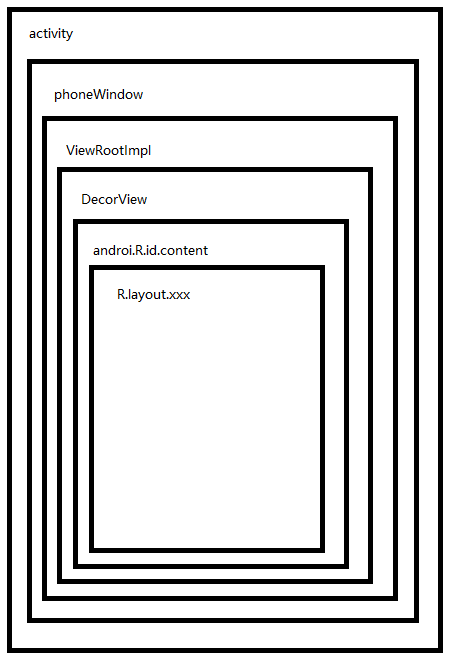
ViewRootImpl在这里起到了一个与decorView链接的作用
返回到handleResumeActivity中,添加了之后,调用了WindowManagerImpl的updateViewLayout方法。
    @Override
    public void updateViewLayout(@NonNull View view, @NonNull ViewGroup.LayoutParams params) {
        applyDefaultToken(params);
        mGlobal.updateViewLayout(view, params);
    }
在该方法中,根据mView的index,获取到对应的ViewRootImpl。这一步的初始化在上面的addview的时候进行了添加。然后调用ViewRootImpl的setLayoutParams方法。
    public void updateViewLayout(View view, ViewGroup.LayoutParams params) {
         synchronized (mLock) {
            int index = findViewLocked(view, true);
            ViewRootImpl root = mRoots.get(index);
            mParams.remove(index);
            mParams.add(index, wparams);
            root.setLayoutParams(wparams, false);
        }
    }

    void setLayoutParams(WindowManager.LayoutParams attrs, boolean newView) {
        synchronized (this) {
            if (newView) {
                requestLayout();
            }
        }
    }
在这里进行了线程的检查,mThread在创建ViewRootImpl时候,就被指定,所以,在这之后更新UI都是要报错的。
    @Override
    public void requestLayout() {
        if (!mHandlingLayoutInLayoutRequest) {
            checkThread();
            mLayoutRequested = true;
            scheduleTraversals();
        }
    }

    void scheduleTraversals() {
        if (!mTraversalScheduled) {
            mChoreographer.postCallback(Choreographer.CALLBACK_TRAVERSAL,
		   // 执行 mTraversalRunnable   中的 run 方法
			 mTraversalRunnable, null);
            if (!mUnbufferedInputDispatch) {
                scheduleConsumeBatchedInput();
            }
            notifyRendererOfFramePending();
            pokeDrawLockIfNeeded();
        }
    }
    final class TraversalRunnable implements Runnable {
        @Override
        public void run() {
            doTraversal();
        }
    }
    void doTraversal() {
        if (mTraversalScheduled) {
            performTraversals();
        }
    }
在这个方法里,调用么测量,布局和绘制。
    private void performTraversals() {
        // cache mView since it is used so much below...
        // mView 是 DectorView
        final View host = mView;
            if (!mStopped || mReportNextDraw) {
                boolean focusChangedDueToTouchMode = ensureTouchModeLocally( (relayoutResult&WindowManagerGlobal.RELAYOUT_RES_IN_TOUCH_MODE) != 0);
                if (focusChangedDueToTouchMode || mWidth != host.getMeasuredWidth()|| mHeight != host.getMeasuredHeight() || contentInsetsChanged) {
                    int childWidthMeasureSpec = getRootMeasureSpec(mWidth, lp.width);
                    int childHeightMeasureSpec = getRootMeasureSpec(mHeight, lp.height);
// 测量
                     // Ask host how big it wants to be
                    performMeasure(childWidthMeasureSpec, childHeightMeasureSpec);
                    layoutRequested = true;
                }
            }
        } else {
        }

        final boolean didLayout = layoutRequested && (!mStopped || mReportNextDraw);
        boolean triggerGlobalLayoutListener = didLayout
                || mAttachInfo.mRecomputeGlobalAttributes;
        if (didLayout) {
// 布局
            performLayout(lp, desiredWindowWidth, desiredWindowHeight);
        }


        if (!cancelDraw && !newSurface) {
            if (!skipDraw || mReportNextDraw) {
// 绘制
                performDraw();
            }
        } else {

        }

        mIsInTraversal = false;
    }
测量是调用的View的measure方法。
    private void performMeasure(int childWidthMeasureSpec, int childHeightMeasureSpec) {
        Trace.traceBegin(Trace.TRACE_TAG_VIEW, "measure");
        try {
            mView.measure(childWidthMeasureSpec, childHeightMeasureSpec);
        } finally {
            Trace.traceEnd(Trace.TRACE_TAG_VIEW);
        }
    }
可以看到在这里调用了onMeasure方法,那么mView是DecorView,DecorView继承FrameLayout。Frame Layout重写了该方法。
  public final void measure(int widthMeasureSpec, int heightMeasureSpec) {
        if ((mPrivateFlags & PFLAG_FORCE_LAYOUT) == PFLAG_FORCE_LAYOUT ||   widthMeasureSpec != mOldWidthMeasureSpec ||  heightMeasureSpec != mOldHeightMeasureSpec) {

            int cacheIndex = (mPrivateFlags & PFLAG_FORCE_LAYOUT) == PFLAG_FORCE_LAYOUT ? -1 :  mMeasureCache.indexOfKey(key);
            if (cacheIndex < 0 || sIgnoreMeasureCache) {
                onMeasure(widthMeasureSpec, heightMeasureSpec);
            }
        }
    }
这里是FrameLayout的onMeasure,其他的布局也会根据自己情况来复写该方法。在该方法中,获取到所有的子View,调用子View的child.measure方法。
 /**
     * {@inheritDoc}
     * 如果,子 view如果设置属性是 match_parent,
     * 如果,measureMatchParentChildren是true (其实就是framlayout模式是非精准模式)
     * 那么这种子view是被测量了两次
     */
    @Override
    protected void onMeasure(int widthMeasureSpec, int heightMeasureSpec) {
        int count = getChildCount();

        //当FrameLayout的宽和高 只有同时设置为 match_parent
        //当FrameLayout的宽和高 指定的size
        ///measureMatchParentChlidren = false,否则为true。

        //MeasureSpec.EXACTLY时,就表示当前视图的大小等于参数measureSpec中所指定的值。

        //当FrameLayout 非精准模式,这时候要把所有宽高设置为 //match_parent的子View都记录下来
        // 这时候FrameLayout的宽高同时受子View的影响
        final boolean measureMatchParentChildren = MeasureSpec.getMode(widthMeasureSpec) != MeasureSpec.EXACTLY || MeasureSpec.getMode(heightMeasureSpec) != MeasureSpec.EXACTLY;

        mMatchParentChildren.clear();

        int maxHeight = 0;
        int maxWidth = 0;
        int childState = 0;//宽高的期望类型

        //测量孩子同时,计算出一个最大宽高
        for (int i = 0; i < count; i++) {
            final View child = getChildAt(i);
            if (mMeasureAllChildren || child.getVisibility() != GONE) { //一次遍历每一个不为GONE的子view

                //第一次测量孩子
                measureChildWithMargins(child, widthMeasureSpec, 0, heightMeasureSpec, 0);

                final LayoutParams lp = (LayoutParams) child.getLayoutParams();

                maxWidth = Math.max(maxWidth, child.getMeasuredWidth() + lp.leftMargin + lp.rightMargin);
                maxHeight = Math.max(maxHeight, child.getMeasuredHeight() + lp.topMargin + lp.bottomMargin);

                childState = combineMeasuredStates(childState, child.getMeasuredState());

                //的mMatchParentChlidren的list里存的是设置为match_parent的子view。
                if (measureMatchParentChildren) {
                    if (lp.width == LayoutParams.MATCH_PARENT || lp.height == LayoutParams.MATCH_PARENT) {
                        mMatchParentChildren.add(child);
                    }
                }
            }
        }

        // Account for padding too
        //加上父亲的padidng
        maxWidth += getPaddingLeftWithForeground() + getPaddingRightWithForeground();
        maxHeight += getPaddingTopWithForeground() + getPaddingBottomWithForeground();

        // Check against our minimum height and width
        // 校验最小宽高
        maxHeight = Math.max(maxHeight, getSuggestedMinimumHeight());
        maxWidth = Math.max(maxWidth, getSuggestedMinimumWidth());


        // 与前景图片比较,获取宽高相对较大的值
        final Drawable drawable = getForeground();
        if (drawable != null) {
            maxHeight = Math.max(maxHeight, drawable.getMinimumHeight());
            maxWidth = Math.max(maxWidth, drawable.getMinimumWidth());
        }

        //设置测量过的宽高
        setMeasuredDimension(resolveSizeAndState(maxWidth, widthMeasureSpec, childState),
                resolveSizeAndState(maxHeight, heightMeasureSpec,
                        childState << MEASURED_HEIGHT_STATE_SHIFT));

        //上面的测量,得到了framlayout的宽,高,下面,需要根据宽高,重新测量子view - 主要是 match_parent 属性的孩子
        //子view中设定为match_parent的个数
        //重新测量
        count = mMatchParentChildren.size();

        if (count > 1) {
            for (int i = 0; i < count; i++) {
                final View child = mMatchParentChildren.get(i);
                final MarginLayoutParams lp = (MarginLayoutParams) child.getLayoutParams();

                final int childWidthMeasureSpec;
                //将属性为match_parent的再测量一遍
                if (lp.width == LayoutParams.MATCH_PARENT) {//子view的宽是match_parent,则宽度期望值是总宽度-padding-margin
                    final int width = Math.max(0, getMeasuredWidth()
                            - getPaddingLeftWithForeground() - getPaddingRightWithForeground()
                            - lp.leftMargin - lp.rightMargin);
                    childWidthMeasureSpec = MeasureSpec.makeMeasureSpec(
                            width, MeasureSpec.EXACTLY);
                } else {
                    childWidthMeasureSpec = getChildMeasureSpec(widthMeasureSpec,
                            getPaddingLeftWithForeground() + getPaddingRightWithForeground() +
                                    lp.leftMargin + lp.rightMargin,
                            lp.width);
                }

                //将属性为match_parent的再测量一遍
                final int childHeightMeasureSpec;
                if (lp.height == LayoutParams.MATCH_PARENT) {
                    final int height = Math.max(0, getMeasuredHeight()
                            - getPaddingTopWithForeground() - getPaddingBottomWithForeground()
                            - lp.topMargin - lp.bottomMargin);
                    childHeightMeasureSpec = MeasureSpec.makeMeasureSpec(
                            height, MeasureSpec.EXACTLY);
                } else {
                    childHeightMeasureSpec = getChildMeasureSpec(heightMeasureSpec,
                            getPaddingTopWithForeground() + getPaddingBottomWithForeground() +
                                    lp.topMargin + lp.bottomMargin,
                            lp.height);
                }

                //子view的宽是match_parent,则宽度期望值是总宽度-padding-margin
                 //把这部分子view重新计算大小
                child.measure(childWidthMeasureSpec, childHeightMeasureSpec);
            }
        }
    }
 private void performLayout(WindowManager.LayoutParams lp, int desiredWindowWidth,  int desiredWindowHeight) {
        mLayoutRequested = false;
        mScrollMayChange = true;
        mInLayout = true;
        final View host = mView;
        try {
            host.layout(0, 0, host.getMeasuredWidth(), host.getMeasuredHeight());
        }
    }
View和ViewGroup的事件分发
View事件分发
View只有事件的分发和消费。
从View的dispatchTouchEvent(事件分发)开始,在ListenerInfo中存放了所有得listener的信息,构建得了一个对象。
这句话是非常重点。 if (li != null && li.mOnTouchListener != null && (mViewFlags & ENABLED_MASK) == ENABLED && li.mOnTouchListener.onTouch(this, event))
如果View的.setOnTouchListener有对象的时候,先执行mOnTouchListener,如果消费了(返回True),则不在执行View的onTouchEvent。
如果mOnTouchListener返回false,在会执行View的onTouchEvent方法。
如果mOnTouchListener返回false, 如果复写了View的onTouchEvent方法,确没有调用super,则不会执行到点击事件。
   public boolean dispatchTouchEvent(MotionEvent event) {
        boolean result = false;
        final int actionMasked = event.getActionMasked();
        if (actionMasked == MotionEvent.ACTION_DOWN) {
            stopNestedScroll();
        }

        if (onFilterTouchEventForSecurity(event)) {
            //noinspection SimplifiableIfStatement
            // 关键 -- 放了什么东西, 里面很多得参数
            ListenerInfo li = mListenerInfo;
            if (li != null && li.mOnTouchListener != null
			// enable 是否为true
			&& (mViewFlags & ENABLED_MASK) == ENABLED
// 当onTouchListener 设置后是否为false
			&& li.mOnTouchListener.onTouch(this, event)) {

                result = true;
            }

            if (!result && onTouchEvent(event)) {
                result = true;
            }

        if (actionMasked == MotionEvent.ACTION_UP ||
                actionMasked == MotionEvent.ACTION_CANCEL ||
                (actionMasked == MotionEvent.ACTION_DOWN && !result)) {
            stopNestedScroll();
        }

        return result;
    }

    public boolean onTouchEvent(MotionEvent event) {
        final float x = event.getX();
        final float y = event.getY();
        final int viewFlags = mViewFlags;
        final int action = event.getAction();
        if (((viewFlags & CLICKABLE) == CLICKABLE ||  (viewFlags & LONG_CLICKABLE) == LONG_CLICKABLE) ||   (viewFlags & CONTEXT_CLICKABLE) == CONTEXT_CLICKABLE) {
            switch (action) {
                case MotionEvent.ACTION_UP:
                    boolean prepressed = (mPrivateFlags & PFLAG_PREPRESSED) != 0;
                    if ((mPrivateFlags & PFLAG_PRESSED) != 0 || prepressed) {
                        boolean focusTaken = false;
                        if (!mHasPerformedLongPress && !mIgnoreNextUpEvent) {
                            if (!focusTaken) {
								if (mPerformClick == null) {
                                    mPerformClick = new PerformClick();
                                }
                                if (!post(mPerformClick)) {
									// 点击事件
                                    performClick();
                                }
                            }
                        }

                    }
                    mIgnoreNextUpEvent = false;
                    break;
            }

            return true;
        }

        return false;
    }
ViewGroup事件分发
ViewGroup有事件的分发,拦截,消费。 先调用了本类中的拦截方法onInterceptTouchEvent,默认是返回false,如果没有拦截复写返回true,也没有取消该事件那么会倒序的循环所有的children。这也是为FrameLayout和RelativeLayout这种重叠的布局考虑,在dispatchTransformedTouchEvent方法中调用了child.dispatchTouchEvent(event)。在为mFirstTouchTarget进行赋值。否则mFirstTouchTarget为null。
如果child是View那么会执行上面View分发的流程。 如果child是viewGroup则会又开始执行本流程。 如果有子View进行了消费,那么break循环,返回true。
如果左右的子View没有消费该down事件,那么mFirstTouchTarget则为null,为null会调用super.dispatchTouchEvent然后自己消费该事件。
    public boolean dispatchTouchEvent(MotionEvent ev) {

        boolean handled = false;
        if (onFilterTouchEventForSecurity(ev)) {
            final int action = ev.getAction();
            final int actionMasked = action & MotionEvent.ACTION_MASK;

			// 很重要的一个地方了
            if (actionMasked == MotionEvent.ACTION_DOWN) {
				// 做了一次清除TouchState       mFirstTouchTarget成了空
				cancelAndClearTouchTargets(ev);
                resetTouchState();
            }

            // Check for interception.
            final boolean intercepted;
            if (actionMasked == MotionEvent.ACTION_DOWN  || mFirstTouchTarget != null) {
                final boolean disallowIntercept = (mGroupFlags & FLAG_DISALLOW_INTERCEPT) != 0;

				if (!disallowIntercept) {
					// down 事件的情况下 ,会调用该行,调用拦截的方法,
                    intercepted = onInterceptTouchEvent(ev); // 默认返回false,需要看子类
                    ev.setAction(action); // restore action in case it was changed
                } else {
                    intercepted = false;
                }
            } else {
                intercepted = true;
            }

            if (intercepted || mFirstTouchTarget != null) {
                ev.setTargetAccessibilityFocus(false);
            }

            // Check for cancelation.
            final boolean canceled = resetCancelNextUpFlag(this) || actionMasked == MotionEvent.ACTION_CANCEL;

            final boolean split = (mGroupFlags & FLAG_SPLIT_MOTION_EVENTS) != 0;
            TouchTarget newTouchTarget = null;
            boolean alreadyDispatchedToNewTouchTarget = false;

			//没拦截 并且 没取消,,默认情况下为true ,if语句 可以执行
            if (!canceled && !intercepted) {

                View childWithAccessibilityFocus = ev.isTargetAccessibilityFocus()  ? findChildWithAccessibilityFocus() : null;

                if (actionMasked == MotionEvent.ACTION_DOWN  || (split && actionMasked == MotionEvent.ACTION_POINTER_DOWN) || actionMasked == MotionEvent.ACTION_HOVER_MOVE) {
                    final int actionIndex = ev.getActionIndex(); // always 0 for down
                    final int idBitsToAssign = split ? 1 << ev.getPointerId(actionIndex)  : TouchTarget.ALL_POINTER_IDS;

                    removePointersFromTouchTargets(idBitsToAssign);

					// 执行到这里 down的时候
                    final int childrenCount = mChildrenCount;
                    if (newTouchTarget == null && childrenCount != 0) {
                        final float x = ev.getX(actionIndex);
                        final float y = ev.getY(actionIndex);
                        // Find a child that can receive the event.
                        // Scan children from front to back.
                        final ArrayList<View> preorderedList = buildOrderedChildList();
                        final boolean customOrder = preorderedList == null  && isChildrenDrawingOrderEnabled();
                        final View[] children = mChildren;
						// 反序 for 循环  ,fragmentlayou的话从顶层开始i
                        for (int i = childrenCount - 1; i >= 0; i--) {
                            final int childIndex = customOrder ? getChildDrawingOrder(childrenCount, i) : i;
                            final View child = (preorderedList == null) ? children[childIndex] : preorderedList.get(childIndex);

                            if (childWithAccessibilityFocus != null) {
                                if (childWithAccessibilityFocus != child) {
                                    continue;
                                }
                                childWithAccessibilityFocus = null;
                                i = childrenCount - 1;
                            }

                            if (!canViewReceivePointerEvents(child) || !isTransformedTouchPointInView(x, y, child, null)) {
                                ev.setTargetAccessibilityFocus(false);
                                continue;
                            }
							// 11
                            newTouchTarget = getTouchTarget(child); // 获取view的target
                            if (newTouchTarget != null) {
                                newTouchTarget.pointerIdBits |= idBitsToAssign;
                                break;
                            }
                            resetCancelNextUpFlag(child);
							// 调用子view的dispatchTouchEvent
                            if (dispatchTransformedTouchEvent(ev, false, child, idBitsToAssign)) {
                                // Child wants to receive touch within its bounds.
                                mLastTouchDownTime = ev.getDownTime();
                                if (preorderedList != null) {
                                    // childIndex points into presorted list, find original index
                                    for (int j = 0; j < childrenCount; j++) {
                                        if (children[childIndex] == mChildren[j]) {
                                            mLastTouchDownIndex = j;
                                            break;
                                        }
                                    }
                                } else {
                                    mLastTouchDownIndex = childIndex;
                                }
                                mLastTouchDownX = ev.getX();
                                mLastTouchDownY = ev.getY();
                                newTouchTarget = addTouchTarget(child, idBitsToAssign);
                                alreadyDispatchedToNewTouchTarget = true;
                                break;
                            }
                            ev.setTargetAccessibilityFocus(false);
                        }
                        if (preorderedList != null) preorderedList.clear();
                    }

                    if (newTouchTarget == null && mFirstTouchTarget != null) {
                        // Did not find a child to receive the event.
                        // Assign the pointer to the least recently added target.
                        newTouchTarget = mFirstTouchTarget;
                        while (newTouchTarget.next != null) {
                            newTouchTarget = newTouchTarget.next;
                        }
                        newTouchTarget.pointerIdBits |= idBitsToAssign;
                    }
                }
            }

            // Dispatch to touch targets.
            if (mFirstTouchTarget == null) {
                handled = dispatchTransformedTouchEvent(ev, canceled, null, TouchTarget.ALL_POINTER_IDS);
            } else {
                TouchTarget predecessor = null;
                TouchTarget target = mFirstTouchTarget;
                while (target != null) {
                    final TouchTarget next = target.next;
                    if (alreadyDispatchedToNewTouchTarget && target == newTouchTarget) {
                        handled = true;
                    } else {
                        final boolean cancelChild = resetCancelNextUpFlag(target.child) || intercepted;
                        if (dispatchTransformedTouchEvent(ev, cancelChild,   target.child, target.pointerIdBits)) {
                            handled = true;
                        }
                        if (cancelChild) {
                            if (predecessor == null) {
                                mFirstTouchTarget = next;
                            } else {
                                predecessor.next = next;
                            }
                            target.recycle();
                            target = next;
                            continue;
                        }
                    }
                    predecessor = target;
                    target = next;
                }
            }
        }
        return handled;
    }