uni-app中web-view和加载本地html
兼容问题平台

1.使用本地网页及相关资源(js、css等文件)必须放在 uni-app 项目根目录->hybrid->html (如下图:)
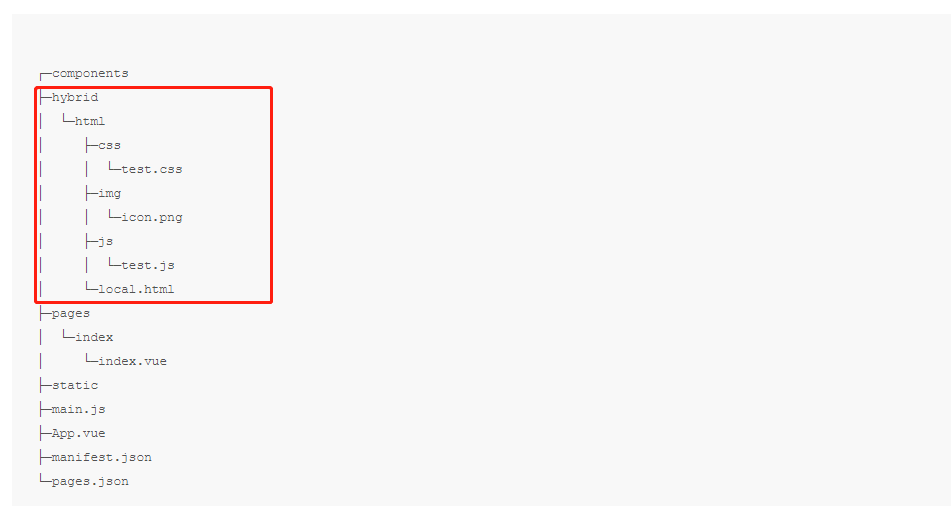
2.创建一个新的.vue文件 (nvue 使用需要手动指定宽高)
.vue部分
<template>
    <view>
        <!-- /hybrid/html/local.html?data=111  向内传值 -->
        <web-view :webview-styles="webviewStyles" src="/hybrid/html/local.html?data=111" @message="getMessage"></web-view>
    </view>
</template>
| 属性 | 类型 | 说明 | 平台差异说明 |
|---|---|---|---|
| src | String | webview 指向网页的链接 | |
| allow | String | 用于为 iframe 指定其特征策略 | H5 |
| sandbox | String | 该属性对呈现在 iframe 框架中的内容启用一些额外的限制条件。 | H5 |
| webview-styles | Object | webview 的样式 | APP |
| @message | EventHandler | 网页向应用 postMessage 时,会在特定时机(后退、组件销毁、分享)触发并收到消息。 | H5 暂不支持 |
| @onPostMessage | EventHandler | 网页向应用实时 postMessage | App-nvue |
- 详细请属性了解 请点这里
js部分
data() {
    return {
        webviewStyles: {
             progress: {  // 加载网络地址是 进度条样式
                color: '#46be8a'
            }
        }
    }
}
methods:{
    getMessage(e) {
        //从 /hybrid/html/local.html中接收到的消息
        console.log('接收到的消息:' + JSON.stringify(e.detail.data));
    },
    // 前端Js处理百度地图和腾讯/高德地图经纬度不同的转换问题
    // 百度转腾讯/高德
    bMapTransqqMap(lng, lat) {
    	let x_pi = (3.14159265358979324 * 3000.0) / 180.0;
    	let x = lng - 0.0065;
    	let y = lat - 0.006;
    	let z = Math.sqrt(x * x + y * y) - 0.00002 * Math.sin(y * x_pi);
    	let theta = Math.atan2(y, x) - 0.000003 * Math.cos(x * x_pi);
    	let lngs = z * Math.cos(theta);
    	let lats = z * Math.sin(theta);
    	return {
        	longitude: lngs,
        	latitude: lats
    	};
    },
    // 腾讯/高德地图转百度地图经纬度 /
    qqMapTransBMap(lng, lat) {
        let x_pi = 3.14159265358979324 * 3000.0 / 180.0;
        let x = lng;
        let y = lat;
        let z = Math.sqrt(x * x + y * y) + 0.00002 * Math.sin(y * x_pi);
        let theta = Math.atan2(y, x) + 0.000003 * Math.cos(x * x_pi);
        let lngs = z * Math.cos(theta) + 0.0065;
        let lats = z * Math.sin(theta) + 0.006;
        return {
          lng: lngs,
          lat: lats
        };
    },
    // 打开第三方导航
    // 地图路径规划 经纬度 城市名称
    openMapRoute(lat, lon, cityName) {
    	var url = '';
    	if (plus.os.name == 'Android') {
    		var hasBaiduMap = plus.runtime.isApplicationExist({
    			pname: 'com.baidu.BaiduMap',
    			action: 'baidumap://'
    		});
    		var hasAmap = plus.runtime.isApplicationExist({
    			pname: 'com.autonavi.minimap',
    			action: 'androidamap://'
    		});
    		var urlBaiduMap = 'baidumap://map/marker?location=' + lat + ',' + lon + '&title=' + cityName + '&src=婚梯';
    		let position = this.bMapTransqqMap(lon, lat);
    		var urlAmap = 'androidamap://viewMap?sourceApplication=婚梯&poiname=' + cityName + '&lat=' + position.latitude + '&lon=' + position.longitude + '&dev=0';
    		if (hasAmap && hasBaiduMap) {
    			plus.nativeUI.actionSheet(
    				{
    					title: '选择地图应用',
    					cancel: '取消',
    					buttons: [
    						{
    							title: '百度地图'
    						},
    						{
    							title: '高德地图'
    						}
    					]
    				},
    				function(e) {
    					switch (e.index) {
    						case 1:
    							plus.runtime.openURL(urlBaiduMap);
    							break;
    						case 2:
    							plus.runtime.openURL(urlAmap);
    							break;
    					}
    				}
    			);
    		} else if (hasAmap) {
    			plus.runtime.openURL(urlAmap);
    		} else if (hasBaiduMap) {
    			plus.runtime.openURL(urlBaiduMap);
    		} else {
    			url = 'geo:' + lat + ',' + lon + '?q=%e6%95%b0%e5%ad%97%e5%a4%a9%e5%a0%82';
    			plus.runtime.openURL(url); //如果是国外应用,应该优先使用这个,会启动google地图。这个接口不能统一坐标系,进入百度地图时会有偏差
    		}
    	} else {
    		// iOS上获取本机是否安装了百度高德地图,需要在manifest里配置,在manifest.json文件app-plus->distribute->apple->urlschemewhitelist节点下添加(如urlschemewhitelist:["iosamap","baidumap"])
    		plus.nativeUI.actionSheet(
    			{
    				title: '选择地图应用',
    				cancel: '取消',
    				buttons: [
    					{
    						title: 'Apple地图'
    					},
    					{
    						title: '百度地图'
    					},
    					{
    						title: '高德地图'
    					}
    				]
    			},
    			function(e) {
    				console.log('e.index: ' + e.index);
    				switch (e.index) {
    					case 1:
    						url = 'http://maps.apple.com/?q=%e6%95%b0%e5%ad%97%e5%a4%a9%e5%a0%82&ll=' + lat + ',' + lon + '&spn=0.008766,0.019441';
    						break;
    					case 2:
    						url = 'baidumap://map/marker?location=' + lat + ',' + lon + '&title=' + cityName + '&src=婚梯';
    						break;
    					case 3:
    						url = 'iosamap://viewMap?sourceApplication=婚梯&poiname=' + cityName + '&lat=' + lat + '&lon=' + lon + '&dev=0';
    						break;
    					default:
    						break;
    				}
    				if (url != '') {
    					plus.runtime.openURL(url, function(e) {
    						plus.nativeUI.alert('本机未安装指定的地图应用');
    					});
    				}
    			}
    		);
    	}
    }


}
/hybrid/html/local.html 部分
<!DOCTYPE html>
<html>
    <head>
        <meta charset="utf-8" />
        <meta name="viewport" content="width=device-width, initial-scale=1.0, maximum-scale=1.0, user-scalable=0">
        <meta http-equiv="x-rim-auto-match" content="none">
        <meta name="format-detection" content="telephone=yes" />
        <title>客户地图</title>
        <link rel="stylesheet" type="text/css" href="./reset.css" />
    </head>
    <body>
        <div id="allmap"></div>
        <div class="userlistBut">
            <img src="./img/jt.png" class='iconimg'>客户
        </div>
        <div class='infolist'>
            <div class='username'>
                <p class='contactPerson'>老赵联系人</p>
                <p class='userTitle'>超群生鲜超市</p>
            </div>
            <div class='userIcon'>
                <div>
                    <a href="tel:13687942130">
                        <img src="./img/call.png" class='userIconImg'>
                        电话
                    </a>
                </div>
                <div class='daohang'>
                    <img src="./img/dh.png" class='userIconImg'>
                    <span>导航</span>
                </div>
            </div>
        </div>
        <div class="slider">
            <ul>
                <li class='on' data-type="all">全部客户</li>
            </ul>
        </div>
        <div class='nodadian'></div>
        <script type="text/javascript" src="./jQuery.js"></script>
        <!-- 百度AK -->
        <script type="text/javascript" src="https://api.map.baidu.com/api?type=webgl&v=2.0&ak=您的AK"></script>
        <!-- uni-app api -->
        <script type="text/javascript" src="https://js.cdn.aliyun.dcloud.net.cn/dev/uni-app/uni.webview.1.5.1.js"></script>
        <script type="text/javascript">
            $(function() {
            	var map = new BMapGL.Map("allmap");
            	var myPosition = {
                    lng: '0', // 经度
                    lat: '0' // 纬度
            	}
            	$('.slider ul').css({'height': $(window).height() + 'px'})
                var userList = [
                    {
                    	username: '徐先生',
                    	call: '13687942134',
                    	id: 1,
                    	userTitle: '家乐福生鲜超市',
                    	none: 1, // 1打点 0 没有打点
                    	lng: '114.02597366', // 经度
                    	lat: '22.54966355' // 纬度
                    },
                    {
                        username: '郭先生',
                        call: '13687942133',
                        id: 1,
                        userTitle: '沃尔玛生鲜超市',
                        none: 1, // 1打点 0 没有打点
                        lng: '114.02597366', // 经度
                        lat: '22.55619355' // 纬度
                    },
                    {
                        username: '唐先生',
                        call: '13687942132',
                        id: 1,
                        userTitle: '华润万家生鲜超市',
                        none: 1, // 1打点 0 没有打点
                        lng: '114.02597366', // 经度
                        lat: '22.55627355' // 纬度
                    },
                    {
                        username: '朱先生',
                        call: '13687942131',
                        id: 1,
                        userTitle: '人人乐生鲜超市',
                        none: 0, // 1打点 0 没有打点
                        lng: '', // 经度
                        lat: '' // 纬度
                    },
                    {
                        username: '王先生',
                        call: '13687942130',
                        id: 1,
                        userTitle: '永辉生鲜超市',
                        none: 0, // 1打点 0 没有打点
                        lng: '', // 经度
                        lat: '' // 纬度
                    },
                ]
                forMapList()
                getUserPostion()
                $(".userlistBut").click(function() {
                    $(".slider").toggleClass("open");
                    $(this).toggleClass('userlistBut-open')
                    $(this).find('.iconimg').toggleClass('iconimg-open')
                });

				$('.slider ul').on('click', 'li', function() {
					if ($(this).attr('data-type') == 'all') {
						$('.infolist').css('display', 'none')
						$('.nodadian').show()
						$('.nodadian').text('全部客户')
						if (!$(this).hasClass('on')) {
							// $(".slider ul li").nextAll().remove();
							// forMapList()
							map.centerAndZoom(new BMapGL.Point(myPosition.lng, myPosition.lat), 13)
						}
					} else {
						var userinfo = JSON.parse($(this).attr('data-userinfo'))
						$('.infolist .username .contactPerson').text(userinfo.username)
						$('.infolist .username .userTitle').text(userinfo.userTitle)
						$('.infolist .userIcon a').attr('href', 'tel:' + userinfo.call)
						$('.infolist').css('display', 'flex')
						if (userinfo.none == 1) {
							$('.nodadian').hide()
							map.centerAndZoom(new BMapGL.Point(userinfo.lng, userinfo.lat), 19)
							$('.infolist .userIcon .daohang').attr('data-position', JSON.stringify(userinfo))
							$('.infolist .userIcon .daohang img').attr('src', './img/dh.png')
							$('.infolist .userIcon .daohang span').text('导航')
						} else {
							$('.nodadian').show()
							$('.nodadian').text('没有打点')
							$('.infolist .userIcon .daohang img').attr('src', './img/zz.png')
							$('.infolist .userIcon .daohang span').text('打点')

							map.centerAndZoom(new BMapGL.Point(myPosition.lng, myPosition.lat), 15)
						}
					}
					$(this).addClass('on').siblings('li').removeClass('on')
				})
				document.addEventListener('UniAppJSBridgeReady', function() {
					$('.daohang').click(function() {
						var data = JSON.parse($('.daohang').attr('data-position'))
						uni.postMessage({
							data: {
								action: data
							}
						});
					})
					uni.getEnv(function(res) {
						console.log('当前环境:' + JSON.stringify(res));
					});
				})
				function forMapList() {
					var isPoint = 0
					var pointlist = []
					for (var i = 0; i < userList.length; i++) {
						if (userList[i].none == '1') {
							var myIcon = new BMapGL.Icon("zb.png", new BMapGL.Size(22, 24)); //自定义icon
							var mark = new BMapGL.Marker(new BMapGL.Point(userList[i].lng, userList[i].lat), {
								icon: myIcon
							}); // 创建标注
							map.addOverlay(mark);
							++isPoint;
						}
						var str =
							`<li data-userinfo='${JSON.stringify(userList[i])}'  data-type = "_this">${userList[i].userTitle}<span class='notManaged'>${userList[i].none==0?'没有打点':''}</span></li>`
						$('.slider ul').append(str)
					}
					map.centerAndZoom(new BMapGL.Point(userList[0].lng, userList[0].lat), 13)
					if (isPoint > 0) {
						$('.nodadian').show()
						$('.nodadian').text('全部客户')
					} else {
						$('.nodadian').show()
						$('.nodadian').text('没有打点的客户')
					}
				}
				// 获取我的位置
				function getUserPostion() {
					var geolocation = new BMapGL.Geolocation();
					geolocation.getCurrentPosition(function(r) {
						if (this.getStatus() == BMAP_STATUS_SUCCESS) {
							var icon = new BMapGL.Icon('mezb.png', new BMapGL.Size(20, 20));
							var mk = new BMapGL.Marker(r.point);
							mk.setIcon(icon);
							map.panTo(r.point);
							myPosition.lat = r.point.lat
							myPosition.lng = r.point.lng
							map.centerAndZoom(new BMapGL.Point(r.point.lng, r.point.lat), 13)
							map.addOverlay(mk);
						} else {
							alert('failed' + this.getStatus());
						}
					}, {
						enableHighAccuracy: true
					})

					function showInfo(e) {
						alert(e.latlng.lng + ", " + e.latlng.lat);
					}
					map.addEventListener("click", showInfo);
				}
			})

			console.log(getQuery('data')); //获取 uni-app 传来的值
			function getQuery(name) {
				// 正则:[找寻'&' + 'url参数名字' = '值' + '&']('&'可以不存在)
				let reg = new RegExp("(^|&)" + name + "=([^&]*)(&|$)");
				let r = window.location.search.substr(1).match(reg);
				if (r != null) {
					// 对参数值进行解码
					return unescape(r[2]);
				}
				return null;
			}
		</script>
	</body>
</html>
- 详细
// 当点击时 uni.postMessage  向 .vue web-view 发送消息
document.addEventListener('UniAppJSBridgeReady', function() {
    $('.daohang').click(function() {
    	var data = JSON.parse($('.daohang').attr('data-position'))
    	uni.postMessage({
    		data: {
    			action: data
    		}
    	});
    })
    uni.getEnv(function(res) {
    	console.log('当前环境:' + JSON.stringify(res));
    });
})

//获取 uni-app 传来的值
console.log(getQuery('data'));
function getQuery(name) {
    // 正则:[找寻'&' + 'url参数名字' = '值' + '&']('&'可以不存在)
    let reg = new RegExp("(^|&)" + name + "=([^&]*)(&|$)");
    let r = window.location.search.substr(1).match(reg);
    if (r != null) {
        // 对参数值进行解码
        return unescape(r[2]);
    }
    return null;
}


// 获取我的位置

var map = new BMapGL.Map("allmap");
var myPosition = {
    lng: '0', // 经度
    lat: '0' // 纬度
}
function getUserPostion() {
    var geolocation = new BMapGL.Geolocation();
    geolocation.getCurrentPosition(function(r) {
    	if (this.getStatus() == BMAP_STATUS_SUCCESS) {
            var icon = new BMapGL.Icon('mezb.png', new BMapGL.Size(20, 20)); // 自定义图标
            var mk = new BMapGL.Marker(r.point);
            mk.setIcon(icon);
            map.panTo(r.point);
            myPosition.lat = r.point.lat // 维度
            myPosition.lng = r.point.lng // 经度
            map.centerAndZoom(new BMapGL.Point(r.point.lng, r.point.lat), 13)  // 将坐标绘制到地图 13=缩放比
            map.addOverlay(mk);
    	} else {
            alert('failed' + this.getStatus());
    	}
    }, {
    	enableHighAccuracy: true
    })
}
// 点击地图时弹出经纬度
function showInfo(e) {
    alert(e.latlng.lng + ", " + e.latlng.lat);
}
map.addEventListener("click", showInfo);

// 循环将坐标点绘如地图
function forMapList() {
    var isPoint = 0
    var pointlist = []
    for (var i = 0; i < userList.length; i++) {
    	if (userList[i].none == '1') {
            var myIcon = new BMapGL.Icon("zb.png", new BMapGL.Size(22, 24)); //自定义icon
            var mark = new BMapGL.Marker(new BMapGL.Point(userList[i].lng, userList[i].lat), {
            	icon: myIcon
            }); // 创建标注
            map.addOverlay(mark);
            ++isPoint;
    	}
    	var str =
    		`<li data-userinfo='${JSON.stringify(userList[i])}'  data-type = "_this">${userList[i].userTitle}<span class='notManaged'>${userList[i].none==0?'没有打点':''}</span></li>`
    	$('.slider ul').append(str)
    }
    map.centerAndZoom(new BMapGL.Point(userList[0].lng, userList[0].lat), 13) //显示第一个坐标
}