先上效果图:
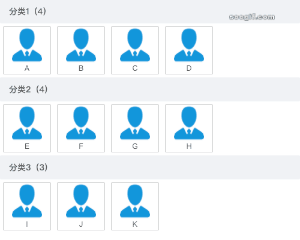
大致步骤:
一、设置元素为可拖拽:draggable 属性设置为 true
二、默认无法将元素放置到其他元素中。需要设置允许放置,阻止对元素的默认处理方式。 调用 onDragOver 事件的 e.preventDefault() 方法
三、onDragEnter及onDragLeave 设置拖拽效果
四、onDrop 操作数据实现拖拽
jsx文件
import React, { useState } from 'react';
import touxiang from 'public/imgs/touxiang.png';
import './index.less';

const ClassifyList = (props) => {

 const [personInfo, setPersonInfo] = useState({});
 const [personClassifyList, setPersonClassifyList] = useState([
 {
  classifyId: '200602779610000001',
  classifyName: '分类1',
  persons: [
    { personId: '200401444590000001', personName: 'A', personImg: null },
    { personId: '200401786650000000', personName: 'B', personImg: null },
    { personId: '200421743460000002', personName: 'C', personImg: null },
    { personId: '200410094840000002', personName: 'D', personImg: null }
  ]
},
{
  classifyId: '200527397450000022',
  classifyName: '分类2',
  persons: [
    { personId: '200401522970000000', personName: 'E', personImg: null },
    { personId: '200415351070000004', personName: 'F', personImg: null },
    { personId: '200401786650000002', personName: 'G', personImg: null },
    { personId: '200529848480000058', personName: 'H', personImg: null }
  ]
},
{
  classifyId: '200602236300000001',
  classifyName: '分类3',
  persons: [
    { personId: '200402671260000001', personName: 'I', personImg: null },
    { personId: '200421743460000012', personName: 'J', personImg: null },
    { personId: '200422780520000000', personName: 'K', personImg: null }
  ]
 }
]);

const dragStart = (e) => {
 // 开始拖拽保存 拖拽元素的数据
 const personInfo = e.target.getAttribute('person-info');
 setPersonInfo(JSON.parse(personInfo));
};

const onDragEnter = (e) => {
 // 拖入目标元素 显示border
 if (e.target.className === 'target' && personInfo.classifyId !== e.target.id) {
   e.target.style.border = '1px dashed red';
 }
};

 const onDragLeave = (e) => {
  // 拖出目标元素 隐藏border
  if (e.target.className === 'target') {
   e.target.style.border = 'none';
  }
 };

const onDrop = (e) => {
 e.preventDefault(); // 避免浏览器对数据的默认处理(默认行为是以链接形式打开)
 if (e.target.className === 'target' && personInfo.classifyId !== e.target.id) {
  e.target.style.border = 'none';
  //  通过操作数据来实现拖拽效果
  const newPersonClassifyList = personClassifyList.map((v) => ({
    ...v,
    persons:
      e.target.id === v.classifyId
        ? v.persons.concat([{ ...personInfo }]) // 拖入的数据拼接到后面
        : personInfo.classifyId === v.classifyId
        ? v.persons.filter((v) => v.personId !== personInfo.personId) // 过滤掉被拖走的数据
        : v.persons
  }));
  setPersonClassifyList([...newPersonClassifyList]);
 }
};

return (
 <div className="classify-list-page">
  {personClassifyList.map((item, index) => (
    <div
     key={item.classifyId}
     className="classify-list"
     onDragOver={(e) => e.preventDefault()}
    >
      <div className="name" classify-index={index}>
        <span>
          {item.classifyName}({item.persons.length})
        </span>
      </div>
      <div
        key={item.classifyId}
        id={item.classifyId}
        className="target"
        onDrop={onDrop}
        onDragEnter={onDragEnter}
        onDragLeave={onDragLeave}
        onDragOver={(e) => e.preventDefault()}
      >
        {item.persons.map((v) => (
          <div
            className="person-card"
            key={v.personId}
            id={v.personId}
            draggable="true"
            onDragStart={dragStart}
            person-info={JSON.stringify({ ...v, classifyId: item.classifyId })}
          >
            <img draggable="false" src={touxiang} alt="" />
            <span>{v.personName}</span>
          </div>
        ))}
      </div>
    </div>
  ))}
  </div>
 );
};
export default ClassifyList;
less文件
.classify-list-page {
   width: 500px;
   border-top: 1px solid #ccc;

>.title {
    font-size: 16px;
    font-weight: 500;
}

>.sub-title {
    height: 50px;
    display: flex;
    align-items: center;
    font-size: 14px;
    color: rgba(0, 0, 0, 0.85);
    font-weight: 500;

    >span:first-child {
        display: flex;
        align-items: center;
        width: 200px;

        &:before {
            content: '';
            width: 18px;
            height: 16px;
            margin: 0 10px 0 15px;
        }
    }
}

.classify-list {
    >.name {
        font-weight: 500;
        font-size: 14px;
        height: 40px;
        display: flex;
        justify-content: space-between;
        align-items: center;
        background: #F0F2F5;
        padding: 0 15px;
        border-radius: 2px;
    }

    >.target,
    >.persons {
        min-height: 80px;
        display: flex;
        flex-wrap: wrap;

        >.person-card {
            width: 80px;
            height: 80px;
            display: flex;
            flex-direction: column;
            align-items: center;
            justify-content: center;
            border: 1px solid #ccc;
            font-size: 12px;
            margin: 5px;
            cursor: pointer;
            position: relative;
            border-radius: 2px;

            >.mask {
                position: absolute;
                left: 10px;
                right: 10px;
                top: 10px;
                bottom: 10px;
                display: none;
            }

            .mask-show {
                display: flex;
                justify-content: center;
                align-items: center;
                background: rgba(0, 0, 0, 0.1);
            }

            >img {
                width: 50px;
                height: 60px;
            }
        }
     }
  }
}
总结拖拽事件
拖动元素事件:
ondragstart - 开始拖动时触发 e.dataTransfer.setData("Text", XXX)方法 设置被拖元素的数据
ondrag - 正在拖动时触发
ondragend - 完成拖动后触发
目标时元素事件:
ondragenter - 被拖动元素进入目标元素触发
ondragover - 被拖动元素在目标元素范围内拖动时触发
ondragleave - 被拖动元素离开目标元素触发
ondrop - 释放鼠标 / 放置到目标元素后触发 e.dataTransfer.getData("Text")方法 获取被拖元素的数据
结束,拜拜。