最近的项目需要搞一个人脸识别的东西!就是视频认证,然后根据认证的信息判断是否是本人操作!
因为之前没搞过人脸识别,所以找了半天解决方案,最后选定了用百度的人脸识别产品!
文档地址:cloud.baidu.com/doc/FACE/s/…
百度人脸识别产品优势:
1.快速集成,基本上零代码开发
2.因为之前用过百度的其它API,所以感觉百度的API文档介绍还是挺全面的,简单明了,不像抖音小程序那样,乱七八糟(吐槽下抖音小程序)
废话不多说,下面是集成步骤:
1.当然是先去注册百度开放平台,登录后到人工智能-人脸识别产品
2.然后创建应用,最后在创建人脸实名认证项目,如下图:
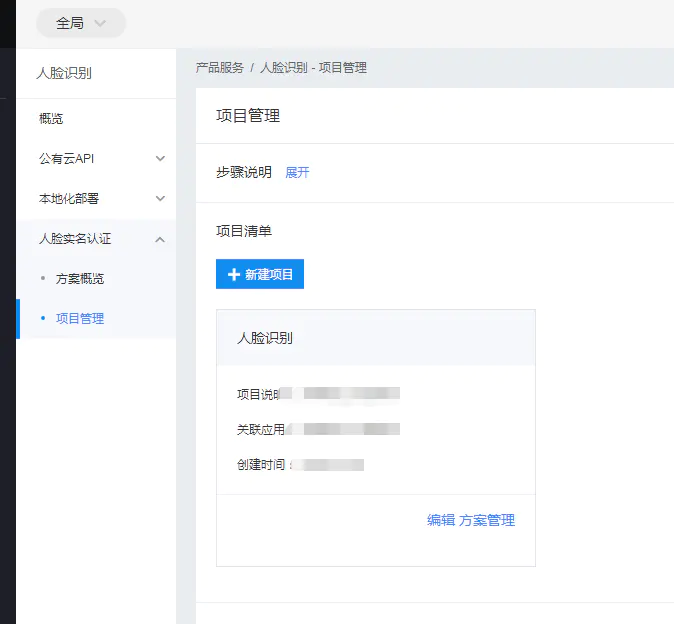
image.png
3.点击方案管理,新建方案。创建后的页面如下图:
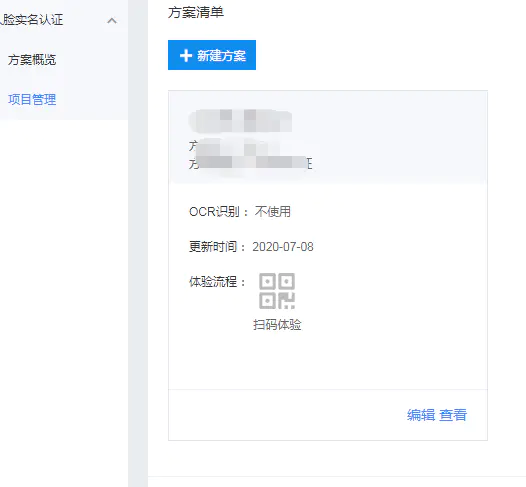
image.png
4.扫码就可以体验人脸识别了。
后台获取用户认证信息(java版):
文档地址:ai.baidu.com/ai-doc/FACE…
1.首先要获取access_token,代码如下
/**
     * 获取API访问token 该token有一定的有效期,需要自行管理,当失效时需重新获取.
     *
     * @param ak
     *            - 百度云官网获取的 API Key
     * @param sk
     *            - 百度云官网获取的 Securet Key
     * @return assess_token 示例:
     *         "24.460da4889caad24cccdb1fea17221975.2592000.1491995545.282335-1234567"
     */
    private static String getAuth(String ak, String sk) {

        String getAccessTokenUrl = HOST + "grant_type=client_credentials" + "&client_id=" + ak + "&client_secret=" + sk;
        try {
            URL realUrl = new URL(getAccessTokenUrl);
            // 打开和URL之间的连接
            HttpURLConnection connection = (HttpURLConnection) realUrl.openConnection();
            connection.setRequestMethod("GET");
            connection.connect();
            // 定义 BufferedReader输入流来读取URL的响应
            BufferedReader in = new BufferedReader(new InputStreamReader(connection.getInputStream()));
            String result = "";
            String line;
            while ((line = in.readLine()) != null) {
                result += line;
            }

            JSONObject jsonObject = new JSONObject(result);
            System.err.println(result);
            String access_token = jsonObject.getString("access_token");
            Calendar calendar = Calendar.getInstance();
            calendar.add(Calendar.SECOND, jsonObject.getInt("expires_in"));
            EXPIRES_IN = calendar.getTime();
            ACCESS_TOKEN = access_token;
            return access_token;
        } catch (Exception e) {
            System.err.printf("获取token失败!");
            e.printStackTrace(System.err);
        }
        return null;
    }
2.获取token后在获取verifyToken,此token用于获取认证URL和认证成功后的用户信息
获取verifyToken的代码如下:
/**
     * 获取verify_token,用户获取认证URL和认证后的用户信息
     *
     * <p>
     * Title: getVerifyToken
     * </p>
     *
     * <p>
     * Description:
     * </p>
     *
     * @return
     */
    private static String getVerifyToken() {

        String verifyToken = "";
        String host = "https://aip.baidubce.com/rpc/2.0/brain/solution/faceprint/verifyToken/generate";

        try {
            Map<String, Object> map = new HashMap<>();
            map.put("plan_id", 10414);

            String param = GsonUtils.toJson(map);

            // 注意这里仅为了简化编码每一次请求都去获取access_token,线上环境access_token有过期时间,
            // 客户端可自行缓存,过期后重新获取。
            String accessToken = getAuth();

            String result = HttpUtil.post(host, accessToken, "application/json", param);
            JSONObject jsonObject = new JSONObject(result);
            JSONObject v = jsonObject.getJSONObject("result");
            verifyToken = v.getString("verify_token");
            return verifyToken;
        } catch (Exception e) {
            e.printStackTrace();
        }
        return verifyToken;
    }
3.获取认证URL,用于返回给前端H5页面。
其中SUCCESS_URL为认证成功后跳转的页面,此URL不可自定义参数,所以这里需要把获取的verifyToken缓存起来,用于认证成功后根据verifyToken获取用户信息.
/**
     * 获取认证URL
     *
     * <p>
     * Title: getVerifyURL
     * </p>
     *
     * <p>
     * Description:
     * </p>
     *
     * @return
     */
    public static Map<String, String> getVerifyURL() {

        // https://brain.baidu.com/face/print/?token=xxx&successUrl=https://xxx&failedUrl=https://xxx
        String url = "https://brain.baidu.com/face/print/";
        String token = getVerifyToken();

        url += "?token=" + token;
        url += "&successUrl=" + SUCCESS_URL;
        url += "&failedUrl=" + FAIL_URL;

        Map<String, String> map = new HashMap<>();
        map.put("token", token);
        map.put("url", url);
        return map;
    }
4.获取用户认证信息
public static String getCardNum(String verifyToken) {
        String url = "https://aip.baidubce.com/rpc/2.0/brain/solution/faceprint/result/detail";
        String idCard = "";
        try {
            Map<String, Object> map = new HashMap<>();
            map.put("verify_token", verifyToken);

            String param = GsonUtils.toJson(map);

            // 注意这里仅为了简化编码每一次请求都去获取access_token,线上环境access_token有过期时间,
            // 客户端可自行缓存,过期后重新获取。
            String accessToken = getAuth();

            String result = HttpUtil.post(url, accessToken, "application/json", param);
            JSONObject jsonObject = new JSONObject(result);
            JSONObject res = jsonObject.getJSONObject("result");

            JSONObject cardConfirm = res.getJSONObject("idcard_confirm");

            idCard = cardConfirm.getString("idcard_number");

        } catch (Exception e) {
            // TODO: handle exception
        }
        return idCard;
    }
附上GsonUtils类和HttpUtil类
1.GsonUtils
/*
 * Copyright (C) 2017 Baidu, Inc. All Rights Reserved.
 */

import java.lang.reflect.Type;

import com.google.gson.Gson;
import com.google.gson.GsonBuilder;
import com.google.gson.JsonParseException;

/**
 * Json工具类.
 */
public class GsonUtils {
    private static Gson gson = new GsonBuilder().create();

    public static String toJson(Object value) {
        return gson.toJson(value);
    }

    public static <T> T fromJson(String json, Class<T> classOfT) throws JsonParseException {
        return gson.fromJson(json, classOfT);
    }

    @SuppressWarnings("unchecked")
    public static <T> T fromJson(String json, Type typeOfT) throws JsonParseException {
        return (T) gson.fromJson(json, typeOfT);
    }
}
2.HttpUtil
import java.io.BufferedReader;
import java.io.DataOutputStream;
import java.io.InputStreamReader;
import java.net.HttpURLConnection;
import java.net.URL;
import java.util.List;
import java.util.Map;

/**
 * http 工具类
 */
public class HttpUtil {

    public static String post(String requestUrl, String accessToken, String params) throws Exception {
        String contentType = "application/x-www-form-urlencoded";
        return HttpUtil.post(requestUrl, accessToken, contentType, params);
    }

    public static String post(String requestUrl, String accessToken, String contentType, String params) throws Exception {
        String encoding = "UTF-8";
        if (requestUrl.contains("nlp")) {
            encoding = "GBK";
        }
        return HttpUtil.post(requestUrl, accessToken, contentType, params, encoding);
    }

    public static String post(String requestUrl, String accessToken, String contentType, String params, String encoding) throws Exception {
        String url = requestUrl + "?access_token=" + accessToken;
        return HttpUtil.postGeneralUrl(url, contentType, params, encoding);
    }

    public static String postGeneralUrl(String generalUrl, String contentType, String params, String encoding) throws Exception {
        URL url = new URL(generalUrl);
        // 打开和URL之间的连接
        HttpURLConnection connection = (HttpURLConnection) url.openConnection();
        connection.setRequestMethod("POST");
        // 设置通用的请求属性
        connection.setRequestProperty("Content-Type", contentType);
        connection.setRequestProperty("Connection", "Keep-Alive");
        connection.setUseCaches(false);
        connection.setDoOutput(true);
        connection.setDoInput(true);

        // 得到请求的输出流对象
        DataOutputStream out = new DataOutputStream(connection.getOutputStream());
        out.write(params.getBytes(encoding));
        out.flush();
        out.close();

        // 建立实际的连接
        connection.connect();
        // 获取所有响应头字段
        Map<String, List<String>> headers = connection.getHeaderFields();
        // 遍历所有的响应头字段
        for (String key : headers.keySet()) {
            System.err.println(key + "--->" + headers.get(key));
        }
        // 定义 BufferedReader输入流来读取URL的响应
        BufferedReader in = null;
        in = new BufferedReader(new InputStreamReader(connection.getInputStream(), encoding));
        String result = "";
        String getLine;
        while ((getLine = in.readLine()) != null) {
            result += getLine;
        }
        in.close();
        System.err.println("result:" + result);
        return result;
    }
}
以上为h5集成人脸识别认证的步骤!如果对你有帮助,就点个赞吧!!!
我的公众号,欢迎大家关注哦!