

什么是base64
Base64是网络上最常见的用于传输8Bit字节码的编码方式之一,Base64就是一种基于64个可打印字符来表示二进制数据的方法。
Base64编码是从二进制到字符的过程,可用于在HTTP环境下传递较长的标识信息。采用Base64编码具有不可读性,需要解码后才能阅读。
总结:base64就是用字符串表示二进制数据。
Base64 编码规则
①把3个字节变成4个字节(补0)。
②每76个字符加一个换行符。
③最后的结束符也要处理(补=)。
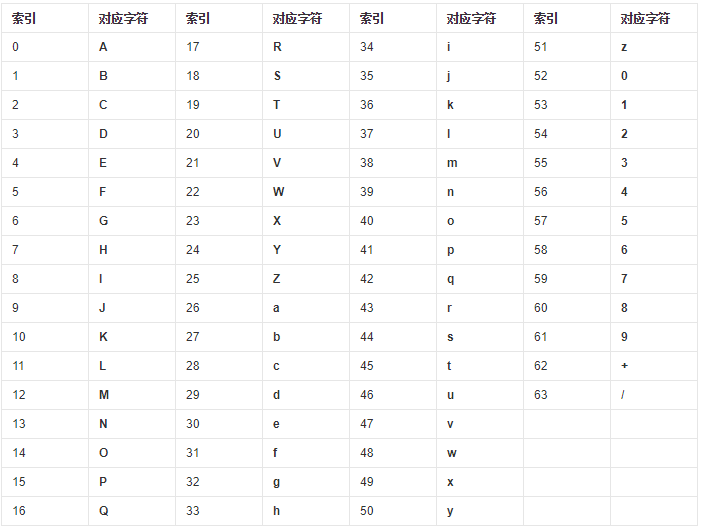
以字符串Tao编码举例
1.每三个8Bit的字节转换为四个6Bit的字节
'T'.charCodeAt().toString(2)//01010100 二进制
'a'.charCodeAt().toString(2)//01100001
'o'.charCodeAt().toString(2)//01101111
转换前 01010100, 01100001, 01101111 (二进制)
转换后 00010101, 00000110, 00000101, 00101111 (二进制),给每个二进制数据前面补00
十进制 21,6,5,47
对应上表就是VGFv
btoa('Tao')//VGFv
以字符串T编码举例
最后的结束符也要处理
btoa('T')//VA==
Base64 解码
atob('VGFv')//Tao
Base64中文编码
btoa('丁');// Failed to execute 'btoa' on 'Window': The string to be encoded contains characters outside of the Latin1 range
The string to be encoded contains characters outside of the Latin1 range.
被编码的字符串包含Latin1范围以外的字符。
Latin1
ISO/IEC8859-1,又称Latin-1或“西欧语言”,是国际标准化组织内ISO/IEC 8859的第一个8位字符集。以ASCII为基础,在空置的0xA0-0xFF的范围内,加入96个字母及符号,藉以供使用变音符号的拉丁字母语言使用。
总结:btoa只能转换占一个字节宽度的字符
所以我们需要将中文转成只占一个字节宽度的字符,刚好通过我的上一篇文章提到的encodeURIComponent可以实现将中文转成ASCII码字符,通过decodeURIComponent可以实现解码。
btoa(encodeURIComponent('丁'))//JUU0JUI4JTgx
atob('JUU0JUI4JTgx')//%E4%B8%81
decodeURIComponent('%E4%B8%81')//丁
最优解
window.btoa(unescape(encodeURIComponent('丁')))//5LiB
decodeURIComponent(escape(window.atob(str)))//丁
图片转Base64
以掘金收藏集图标为列:
1.Arraybuffer转base64
    fetch('https://p1-jj.byteimg.com/tos-cn-i-t2oaga2asx/gold-assets/v3/static/img/collections.945b9ae.png~tplv-t2oaga2asx-image.image',{
        method: 'get',
        responseType: 'arraybuffer'
    }).then(res =>res.arrayBuffer()).then(res=> {
	console.log(res);
        var base64=arrayBufferToBase64(res);
        console.log(base64);
    })
     function arrayBufferToBase64( buffer ) {
        var binary = '';
        var bytes = new Uint8Array( buffer );
        var len = bytes.byteLength;
        for (var i = 0; i < len; i++) {
            binary += String.fromCharCode( bytes[ i ] );
        }
        return window.btoa( binary );
    }
2.blob转base64
    fetch('https://p1-jj.byteimg.com/tos-cn-i-t2oaga2asx/gold-assets/v3/static/img/collections.945b9ae.png~tplv-t2oaga2asx-image.image',{
        method: 'get',
        responseType: 'blob'
    }).then(res =>res.blob()).then(res=> {
	console.log(res);
        blobToDataURL(res,(e)=>{console.log(e)})
    })
   function blobToDataURL(blob, callback) {
        var a = new FileReader();
        a.onload = function (e) { callback(e.target.result); }
        a.readAsDataURL(blob);
    }