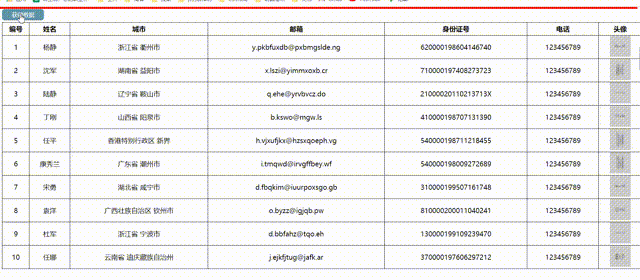
<!DOCTYPE html>
<html lang="en">
<head>
<meta charset="UTF-8">
<meta name="viewport" content="width=device-width, initial-scale=1.0">
<title>ajax状态</title>
<style>
* {
margin: 0;
padding: 0;
}
body{
padding: 5px;
}
.loading-bar {
width: 100vw;
height: 4px;
background-color: red;
position: absolute;
top: 0;
left: 0;
animation: grow 1s infinite forwards;
display: none;
}
@keyframes grow {
from {
width: 0%;
}
to {
width: 100%;
}
}
button{
width: 100px;
height: 26px;
outline: none;
color:
margin-bottom: 5px;
border: none;
cursor: pointer;
border-radius: 6px;
background-color: rgb(94, 147, 168);
}
table {
width: 100%;
border-collapse: collapse;
}
th{
border: 1px solid
}
tr,
td {
height: 30px;
text-align: center;
border: 1px solid
}
</style>
</head>
<body>
<button>获得数据</button>
<div class="loading-bar">
</div>
<table class="tab">
<th>编号</th>
<th>姓名</th>
<th>城市</th>
<th>邮箱</th>
<th>身份证号</th>
<th>电话</th>
<th>头像</th>
</table>
<script src="https://cdn.bootcdn.net/ajax/libs/jquery/3.5.1/jquery.min.js"></script>
<script>
$("button").click(function () {
$.ajax({
type: "GET",
url: "./data.json",
data: "data",
beforeSend() {
$(".loading-bar").show();
},
dataType: "json",
success(data) {
data.forEach(item => {
let tr = $("<tr/>");
tr.append(`
<td>${item.uid}</td>
<td>${item.name}</td>
<td>${item.city}</td>
<td>${item.email}</td>
<td>${item.cardid}</td>
<td>${item.tel}</td>
<td>
<img src="${item.avatar}" style="width:100px; height:100px"/>
</td>
`)
$(".tab").append(tr);
})
},
complete() {
setInterval(() => {
$(".loading-bar").hide();
}, 1000);
},
});
})
</script>
</body>
</html>