记录一下,调用第三方(比较刁钻)的接口,爬坑记录
1. 工具类的封装 (完善中)
**
 * Openapi接口调用过程中会用到的一些工具方法
 *
 * @author shenhong
 *
 */
public class HttpUtil {

	private static HttpClient staticClient = null;
	protected static final Integer DEFAULT_CONNECTION_TIME_OUT = Integer.valueOf(1000000);
	protected static final Integer DEFAULT_SOCKET_TIME_OUT = Integer.valueOf(200000);
	protected static final String DEFAULT_CHAR_SET = "UTF-8";

	static {
		PoolingHttpClientConnectionManager cm = new PoolingHttpClientConnectionManager();
		cm.setMaxTotal(128);
		cm.setDefaultMaxPerRoute(128);
		staticClient = HttpClients.custom().setConnectionManager(cm).build();
	}

	/**
	 *   适用于  get请求 参数类型为 application/x-www-form-urlencoded  和 text/plain;charset=utf8
	 * @param url
	 * @param cookie
	 * @return
	 * @throws Exception
	 */
	public static String doGet(String url,String cookie) throws Exception {
		HttpClient client = null;
		HttpGet get = new HttpGet(url);
		get.setHeader("Content-Type", "application/x-www-form-urlencoded");
		get.setHeader("Cookie", cookie);
		try {
			RequestConfig.Builder customReqConf = RequestConfig.custom();
			customReqConf.setConnectTimeout(DEFAULT_CONNECTION_TIME_OUT.intValue());
			customReqConf.setSocketTimeout(DEFAULT_CONNECTION_TIME_OUT.intValue());
			get.setConfig(customReqConf.build());
			HttpResponse res = null;
			client = createSSLInsecureClient();
			res = client.execute(get);
			return IOUtils.toString(res.getEntity().getContent(), "UTF-8");
		} finally {
			get.releaseConnection();
			if ((url.startsWith("https")) && (client != null) && ((client instanceof CloseableHttpClient))) {
				((CloseableHttpClient) client).close();
			}
		}
	}

	public static CloseableHttpClient createSSLInsecureClient() throws GeneralSecurityException {
		try {
			javax.net.ssl.SSLContext sslContext = new org.apache.http.ssl.SSLContextBuilder()
					.loadTrustMaterial(null, new TrustStrategy() {
						public boolean isTrusted(X509Certificate[] chain, String authType) throws CertificateException {
							return true;
						}
					}).build();
			SSLConnectionSocketFactory sslsf = new SSLConnectionSocketFactory(sslContext, new HostnameVerifier() {
				public boolean verify(String hostname, SSLSession session) {
					return true;
				}
			});
			return HttpClients.custom().setSSLSocketFactory(sslsf).build();
		} catch (GeneralSecurityException e) {
			throw e;
		}
	}


	/**
	 *  适用于 post请求 并传输 参数类型为  form-data ,Raw类型的application-json格式
	 * @param url
	 * @param params
	 * @param cookie
	 * @return
	 */
	public static String doPost(String url, MultipartEntityBuilder params, String cookie){
		HttpClient client = null;

		HttpPost post = new HttpPost(url);

		// 登录返回的cookie  如果没有不记录
		if(StringUtils.isNotBlank(cookie)){
			post.setHeader("Cookie" ,cookie);
		}
		try {

			/*List<NameValuePair> nvmps = new ArrayList<NameValuePair>();

			for (Map.Entry<String, Object> entry : params.entrySet()) {
				nvmps.add(new BasicNameValuePair((String) entry.getKey(),
						(String) entry.getValue()));
			}*/
			post.setEntity(params.build());
			client = createSSLInsecureClient();
			HttpResponse res = client.execute(post);

			HttpEntity entity = res.getEntity();
			return EntityUtils.toString(entity);

		} catch (Exception e ){
			e.printStackTrace();
			return e.getMessage();
		}
	}

    /**
    * 适用于请求方式为  xml/text raw 类型的
    *
    */
	public static String xmlPost(String url ,String xmStr,String cookie){
		HttpClient client = null;
		HttpPost post = new HttpPost(url);
		post.setHeader("Cookie", cookie);

		try {
			client = createSSLInsecureClient();
			post.setHeader("Content-Type",ContentType.TEXT_XML.getMimeType());
			/*
			*这里可能会出现请求失败的问题 ,默认的编码格式为IOS8859-1,
			*手动修改参数的格式为UTF-8 即可解决该aii问题
			StringEntity entity = new StringEntity(xmStr, "text/xml","UTF-8");
			*/
			StringEntity entity = new StringEntity(xmStr, ContentType.TEXT_XML);
			post.setEntity(entity);
			HttpResponse response = client.execute(post);

			HttpEntity httpEntity = response.getEntity();
			return EntityUtils.toString(httpEntity);

		} catch (Exception e ){
			e.printStackTrace();
			return e.getMessage();
		}
	}

}
2. 不同参数类型对应的请求方式
2.1 POST, 请求头类型为:'application/x-www-form-urlencoded' 类型的
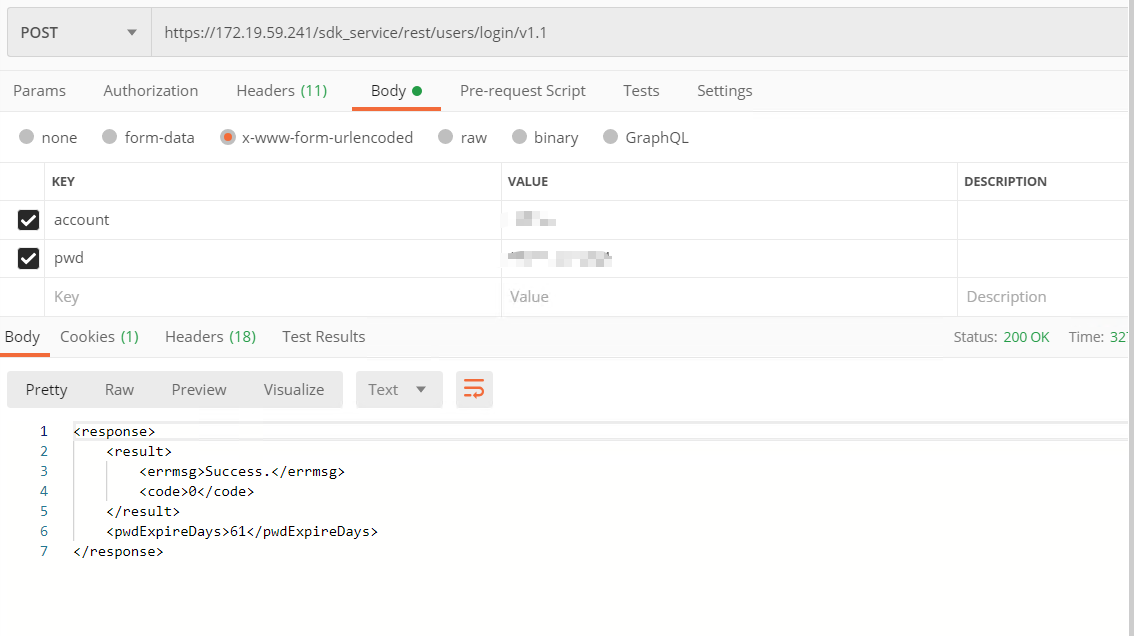
service层的处理
    private static final String loginPath = 'http://xxx.xx.xx/rest/service/loginv1'


    public String login(String account, String pwd){
        //直接使用的方式  这里使用BasicNameValuePair的具体的原因可以百度,post请求中
        // x-www-form-urlencoded 对应的参数是键值对形式的 但是不建议用 Map
        List<BasicNameValuePair> list = new ArrayList<BasicNameValuePair>();
		list.add(new BasicNameValuePair("account", "xxxx"));
		list.add(new BasicNameValuePair("pwd","xxxx" ));

        // 2. 参数转化
        String params = EntityUtils.toString(new UrlEncodedFormEntity(list,"UTF-8"));

        // 3. 创建HttpClient 连接
        Httpclient client = HttpUtil.createSSLInsecureClient();

        HttpPost post = new HttpPost(loginPath);
        StringEntity entity = new StringEntity(params, ContentType.APPLICATION_FORM_URLENCODED);
        post.setEnitity(entity);

        //4 .获取返回结果  因为这边返回结果是xml格式  需要进行解析  xml解析的方式有很多
        HttpResponse response = client.execute(post);

        // 5 .获取返回的实体类
        HttpEntity entityRes = response.getEntity();
        //转化成字符串
        JSONObject jsonObj = (JSONObject) JSON.parse(string);
        if(jsonObj.getString("code").equals("0")) {

            //获取cookie
            Header [] cookie = response.getHeaders("Set-Cookie");
            String headers []  = cookie[0].getValue().split(";");
            return headers[0];
        }else {
            return "登陆失败!";
        }

    }
2.2 GET 请求
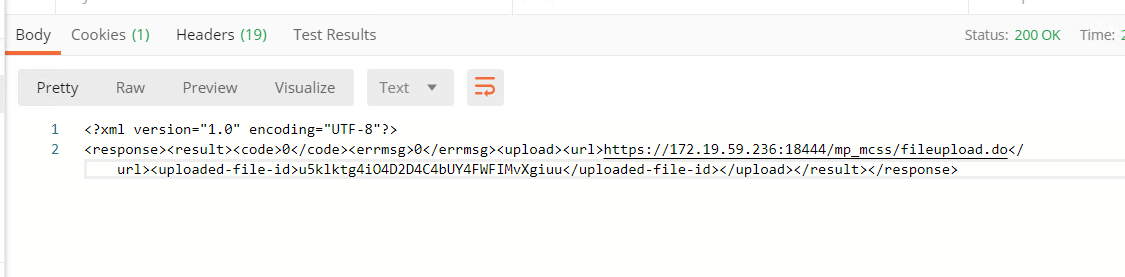
public Map<String, Object> getUploadPath(String name, String length) throws Exception{
        Map<String, Object> returnDate = new HashMap<>();

       String url = configuration.getHuaweihost() + UPLOAD_PATH_GET_URL + "?name=" + name + "&length=" + length;
       String cookie = login();
       String res = HttpUtil.doGet(url,cookie);
        // xml 参数解析
       JSONObject response = XmlConvertUtil.xmlToJson(res);
       JSONObject result = (JSONObject) response.get("result");
       Integer code = (Integer) result.get("code");
       if(code !=0){
           String msg = (String) result.get("errmsg");
           returnDate.put("msg" ,msg);
           return returnDate;
       }

        JSONObject upload = (JSONObject) result.get("upload");
        String uploadUrl = upload.get("url").toString();

        String fildId = upload.get("upload-file-id").toString();

        returnDate.put("url",uploadUrl);
        returnDate.put("upload-file-id",fildId);

        return returnDate;
    }
2.3 POST xml/text类型 请求
private String filePublish(String name, String fileId,String cookie)  {
        // 文件发布  POST  Raw  xml 类型参数
        PublishBo bo = new PublishBo();
        bo.setFileId(fileId);
        PublishBo.CaseFile caseFile = new PublishBo.CaseFile();
        caseFile.setGroupId(1);
        caseFile.setModifyTimStamp(System.currentTimeMillis() + "");
        caseFile.setName(name);
        caseFile.setTmpFile(false);
        caseFile.setSourceId(0);
        bo.setCaseFile(caseFile);
        try {

            String xml = XmlConvertUtil.convertToXml(bo,"UTF-8");
            String url = configuration.getHuaweihost() + FILE_CONFIRM_POST_URL;

            String res = HttpUtil.xmlPost(url ,xml,cookie);

            JSONObject object = XmlConvertUtil.xmlToJson(res);

            JSONObject result = (JSONObject) object.get("result");
            if(!result.getString("code").equals(0)){
                return result.getString("errmsg");
            }

            return result.getString("casefileId");

        } catch (Exception e) {
            e.printStackTrace();
            return e.getMessage();
        }
    }
POST 请求 请求参数是form-data 类型 (有文件的情况)
MultipartEntityBuilder builder = MultipartEntityBuilder.create();

       /* File newFile = new File(file.getOriginalFilename());
        FileUtils.copyInputStreamToFile(file.getInputStream(), newFile);
        // 会在本地产生临时文件,用完后需要删除
        if (newFile.exists()) {
            newFile.delete();
        }*/
        builder.addBinaryBody("imgInput", new File("C:\\Users\\Administrator\\Desktop\\人脸测试.jpg"));
        builder.addTextBody("action" ,"upload");
        builder.addTextBody("uploaded-file-id" ,fildId);
        builder.addTextBody("begin" ,"0");
        builder.addTextBody("length" ,length);