一、背景
笔者有一台旧电脑,没有安装图形界面。 前几天,我的网站崩溃了,但是我不知道。
解决方案也很简单,有很多工具,可以远程监控服务状态。今天,介绍另一种方法。用react写命令行工具。
react还能写命令行?是的,它不但能写命令行,还能写硬件。不过今天不介绍硬件,只介绍命令行。
二、技术栈
1、react
2、axios
3、react-cli-renderer
4、chalk
5、babel-preset-react-app
二、全部代码
因为代码比较简单,因此贴上全部代码:
import ReactCLI, { Section } from "react-cli-renderer";
import React from "react";
import chalk from "chalk";
const axios = require('axios');

class MyReactCLIApp extends React.Component {
  state = {
    status: 0
  };

  componentDidMount() {
    setInterval(()=>{
      axios.get('http://localhost:3000')
      .then((response) => {
        // console.log(response);
        this.setState({ status: response.status })
      })
      .catch((error) => {
          if (error.response) {
            this.setState({ status: error.response.status })
          }else{
            this.setState({ status: -1 })
          }
      });
    },1000)
  }

  render() {
    return (
      <Section border={{ horizontal: "-", vertical: "|" }} align="center">
        网站状态监控
        <Section horizontal>
          <Section align="center">
            {this.state.status == 0 ? chalk.blue("●") : "○"} 正在检测<br />
            {this.state.status == 200 ? chalk.green("●") : "○"} 200 正常<br />
            {this.state.status == 500 ? chalk.red("●") : "○"} 500 错误<br />
            {this.state.status == -1 ? chalk.red("●") : "○"} 连接超时
          </Section>
        </Section>
      </Section>
    );
  }
}

ReactCLI(<MyReactCLIApp />);
三、最终效果
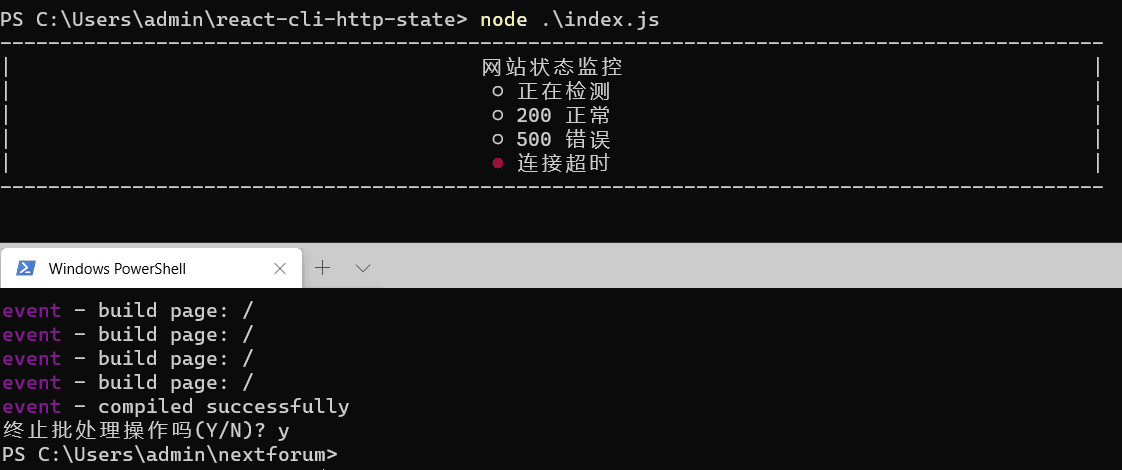
录制的时候把两个终端放一起了,并没有在旧电脑上录制。上面的是监控状态,下面的是启动一个网站服务。
实际上可以监控远程地址。
最后说明,本文其实没有什么技术含量,但是,可能很多人并不知道,react可以写命令行。
全部代码位于:github.com/reactbook/r…
四、参考,及扩展
1、参考
1)stackoverflow.com/questions/3…
2、还能做什么?
1)可以做命令行的天气预报。
2)可以做远程遥控的终端字符动画片。