

参考链接
github.com/vincentSea/…
www.jianshu.com/p/eadadd86d…
效果图
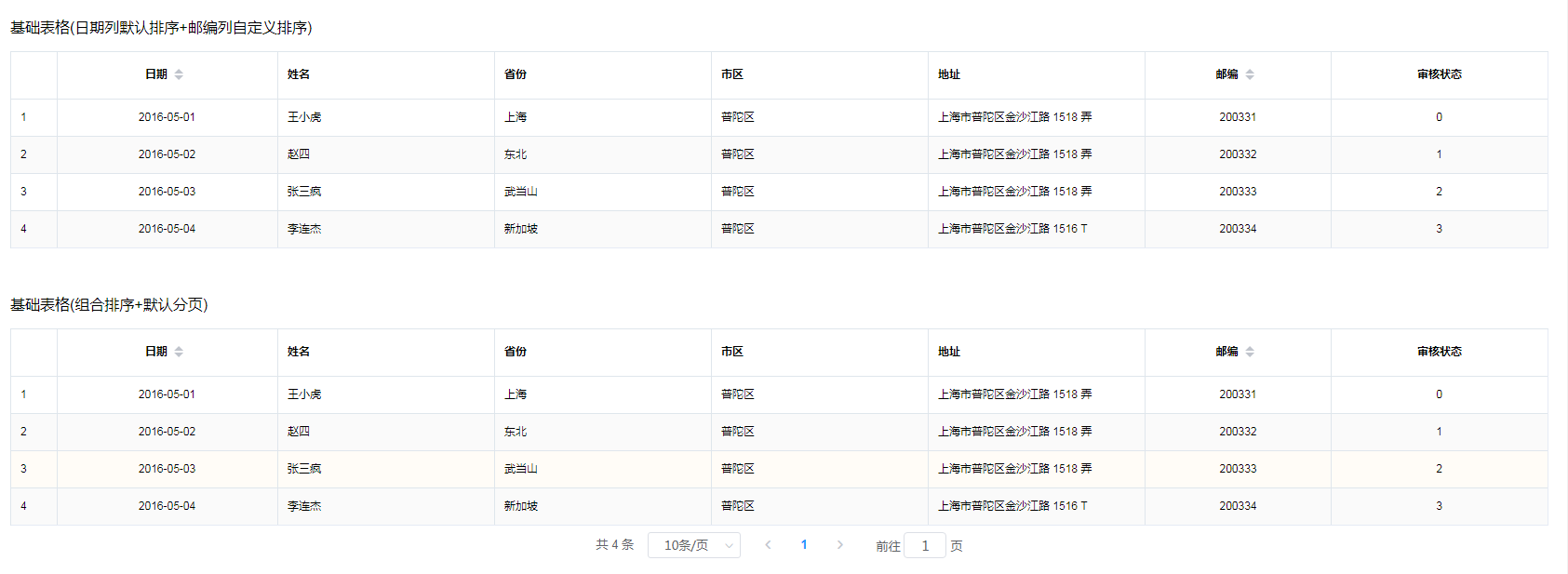
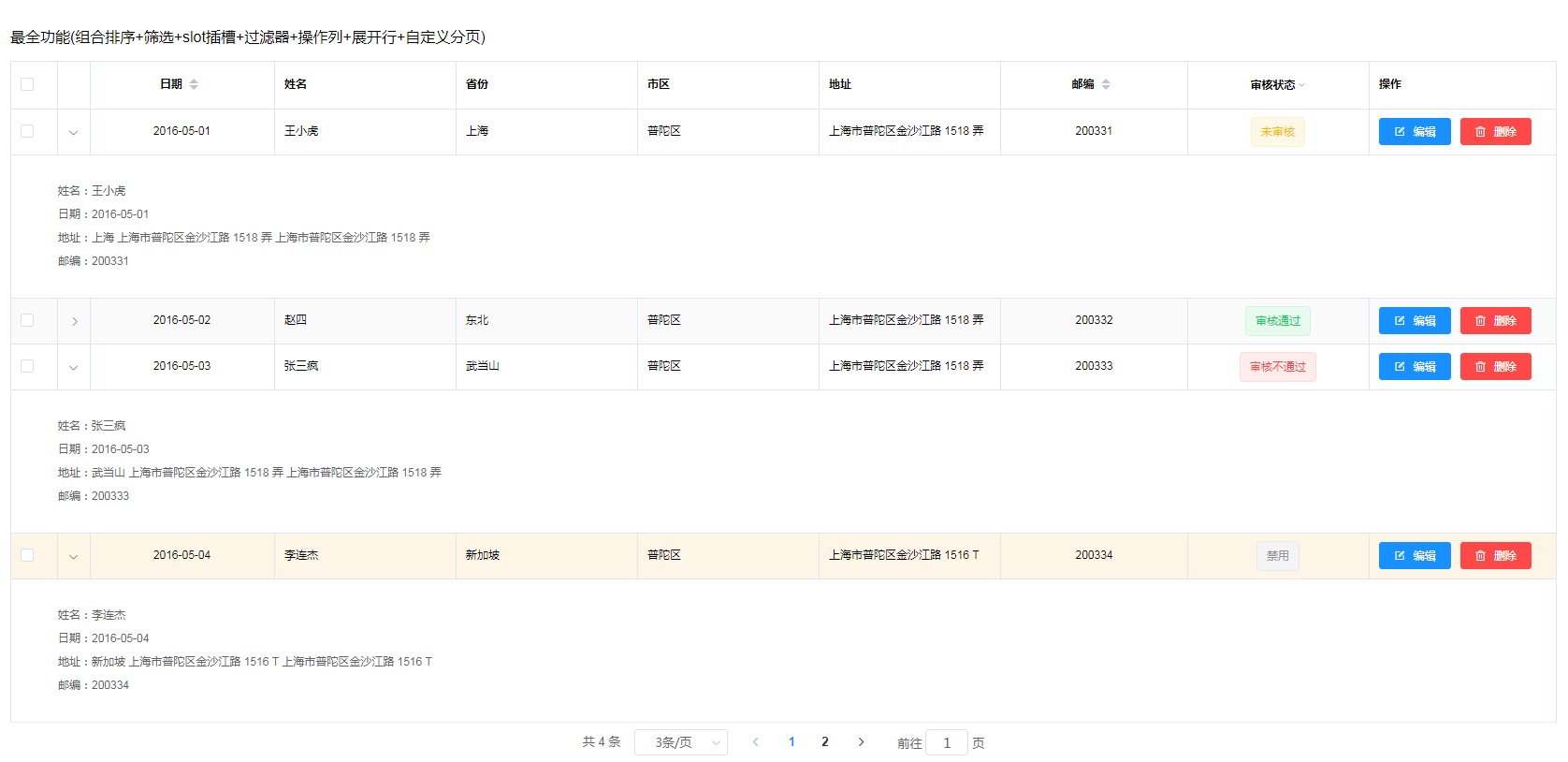
封装table-custom组件
<template>
  <section>
    <!-- 表格组件 -->
    <template>
      <el-table
        ref="table"
        v-loading="loading"
        size="small"
        fit
        highlight-current-row
        :stripe="stripe"
        :border="border"
        :data="tableData"
        v-bind="$attrs"
        v-on="$listeners"
        @row-click="toggleExpand"
        @sort-change="handleSortChange"
        @selection-change="handleSelectionChange"
      >
        <el-table-column :type="type" width="50" />
        <!-- 展开行 -->
        <slot />
        <!-- 表格字段 -->
        <template v-for="(item,index) in tableColumn">
          <!-- 筛选字段 -->
          <el-table-column
            v-if="item.filters"
            :key="index"
            :width="item.width"
            :align="item.align"
            :label="item.label"
            :prop="item.prop"
            :sortable="item.sortable"
            :filters="item.filters ? item.filters : []"
            :filter-method="filterHandler"
            show-overflow-tooltip
          >
            <template slot-scope="scope">
              <slot v-if="item.slot" :name="item.prop" v-bind="scope" />
              <span v-else>{{ scope.row[item.prop] }}</span>
            </template>
            <!-- <template slot-scope="scope">
              <span v-if="item.render">
                {{ item.render(scope.row) }}
              </span>
              <span v-else>{{ scope.row[item.prop] }}</span>
            </template> -->
          </el-table-column>
          <!-- 其他字段 -->
          <el-table-column
            v-else
            :key="index"
            :width="item.width"
            :align="item.align"
            :label="item.label"
            :prop="item.prop"
            :sortable="item.sortable"
            show-overflow-tooltip
          >
            <template slot-scope="scope">
              <slot v-if="item.slot" :name="item.prop" v-bind="scope" />
              <span v-else>{{ scope.row[item.prop] }}</span>
            </template>
            <!-- <template slot-scope="scope">
              <span v-if="item.render">
                {{ item.render(scope.row) }}
              </span>
              <span v-else>{{ scope.row[item.prop] }}</span>
            </template> -->
          </el-table-column>
        </template>
        <!-- 操作字段 -->
        <el-table-column
          v-if="tableOption.label"
          :fixed="tableOption.fixed"
          :width="tableOption.width"
          :label="tableOption.label"
        >
          <template slot-scope="scope">
            <el-button
              v-for="(item,index) in tableOption.options"
              :key="index"
              :type="item.type"
              :icon="item.icon"
              size="mini"
              @click.stop="handleButtonClick(item.methods,scope.row,index)"
            >
              {{ item.label }}
            </el-button>
          </template>
        </el-table-column>
      </el-table>
    </template>

    <!-- 翻页组件 -->
    <template v-if="pagination && paginationObj.total>0">
      <section class="pagination">
        <el-pagination
          :page-sizes="pageSizes"
          :layout="layout"
          :current-page="paginationObj.currentPage"
          :page-size="paginationObj.pageSize"
          :total="paginationObj.total"
          v-bind="$attrs"
          v-on="$listeners"
          @size-change="handleSizeChange"
          @current-change="handleCurrentChange"
        />
      </section>
    </template>
  </section>
</template>

<script>
/**
 * 参考链接:
 * https://www.jianshu.com/p/eadadd86d9c0
 * https://github.com/vincentSea/vue-free-table/blob/master/src/views/Home.vue
 * 本组件支持表格排序、筛选、展开行、翻页、操作列 render
 * 组件调用方式,请查看 src/views/dashboard/index3.vue
 */
export default {
  props: {
    loading: {
      // 加载数据时显示动效
      type: Boolean,
      default: false
    },
    stripe: {
      // 带斑马纹的表格
      type: Boolean,
      default: true
    },
    border: {
      // Table具有竖直方向的边框的
      type: Boolean,
      default: true
    },
    type: {
      /**
       * 对应列的类型
       * 如果设置了 selection 则显示多选框
       * 如果设置了 index 则显示该行的索引(从 1 开始计算)
       * 如果设置了 expand 则显示为一个可展开的按钮
       */
      type: String,
      default: 'index'
    },
    tableData: {
      // 表格数据
      type: Array,
      required: true
    },
    tableColumn: {
      // 表格列
      type: Array,
      required: true
    },
    tableOption: {
      // 表格操作列
      type: Object,
      default: () => {
        return {}
      }
    },
    pagination: {
      // 是否需要翻页组件
      type: Boolean,
      default: true
    },
    layout: {
      // 翻页组件布局,子组件名用逗号分隔
      type: String,
      default: 'total, sizes, prev, pager, next, jumper'
    },
    pageSizes: {
      // 每页显示个数选择器的选项设置
      type: Array,
      default: () => [10, 30, 50, 100]
    },
    paginationObj: {
      /**
       * total:总条目数
       * currentPage:当前页数,支持 .sync 修饰符
       * pageSize:每页显示条目个数,支持 .sync 修饰符
       */
      type: Object,
      default: () => {
        return {
          total: 0,
          currentPage: 1,
          pageSize: 10
        }
      }
    }
  },
  methods: {
    handleButtonClick(methods, row, index) {
      // 按钮事件
      this.$emit('handle-button-click', { methods: methods, row: row, index: index })
    },
    handleSortChange(sort) {
      // 排序参数为 { column, prop, order }
      this.$emit('handle-sort-change', sort)
    },
    handleSelectionChange(val) {
      this.$emit('handle-selection-change', val)
    },
    filterHandler(value, row, column) {
      /**
       * 在列中设置filtersfilter-method属性即可开启该列的筛选,
       * filters 是一个数组,filter-method是一个方法,
       * 它用于决定某些数据是否显示,会传入三个参数:value, row 和 column
       */
      const property = column['property']
      return row[property] === value
    },
    toggleExpand(row) {
      // 用于可展开表格与树形表格,切换某一行的展开状态
      this.$refs.table.toggleRowExpansion(row)
    },
    handleSizeChange(size) {
      this.$emit('handle-size-change', size)
    },
    handleCurrentChange(current) {
      this.$emit('handle-current-change', current)
    }
  }
}
</script>

<style lang="stylus" scoped>
.pagination {
  position: relative;
  text-align: center;
  padding: 5px 0;
}
</style>
组件调用方式
<template>
  <div class="app-container">
    <p>基础表格(日期列默认排序+邮编列自定义排序)</p>
    <table-custom
      :loading="loading"
      :pagination="false"
      :table-data="tableData"
      :table-column="basicColumn"
      :pagination-obj="paginationObj"
      @handle-button-click="handleButtonClick"
      @handle-sort-change="handleSortChange"
      @handle-current-change="handleCurrentChange"
      @handle-size-change="handleSizeChange"
    />

    <br>
    <br>

    <p>基础表格(组合排序+默认分页)</p>
    <table-custom
      :loading="loading"
      :table-data="tableData"
      :table-column="basicColumn"
      :pagination-obj="paginationObj"
      @handle-button-click="handleButtonClick"
      @handle-sort-change="handleSortChange"
      @handle-current-change="handleCurrentChange"
      @handle-size-change="handleSizeChange"
    />

    <br>
    <br>

    <p>最全功能(组合排序+筛选+slot插槽+过滤器+操作列+展开行+自定义分页)</p>
    <table-custom
      type="selection"
      :loading="loading"
      :table-data="tableData"
      :table-column="tableColumn"
      :table-option="tableOption"
      :pagination="pagination"
      :page-sizes="pageSizes"
      :pagination-obj="paginationObj"
      @handle-button-click="handleButtonClick"
      @handle-sort-change="handleSortChange"
      @handle-selection-change="handleSelectionChange"
      @handle-current-change="handleCurrentChange"
      @handle-size-change="handleSizeChange"
    >
      <el-table-column type="expand" width="35">
        <template slot-scope="scope">
          <div>
            <p>姓名:{{ scope.row.name }}</p>
            <p>日期:{{ scope.row.date }}</p>
            <p>
              地址:{{ scope.row.province }} {{ scope.row.address }} {{ scope.row.address }}
            </p>
            <p>邮编:{{ scope.row.zip }}</p>
          </div>
        </template>
      </el-table-column>

      <template v-slot:status="{ row }">
        <el-tag :type="row.status | statusFilter">
          {{ row.status | labelFilter }}
        </el-tag>
      </template>
    </table-custom>
  </div>
</template>

<script>
import tableCustom from '@/components/BaseTable/table-custom'

export default {
  components: {
    tableCustom
  },
  filters: {
    statusFilter(status) {
      const statusMap = {
        '0': 'warning',
        '1': 'success',
        '2': 'danger',
        '3': 'info'
      }
      return statusMap[status]
    },
    labelFilter(val) {
      const labelMap = {
        '0': '未审核',
        '1': '审核通过',
        '2': '审核不通过',
        '3': '禁用'
      }
      return labelMap[val]
    }
  },
  data() {
    return {
      loading: false,
      tableData: [
        {
          id: 1,
          date: '2016-05-01',
          name: '王小虎',
          province: '上海',
          city: '普陀区',
          address: '上海市普陀区金沙江路 1518 弄',
          zip: 200331,
          status: '0'
        },
        {
          id: 2,
          date: '2016-05-02',
          name: '赵四',
          province: '东北',
          city: '普陀区',
          address: '上海市普陀区金沙江路 1518 弄',
          zip: 200332,
          status: '1'
        },
        {
          id: 3,
          date: '2016-05-03',
          name: '张三疯',
          province: '武当山',
          city: '普陀区',
          address: '上海市普陀区金沙江路 1518 弄',
          zip: 200333,
          status: '2'
        },
        {
          id: 4,
          date: '2016-05-04',
          name: '李连杰',
          province: '新加坡',
          city: '普陀区',
          address: '上海市普陀区金沙江路 1516 T',
          zip: 200334,
          status: '3'
        }
      ],
      basicColumn: [
        { label: '日期', prop: 'date', align: 'center', sortable: true },
        { label: '姓名', prop: 'name' },
        { label: '省份', prop: 'province' },
        { label: '市区', prop: 'city' },
        { label: '地址', prop: 'address' },
        { label: '邮编', prop: 'zip', align: 'center', sortable: 'custom', width: '200' },
        { label: '审核状态', prop: 'status', align: 'center', slot: false }
      ],
      tableColumn: [
        { label: '日期', prop: 'date', align: 'center', sortable: true },
        { label: '姓名', prop: 'name' },
        { label: '省份', prop: 'province' },
        { label: '市区', prop: 'city' },
        { label: '地址', prop: 'address' },
        { label: '邮编', prop: 'zip', align: 'center', sortable: true, width: '200' },
        {
          label: '审核状态',
          prop: 'status',
          align: 'center',
          slot: true, // 特定列是否需要slot插槽
          // filters: this.filterCondition,
          filters: [
            { text: '未审核', value: '0' },
            { text: '审核通过', value: '1' },
            { text: '审核不通过', value: '2' },
            { text: '禁用', value: '3' }
          ],
          render: (row) => {
            if (row.status === '0') {
              return '未审核'
            } else if (row.status === '1') {
              return '审核通过'
            } else if (row.status === '2') {
              return '审核不通过'
            } else {
              return '禁用'
            }
          }
        }
      ],
      tableOption: {
        label: '操作',
        fixed: 'right',
        width: '200',
        options: [
          { label: '编辑', type: 'primary', icon: 'el-icon-edit-outline', methods: 'edit' },
          { label: '删除', type: 'danger', icon: 'el-icon-delete', methods: 'delete' }
        ]
      },
      filterCondition: [],
      pagination: true,
      pageSizes: [1, 3, 5, 8],
      paginationObj: {
        total: 4,
        currentPage: 1,
        pageSize: 3
      }
    }
  },
  computed: {
    changeLable() {
      const condition = [...new Set(this.tableData)].map((item) => {
        return { text: this.labelFilter(item.status), value: item.status }
      })
      return condition
    }
  },
  created() {
    // this.filterCondition = this.changeLable
  },
  methods: {
    labelFilter(val) {
      const labelMap = {
        '0': '未审核',
        '1': '审核通过',
        '2': '审核不通过',
        '3': '禁用'
      }
      return labelMap[val]
    },
    handleButtonClick(param) {
      this.$message({
        message: param,
        type: 'info'
      })
    },
    handleSortChange({ column, prop, order }) {
      this.$message({
        message: { prop, order },
        type: 'info'
      })
      // const param = Object.assign({}, { prop, order })
      // this.$emit('sort-change', param)
    },
    handleSelectionChange(val) {
      this.$message({
        message: val,
        type: 'info'
      })
    },
    handleCurrentChange(current) {
      this.$message({
        message: `当前页: ${current}`,
        type: 'info'
      })
      // this.currentPage = current
      // this.queryTable()
    },
    handleSizeChange(size) {
      this.$message({
        message: `每页 ${size} 条`,
        type: 'info'
      })
      // this.currentPage = 1
      // this.pageSize = size
      // this.queryTable()
    }
  }
}
</script>

