

需求描述
前段时间接到了一个给相机照片加水印、位置信息、时间的需求。需求业务很简单,思路也一下子就有了:
- 前端获取图片文件的base64编码,传到后端
- 后端解析base64编码为byte数组,构造ByteArrayInputStream字节输入流
- 根据字节流构造BufferedImage对象,然后利用jdk提供的Graphics2D工具,对图片进行加水印、文字等操作
- 处理完成后,上传至阿里云OSS
踩坑
- 这个需求核心地方就是给图标加水印、文字。由于有jdk提供的Graphics2D图片处理工具类,很快就把加水印的代码写完了。一开始在网上随便下载了几张图片测试了下,都没什么大问题。
以下是加水印部分的代码:
//获取相片宽高
int width = picture.getWidth();
int height = picture.getHeight();
............
............
............
// 创建图片缓存对象
BufferedImage image = new BufferedImage(width, height, BufferedImage.TYPE_INT_BGR);
// 创建绘图工具Graphics2D对象
Graphics2D graphics = image.createGraphics();
// 绘制照片
graphics.drawImage(picture, 0, 0, width, height, null);
// 绘制好享家水印图
graphics.drawImage(wmImg, width - wmWidth, 0, wmWidth, wmHeight, null);
//绘制位置图标
graphics.drawImage(locationImg, 80, height - 150, locationWidth, locationHeight, null);

//设置字体
graphics.setFont(new Font("微软雅黑", Font.BOLD, 40));
//设置颜色
graphics.setColor(Color.white);

//设置时间
addTime(width, height, graphics);

//获取位置信息
String location = getLocation(longitude, latitude);
//设置位置
graphics.setFont(new Font("微软雅黑", Font.PLAIN, 30));
graphics.drawString(location, 180, height - 90);

// 销毁绘图工具
graphics.dispose();
加完水印的照片如下:
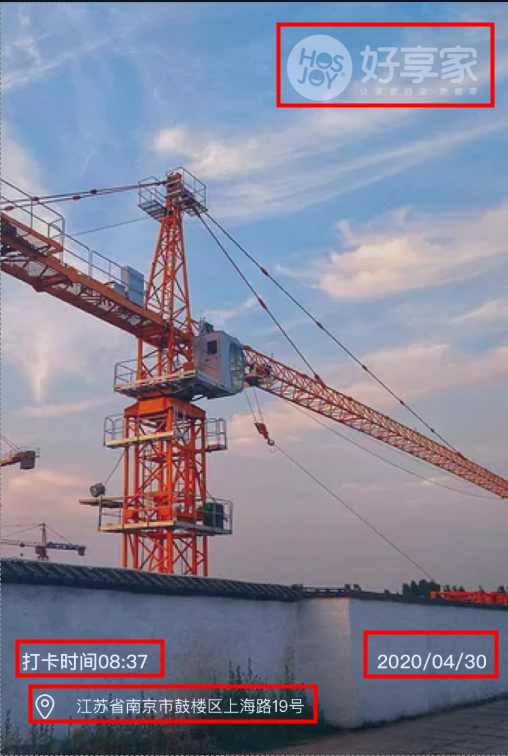
-
上图是随便找的网图,不是手机拍摄的原图。
当我用自己手机拍摄照片来测试加水印效果时,发现水印位置加错了。
原图如下:
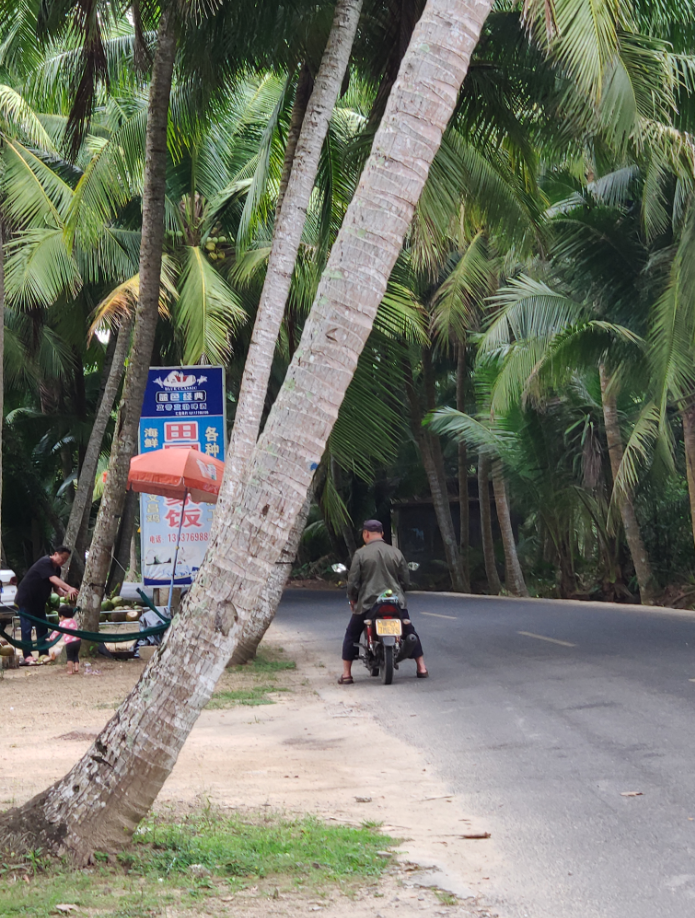
加水印的效果如下:
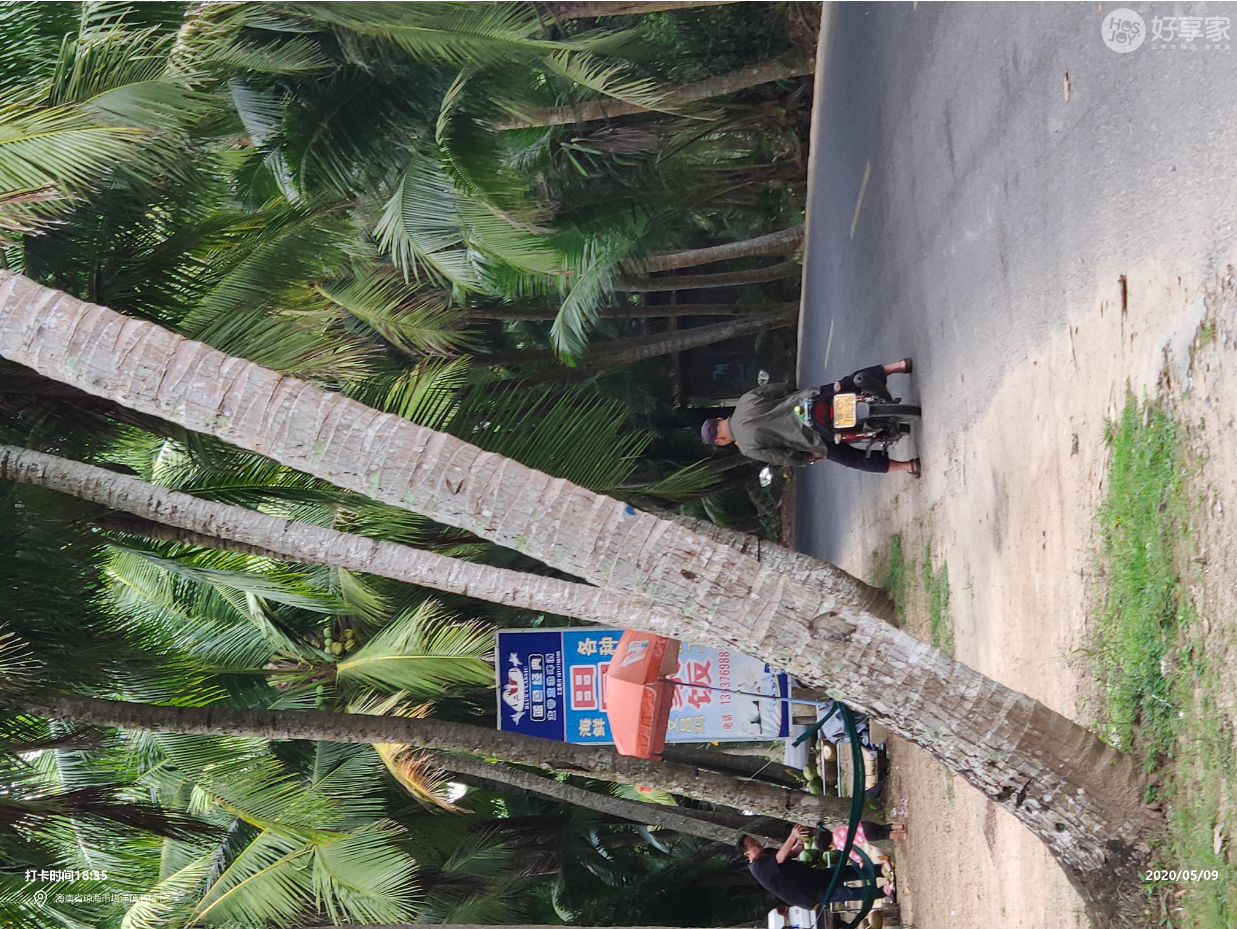
本意是想加水印和文字的位置,与图片拍摄的角度一致。这张图却旋转了90度。
问题初步分析
(1)首先调试代码,很快就发现了水印位置加错的原因。
int width = picture.getWidth();
int height = picture.getHeight();
这段代码,获取到的宽高反了。图片本身的宽高是3024x4032,而代码中获取到的宽高却是4032x3024。
相当于,我认为照片的拍摄角度是竖拍,可是程序却认为照片的拍摄角度是横拍。
(2)首先怀疑是自己代码的问题。反复修改了几次,然而获取到的宽高都是反的。
然后怀疑,难道BufferedImage这个类有bug?感觉不太可能。
然后又试了试给QQ截图加水印,没问题。
这就很奇怪了,有些图,BufferedImage可以正确的识别其宽高,有些图就不行。
(3)然后又用同事的手机拍了张照片,发现获取到的宽高依然是反的。
这时基本就总结出问题的规律了:
像QQ截图、网络图片、微信传过来的被压缩后的图片,用BufferedImage获取其宽高没问题,水印也可以正常加上。 但是如果是手机拍摄的原图,获取其宽高是反过来的,水印位置也就加错了。
(4)此时忽然又想到一个问题:刚刚我是用手机竖着拍摄的,获取其宽高是反的。 如果是横着拍呢?倒着拍呢? 或者改用前置摄像头,横着拍、竖着拍、倒着拍......甚至是斜着拍...... 各种情况,如何在正确的位置加上水印呢?
突破点
照片元信息
通过不同拍摄角度的反复测试,发现,有些拍摄角度,获取的宽高是正确的,有些是旋转90/180/270度后的结果。如果想要在正确的位置加上水印,就需要先获取其是否被旋转过,然后根据旋转的角度调整回原有的角度,
调整后再进行加水印操作。
所以问题关键是,如何获取其旋转的角度。
我们通过查看照片的属性信息发现,windows系统可以获取照片的相机、位置、亮度、饱和度等原始信息,那么既然window系统可以获取到,java程序也一定可以获取到照片的原始信息。我们希望获取到的是照片的旋转角度。
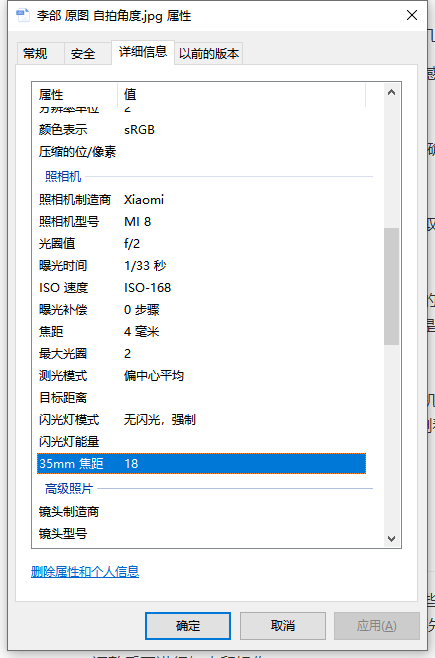
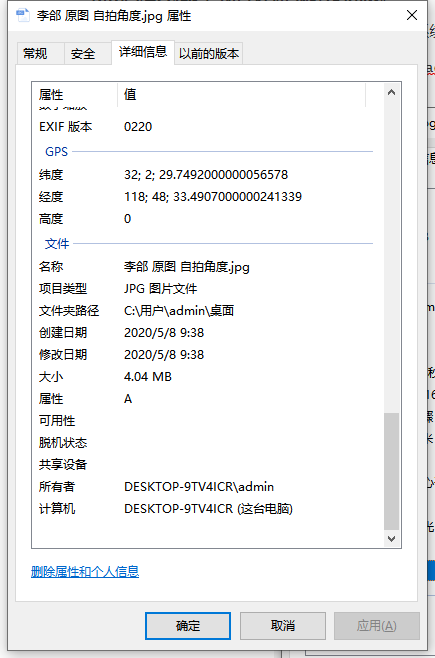
EXIF
查阅资料得知,对于相片的相机、位置等信息,有一个专业名词描述,叫 EXIF。
引用资料上的一段专业术语:
EXIF是 Exchangeable Image File的缩写,这是一种专门为数码相机照片设定的格式。这种格式可以用来记录数字照片的属性信息,例如相机的品牌及型号、相片的拍摄时间、拍摄时所设置的光圈大小、快门速度、ISO等等信息。除此之外它还能够记录拍摄数据,以及照片格式化方式,这样就可以输出到兼容EXIF格式的外设上,例如照片打印机等。
EXIF java包
目前最简单易用的EXIF信息处理的Java包是Drew Noakes写的metadata-extractor。下面我们给出一段代码将这个图片的所有的EXIF信息全部打印出来。
public static void main(String[] args) throws Exception {
        File jpegFile = new File("C:\\Users\\admin\\Desktop\\李郃 原图 自拍角度.jpg");
        Metadata metadata = JpegMetadataReader.readMetadata(jpegFile);
        Iterable<Directory> directories = metadata.getDirectories();
        for (Directory directory : directories) {
            for (Tag tag : directory.getTags()) {
                System.out.println(tag.toString());
            }
        }
    }
运行结果如下:
[Jpeg] Compression Type - Baseline
[Jpeg] Data Precision - 8 bits
[Jpeg] Image Height - 3880 pixels
[Jpeg] Image Width - 5184 pixels
[Jpeg] Number of Components - 3
[Jpeg] Component 1 - Y component: Quantization table 0, Sampling factors 2 horiz/2 vert
[Jpeg] Component 2 - Cb component: Quantization table 1, Sampling factors 1 horiz/1 vert
[Jpeg] Component 3 - Cr component: Quantization table 1, Sampling factors 1 horiz/1 vert
[Exif SubIFD] ISO Speed Ratings - 168
[Exif SubIFD] Exposure Program - Program normal
[Exif SubIFD] F-Number - F2
[Exif SubIFD] Exposure Time - 1/33 sec
[Exif SubIFD] Unknown tag (0x9999) - {"sensor_type":"front","mirror":true}
[Exif SubIFD] Sensing Method - (Not defined)
[Exif SubIFD] Sub-Sec Time Digitized - 826444
[Exif SubIFD] Sub-Sec Time Original - 826444
[Exif SubIFD] Sub-Sec Time - 826444
[Exif SubIFD] Focal Length - 3.52 mm
[Exif SubIFD] Flash - Flash did not fire, auto
[Exif SubIFD] White Balance - Unknown
[Exif SubIFD] Metering Mode - Center weighted average
[Exif SubIFD] Scene Capture Type - Standard
[Exif SubIFD] Focal Length 35 - 18mm
[Exif SubIFD] Max Aperture Value - F2
[Exif SubIFD] Date/Time Digitized - 2020:05:08 09:30:55
[Exif SubIFD] Exposure Bias Value - 0 EV
[Exif SubIFD] Exif Image Height - 3880 pixels
[Exif SubIFD] White Balance Mode - Auto white balance
[Exif SubIFD] Date/Time Original - 2020:05:08 09:30:55
[Exif SubIFD] Brightness Value - -54/100
[Exif SubIFD] Exif Image Width - 5184 pixels
[Exif SubIFD] Exposure Mode - Auto exposure
[Exif SubIFD] Aperture Value - F2
[Exif SubIFD] Components Configuration - YCbCr
[Exif SubIFD] Color Space - sRGB
[Exif SubIFD] Scene Type - Directly photographed image
[Exif SubIFD] Shutter Speed Value - 1/33 sec
[Exif SubIFD] Exif Version - 2.20
[Exif SubIFD] FlashPix Version - 1.00
[Exif IFD0] Unknown tag (0x0100) - 5184
[Exif IFD0] Model - MI 8
[Exif IFD0] Unknown tag (0x0101) - 3880
[Exif IFD0] Orientation - Left side, bottom (Rotate 270 CW)
[Exif IFD0] Date/Time - 2020:05:08 09:30:55
[Exif IFD0] YCbCr Positioning - Center of pixel array
[Exif IFD0] Resolution Unit - Inch
[Exif IFD0] X Resolution - 72 dots per inch
[Exif IFD0] Y Resolution - 72 dots per inch
[Exif IFD0] Make - Xiaomi
[Interoperability] Interoperability Index - Recommended Exif Interoperability Rules (ExifR98)
[Interoperability] Interoperability Version - 1.00
[GPS] GPS Latitude Ref - N
[GPS] GPS Latitude - 32.0° 2.0' 29.749199999985194"
[GPS] GPS Longitude Ref - E
[GPS] GPS Longitude - 118.0° 48.0' 33.49069999996573"
[GPS] GPS Altitude Ref - Sea level
[GPS] GPS Altitude - 0 metres
[GPS] GPS Time-Stamp - 1:30:53 UTC
[GPS] GPS Processing Method - [15 bytes]
[GPS] GPS Date Stamp - 2020:05:08
从这个执行的结果我们可以看出该照片是在2005年05月13日 22时18分49秒拍摄的,拍摄用的相机型号是MI 8,曝光时间是1/33秒,光圈值F2,焦距3.52毫米,以及经度和纬度等信息。
其中最重要的信息就是——拍摄方向。上述例子中关于相片拍摄方向的信息是:
Orientation - Left side, bottom (Rotate 270 CW)
EXIF包源码分析
我们在拍照的时候经常会根据场景的不同来选择相机的方向,例如拍摄一颗高树,我们会把相机竖着拍摄,使景物刚好适合整个取景框,但是这样得到的图片如果用普通的图片浏览器看便是倒着的,需要调整角度才能得到一个正常的图像,有如下面一张照片。
这张图片正常的情况下需要向左调整90度,也就是顺时针旋转270度才适合观看。通过读取该图片的EXIF信息,我们得到关于拍摄方向的这样一个结果:[Exif] Orientation - Left side, bottom (Rotate 270 CW)。而直接读取ExitDirectory.TAG_ORIENTATION标签的值是8。我们再来看这个项目是如何来定义这些返回值的,打开源码包中的ExifDescriptor类的getOrientationDescription方法,该方法代码如下:
public String getOrientationDescription()
    {
        Integer value = _directory.getInteger(ExifThumbnailDirectory.TAG_ORIENTATION);
        if (value==null)
            return null;
        switch (value) {
            case 1: return "Top, left side (Horizontal / normal)";
            case 2: return "Top, right side (Mirror horizontal)";
            case 3: return "Bottom, right side (Rotate 180)";
            case 4: return "Bottom, left side (Mirror vertical)";
            case 5: return "Left side, top (Mirror horizontal and rotate 270 CW)";
            case 6: return "Right side, top (Rotate 90 CW)";
            case 7: return "Right side, bottom (Mirror horizontal and rotate 90 CW)";
            case 8: return "Left side, bottom (Rotate 270 CW)";
            default:
                return String.valueOf(value);
        }
    }
从这个方法我们可以清楚看到各个返回值的意思。
另外查阅资料得知,对于手机相机,其旋转角度只有1、3、6、8四种,根据上述代码整理得出如下对应关系:
| 参数 | 应旋转角度 |
|---|---|
| 1 | 0 |
| 3 | 180 |
| 6 | 顺时针旋转90度 |
| 8 | 逆时针旋转90度 |
如此我们便可以根据实际的返回值来对图像进行旋转或者是镜像处理,然后再添加水印了。
代码修改
分析总结
通过以上分析,总结如下:
(1)通过手机拍摄的照片,由于拍摄方向的不同,我们需要先读取照片的EXIF信息,根据orientation值对原有照片进行旋转;
(2)获取旋转后的BufferedImage对象,再进行添加水印操作。
获取照片应旋转的角度
public int getImgRotateAngle(InputStream inputStream) {
        int rotateAngle = 0;
        try {
            Metadata metadata = JpegMetadataReader.readMetadata(inputStream);
            Iterable<Directory> directories = metadata.getDirectories();
            for (Directory directory : directories) {
                for (Tag tag : directory.getTags()) {
                    int tagType = tag.getTagType();
                    //照片拍摄角度信息
                    if (274 == tagType) {
                        String description = tag.getDescription();
                        //Left side, bottom (Rotate 270 CW)
                        switch (description) {
                            //顺时针旋转90度
                            case "Right side, top (Rotate 90 CW)":
                                rotateAngle = 90;
                                break;
                            case "Left side, bottom (Rotate 270 CW)":
                                rotateAngle = 270;
                                break;
                            case "Bottom, right side (Rotate 180)":
                                rotateAngle = 180;
                                break;
                            default:
                                rotateAngle = 0;
                                break;
                        }
                    }

                }
            }
            return rotateAngle;
        }
        catch (JpegProcessingException e) {
            return 0;
        }
    }
添加水印
主要思路是:
(1)获取照片应旋转角度;
(2)根据应旋转的角度,旋转图片,得到旋转后的BufferedImage对象;
(3)对旋转后的BufferedImage对象作添加水印操作
private String doProcessPic(byte[] bytes, String longitude, String latitude) {
        ByteArrayInputStream inputStream = new ByteArrayInputStream(bytes);
        ByteArrayInputStream inputStream1 = new ByteArrayInputStream(bytes);
        //读取照片
        BufferedImage picture;
        BufferedImage wmImg;
        BufferedImage locationImg;
        InputStream wmIs = null;
        InputStream locationImgIs = null;
        int imgRotateAngle;
        try {
            //1.获取应旋转角度
            imgRotateAngle = getImgRotateAngle(inputStream1);
            log.info("获取到图片应旋转角度为:{}", imgRotateAngle);

            picture = ImageIO.read(inputStream);
            //读取水印图片
            wmIs = new ClassPathResource("template/watermark.png").getInputStream();
            wmImg = ImageIO.read(wmIs);
            //读取位置图片
            locationImgIs = new ClassPathResource("template/location.png").getInputStream();
            locationImg = ImageIO.read(locationImgIs);
        }
        catch (IOException e) {
            log.error("读取照片或水印图片失败", e);
            throw new ClientException("读取照片或水印图片失败");
        }
        finally {
            if (wmIs != null) {
                IOUtils.closeQuietly(wmIs);
            }
            if (locationImgIs != null) {
                IOUtils.closeQuietly(locationImgIs);
            }

        }

        int wmWidth = wmImg.getWidth();
        int wmHeight = wmImg.getHeight();

        int locationWidth = locationImg.getWidth();
        int locationHeight = locationImg.getHeight();

        BufferedImage newImage;
        Graphics2D graphics;

        //2.根据应旋转的角度,旋转图片,得到旋转后的BufferedImage对象
        picture = this.rotate(picture, imgRotateAngle);


        //3.对旋转后的BufferedImage对象作添加水印操作
        int width = picture.getWidth();
        int height = picture.getHeight();

        // 创建图片缓存对象
        newImage = new BufferedImage(width, height, BufferedImage.TYPE_INT_BGR);
        // 创建绘图工具Graphics2D对象
        graphics = newImage.createGraphics();
        // 绘制照片
        graphics.drawImage(picture, 0, 0, null);


        // 绘制好享家水印图
        graphics.drawImage(wmImg, width - wmWidth, 0, wmWidth, wmHeight, null);
        //添加时间信息
        addTime(graphics, width, height);

        //添加位置信息
        addLocation(longitude, latitude, graphics, height, locationImg, locationWidth, locationHeight);

        // 销毁绘图工具
        graphics.dispose();

        //上传到OSS
        String accessUrl = uploadImgOss(newImage);

        return accessUrl;
    }
总结
在给手机拍摄的原始照片添加水印时,一定不能直接按照程序获取到的BufferedImage来添加水印。因为获取到的BufferedImage可能是旋转后的图像。需要先获取其EXIF信息,根据拍摄角度信息,对图像进行旋转,然后再进行添加水印。
参考文章
1.my.oschina.net/xuqiang/blo… Java实现图片内容无损任意角度旋转
2.blog.csdn.net/z69183787/a… Java 处理 iphone拍照后 图片EXIF属性翻转90度的方法
