文章主要记录如何实现使用express连接数据库,做增删改查,关联数据库,封装路由,jsonwebtoken鉴权,bcrypt登录密码加密,multer文件上传和一些请求数据的处理,开发日志记录。
1 连接mongoose数据库
app.js
const mongoose = require('mongoose');
// 连接mongoose数据库名为restful的数据库
mongoose.connect('mongodb://localhost:27017/restful', {
  useUnifiedTopology: true,
  useNewUrlParser: true
})
//可以使用promise链式语法
mongoose.Promise = global.Promise;
2 建立mongoose Model模型
app/models/product.js
const mongoose = require('mongoose');

//类似于Constructor,可以使用new一个对象
const productSchema = mongoose.Schema({
  _id: mongoose.Schema.Types.ObjectId,
  name: { type: String, required: true },
  price: { type: Number, required: true }
});

module.exports = mongoose.model('Product', productSchema);
3 基于product数据库模型Model进行增删改查
api/routes/products.js
const express = require('express');
const router = express.Router();
const mongoose = require('mongoose');

//使用common.js引入Product模型
const Product = require('../models/product');

router.get('/', (req, res, next) => {
  Product.find() // 查看所有的Model数据,查找的是一个数组
    .select('name price _id') //选择特定的字段作为doc
    .exec()//使用它就可以使用.then .catch代理回调函数,解决call hell
    .then(docs => {
      const response = {  // 字段封装并返回
        count: docs.length,
        products: docs.map(doc => {//遍历文档,并返回经过处理的以下字段
          return {
            name: doc.name,
            price: doc.price,
            _id: doc._id,
            //使用request目的在于基于该字段再次请求其具体api内容
            request: {
              type: 'GET',
              url: 'http://localhost:3000/products/' + doc._id
            }
          }
        })
      };
      res.status(200).json(response)
    })
    .catch(err =>{
      console.log(err);
      res.status(500).json({
        error: err
      })
    })
})

router.post('/', (req, res, next) => {
//新增文档语法
  const product = new Product({
    _id: new mongoose.Types.ObjectId(),
    name: req.body.name,
    price: req.body.price
  });

  product
    .save()// 保存新的文档
    .then(result => {
      res.status(201).json({
        message: "created product successfully",
        createdProduct: { // 将已有的字段封装一个新的字段对象下
          name: result.name,
          price: result.price,
          _id: result._id,
          request: {
            type: 'GET',
            url: 'http://localhost:3000/products/' + result._id
          }
        }
      })
  })
  .catch(err => {
    res.status(500).json({
      error: err
    })
  })

})

router.get('/:productId', (req, res, next) => {
  const id = req.params.productId;
  Product.findById(id) // 基于_id查看该文档
    .select('name price _id')
    .exec()
    .then(doc => {
      if (doc) {
        res.status(200).json({
          product: doc,
          request: {
            type: 'GET',
            url: 'http://localhost:3000/products'
          }
        })
      } else {
        res.status(404).json({message: 'not found'});
      }

    })
    .catch(err => {
      res.status(500).json({error: err});
    })
})

router.patch('/:productId', (req, res, next) => {
  const id = req.params.productId;
  const updateOps = {};
  // for...of循环不会遍历对象的key,只会循环出数组的value 可以配合Object.keys()
  for (const ops of Object.keys(req.body)) {
    updateOps[ops] = req.body[ops]
  }
  // 基于_id修改该文档字段的属性值,当然是基于原有的字段名了
  Product.update({ _id: id }, { $set: updateOps })
    .exec()
    .then(result => {
      res.status(200).json({
        message: 'Product updated',
        request: {
          type: 'GET',
          url: 'http://localhost:3000/products/' + id
        }
      });

    })
    .catch(err => {
      console.log(err);
      res.status(500).json({
        error: err
      })
    })
})

router.delete('/:productId', (req, res, next) => {
  const id = req.params.productId;
  // 基于_id删除该文档
  Product.remove({ _id: id })
    .exec()
    .then(result => {
      res.status(200).json({
        message: 'Product deleted',
        request: {  // request 为POST该如何
          type: 'POST',
          url: 'http://localhost:3000/products',
          body: { name: 'String', price: 'Number' }
        }
      });
    })
    .catch(err => {
      console.log(err);
      res.status(500).json({
        error: err
      })
    })
})

module.exports = router;
4 建立Order数据模型,并关联Product数据模型
api/models/order.js
const mongoose = require('mongoose');

const orderSchema = mongoose.Schema({
  _id: mongoose.Schema.Types.ObjectId,
  //关联到Product集合(collection)
  product: { type: mongoose.Schema.Types.ObjectId, ref: 'Product', require: true },
  quantity: { type: Number, default: 1 }
});

module.exports = mongoose.model('Order', orderSchema);
api/routes/orders
4.1 Order路由增删改查
const express = require('express');
const router = express.Router();
const mongoose = require('mongoose');

const Order = require('../models/order');
const Product = require('../models/product');

// Handle incoming  GET request to /orders
// 处理连入到/orders的GET请求
router.get('/', (req, res, next) => {
  Order.find()
     // 仅选择其中三个字段显示
    .select("product quantity _id")
    // 第一个参数:将关联数据库表详细展示出来,第二个参数:为详细表中的展示的字段
    // 使用populate将不再是id,而是该数据库中的name price字段
    .populate('product', 'name price')
    .exec()
    .then(docs => {
      res.status(200).json({
        count: docs.length,
        orders: docs.map(doc => {
          return {
            _id: doc._id,
            quantity: doc.quantity,
            product: doc.product,
            request: {
              type: "GET",
              url: 'http://localhost:3000/orders/' + doc._id
            }
          }
        }),

      })
    })
    .catch(err => {
      res.status(500).json({
        error: err
      })
    })
})

// 关联数据库
//借助product的_id构建order数据集合,关联订单数
router.post('/', (req, res, next) => {
  Product.findById(req.body.productId)
    .then(product => {
      if (!product) {
        return res.status(404).json({
          message: 'page not found'
        })
      }
      const order = new Order({
        _id: mongoose.Types.ObjectId(),
        quantity: req.body.quantity,
        product: req.body.productId
      });
      return order.save();
    })
    .then(result => {
      res.status(201).json({
        message: 'order created',
        createdOrder: {
          _id: result._id,
          product: result.product,
          quantity: result.quantity
        },
        request: {
          type: 'GET',
          url: 'http://localhost:3000/orders/' + result._id
        }
      })
    })
    .catch(err => {
      console.log(err);
      res.status(500).json({
        error: err
      })
    })
})

router.get('/:orderId', (req, res, next) => {
  Order.findById(req.params.orderId)
    .populate('product', 'name') //关联product数据库的product name字段
    .exec()
    .then(order => {
      if(!order) {
        res.status(404).json({
          message: 'order not found'
        })
      }
      res.status(200).json({
        order: order,
        request: {
          type: 'GET',
          url: 'http://localhost:3000/orders'
        }
      })
    })
    .catch(err => {
      res.status(500).json({
        error: err
      })
    })
})


router.delete('/:orderId', (req, res, next) => {
  Order.remove({ _id: req.params.orderId })
    .exec()
    .then(result => {
      res.status(200).json({
        message: 'Order deleted',
        request: {
          type: 'POST',
          url: 'http://localhost:3000/orders',
          body: { productId: 'ID', quantity: 'Number' }
        }
      })
    })
})

module.exports = router;
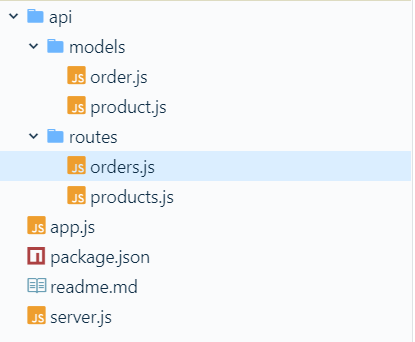
当前项目目录