课堂作业
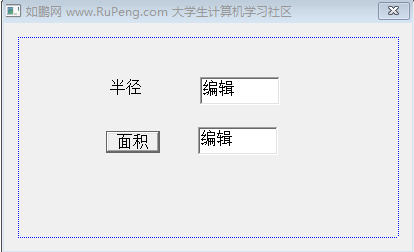
第一题【整型】面积计算器,半径由用户输入
步骤:
- 控件及标题如下,当用户按下面积按钮显示计算结果
- 代码如下
#include "stdafx.h"
#include <windows.h>
#include <windowsx.h>
#include "resource.h"
#include "MainDlg.h"
#include <stdlib.h>   //这个头文件在插件中没有集成,每次需手动添加
void Main_OnCommand(HWND hwnd, int id, HWND hwndCtl, UINT codeNotify)
{
    switch(id)
    {
        case IDC_OK:
			{
				TCHAR str1[256];

				GetDlgItemText(hwnd, IDC_EDIT1, str1, sizeof(str1));  //得到ID_EDIT1文本框的焦点,进行输入字符串

				int r = atoi(str1);

				double  s = 3.1415926 * r * r;

				TCHAR str2[256];

                              //第一种(两种都是以整型输出)
				int imj = (int)s;
				wsprintf(str2, "%d", imj);

				//第二种
				//itoa(s, str2, 10);


				SetDlgItemText(hwnd, IDC_EDIT2, str2);


			}
        break;
        default:
		break;
    }
}
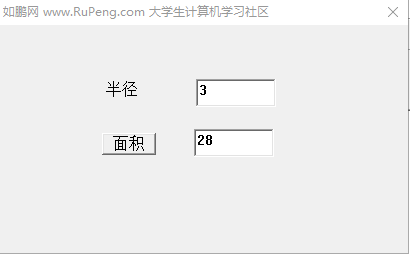
3.运行结果:
第二题: 十进制转换二进制
步骤:
-
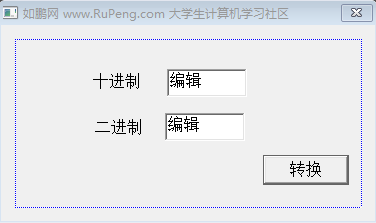
控件及标题如下,当用户按下面积按钮显示计算结果
-
代码如下
void Main_OnCommand(HWND hwnd, int id, HWND hwndCtl, UINT codeNotify)
{
    switch(id)
    {
        case IDC_OK:
			{
				TCHAR str1[256];
				GetDlgItemText(hwnd, IDC_TEN, str1, sizeof(str1));

				int i;
				i= atoi(str1);

				TCHAR str2[256];
				itoa(i, str2, 2);

				SetDlgItemText(hwnd, IDC_TWO, str2);
			}

        break;
        default:
		break;
    }
}
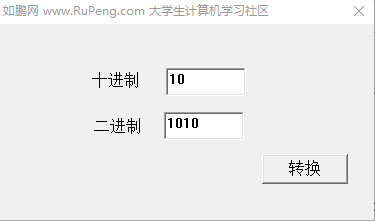
- 输入十进制10, 单击转换
第三题: 计算两个数的差
步骤:
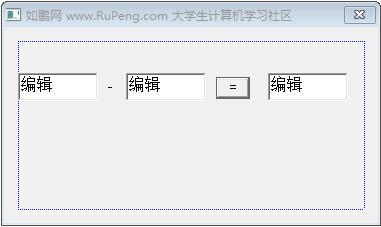
- 控件及标题如下,当用户按下面积按钮显示计算结果
void Main_OnCommand(HWND hwnd, int id, HWND hwndCtl, UINT codeNotify)
{
    switch(id)
    {
        case IDC_OK:
			{

				TCHAR str1[256];
				TCHAR str2[256];
				GetDlgItemText(hwnd, IDC_EDIT1, str1, sizeof(str1));
				GetDlgItemText(hwnd, IDC_EDIT2, str2, sizeof(str2));

				int i1 = atoi(str1);
				int i2 = atoi(str2);
				int add;
				add = i1-i2;

				TCHAR str3[256];
				itoa(add, str3, 10);

				SetDlgItemText(hwnd, IDC_EDIT3, str3);

			}

        break;
        default:
		break;
    }
}
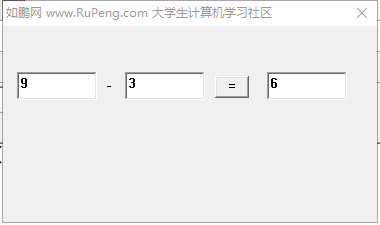
- 输入9和3,单击等号
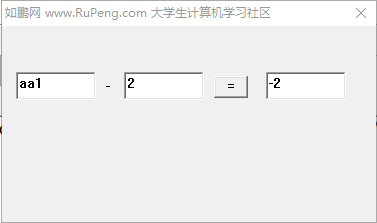
- 当输入数字以外的值时,它不会报错,并且计算结果
第四题【防止输入非法数据】计算两个数的差
步骤:
- 控件及标题如下,当用户按下面积按钮显示计算结果
- 代码如下
void Main_OnCommand(HWND hwnd, int id, HWND hwndCtl, UINT codeNotify)
{
    switch(id)
    {
        case IDC_OK:
			{

				TCHAR str1[256];
				TCHAR str2[256];
				GetDlgItemText(hwnd, IDC_EDIT1, str1, sizeof(str1));
				GetDlgItemText(hwnd, IDC_EDIT2, str2, sizeof(str2));

				int i1 = atoi(str1);
				int i2 = atoi(str2);

				TCHAR str3[256];
				TCHAR str4[256];
				wsprintf(str3, "%d", i1);
				wsprintf(str4, "%d", i2);

				if(strcmp(str1, str3)!= 0) //strcmp:字符串比较函数
				{
					MessageBox(hwnd, TEXT("你输入的第一个数字是非法的"),TEXT("警告"),MB_OK|MB_ICONERROR);

					return;//加上return;后防止继续向下计算
				}

				if(strcmp(str2, str4)!= 0)
				{
					MessageBox(hwnd, TEXT("你输入的第二个数字是非法的"),TEXT("警告"),MB_OK|MB_ICONERROR);

					return;//加上return;后防止继续向下计算
				}


				int add;
				add = i1-i2;


				TCHAR str5[256];
				itoa(add, str5, 10);

				SetDlgItemText(hwnd, IDC_EDIT3, str5);

			}

        break;
        default:
		break;
    }
}
- 当输入字母时
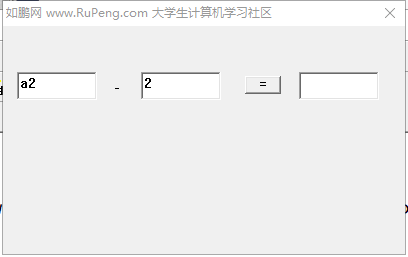
- 单击等号,会提示报错
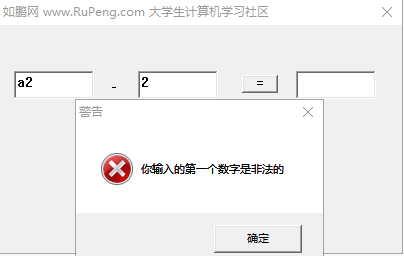
- 单击确定后不会计算结果,还是输入数值的图
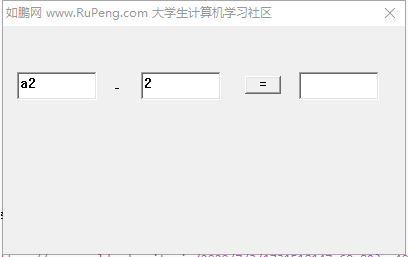
第五题【函数实现】计算两个数的差
步骤:
- 控件及标题如下,当用户按下面积按钮显示计算结果
- 代码如下
void Main_OnCommand(HWND hwnd, int id, HWND hwndCtl, UINT codeNotify)
{
    switch(id)
    {
        case IDC_OK:
			{

				TCHAR str1[256];
				TCHAR str2[256];
				GetDlgItemText(hwnd, IDC_EDIT1, str1, sizeof(str1));
				GetDlgItemText(hwnd, IDC_EDIT2, str2, sizeof(str2));

				if(charge(str1) == false)
				{
					MessageBox(hwnd, TEXT("你输入的第一个数字是非法的"),TEXT("警告"),MB_OK|MB_ICONERROR);

					return;//加上return;后防止继续向下计算
				}

				if(charge(str2) == false)
				{
					MessageBox(hwnd, TEXT("你输入的第二个数字是非法的"),TEXT("警告"),MB_OK|MB_ICONERROR);

					return;//加上return;后防止继续向下计算
				}

				int i1 = atoi(str1);
				int i2 = atoi(str2);

				int add;
				add = i1-i2;


				TCHAR str5[256];
				itoa(add, str5, 10);

				SetDlgItemText(hwnd, IDC_EDIT3, str5);

			}

        break;
        default:
		break;
    }
}

BOOL charge(TCHAR * str)
{

	int i1 = atoi(str);

	TCHAR str3[256];

	wsprintf(str3, "%d", i1);

	if(strcmp(str, str3)!=0)
	{
		return FALSE;
	}
	else
	{
		return TRUE;
	}
}
- 输入6和3,单击等号
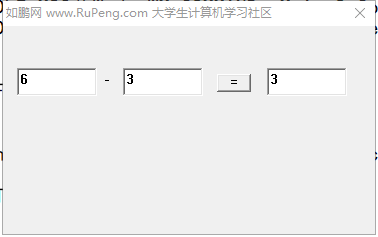
成品: