前言
官网!官网!官网!先看官方文档再看博客,不能保证自己理解的100%对!!!
在学习spring security的过程中,看了官网对其的部分介绍也在网上看了很多帖子,最后总结一下自己这几天来所学习到的部分东西,供自己记忆也希望能与部分刚入门的同学交流或者对想入门的同学有所帮助。
MAVEN
项目为spring-boot项目,不涉及xml的内容。
//springboot版本是2.3.1
<dependency>
            <groupId>org.springframework.boot</groupId>
            <artifactId>spring-boot-starter-web</artifactId>
</dependency>
//对应的security版本为5.3.3
<dependency>
            <groupId>org.springframework.boot</groupId>
            <artifactId>spring-boot-starter-security</artifactId>
</dependency>
//javaweb Token 根据实际业务选择是否使用
<dependency>
            <groupId>io.jsonwebtoken</groupId>
            <artifactId>jjwt</artifactId>
            <version>0.7.0</version>
</dependency>
定义业务对象
简单的用户实体
package com.jl.springsecurity2.domain;

import org.springframework.security.core.GrantedAuthority;
import org.springframework.security.core.userdetails.UserDetails;

import java.util.*;

/**
 * @author: jia liang
 * @data: 10:11 上午 2020/7/2
 * @desc:
 */
public class User implements UserDetails {

    private String username;
    private String password;
    private List<? extends GrantedAuthority> roles;

    public String getUsername() {
        return username;
    }

    @Override
    public boolean isAccountNonExpired() {
        return true;
    }

    @Override
    public boolean isAccountNonLocked() {
        return true;
    }

    @Override
    public boolean isCredentialsNonExpired() {
        return true;
    }

    @Override
    public boolean isEnabled() {
        return true;
    }

    public void setUsername(String username) {
        this.username = username;
    }
    @Override
    public Collection<? extends GrantedAuthority> getAuthorities() {
        return roles;
    }
    public String getPassword() {
        return password;
    }
    public void setPassword(String password) {
        this.password = password;
    }
    public User() {
    }
    public User(String username, String password, List<? extends GrantedAuthority> roles) {
        this.username = username;
        this.password = password;
        this.roles = roles;
    }
    public User(String username, String password) {
        this.username = username;
        this.password = password;
    }
}
- 用户实体实现UserDetails,spring为用户实体提供的扩展
public interface UserDetails extends Serializable {
        //提供用户的权限列表信息(集合)
	Collection<? extends GrantedAuthority> getAuthorities();
	String getPassword();
	String getUsername();
	//对用户信息的扩展,4个方法都对用户账户进行状态判断见名知意。
	//true则通过,false则抛出对应异常,可在业务层针对不同的异常做不同的处理
	boolean isAccountNonExpired();
	boolean isAccountNonLocked();
	boolean isCredentialsNonExpired();
	boolean isEnabled();
}
- spirng为role也提供了扩展,只需extends GrantedAuthority即可,此文就不选择扩展了。
package com.jl.springsecurity2.domain;

/**
 * @author: jia liang
 * @data: 10:37 上午 2020/7/2
 * @desc:
 */
public class Role {
    private String roleName;
    public String getRoleName() {
        return roleName;
    }
    public void setRoleName(String roleName) {
        this.roleName = roleName;
    }
    public Role(String roleName) {
        this.roleName = roleName;
    }
}
控制层
- 大部分项目登录功能都不相同,security提供的登录满足不了大部分的需求,所以登录功能在控制层进行自定义开发,但是认证逻辑还是交与security处理。
- AuthenticationManagerBuilder注入的目的是为了验证用户在登录是提交的username以及password,它需要的是UsernamePasswordAuthenticationToken令牌信息。
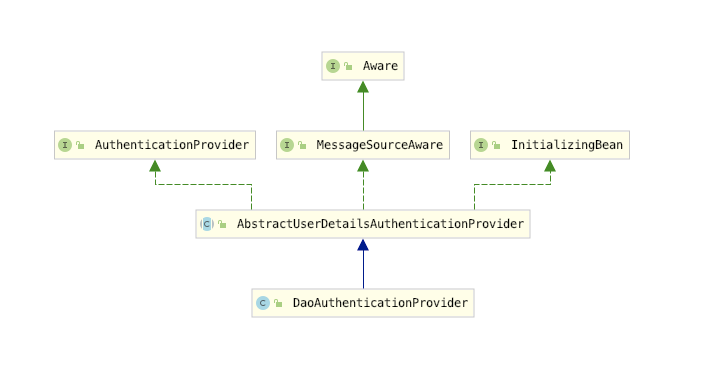
- 深入源码会发现authenticate()此方法会默认进入到AbstractUserDetailsAuthenticationProvider然后通过DaoAuthenticationProvider类中的部分方法对用户信息进行验证。
- DaoAuthenticationProvider继承了AbstractUserDetailsAuthenticationProvider实现了了AuthenticationProvider对其authenticate()进行开发,并在其基础上进行了扩展,详细请阅读源码。
package com.jl.springsecurity2.web;

import com.jl.springsecurity2.annotation.AnonyAccess;
import com.jl.springsecurity2.domain.User;
import com.jl.springsecurity2.util.GlobalResultData;
import com.jl.springsecurity2.util.JwtUtil;
import org.springframework.beans.factory.annotation.Autowired;
import org.springframework.security.access.prepost.PreAuthorize;
import org.springframework.security.authentication.UsernamePasswordAuthenticationToken;
import org.springframework.security.config.annotation.authentication.builders.AuthenticationManagerBuilder;
import org.springframework.security.core.Authentication;
import org.springframework.security.core.GrantedAuthority;
import org.springframework.security.core.context.SecurityContextHolder;
import org.springframework.web.bind.annotation.GetMapping;
import org.springframework.web.bind.annotation.PostMapping;
import org.springframework.web.bind.annotation.RestController;

import java.util.ArrayList;
import java.util.Collection;
/**
 * @author: jia liang
 * @data: 11:14 上午 2020/7/2
 * @desc:
 */

@RestController
public class UserController {
    @Autowired
    private AuthenticationManagerBuilder authenticationManagerBuilder;
    @PostMapping("/login")
    @AnonyAccess
    public String login(String username, String password){
           UsernamePasswordAuthenticationToken authenticationToken = new UsernamePasswordAuthenticationToken(username, password);
           Authentication authenticate = authenticationManagerBuilder.getObject().authenticate(authenticationToken);
           SecurityContextHolder.getContext().setAuthentication(authenticate);
           Collection<? extends GrantedAuthority> authorities = authenticate.getAuthorities();
           ArrayList<GrantedAuthority> simpleGrantedAuthorities = new ArrayList<>();
           for (GrantedAuthority authority : authorities) {
               simpleGrantedAuthorities.add(authority);
           }
           String token = JwtUtil.createJWT(new User(username, password, simpleGrantedAuthorities));
           return GlobalResultData.OK(token);
    }
    @GetMapping("/info")
    public String info(){
        return GlobalResultData.OK(SecurityContextHolder.getContext().getAuthentication());
    }
    @GetMapping("/admin")
    @PreAuthorize("hasRole('admin')")
    public String admin(){
        return GlobalResultData.OK(SecurityContextHolder.getContext().getAuthentication());
    }
    @GetMapping("/user")
    @PreAuthorize("hasRole('user1')")
    public String user(){
        return GlobalResultData.OK(SecurityContextHolder.getContext().getAuthentication());
    }
}
自定义验证规则
- 编写自己的provider,实现AuthenticationProvider类并重写里面的authenticate(Authentication authentication),supports(Class<?> authentication)方法并注入到spring的单例池交于spring管理。
解析
- authenticate(Authentication authentication)方法里的入参authentication是在你通过AuthenticationManagerBuilder对UsernamePasswordAuthenticationToken令牌进行验证是传递进来的凭证信息,通过你自定义的逻辑处理决定是否返回一个有效的凭证。(在处理时涉及到密码编码与解码的逻辑,详细点击)通过自定义的密码对存储密码(rawPassword)和编码密码(encodedPassword)进行校对。
package com.jl.springsecurity2.security;

import com.jl.springsecurity2.domain.User;
import org.springframework.beans.factory.annotation.Autowired;
import org.springframework.security.authentication.AuthenticationProvider;
import org.springframework.security.authentication.BadCredentialsException;
import org.springframework.security.authentication.UsernamePasswordAuthenticationToken;
import org.springframework.security.core.Authentication;
import org.springframework.security.core.AuthenticationException;
import org.springframework.security.core.authority.SimpleGrantedAuthority;
import org.springframework.security.core.userdetails.UserDetails;
import org.springframework.security.core.userdetails.UsernameNotFoundException;
import org.springframework.security.crypto.password.PasswordEncoder;
import org.springframework.stereotype.Component;
import org.springframework.util.StringUtils;

import java.util.ArrayList;
import java.util.HashMap;
import java.util.Map;

/**
 * @author: jia liang
 * @data: 11:11 上午 2020/7/2
 * @desc:
 */
@Component
public class MyProvider implements AuthenticationProvider {

    @Autowired
    private MyUserDetailService userDetailService;

    @Autowired
    private PasswordEncoder passwordEncoder;

    private static Map<String, User> db = new HashMap<>();

    static {
        ArrayList<SimpleGrantedAuthority> roles = new ArrayList<>();
        roles.add(new SimpleGrantedAuthority("admin"));
        db.put("admin",new User("admin","123",roles));
        db.put("jl",new User("jl","123",roles));
    }

    @Override
    public Authentication authenticate(Authentication authentication) throws AuthenticationException {
        String username = (String) authentication.getPrincipal();
        String password = authentication.getCredentials().toString();
        UserDetails user = userDetailService.loadUserByUsername(username);
        if(StringUtils.isEmpty(user)){
            throw new UsernameNotFoundException("user not found");
        }
        if(!passwordEncoder.matches(password, user.getPassword()) ){
            throw new BadCredentialsException("wrong password");
        }

        return new UsernamePasswordAuthenticationToken(username,password,user.getAuthorities());
    }

    @Override
    public boolean supports(Class<?> authentication) {
        return UsernamePasswordAuthenticationToken.class.isAssignableFrom(authentication);
    }
}
自定义用户实体加载
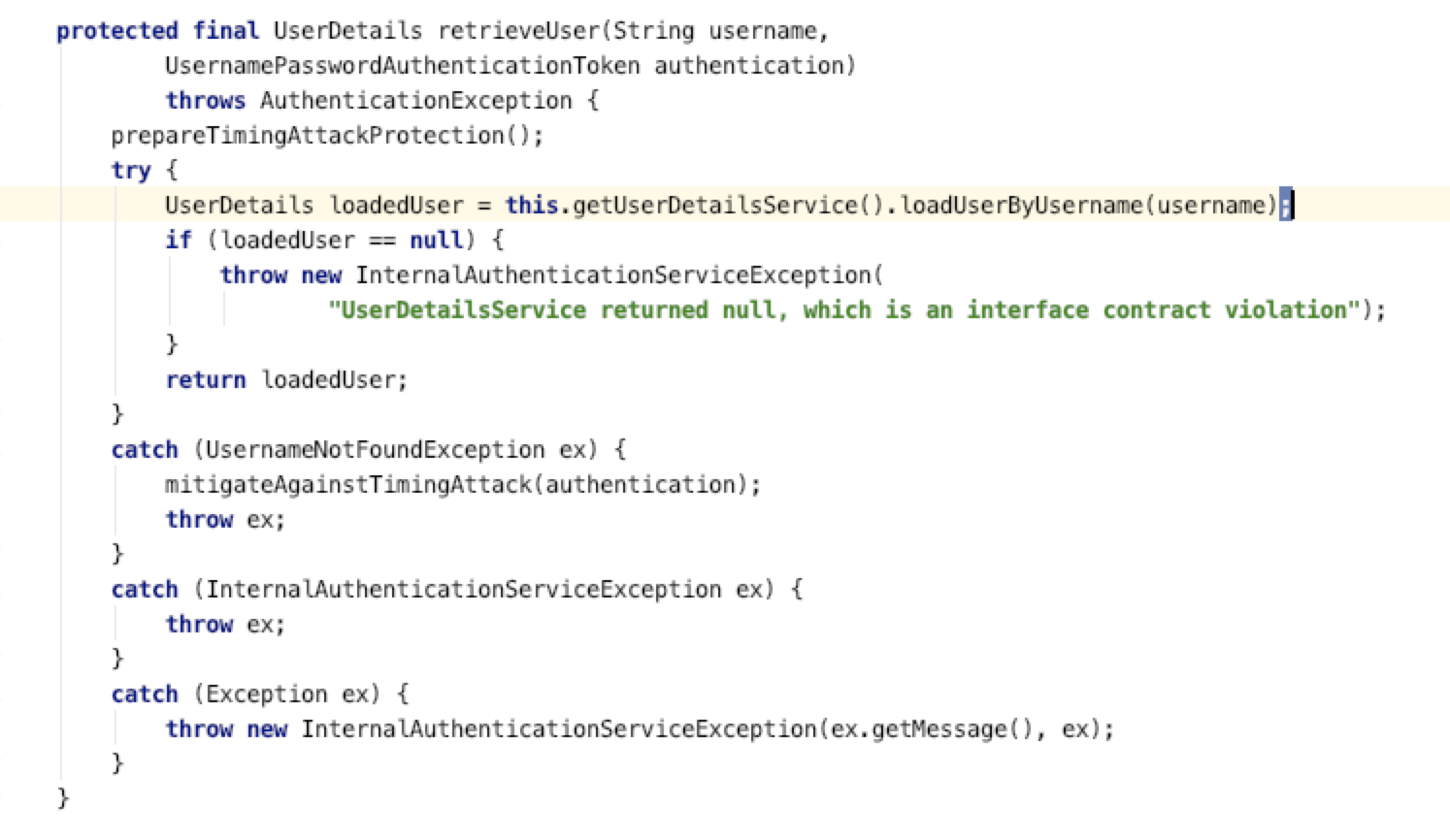
- 默认的provider(DaoAuthenticationProvider)会在此处调用当前loadUserByUsername()方法(前提是实现接口的情况下),如果未实现接口则会在项目启动时基于内存会将密码打印在控制台上。
- 若是提供自定义provider则可自定义调用此方法来加载实体。
package com.jl.springsecurity2.security;

import com.jl.springsecurity2.domain.User;
import org.springframework.security.core.authority.SimpleGrantedAuthority;
import org.springframework.security.core.userdetails.UserDetails;
import org.springframework.security.core.userdetails.UserDetailsService;
import org.springframework.security.core.userdetails.UsernameNotFoundException;
import org.springframework.stereotype.Component;

import java.util.ArrayList;
import java.util.HashMap;
import java.util.Map;

/**
 * @author: jia liang
 * @data: 4:19 下午 2020/7/2
 * @desc:
 */
@Component
public class MyUserDetailService implements UserDetailsService {

    private static Map<String, User> db = new HashMap<>();

    static {
        ArrayList<SimpleGrantedAuthority> roles = new ArrayList<>();
        roles.add(new SimpleGrantedAuthority("admin"));
        //密码是123
        db.put("admin",new User("admin","$2a$10$mtCknFZmlRlcUQSyb.twEeJXMXS39.ff0sYWDje3WXHvkLFYcLQTG",roles));
        //密码是123
        db.put("jl",new User("jl","$2a$10$mtCknFZmlRlcUQSyb.twEeJXMXS39.ff0sYWDje3WXHvkLFYcLQTG",roles));
    }

    @Override
    public UserDetails loadUserByUsername(String username) throws UsernameNotFoundException {
        return db.get(username);
    }

}
自定义过滤器拦截验证非允许的匿名请求
- 对除允许匿名访问的请求外的其他所有请求进行拦截验证(主要是验证token的有效性)
package com.jl.springsecurity2.security;

import com.jl.springsecurity2.domain.User;
import com.jl.springsecurity2.util.JwtUtil;
import io.jsonwebtoken.Claims;
import org.springframework.security.authentication.UsernamePasswordAuthenticationToken;
import org.springframework.security.core.authority.SimpleGrantedAuthority;
import org.springframework.security.core.context.SecurityContextHolder;
import org.springframework.stereotype.Component;
import org.springframework.util.StringUtils;
import org.springframework.web.filter.GenericFilterBean;

import javax.servlet.FilterChain;
import javax.servlet.ServletException;
import javax.servlet.ServletRequest;
import javax.servlet.ServletResponse;
import javax.servlet.http.HttpServletRequest;
import javax.servlet.http.HttpServletResponse;
import java.io.IOException;
import java.util.Arrays;
import java.util.List;
import java.util.stream.Collectors;

/**
 * @author: jia liang
 * @data: 10:45 上午 2020/7/2
 * @desc:
 */
@Component
public class TokenFilter extends GenericFilterBean {

    @Override
    public void doFilter(ServletRequest servletRequest, ServletResponse servletResponse, FilterChain filterChain) throws IOException, ServletException {
        HttpServletRequest request = (HttpServletRequest) servletRequest;
        HttpServletResponse response = (HttpServletResponse) servletResponse;
        String token = resolveToken(request);
        if(StringUtils.hasText(token) && JwtUtil.validateToken(response, token)){
            Claims claims = JwtUtil.getClaimsFromToken(token);
            String username = claims.getSubject();
            List<SimpleGrantedAuthority> auth1 = Arrays.stream(claims.get("auth").toString().split(",")).map(SimpleGrantedAuthority::new).collect(Collectors.toList());
            User user = new User(username, "", auth1);
            UsernamePasswordAuthenticationToken authenticationToken = new UsernamePasswordAuthenticationToken(user.getUsername(), user.getPassword(), user.getAuthorities());
            SecurityContextHolder.getContext().setAuthentication(authenticationToken);
        }
        filterChain.doFilter(servletRequest, servletResponse);

    }


    private String resolveToken(HttpServletRequest request){
        String token = request.getHeader("token");
        if(StringUtils.hasText(token)){
            return token;
        }
        return null;
    }
}
Security核心配置
- 在做了一大堆准备工作后,将所以准备的信息告诉Security让它以某种方式运行。
- @EnableGlobalMethodSecurity(prePostEnabled = true)开启权限注解方式,详细看注释
package com.jl.springsecurity2.security;

import com.jl.springsecurity2.annotation.AnonyAccess;
import org.springframework.beans.factory.annotation.Autowired;
import org.springframework.context.ApplicationContext;
import org.springframework.context.annotation.Bean;
import org.springframework.context.annotation.Configuration;
import org.springframework.http.HttpMethod;
import org.springframework.security.config.annotation.authentication.builders.AuthenticationManagerBuilder;
import org.springframework.security.config.annotation.method.configuration.EnableGlobalMethodSecurity;
import org.springframework.security.config.annotation.web.builders.HttpSecurity;
import org.springframework.security.config.annotation.web.configuration.EnableWebSecurity;
import org.springframework.security.config.annotation.web.configuration.WebSecurityConfigurerAdapter;
import org.springframework.security.config.core.GrantedAuthorityDefaults;
import org.springframework.security.config.http.SessionCreationPolicy;
import org.springframework.security.crypto.bcrypt.BCryptPasswordEncoder;
import org.springframework.security.crypto.password.PasswordEncoder;
import org.springframework.security.web.authentication.UsernamePasswordAuthenticationFilter;
import org.springframework.web.method.HandlerMethod;
import org.springframework.web.servlet.mvc.method.RequestMappingInfo;
import org.springframework.web.servlet.mvc.method.annotation.RequestMappingHandlerMapping;

import java.util.HashSet;
import java.util.Map;

/**
 * @author: jia liang
 * @data: 10:42 上午 2020/7/2
 * @desc:
 */
@Configuration
@EnableWebSecurity
@EnableGlobalMethodSecurity(prePostEnabled = true)
public class SecurityConfig extends WebSecurityConfigurerAdapter {

    @Autowired
    private TokenFilter tokenFilter;

    @Autowired
    private MyProvider provider;


   @Autowired
   private MyUserDetailService userDetailService;

    @Autowired
    private ApplicationContext applicationContext;


    @Override
    protected void configure(HttpSecurity http) throws Exception {
        //  关闭csrf
        http.csrf().disable();
        //在spring启动时会对security进行初始化,扫描所有接口包含AnonyAccess注解的通过配置一律放行。
        Map<RequestMappingInfo, HandlerMethod> handlerMethods = applicationContext.getBean(RequestMappingHandlerMapping.class).getHandlerMethods();
        HashSet<String> annoyUrls = new HashSet<>();
        for (Map.Entry<RequestMappingInfo, HandlerMethod> requestMappingInfoHandlerMethodEntry : handlerMethods.entrySet()) {
            HandlerMethod handlerMethod = requestMappingInfoHandlerMethodEntry.getValue();
            AnonyAccess anonyAccess = handlerMethod.getMethodAnnotation(AnonyAccess.class);
            if(anonyAccess != null){
                annoyUrls.addAll(requestMappingInfoHandlerMethodEntry.getKey().getPatternsCondition().getPatterns());
            }
        }
        //将我们自定义的过滤器放入到security的filterChain中去执行,并且关闭session
        http.addFilterBefore(tokenFilter, UsernamePasswordAuthenticationFilter.class)
                .sessionManagement()
                .sessionCreationPolicy(SessionCreationPolicy.STATELESS);

        http.authorizeRequests()
                //放行接口
                .antMatchers(HttpMethod.OPTIONS,"/**").permitAll()
                //放行接口
                .antMatchers(annoyUrls.toArray(new String[0])).permitAll()
                //除此之外的所有接口都要进行权限认证
                .anyRequest().authenticated();


                //对异常信息的处理主要针对401和403
        http.exceptionHandling()
                .authenticationEntryPoint((httpServletRequest, httpServletResponse, e) -> {
                    httpServletResponse.getWriter().write("anonyAccess not allowed");
                })
                .accessDeniedHandler((httpServletRequest, httpServletResponse, e) -> {
                    httpServletResponse.getWriter().write("you not have permission");
                });


    }

    @Override
    protected void configure(AuthenticationManagerBuilder auth) throws Exception {
        auth.userDetailsService(userDetailService);
        auth.authenticationProvider(provider);
    }


    //关闭角色的前缀
    @Bean
    public GrantedAuthorityDefaults grantedAuthorityDefaults(){
        return new GrantedAuthorityDefaults("");
    }
    //注入编码器
    @Bean
    public PasswordEncoder passwordEncoder(){
        return new BCryptPasswordEncoder();
    }


}
- AnonyAccess注解
package com.jl.springsecurity2.annotation;

import java.lang.annotation.ElementType;

/**
 * @author: jia liang
 * @data: 10:58 上午 2020/7/2
 * @desc:
 */
@java.lang.annotation.Target({ElementType.METHOD})
@java.lang.annotation.Retention(java.lang.annotation.RetentionPolicy.RUNTIME)
@java.lang.annotation.Documented
public @interface AnonyAccess {
}