前言
当项目数据量比较大,单表千万级别的时候,需要分库分表,网上搜索这方面的开源框架,最常见的就是mycat,sharding-sphere, 本文选取的是后者。下期有时间出版mycat.
涉及的高街元素知识:
springboot 2.xsharding-spheremybatis plus
涉及到的知识这里无法一一说明,靠自己去官网look!
目录
一、实现
1. 数据库
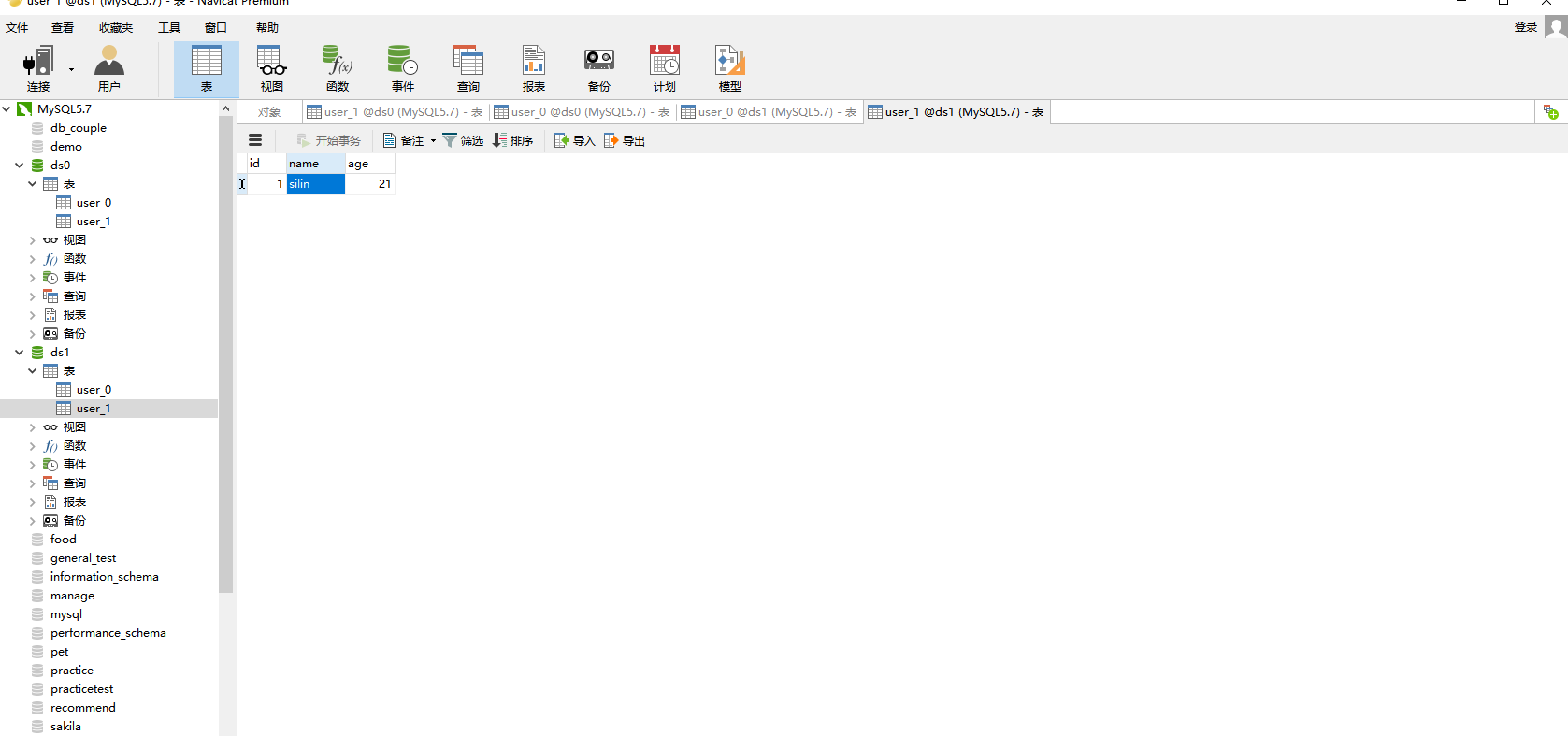
- 数据库结构:
ds0
 ├── user_0
 └── user_1
ds1
 ├── user_0
 └── user_1
- 数据库语句:
数据库: ds0
CREATE DATABASE IF NOT EXISTS `ds0`
;
USE `ds0`;
SET NAMES utf8mb4;
SET FOREIGN_KEY_CHECKS = 0;

-- ----------------------------
-- Table structure for user_0
-- ----------------------------
DROP TABLE IF EXISTS `user_0`;
CREATE TABLE `user_0` (
  `id` int(11) NOT NULL,
  `name` varchar(255) DEFAULT NULL,
  `age` int(11) DEFAULT NULL,
  PRIMARY KEY (`id`)
) ENGINE=InnoDB DEFAULT CHARSET=utf8mb4;

-- ----------------------------
-- Table structure for user_1
-- ----------------------------
DROP TABLE IF EXISTS `user_1`;
CREATE TABLE `user_1` (
  `id` int(11) NOT NULL,
  `name` varchar(255) DEFAULT NULL,
  `age` int(11) DEFAULT NULL,
  PRIMARY KEY (`id`)
) ENGINE=InnoDB DEFAULT CHARSET=utf8mb4;
数据库: ds1
CREATE DATABASE IF NOT EXISTS `ds1`;
USE `ds1`;
SET NAMES utf8mb4;
SET FOREIGN_KEY_CHECKS = 0;

-- ----------------------------
-- Table structure for user_0
-- ----------------------------
DROP TABLE IF EXISTS `user_0`;
CREATE TABLE `user_0` (
  `id` int(11) NOT NULL,
  `name` varchar(255) DEFAULT NULL,
  `age` int(11) DEFAULT NULL,
  PRIMARY KEY (`id`)
) ENGINE=InnoDB DEFAULT CHARSET=utf8mb4;

-- ----------------------------
-- Table structure for user_1
-- ----------------------------
DROP TABLE IF EXISTS `user_1`;
CREATE TABLE `user_1` (
  `id` int(11) NOT NULL,
  `name` varchar(255) DEFAULT NULL,
  `age` int(11) DEFAULT NULL,
  PRIMARY KEY (`id`)
) ENGINE=InnoDB DEFAULT CHARSET=utf8mb4;
2. java代码
项目文件结构
├─src
  ├─main
    ├─java
    │  └─com
    │      └─example
    │          └─eurekaclient
    │              ├─config
    │              ├─controller
    │              ├─entity
    │              ├─mapper
    │              └─service
    │                  └─impl
    └─resources
            ├─static
            └─templates
那么我们的pom.xml需要引入什么呢?注意一下哈,本文的项目是写在eureka的客户端,pom.xml只是作为参考你们提取你们所需到你们自己的项目中去。
pom.xml 文件
<?xml version="1.0" encoding="UTF-8"?>
<project xmlns="http://maven.apache.org/POM/4.0.0" xmlns:xsi="http://www.w3.org/2001/XMLSchema-instance"
         xsi:schemaLocation="http://maven.apache.org/POM/4.0.0 https://maven.apache.org/xsd/maven-4.0.0.xsd">
    <modelVersion>4.0.0</modelVersion>
    <parent>
        <groupId>org.springframework.boot</groupId>
        <artifactId>spring-boot-starter-parent</artifactId>
        <version>2.2.6.RELEASE</version>
        <relativePath/> <!-- lookup parent from repository -->
    </parent>
    <groupId>com.example</groupId>
    <artifactId>eurekaclient</artifactId>
    <version>0.0.1-SNAPSHOT</version>
    <name>eurekaclient</name>
    <description>Demo project for Spring Boot</description>

    <properties>
        <java.version>1.8</java.version>
        <spring-cloud.version>Hoxton.SR4</spring-cloud.version>
    </properties>

    <dependencies>
        <dependency>
            <groupId>com.alibaba</groupId>
            <artifactId>fastjson</artifactId>
            <version>1.2.60</version>
        </dependency>

        <dependency>
            <groupId>org.apache.shardingsphere</groupId>
            <artifactId>sharding-jdbc-spring-boot-starter</artifactId>
            <version>4.0.0-RC2</version>
        </dependency>

        <dependency>
            <groupId>org.apache.shardingsphere</groupId>
            <artifactId>sharding-jdbc-spring-namespace</artifactId>
            <version>4.0.0-RC2</version>
        </dependency>

        <!--lombok-->
        <dependency>
            <groupId>org.projectlombok</groupId>
            <artifactId>lombok</artifactId>
            <version>1.18.8</version>
        </dependency>

        <!--mybatis plug-->
        <dependency>
            <groupId>com.baomidou</groupId>
            <artifactId>mybatis-plus-boot-starter</artifactId>
            <version>3.1.1</version>
        </dependency>

        <!--数据库驱动-->
        <dependency>
            <groupId>mysql</groupId>
            <artifactId>mysql-connector-java</artifactId>
            <scope>runtime</scope>
        </dependency>

        <dependency>
            <groupId>org.springframework.boot</groupId>
            <artifactId>spring-boot-starter-tomcat</artifactId>
        </dependency>

        <dependency>
            <groupId>org.springframework.boot</groupId>
            <artifactId>spring-boot-starter-web</artifactId>
        </dependency>
        <dependency>
            <groupId>org.springframework.cloud</groupId>
            <artifactId>spring-cloud-starter-netflix-eureka-client</artifactId>
        </dependency>

        <dependency>
            <groupId>org.springframework.boot</groupId>
            <artifactId>spring-boot-devtools</artifactId>
            <scope>runtime</scope>
            <optional>true</optional>
        </dependency>
        <dependency>
            <groupId>org.springframework.boot</groupId>
            <artifactId>spring-boot-starter-test</artifactId>
            <scope>test</scope>
            <exclusions>
                <exclusion>
                    <groupId>org.junit.vintage</groupId>
                    <artifactId>junit-vintage-engine</artifactId>
                </exclusion>
            </exclusions>
        </dependency>
        <dependency>
            <groupId>com.baomidou</groupId>
            <artifactId>mybatis-plus-extension</artifactId>
            <version>3.1.1</version>
        </dependency>
    </dependencies>

    <dependencyManagement>
        <dependencies>
            <dependency>
                <groupId>org.springframework.cloud</groupId>
                <artifactId>spring-cloud-dependencies</artifactId>
                <version>${spring-cloud.version}</version>
                <type>pom</type>
                <scope>import</scope>
            </dependency>
        </dependencies>
    </dependencyManagement>

    <build>
        <plugins>
            <plugin>
                <groupId>org.springframework.boot</groupId>
                <artifactId>spring-boot-maven-plugin</artifactId>
            </plugin>
        </plugins>
    </build>

</project>
高街元素,划重点: 如何配置分库分表以及策略需要仔细看一下这个文件的注释
application.yml文件
server:
  port: 8762

eureka:
  client:
    serviceUrl:
      defaultZone: http://localhost:8761/eureka/

mybatis:
  mapper-locations: classpath:mapper/*.xml
  type-aliases-package: com.example.eurekaclient.entity
  # 开启mybatis sql打印
  configuration:
    log-impl: org.apache.ibatis.logging.stdout.StdOutImpl

# 配置ds0 和ds1两个数据源
spring:
  application:
    name: service-client01
  shardingsphere:
    datasource:
      jpa:
        hibernate:
          ddl-auto: update //自动更新
        show-sql: true  //日志中显示sql语句
      names: ds0,ds1
      #ds0 配置
      ds0:
        type: com.zaxxer.hikari.HikariDataSource
        driver-class-name: com.mysql.cj.jdbc.Driver
        jdbc-url: jdbc:mysql://localhost:3306/ds0?useUnicode=true&characterEncoding=utf-8&useSSL=false&serverTimezone=UTC&autoReconnect=true&failOverReadOnly=false&zeroDateTimeBehavior=convertToNull
        username: root
        password: root
      #ds1 配置
      ds1:
        type: com.zaxxer.hikari.HikariDataSource
        driver-class-name: com.mysql.cj.jdbc.Driver
        jdbc-url: jdbc:mysql://localhost:3306/ds1?useUnicode=true&characterEncoding=utf-8&useSSL=false&serverTimezone=UTC&autoReconnect=true&failOverReadOnly=false&zeroDateTimeBehavior=convertToNull
        username: root
        password: root
    # 分库策略 根据id取模确定数据进哪个数据库
    sharding:
      default-database-strategy:
        inline:
          sharding-column:  id
          algorithm-expression: ds$->{id % 2}
      # 具体分表策略
      # 节点 ds0.user_0,ds0.user_1,ds1.user_0,ds1.user_1
      tables:
        user:
          actual-data-nodes: ds$->{0..1}.user_$->{0..1}
          # 分表字段id
          table-strategy:
            inline:
              sharding-column: id
              # 分表策略 根据id取模,确定数据最终落在那个表中
              algorithm-expression: user_$->{id % 2}
          # 使用SNOWFLAKE算法生成主键
          key-generator:
            column: id
            type: SNOWFLAKE
#      binding-tables: user
      # 打印sql解析过程
      props:
        sql.show: true
  main:
    allow-bean-definition-overriding: true
config文件中的MybatisPlusConfig.java
package com.example.eurekaclient.config;

import com.baomidou.mybatisplus.core.parser.ISqlParser;
import com.baomidou.mybatisplus.extension.parsers.BlockAttackSqlParser;
import com.baomidou.mybatisplus.extension.plugins.PaginationInterceptor;
import com.baomidou.mybatisplus.extension.plugins.PerformanceInterceptor;
import org.mybatis.spring.annotation.MapperScan;
import org.springframework.context.annotation.Bean;
import org.springframework.context.annotation.Configuration;

import java.util.ArrayList;
import java.util.List;

@Configuration
@MapperScan("com.example.eurekaclient.mapper")
public class MybatisPlusConfig {

    @Bean
    public PaginationInterceptor paginationInterceptor() {
        PaginationInterceptor paginationInterceptor = new PaginationInterceptor();
        List<ISqlParser> sqlParserList = new ArrayList<>();
        sqlParserList.add(new BlockAttackSqlParser());
        paginationInterceptor.setSqlParserList(sqlParserList);
        return new PaginationInterceptor();
    }

    @Bean
    public PerformanceInterceptor performanceInterceptor() {
        return new PerformanceInterceptor();
    }
}
controller文件中的UserController.java
package com.example.eurekaclient.controller;

import com.example.eurekaclient.entity.User;
import com.example.eurekaclient.service.UserService;
import org.springframework.beans.factory.annotation.Autowired;
import org.springframework.web.bind.annotation.*;

import java.util.List;

@RestController
public class UserController {

    @Autowired
    private UserService userService;

    @GetMapping("/select")
    public List<User> select() {
        return userService.getUserList();
    }

    @GetMapping("/insert")
    public Boolean insert(@RequestParam("id") Integer id ,
                          @RequestParam("age") Integer age,
                          @RequestParam("name") String name) {
        User user = new User();
        user.setId(id);
        user.setAge(age);
        user.setName(name);
        return userService.save(user);
    }


}
entry文件中User.java
package com.example.eurekaclient.entity;

import com.baomidou.mybatisplus.annotation.TableName;
import com.baomidou.mybatisplus.extension.activerecord.Model;
import lombok.Data;
import groovy.transform.EqualsAndHashCode;
import lombok.experimental.Accessors;

@Data
@EqualsAndHashCode(callSuper = true)
@Accessors(chain = true)
@TableName("user")
public class User extends Model<User> {

    /**
     * 主键Id
     */
    private int id;

    /**
     * 名称
     */
    private String name;

    /**
     * 年龄
     */
    private int age;
}
mapper文件中UserMapper.java
package com.example.eurekaclient.mapper;

import com.baomidou.mybatisplus.core.mapper.BaseMapper;
import com.example.eurekaclient.entity.User;


public interface UserMapper extends BaseMapper<User> {
}
service文件中UserService.java
package com.example.eurekaclient.service;

import com.baomidou.mybatisplus.extension.service.IService;
import com.example.eurekaclient.entity.User;

import java.util.List;

public interface UserService extends IService<User> {

    /**
     * 保存用户信息
     * @param entity
     * @return
     */
    @Override
    boolean save(User entity);

    /**
     * 查询全部用户信息
     * @return
     */
    List<User> getUserList();
}
service/impl文件中UserServiceImpl.java
package com.example.eurekaclient.service.impl;

import com.baomidou.mybatisplus.core.toolkit.Wrappers;
import com.baomidou.mybatisplus.extension.service.impl.ServiceImpl;
import com.example.eurekaclient.entity.User;
import com.example.eurekaclient.mapper.UserMapper;
import com.example.eurekaclient.service.UserService;
import org.springframework.stereotype.Service;

import java.util.List;

@Service
public class UserServiceImpl extends ServiceImpl<UserMapper, User> implements UserService {

    @Override
    public boolean save(User user) {
        return super.save(user);
    }

    @Override
    public List<User> getUserList() {
        return baseMapper.selectList(Wrappers.<User>lambdaQuery());
    }
}
EurekaclientApplication.java就不写了,正常操作,由于配置了eureka客户端,需要的话,下载源码看吧。
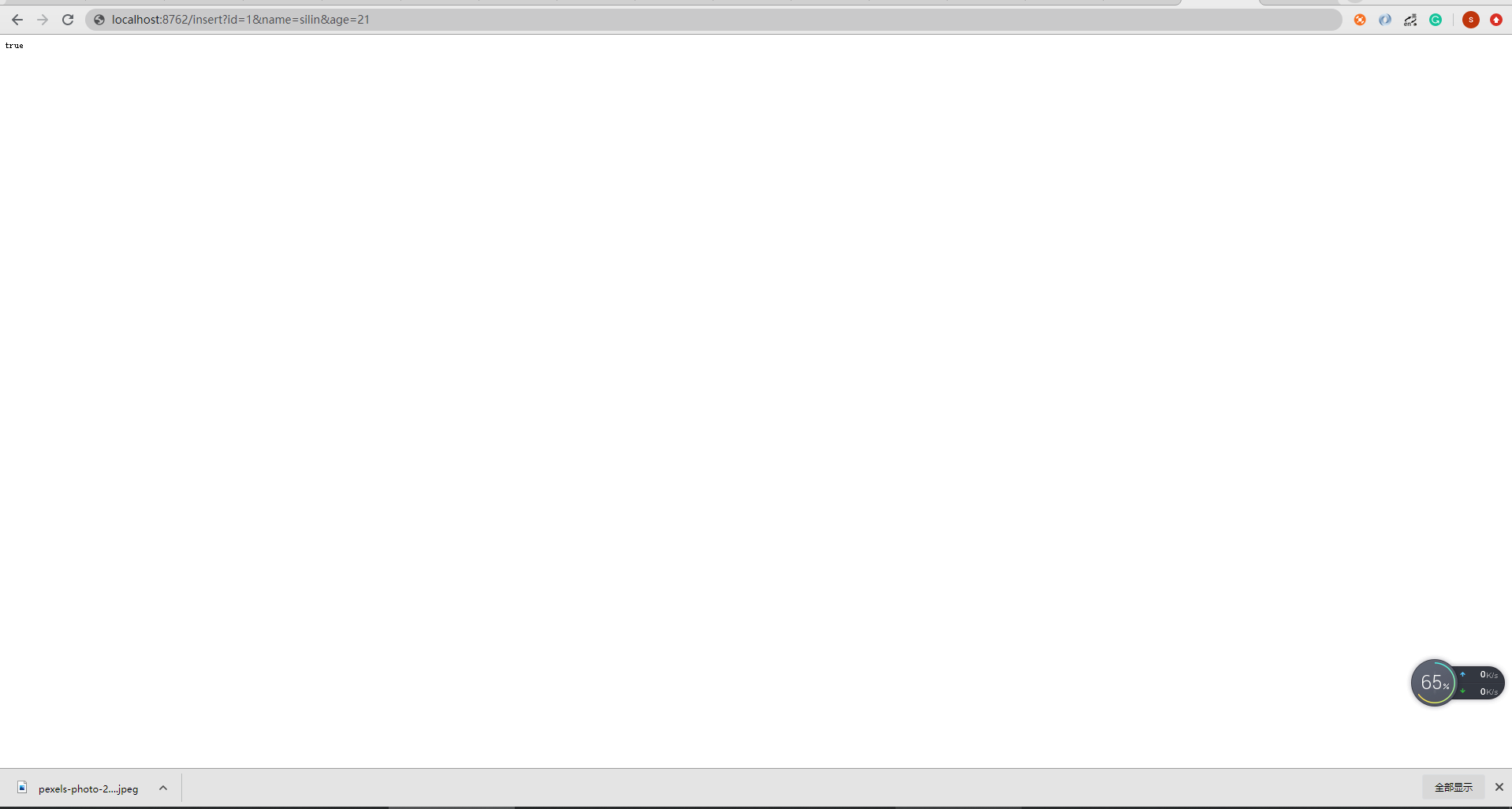
当写完代码后,进行下一步操作,由于我设置了端口是8762,访问下面路径: 插入数据:
http://localhost:8762/insert?id=1&name=silin&age=21
http://localhost:8762/insert?id=2&name=silin&age=22
http://localhost:8762/insert?id=2&name=silin&age=23
查询的访问:
http://localhost:8762/select
二、效果
访问:http://localhost:8762/insert?id=1&name=silin&age=21
三、注意事项
采坑点:在yml文件,一定要非常注意,容易配置错误,务必心细,而mybatic plus这些配置是可以换成JPA\mybatis等
四、源码链接
访问源码链接后请找到名为: eurkaclient 进行下载。
源码的链接: github.com/silin528/sp…
五、支持作者
若是对您有帮助,请支持一下作者。点个赞啦!