

旧版
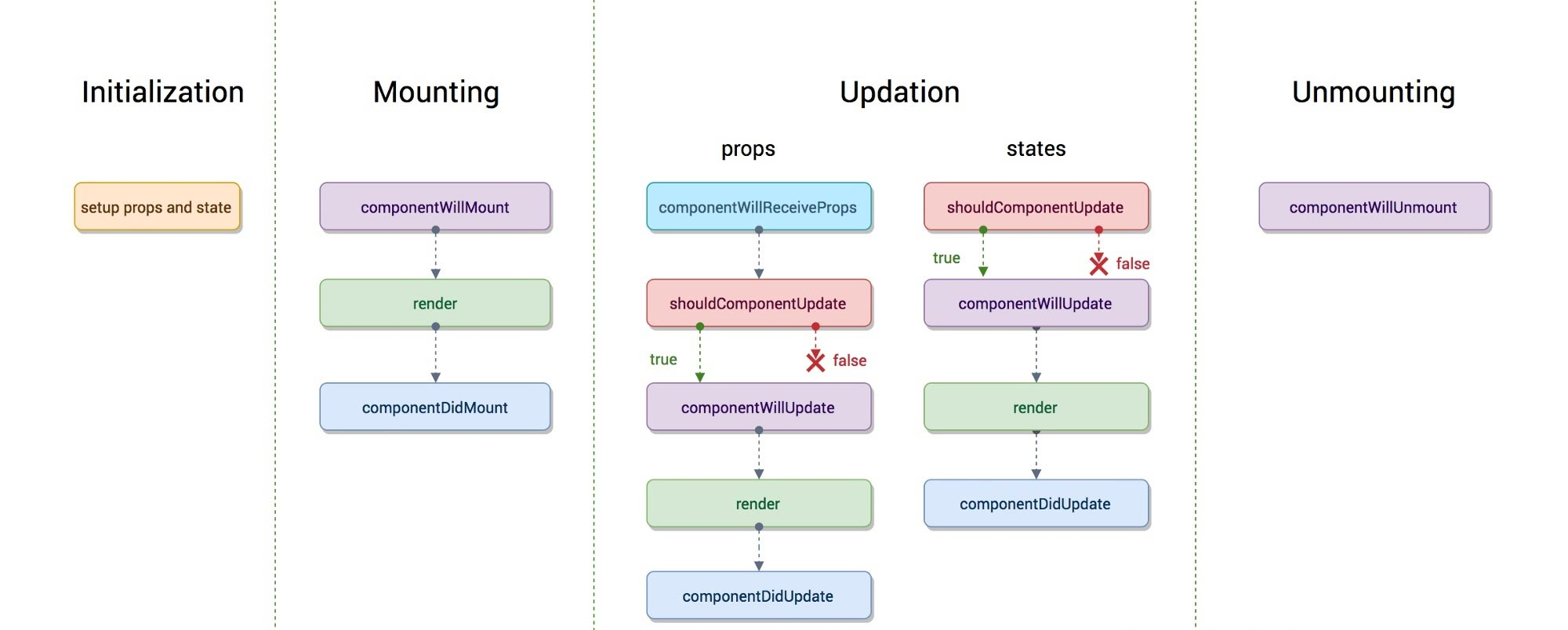
执行顺序
-
在contructor中进行初始化,设置props和state
-
组件挂载阶段
- componentWillMount():组件将要挂载 componentWillMount在渲染过程中可能会执行多次
- render : 组件进行渲染,props或者state改变,则会重新执行
- componentDidMount() :组件完成挂载 只执行一次,一般是在componentDidMount执行副作用,进行异步操作
-
组件更新阶段
- shouldComponentUpdate(nextProps,nextState) :组件是否更新,如果返回值为false,则不进行渲染,不向下执行【不能在此调用setState,否则会造成死循环】
- shouldComponentUpdate返回值为true,向下执行
- componentWillUpdate:组件将要更新
- render 组件进行渲染(如果有子组件)
- 子组件 componentWillReceiveProps:组件收到新的属性对象 【第一次不执行,当props发生改变时才会触发】
- 子组件 shouldComponentUpdate(假定返回值为true)
- 子组件 componentWillUpdate:组件将要更新
- 子组件 componentDidUpdate:组件更新完成 9 父组件 componetDidUpdate: 组件更新完成
-
组件卸载
- componentWillUnmount
PureComponent
- 减少组件的渲染
- 只适合类组件(React.PureComponent)
- 在shouldComponentUpdate的阶段进行判断状态是否改变,从而决定组件是否更新
- 代码实现
import React from 'react'
export class PureComponent extends React.Component {
	isPureComponent = true
	//传入新的属性对象和状态对象,然后返回一个是否需要更新的boolean值
	shouldComponentUpdate(nextProps, nextState) {
		return (
			!shallowEqual(this.props, nextProps) ||
			!shallowEqual(this.state, nextState)
		)
	}
}

//浅比较 比较obj1和obj2是否相等,如果相等的话则返回true,不相等返回false,只比较第一层
function shallowEqual(obj1, obj2) {
	if (obj1 === obj2) {
		return true
	}

	if (
		typeof obj1 !== 'object' ||
		obj1 === null ||
		typeof obj2 !== 'object' ||
		obj2 === null
	) {
		return false
	}

	let keys1 = Object.keys(obj1)
	let keys2 = Object.keys(obj2)
	if (keys1.length !== keys2.length) {
		return false
	}

	for (let key of keys1) {
		if (!obj2.hasOwnProperty(key) || obj1[key] !== obj2[key]) {
			return false
		}
	}
	return true
}
- 函数组件(React.memo)
- 入参是个需要根据状态是否改变决定是否重新渲染的函数组件
- 返回值一个继承PureComponent的类组件,渲染的就是传入的函数组件
- 代码实现
import React from 'react'
export default function memo(FunComponent) {
	return class extends React.PureComponent {
		render() {
			// return FunComponent(this.props) 可行
			return <FunComponent {...this.props} />
		}
	}
}
新版(react16以后)
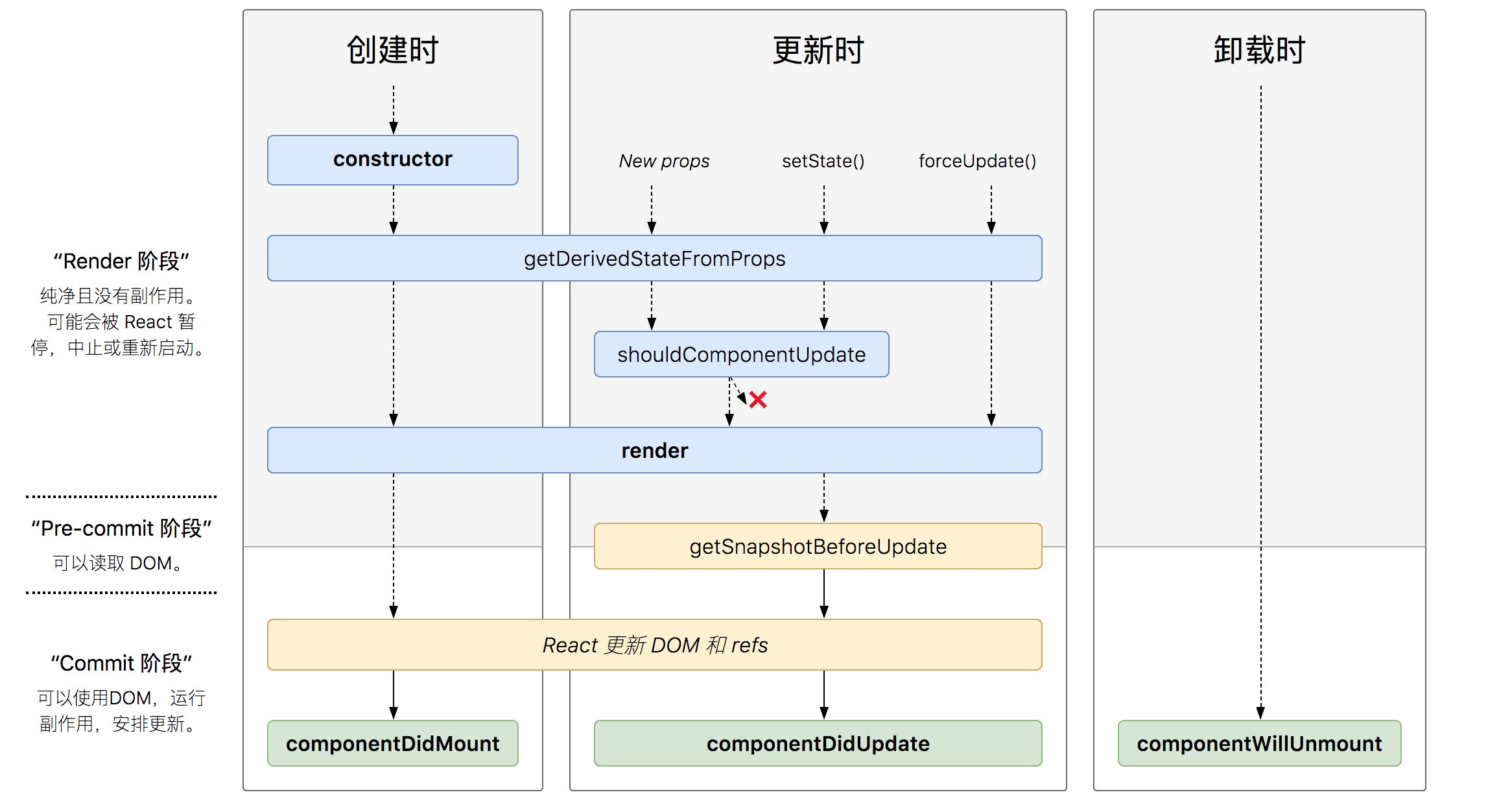
新版和旧版的区别
-
删除的方法(但是依旧可以使用,只是不建议使用 )
- componentWillMount
- componentWillUpdate
- componentWillReceiveProps
-
增加的方法
- getDerivedStateFromProps
static getDerivedStateFromProps(props,state) 1. 将传入的props映射到state上 2. 在初始化之后执行,可执行多次 3. 第一次接收到props也会执行,不会等到第二次更新之后才执行 4. 只要组件重新渲染 就会执行- getSnapshotBeforeUpdate
1. render 之前 componentDidUpdate 之后 2. getSnapshotBeforeUpdated的返回值会做为第三个参数传给componentDidUpdate 3. 使用的时机是:可以读取DOM,但是不可以操作DOM- 案列:滚动条固定在某一位置上,当前内容区显示的信息,不改变
import React from 'react'


export default class LifeCycleNew extends React.Component {
	constructor(props) {
		super(props)
		this.inputValue = React.createRef()
		this.wrapper = React.createRef()
		this.state = {
			num: 1,
			msg: []
		}
		console.log('1.  组件初始化 initialization: 设置props和state')
	}

	addMsg = () => {
		this.setState({
			msg: [this.state.msg.length, ...this.state.msg]
		})
	}

	componentDidMount() {
		console.log('4.  组件挂载完成 componentDidMount')
		this.timeID = setInterval(() => {
			this.addMsg()
		}, 1000)
	}

	shouldComponentUpdate(nextProps, nextState) {
		console.log('5.  组件是否更新 shouldComponentUpdate')
		return nextState.num % 3
	}

	componentDidUpdate(preProps, preState, preScrollHeight) {
		console.log('7.  组件更新完成 componentDidUpdate')
		this.wrapper.current.scrollTop =
			this.wrapper.current.scrollTop +
			(this.wrapper.current.scrollHeight - preScrollHeight)
	}

	getSnapshotBeforeUpdate() {
		console.log('8.  getSnapshotBeforeUpdate')
		// 返回当前元素未更新前的内容高度
		return this.wrapper.current.scrollHeight
	}

	componentWillUnmount() {
		window.clearInterval(this.timeID)
	}


	render() {
		console.log('3.  组件进行渲染 render')
		return (
			<div
				ref={this.wrapper}
				style={{
					border: '5px solid red',
					padding: '10px',
					height: '200px',
					overflow: 'auto'
				}}
			>
				{this.state.msg.map((item, index) => (
					<div key={index}>{item} </div>
				))}


			</div>
		)
	}
}
错误边界(Error Boundaries)
-
解决错误问题:
- 如果当一个组件异步加载下载js文件时,网络错误,无法下载js文件
- 使用Suspense时,没有fallback属性
-
解决方法:
- 声明周期componentDidCatch来处理错误 (打印错误信息)
- 静态方法 static getDerivedStateFromError 来处理错误 (渲染备用 UI )
