

今天在使用 AudioManager 调节系统音量大小和切换静音的时候抛出了异常:
System.err: java.lang.SecurityException: Not allowed to change Do Not Disturb state
System.err: at android.os.Parcel.readException(Parcel.java:1683)
System.err: at android.os.Parcel.readException(Parcel.java:1636)
System.err: at android.media.IAudioService$Stub$Proxy.setRingerModeExternal(IAudioService.java:962)
System.err: at android.media.AudioManager.setRingerMode(AudioManager.java:1022)
查了一下发现是在 Android 6.0(API 23)之后,如果应用需要在免打扰模式下切换音量大小或者通知策略,首先需要在清单文件 AndroidManifest.xml 注册相应的权限:
<!-- 在这里注册不是为了在代码中申请该权限,而是能在跳转到的免打扰权限清单中看到该应用 -->
<uses-permission android:name="android.permission.ACCESS_NOTIFICATION_POLICY"/>
然后在需要改变音量大小或通知策略的代码中进行判断:
val notificationManager = getSystemService(Context.NOTIFICATION_SERVICE) as NotificationManager
if (Build.VERSION.SDK_INT >= Build.VERSION_CODES.M && !notificationManager.isNotificationPolicyAccessGranted) {
    startActivity(Intent(Settings.ACTION_NOTIFICATION_POLICY_ACCESS_SETTINGS))
}
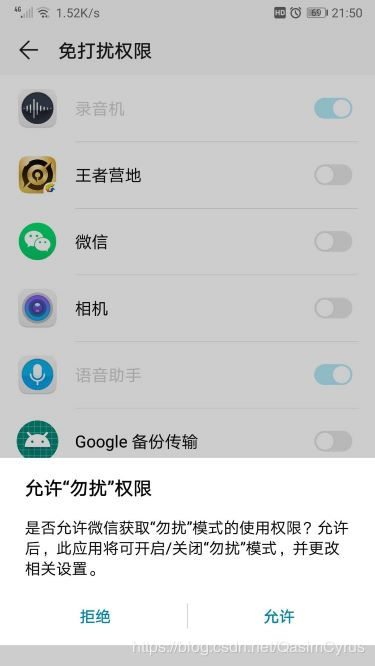
这时候会跳转到免打扰权限的清单界面,开启权限之后就可以在免打扰模式下进行音量修改等相关操作了,这个开启权限的操作也是跟其他权限申请的方式有所不同。
NotificationManager 的源码中可以看到,我们还可以通过广播的方式来监听应用对于该权限申请的变化:
/**
 * Intent that is broadcast when the state of {@link #isNotificationPolicyAccessGranted()}
 * changes.
 *
 * This broadcast is only sent to registered receivers, and only to the apps that have changed.
 */
@SdkConstant(SdkConstant.SdkConstantType.BROADCAST_INTENT_ACTION)
public static final String ACTION_NOTIFICATION_POLICY_ACCESS_GRANTED_CHANGED
        = "android.app.action.NOTIFICATION_POLICY_ACCESS_GRANTED_CHANGED";
参考:In Android 7 (API level 24) my app is not allowed to mute phone (set ringer mode to silent)
