


在用React开发项目时,多多少少需要状态管理,各种状态管理库层出不穷。但有时候一个项目不需要太重的状态管理库。React 16.8后推出了Hooks写法,我们可以利用这一个新特性,手写一个Hooks风格的简易多模块Redux。
❝默认已经熟悉各种Hooks的用法
❞
1 使用Hooks创建状态上下文
# src/redux/index.js

import React from 'react'

const StateContext = React.createContext()
const DispatchContext = React.createContext()

export const Provider = ({ children, store }) => {
  const [state, dispatch] = React.useReducer(store.reducers, store.state)

  return (
    <StateContext.Provider value={state}>
      <DispatchContext.Provider value={dispatch}>
        {children}
      </DispatchContext.Provider>
    </StateContext.Provider>
  )
}

export const useRedux = () => {
  const state = React.useContext(StateContext)
  const dispatch = React.useContext(DispatchContext)

  if (state === void 0 || dispatch === void 0) {
    throw new Error('useRedux must be used whithin a Provider')
  }

  return [state, dispatch]
}
- 我们创建了
StateContext和DispatchContext用于管理state和dispatch的状态。当然这里可以直接创建单独的storeContext进行管理。这样分开定义有助于理解。 - 定义
Provider方法,接收两个参数children和store,用于接收传递的子组件和store状态。 - 利用
useReducer的特性,可以获得类似redux的state和dispatch。 - 分别将
state和dispatch赋值给由StateContext和DispatchContext提供的Provider,这样state和dispatch将会在整个节点树上传递下去。 - 自定义Hooks
useRedux,将定义好的state和dispatch返回出去。
2 如何实现多模块的Redux
在项目的src/store中分别创建index.js、counter.js、user.js。
# /src/store/user.js

const UserModule = {
  state: {
    token: ''
  },
  reducer: (state, action) => {
    switch (action.type) {
      case 'SET_TOKEN':
        return { ...state, token: 'token-string' }
      case 'RESET_TOKEN':
        return { ...state, token: '' }
      default:
        return state
    }
  }
}

export default UserModule
# /src/store/counter.js

const CounterModule = {
  state: {
    count: 0,
  },
  reducer: (state, action) => {
    switch (action.type) {
      case 'increment':
        return { ...state, count: state.count + 1 }
      case 'decrement':
        return { ...state, count: state.count - 1 }
      default:
        return state
    }
  },
}

export default CounterModule
# src/store/index.js

import { combineReducer } from '../utils'
import UserModuel from './user'
import CounterModule from './counter'

const state = {
  user: UserModuel.state,
  counter: CounterModule.state
}

const reducers = combineReducer({
  user: UserModuel.reducer,
  counter: CounterModule.reducer
})

export default {
  state,
  reducers
}
很常规的分模块定义state和reducer。
在index.js中,我们使用了combineReducer这个自定义方法将多个reducer合并。这里也是模仿Redux的实现方法写了一个简易的combineReducer。
# /src/utils/index.js

export const combineReducer = reducers => (state = {}, action) =>
  Object.keys(reducers).reduce((newState, key) => {
    newState[key] = reducers[key](state[key], action)
    return newState
  }, {})
3 如何使用
在项目根目录的index.js中引入Provider和定义好的store
# src/index.js

import React from 'react'
import ReactDOM from 'react-dom'
import './index.css'
import App from './App'
import * as serviceWorker from './serviceWorker'
import { Provider } from './redux'
import store from './store'

ReactDOM.render(
  <React.StrictMode>
    <Provider store={store}>
      <App />
    </Provider>
  </React.StrictMode>,
  document.getElementById('root')
)

// If you want your app to work offline and load faster, you can change
// unregister() to register() below. Note this comes with some pitfalls.
// Learn more about service workers: https://bit.ly/CRA-PWA
serviceWorker.unregister()
使用Provider将App包裹,传入store。和使用Redux一模一样的使用方法。
# src/App.js

import React from 'react'
import logo from './logo.svg'
import './App.css'
import { useRedux } from './redux'

function App() {
  const [state, dispatch] = useRedux()

  return (
    <div className="App">
      <header className="App-header">
        <img src={logo} className="App-logo" alt="logo" />
        <p>Count:{state.counter.count}</p>
        <button onClick={() => dispatch({ type: 'increment' })}>+</button>
        <button onClick={() => dispatch({ type: 'decrement' })}>-</button>
        <p>Token:{state.user.token}</p>
        <button onClick={() => dispatch({ type: 'SET_TOKEN' })}>
          SET TOKEN
        </button>
        <button onClick={() => dispatch({ type: 'RESET_TOKEN' })}>
          RESET TOKEN
        </button>
      </header>
    </div>
  )
}

export default App
引入之前定义好的useRedux,开始尽情使用吧。
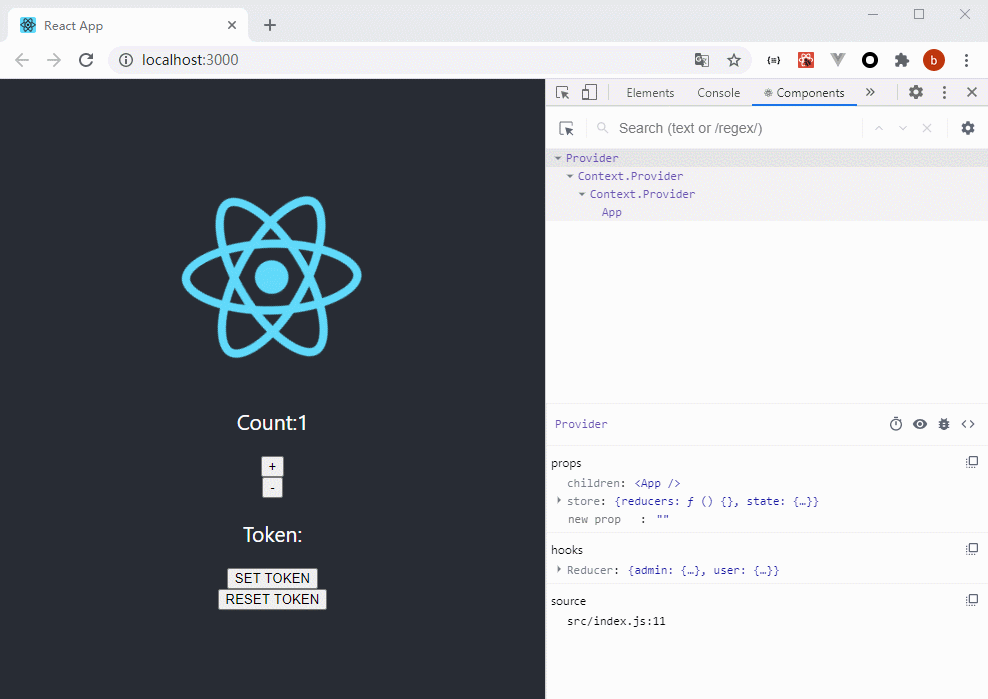
这只是一个简易的Redux实现,其中代码还有很多瑕疵和需要改进的地方。但是在中小型项目中已经足够使用了。
(动图中的变量名可能和代码有出入,请忽略这个细节,逃)。
本文使用 mdnice 排版
