

a 标签的用法
属性
- href
- 网址
- 路径
- /a/b/c (绝对路径) 以及 a/b/c (相对路径)
- index.html 以及 ./index.html
- 伪协议
- javascript:代码;
- mailto:邮箱地址
- tel:手机号
- id
- href=#xxx (锚点)
- target
- 内置名称
- _blank: 新窗口打开
- _top: 加载响应进入顶层浏览上下文
- _parent: 加载到当前浏览器上下文的父级
- _self: 当前页面加载
- 程序员的命名
- window 的 name 如 target="hello", 此时 window.name = 'hello'
- iframe 的 name
- 内置名称
- download
- 作用
- 不是打开页面,而是下载页面
- 问题
- 不是所有浏览器都支持,尤其是手机浏览器可能不支持
- 作用
- rel=noopener
作用
- 跳转外部页面
- 跳转内部锚点
- 跳转到邮箱或电话等
img 标签的用法
作用
发出 get 请求,展示一张图片
属性
- alt: 图片加载失败时显示的文本
- height: 图片高度
- width: 图片宽度
- src: 图片地址
事件
- onload: 图片加载成功时会触发
- onerror: 图片加载失败时会触发
响应式
最大宽度为页面宽度的100%
max-width: 100%;
table 标签的用法
相关的标签
- table: 表格
- thead: 表头
- tbody: 表格主题
- tfoot: 表格底部
- tr: table row (行)
- td: table dock (单元格)
- th: table head (表头)
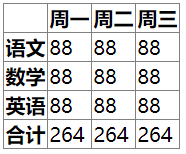
<table>
  <thead>
    <tr>
      <th></th>
      <th>周一</th>
      <th>周二</th>
      <th>周三</th>
    </tr>
  </thead>
  <tbody>
    <tr>
      <th>语文</th>
      <td>88</td>
      <td>88</td>
      <td>88</td>
    </tr>
    <tr>
      <th>数学</th>
      <td>88</td>
      <td>88</td>
      <td>88</td>
    </tr>
    <tr>
      <th>英语</th>
      <td>88</td>
      <td>88</td>
      <td>88</td>
    </tr>
  </tbody>
  <tfoot>
    <tr>
      <th>合计</th>
      <td>264</td>
      <td>264</td>
      <td>264</td>
    </tr>
  </tfoot>
</table>
<style>
  table {
    border-collapse: collapse;
    border-spacing: 0;
  }
  table tr,
  td,
  th {
    border: 1px solid gray;
  }
</style>
相关的样式
- table-layout: 设置表格布局算法
- automatic: 默认。列宽度由单元格内容设定。
- fixed: 列宽由表格宽度和列宽度设定。
- inherit: 规定应该从父元素继承 table-layout 属性的值。
- border-collapse: 为表格设置合并边框模型
- separate: 默认值。边框会被分开。不会忽略 border-spacing 和 empty-cells 属性。
- collapse: 如果可能,边框会合并为一个单一的边框。会忽略 border-spacing 和 empty-cells 属性。
- inherit: 规定应该从父元素继承 border-collapse 属性的值。
- border-spacing: 相邻单元格的边框间的距离(仅用于“边框分离”模式)
- length: 规定相邻单元的边框之间的距离。使用 px、cm 等单位。不允许使用负值。
- 如果定义一个 length 参数,那么定义的是水平和垂直间距。
- 如果定义两个 length 参数,那么第一个设置水平间距,而第二个设置垂直间距。
- inherit: 规定应该从父元素继承 border-spacing 属性的值。
- length: 规定相邻单元的边框之间的距离。使用 px、cm 等单位。不允许使用负值。
其他感想
HTML标准类型的问题,要去 MDN 上搜索答案
例如: iframe mdn
