

结构体是用户自定义的数据类型
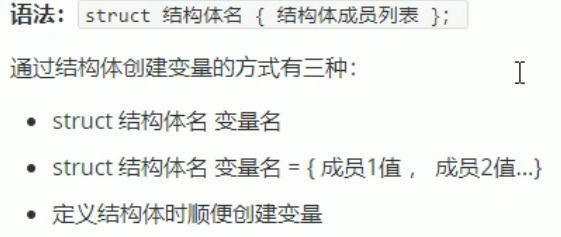
#include<iostream>
using namespace std;
#include<string>

struct student {
	string name;
	int age;
	string sex;
}s1;//顺便创建变量

int main() {
	student s2;//在创建结构体变量时,可以在前面加上struct,也可不加
	s2.age = 12;//使用变量时加. 来访问其成员
	s2.name = "阿飞";
	s2.sex = "nv";
	cout << "姓名" << s2.name << "性别" << s2.sex << "年龄" << s2.age <<endl;
	student s3 = { "张泽",13 };//按顺序来赋值
	cout << s3.name << s3.age;
	s1.age = 14;


	student s4[3]={//结构体数组
	    {"张三",18,"男"},
	    {"李四",18,"男"},
	    {"王五",19,"女"}
	};
	s4[2].age=20;//修改
	for(int i=0;i<3;i++){//遍历数组
	    cout<<"姓名: "<<s4[i].name
	    <<"年龄: "<<s4[i].age
	    <<"性别: "<<s4[i].sex<<endl;
	}


	student * p = &s2;
	p->age = 21;//通过指针来访问成员变量
	cout << "年龄" << p->age;

	system("pause");
	return 0;
}
结构体嵌套
以上面代码为例,在学生结构体后面加上:
struct teacher {//假设一对一辅导学生
	string name;
	int age;
	string sex;
	student s5;
};
主程序加上:
struct teacher t1;
	t1.s5.age = 12;
	t1.s5.name = "刘翔";
	cout << "辅导的学生的名字:" << t1.s5.name << endl;
结构体也可以作为函数参数,不同的是指针的使用
void printstudent(const student * s){//直接用地址传递,可以减少内存空间的使用,和取消复制值
s->name="李玉";//const可以避免实参被修改
    cout<<"姓名:"<<s->name<<"年龄:"<<s->age<<"性别:"<<s->sex<<endl;
}

int main{
    student s6={"吴刚",23,"男"};//使用空间较多
    printstudent(&s6);
}
排序
#include<iostream>
using namespace std;
#include<string>


struct student {
	string name;
	int age;
	string sex;
}s1;

int main() {

	student s4[5] = {//结构体数组
		{"张三",20,"男"},
		{"李四",18,"男"},
		{"王五",19,"女"},
	    {"阿飞",12,"女"},
	    {"刘翔",14,"男"}
	};
	for (int i = 0; i < 5; i++) {//遍历数组
		cout << " 姓名: " << s4[i].name
			 << " 年龄: " << s4[i].age
			 << " 性别: " << s4[i].sex << endl;
	};
	for (int i = 0; i < 4; i++) {
		for (int j = 0; j < 4 - i; j++) {
			if (s4[j].age > s4[j + 1].age) {
				student temp = s4[j];//注意中间变量的类型
				s4[j] = s4[j + 1];
				s4[j+1] = temp;
			}
		}
	}
	cout << "冒泡排序后:" << endl;
	for (int i = 0; i < 5; i++) {//遍历数组
		cout << " 姓名: " << s4[i].name
			<< " 年龄: " << s4[i].age
			<< " 性别: " << s4[i].sex << endl;
	};

	system("pause");
	return 0;
}

