

简介
用于解决海量结构化日志的数据统计,将结构化的数据文件映射成一张表,提供类SQL查询功能。
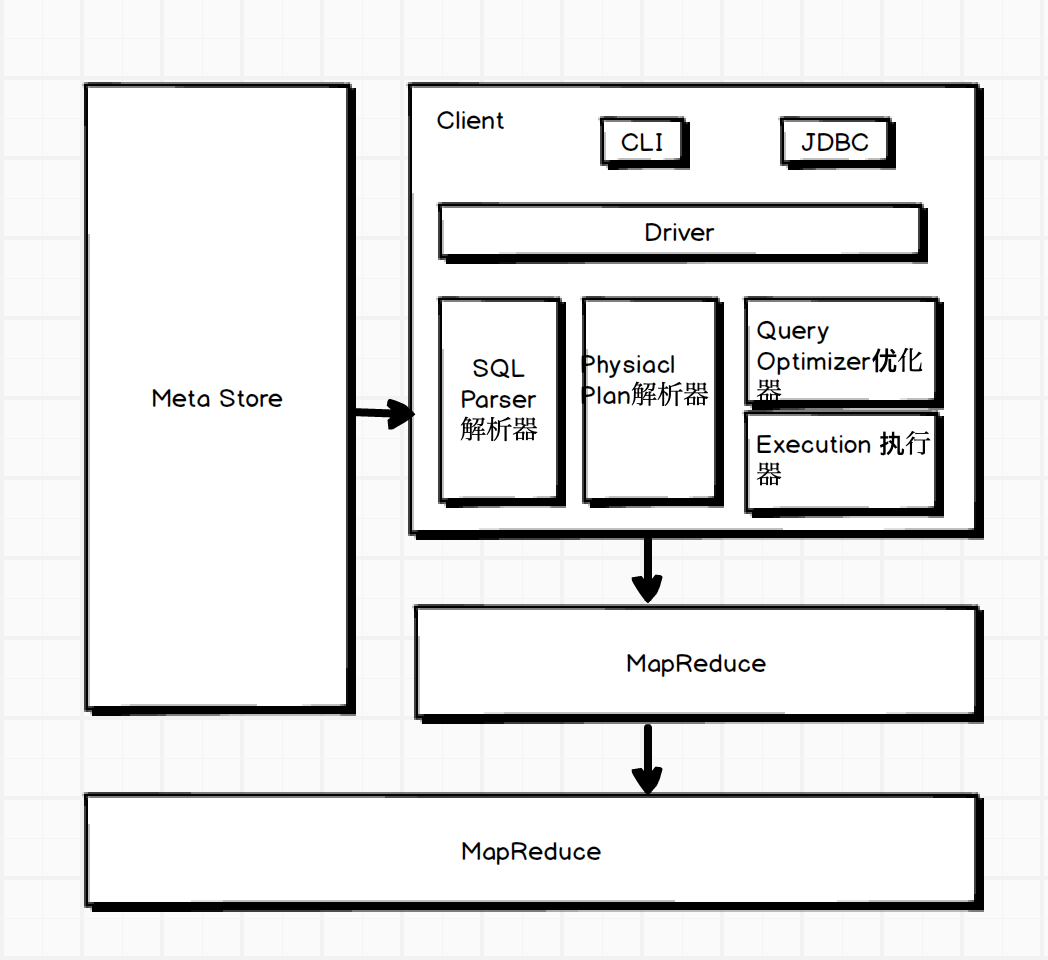
架构图
建表语法
CREATE [EXTERNAL] TABLE [IF NOT EXISTS] table_name
[(col_name data_type [COMMENT col_comment], ...)]
[COMMENT table_comment]
[PARTITION BY (col_name data_type [COMMENT col_comment], ...)]
[CLUSTERED BY (col_name, col_name, ...)
[SORTED BY (col_name [ASC|DESC], ...)] INTO num_buckets BUCKETS]
[ROW FORMAT row_format]
[STORED AS file_format]
[LOCATION hdfs_path]
- EXTERNAL 创建内部表时,Hive将数据移动到数仓指向的路径;创建外部表时,仅记录数据所在的路径。
- COMMONT 为表和列添加注释
- PARTITIONED BY 创建分区表
- CLUSTERED BY 创建分桶表
- SORTED BY
- ROW FORMAT
DELIMITED [FIELDS TERMINATED BY char] [COLLECTION ITEMS TERMINATED BY char] [MAP KEYS TERMINATED BY char] [LINES TERMINATED BY char]
- STORED AS 制定存储文件类型(SEQUENCEFILE,TEXTFILE,RCFILE(列式存储文件))
- LOCATION:表在HDFS上的存储位置
- LIKE 允许用户复制表结构,不复制数据
CREATE TABLE employee
(
name string,
work_place array<string>,
gender_age struct<gender:string,age:int>,
skills_score map<string,int>,
depart_title map<string, array<string>>
)
partitioned by (year int, month int)
row format delimited
fields terminted by '|'
collection items terminated by ','
map keys terminted by ':';
基本查询
- count(col)
- max(col)
- min(col)
- sum(col)
- avg(col)
- limit 10
- where col > 10 # 针对表
- between/in/is null
- group by col
- having col > 10 # 针对分组后的表
- t1 join t2 on t1.id = t2.id
排序
- Order By (全局排序),一个reducer
- Sort By (分区内排序)
- Distribute By (类似MR中partition,进行分区,结合sort by使用)
- Cluster By (当distribute by 和sort by 字段相同时,可以使用cluster by)
分桶
分区针对的是数据的存储路径,分桶针对的是数据文件
// 创建分桶表,导入数据
create table stu_buck(id int, name string)
clustered by(id)
into 4 buckets
row format delimited fields terminated by '\t';

load dat local inpath '/optmodule/datas/student.txt' into table stu_buck;
set hive.enforce.bucketing=true;
自定义UDF、UDTF
- 用UDF解析公共字段,UDTF解析事件字段
- 自定义UDF:继承UDF,重写evaluate()
- 自定义UDTF:继承GenericUDTF,重写initialize(自定义输出列名和类型),process(将结果返回forward(result),close)
常用查询函数
-
空字段赋值 nvl(string, replace),string为空,返回null
-
case sex when 'man' then 1 else 0 end
-
行转列 concat(col1, col2, ...) | concat_ws(separator,col1,col2, ...)
-
列转行 explode(col), lateral view(用于和split,explode等UDTF一起使用,能够将一列数据拆分成多行数据,对拆分后的数据进行聚合)
create table movie_info( movie string, category array<string> ) row format delimited fields terminated by "\t" collection items terminated by ","; select movie category_name from movie_info lateral view explode(category) table_tmp as category_name; -
窗口函数 over() 指定分析函数工作的窗口大小
CURRENT ROW: 当前行 n PRECENDING: 往前n行数据 n FOLLOWING: 往后n行数据 UNBOUNDED: 起点 LAG(col,n): 往前第n行数据 LEAD(col,n): 往后第n行数据 NTILE(n): 把有序分区中的行分发到指定数据的组中 -
排序
- rank() 排序相同时会重复,总数不变;
- dense_rank() 排序相同时会重复,总数减少;
- row_number() 根据顺序计算
参数设置
# 开启hive中间传输数据压缩功能
set hive.exec.compress.intermediate=true;
# 开启mapreduce中map输出压缩功能
set mapreduce.map.output.compress=true;
# 设置mapreduce中map输出数据压缩方式
set mapreduce.map.output.compress.codec=org.apache.hadoop.io.compress.SnappyCodec;

# 开启hive数据压缩功能
set hive.exec.compress.output=true;
# 开启mapreduce输出数据压缩
set mapreduce.output.fileoutputformat.compress=true;
# 设置mapreduce数据输出压缩方式
set mapreduce.output.fileoutputformat.compress.codec=org.apache.hadoop.io.compress.SnappyCodec;
# 设置最终数据输出压缩为块压缩
set mapreduce.output.fileoutputformat.compress.type=BLOCK;
优化
- fetch抓取,Hive对某些情况的查询可以不必使用mapreduce计算 (hive.fetch.task.conversion=more,全局查找、字段查找、limit等不走MR)
- 本地模式,当数据量非常小时,通过本地模式处理所有任务效率更高 (hive.exec.mode.local.auto=true,开启本地MR)
- 合理设置map数
- mapred.min.split.size:数据的最小分割单元,默认值:1B
- mapred.max.split.size:数据的最大分割单元,默认值:256MB
- 通过调整max可以起到调整map数的作用,减小max可以增加map数,增大max可以减少map数
- 复杂文件增加Map数
set mapreduce.input.fileinputformat.split.maxsize=100; - 合理设置Reduce数
过多的启动和初始化reduce会消耗时间和资源 reduce过多,会产生小文件问题 处理大数据量利用合适的Reduce数;使单个reduce任务处理数据量的大小合适
- 小文件产生
动态分区插入数据,产生大量小文件,导致map数量剧增 reduce数量越多,产生的小文件也越多 数据源本身含有大量的小文件
- 小文件解决方案
- 在Map执行前合并小文件,减少Map数。CombineHiveInputFormat对小文件进行合并,HiveInputFormat对小文件没有合并的功能
- merge
set hive.merge.mapfiles = true; set hive.merge.mapredfiles = true; set hive.merge.size.per.task = 268435456; # 默认256M set hive.merge.smallfiles.avgsize = 16777216; # 当输出文件的平均大小小于16M时,启动独立的map-reduce进行文件merge - JVM重用
set mapreduce.job.jvm.numtasks=10;
- 开启map端combiner
set hive.map.aggr=true; - 并行执行
set hive.exec.parallel=true; set hive.exec.parallel.thread.numbers=16; - 严格模式
<property> <name>hive.mapred.mode</name> <value>strict</value> </property> - 推测执行
hadoop mapred-site.xml <property> <name>mapreduce.map.speculative</name> <value>true</value> </property> - 压缩
- 执行计划
EXPLAIN [EXTENDED|DEPENDENCY|AUTHORIZATION] query

explain extended select deptno, avg(sal) avg_sal from emp group bu deptno;
数据倾斜
- 大表 join 大表 空Key过滤;空Key转换
# 不随机分布Null值,产生数据倾斜 insert overwrite table jointable select n.* from nullidtable n left join ori o on n.id = b.id; # 随机分布Null值 insert overwrite table jointable select n.* from nullidtable n full join ori o on case when n.id is null then concat('hive', rand()) else n.id end = o.id - MapJoin
set hive.auto.convert.join=true; set hive.mapjoin.smalltable.filesize=25000000; - GroupBy
hive.map.aggr=true hive.groupby.mapaggr.checkinterval=100000 hive.groupby.skewindata=true - Count(Distinct)去重统计,使用单个ReduceTask执行任务,当数据量大时,会到值Job难以完成
- 笛卡尔积,当join的时候不加on条件,或者on条件无效,hive会使用一个reduce执行任务
- 动态分区调整
hive.exec.dynamic.partition=true
hive.exec.dyanmic.partition.mode=nonstrict
hive.exec.max.dynamic.partitions=1000
hive.exec.max.synamic.partitions.pernode=100
hive.exec.max.created.files=100000
hive.error.on.empty.partition=false
