这是小弟的第一次在掘金上发表文章,技术能力有限要喷请轻点喷。。。。。(尬。。。) 最近接触一个老项目,用的Jquery, 需要写个向导插件 于是结合了自己的想法用Jquery 实现了一下
组件样例
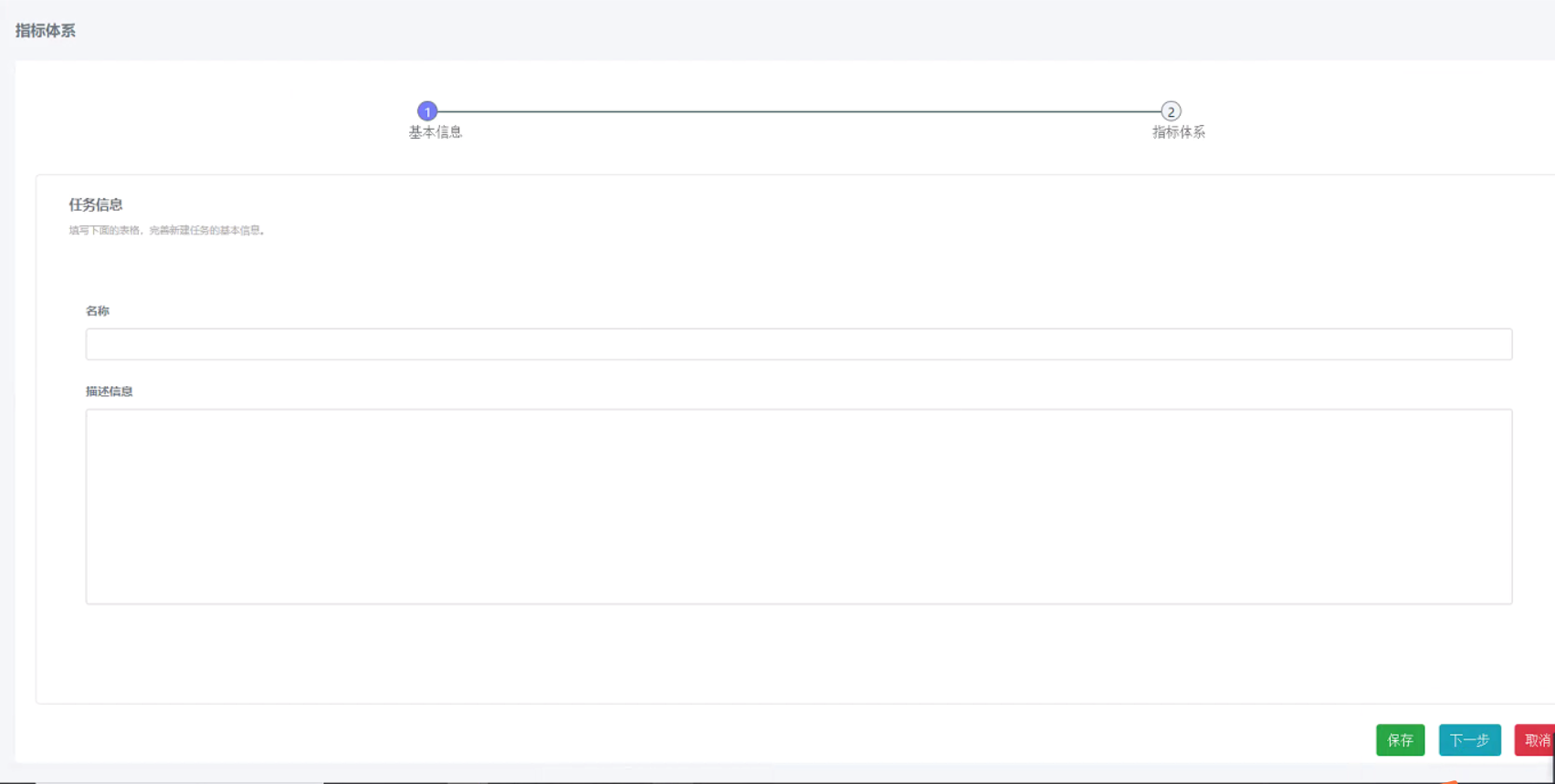
代码
// 公用流程组件
(function ($) {
  $.fn.CommonWizard = function (options) {
    /*当没有这个元素或者不是DIV的时候返回*/
    if (this.length !== 1 || this.prop('tagName') !== 'DIV') {
      return;
    }

    const params = $.extend({}, $.fn.CommonWizard.defaults, options);
    //控制跳转的 初始化的时候为true
    params.canJumpToNext = true;

    this.empty();

    this.append(
      `
      <div class="wizard">

        <div class="wizard-content">
          <iframe src="${params.contentList[0]}" frameborder="0" scrolling="no"></iframe>
        </div>
        <div class="wizard-footer">
          <div class="pre">
            <button class="btn btn-info pre-btn" >上一步</button>
          </div>
          <div class="next">
            <button class="btn btn-success save-btn">保存</button>
            <button class="btn btn-info next-btn">下一步</button>
          </div>
        </div>
      </div>
      `
    );

    const $wizard = this.find('.wizard');
    const $preBtn = $wizard.find('.pre-btn');
    const $nextBtn = $wizard.find('.next-btn');
    // 开始就隐藏上一步按钮
    $preBtn.hide();
    let tabIndex = 1;

    //检查状态
    const checkWizardBtnState = (tabIndex) => {
      $preBtn.show();
      $nextBtn.show();

      if (tabIndex === 1) {
        $preBtn.hide();
      }

      if (tabIndex === params.titles.length) {
        $nextBtn.hide();
      }
    };

    this.init = function () {
      // $loading.hide();
      renderContent(0);
      renderWizardLi(params.titles, params.type);
    };

    this.next = function () {
      params.canJumpToNext = true;
    };

    /* 渲染head */
    const renderWizardLi = (titles, type) => {
      if (type === 'big') {
        const $wizardUl = $(`<ul class="bwizard-ul"></ul>`);

        $wizardUl.prependTo($wizard);
        $.each(titles, function (index, item) {
          $(
            `
            <li class="item ${index === 0 && 'active'}">
              <div class="text">
                <div><span class="iconfont ${params.icons[index]}" ></span></div>
                <div>${index + 1}、${item}</div>
              </div>
            </li>
          `
          ).appendTo($wizardUl);
        });
      } else {
        const $wizardUl = $(`<ul class="wizard-ul"></ul>`);
        $wizardUl.prependTo($wizard);
        $.each(titles, function (index, item) {
          $(
            `
            <li class="item ${index === 0 && 'active'}">
              <div class="text" data-text="${item}">${index + 1}</div>
            </li>
          `
          ).appendTo($wizardUl);
        });
      }
    };

    // 在切换Iframe 之前
    const beforeChangeIframe = () => {
      const iframeWindow = $wizard.find('iframe').get(0).contentWindow.window;
      const iframeUrl = $wizard.find('iframe').attr('src');
      params.beforeChangeIframe && params.beforeChangeIframe(iframeUrl, iframeWindow);
    };

    /* 切换渲染的内容 */
    const renderContent = (index) => {
      params.canJumpToNext && $wizard.find('iframe').attr('src', params.contentList[index]);
    };

    this.init();

    /* ================================事件绑定============================================ */
    $wizard.find('.text').click(function (e) {
      e.stopPropagation();
      e.preventDefault();

      // 切换iframe 之前
      beforeChangeIframe();

      //如果不能跳转 一下都不执行
      if (!params.canJumpToNext) {
        return;
      }
      //计算处于哪个tab
      tabIndex = $(this).parent().prevAll().length + 1;

      $wizard.find('.item').each(function (index, item) {
        $(item).removeClass('active');
      });
      $(this).parent().addClass('active').prevAll().addClass('active');
      //监测按钮状态
      checkWizardBtnState(tabIndex);
      renderContent(tabIndex - 1);
    });

    $wizard.find('.pre-btn').click(function (e) {
      e.stopPropagation();
      e.preventDefault();

      // 切换iframe 之前
      beforeChangeIframe();

      //如果不能跳转 一下都不执行
      if (!params.canJumpToNext) {
        return;
      }

      $wizard
        .find('.item')
        .eq(tabIndex - 1)
        .removeClass('active');

      tabIndex -= 1;
      checkWizardBtnState(tabIndex);
      renderContent(tabIndex - 1);
    });

    $wizard.find('.next-btn').click(function (e) {
      e.stopPropagation();
      e.preventDefault();

      // 切换iframe 之前
      beforeChangeIframe();

      //如果不能跳转 一下都不执行
      if (!params.canJumpToNext) {
        return;
      }
      $wizard.find('.item').eq(tabIndex).addClass('active');

      tabIndex += 1;
      checkWizardBtnState(tabIndex);
      renderContent(tabIndex - 1);
    });

    $wizard.find('iframe').on('load', function () {
      const iframeWindow = $wizard.find('iframe').get(0).contentWindow.window;
      const iframeUrl = $wizard.find('iframe').attr('src');
      params.renderIframe && params.renderIframe(iframeUrl, iframeWindow);
      // 跳转后 重置为false 控制一下次跳转
      params.canJumpToNext = false;
    });

    return this;
  };

  $.fn.CommonWizard.defaults = {};
})(jQuery);
代码思路
- 1.外层DIV
- 2.里面嵌入iFrame
备注
- 1.添加了next方法来控制是否可以进入下一步
- 2.渲染iframe的时候因为有渲染时间,所以绑定了onload事件 , 每次在回填数据的时候 需要调用settimeout
- 3.写了2个钩子函数 检测生命周期 renderIframe 渲染, beforeChangeIframe渲染之前
- 4.调用iframeWindow 来操作里面的子页面 iframeUrl来判断Iframe的连接地址
使用如下
CommonWizard = $body.find('#Wizard').CommonWizard({
      titles: ['基本信息', '操作列表'],
      contentList: ['url1', 'url2'],
      renderIframe: function (url, window) {
        iframeWindow = window;
        iframeUrl = url;
        // 每次渲染页面都在回填
        if (iframeUrl === 'url1') {
          setTimeout(function () {
            iframeWindow.feedData();
          }, 100);
        }

        if (iframeUrl === 'url2') {
          setTimeout(function () {
            iframeWindow.feedData();
          }, 100);
        }
      },
      beforeChangeIframe: function () {
        // 刚开始载入的时候 是没有Iframe和iframeWindows的
        if (!iframeUrl || !iframeWindow) {
          return;
        }

        if (iframeUrl === 'url1') {
          basicData = iframeWindow.getFormData();
          if (!basicData) {
            return;
          }
          CommonWizard.next();
        }

        if (iframeUrl === 'url2') {
          CommonWizard.next();
        }
      },
    });

    //添加取消按钮
    $(`<button class="btn btn-danger cancel-btn" style="">取消</button>`).appendTo($body.find('.next'));
  };