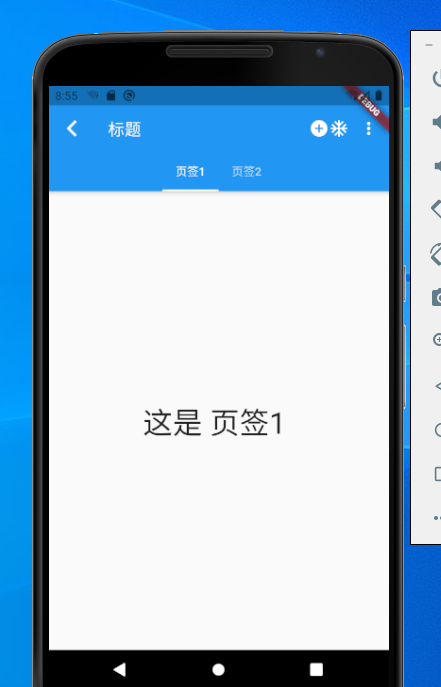
void main() => runApp(MyApp());


// 无状态组件
class MyApp extends StatelessWidget {
  // This widget is the root of your application.
  @override
  Widget build(BuildContext context) {
    return MaterialApp(
      title: 'Flutter Demo',
      theme: ThemeData(
        primarySwatch: Colors.blue,
      ),
      home: MyHomePage(title: 'Flutter Demo Home Page'),
    );
  }
}

// 有状态组件
class MyHomePage extends StatefulWidget {
  MyHomePage({Key key, this.title}) : super(key: key);

  final String title;

  @override
  _MyHomePageState createState() => _MyHomePageState();
}


// 标签
class _MyHomePageState extends State<MyHomePage> with SingleTickerProviderStateMixin{

  final List<Tab> myTabs = <Tab>[
    Tab(text: '页签1'),
    Tab(text: '页签2'),
  ];

  TabController _tabController;
  @override
  void initState() {
    super.initState();
    _tabController = TabController(vsync:this,length: myTabs.length);
  }

  @override
  void dispose() {
    _tabController.dispose();
    super.dispose();
  }

  @override
  Widget build(BuildContext context) {
    return Scaffold(
      appBar: AppBar(
        leading: new Icon(Icons.arrow_back_ios),//显示在左上角的view
        automaticallyImplyLeading: true,//
        title: Text("标题",style: TextStyle(color: Colors.white),),//显示在title位置的view
        flexibleSpace: FlexibleSpaceBar(),//做折叠效果使用
        elevation: 4,//控制阴影大小 ,没有默认ThemeData.appBarTheme.elevation属性,属性也没有默认4
        shape: RoundedRectangleBorder(),//设置各种形状的边框 BeveledRectangleBorder,BoxBorder,CircleBorder,ContinuousRectangleBorder,InputBorder,RoundedRectangleBorder,StadiumBorder
        backgroundColor: Colors.blue,//背景色
        brightness: Brightness.light,//设置状态栏模式。有深色和浅色两种主题,
        iconTheme: IconThemeData(color: Colors.white),//定义图标的颜色,不透明度和大小。
        textTheme: Theme.of(context).textTheme,//设置文字样式
        primary: true,//如果为false,会沉浸在状态栏下
        centerTitle: false,//标题是否居中显示
        titleSpacing: NavigationToolbar.kMiddleSpacing,//标题左右间距,默认NavigationToolbar.kMiddleSpacing,设置为0 占用所有可用空间
        toolbarOpacity: 1.0,//工具栏透明度,值为1.0完全不透明,值为0.0完全透明。
        bottomOpacity: 1.0,//bottom透明度,值为1.0完全不透明,值为0.0完全透明。

        bottom:  TabBar(//设置底部view,需要CupertinoTabBar,ObstructingPreferredSizeWidget,PreferredSize,TabBar包裹
          controller: _tabController,
          isScrollable: true,
          tabs: myTabs,
        ),

        actions: <Widget>[//功能按钮,PopupMenuButton添加扩展按钮
          new Icon(Icons.add_circle),
          new Icon(Icons.ac_unit),
          PopupMenuButton(
            itemBuilder: (BuildContext context) =>
            <PopupMenuItem<String>>[
              PopupMenuItem<String>(child: Text("扩展按钮1"), value: "1",),
              PopupMenuItem<String>(child: Text("扩展按钮2"), value: "2",),
            ],
            onSelected: (String action) {
              switch (action) {
                case "1":
                  print("扩展按钮1");
                  break;
                case "2":
                  print("扩展按钮2");
                  break;
              }
            },
            onCanceled: () {
              print("onCanceled");
            },
          )
        ],
      ),
      body: TabBarView(
        controller: _tabController,
        children: myTabs.map((Tab tab) {
          final String label = tab.text.toLowerCase();
          return Center(
            child: Text(
              '这是 $label ',
              style: const TextStyle(fontSize: 36),
            ),
          );
        }).toList(),
      ),
    );
  }
}