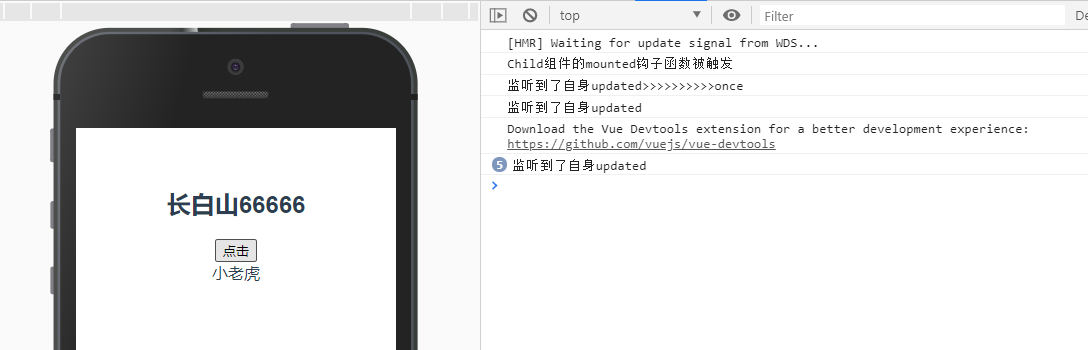
<template>
  <div class="hello">
      <h2>{{name}}</h2>
      <button @click="clickAction">点击</button>
     <Child @hook:updated="abc"/>
  </div>
</template>
<script>
import Child from './Child.vue';
export default {
  name: 'HelloWorld',
  components: {Child},
  data() {
    return {
      name: '意大利炮'
    }
  },
  mounted() {
   this.name = '长白山'
   this.$once('hook:updated',()=>{
      console.log('监听到了自身updated>>>>>>>>>>once')
    })
   this.$on('hook:updated',()=>{
      console.log('监听到了自身updated')
    })
  },
  methods: {
    abc() {
      console.log('Child组件的mounted钩子函数被触发')
    },
    clickAction() {
      this.name += '6'
    }
  }
}
</script>
>>>>>>>>>>>>>>>>>>>>>>>>>>>>>>>>>>>>>>>>
>>>>>>>>>>>>>>>>>>>>>>>>>>>>>>>>>>>>>>>>
>>>>>>>>>>>>>>>>>>>>>>>>>>>>>>>>>>>>>>>>

Child组件
<template>
    <div>
        <div>{{name}}</div>
    </div>

</template>
<script>
export default {
    data() {
        return {
            name:'大老虎'
        }
    },
    mounted(){
        this.name = '小老虎'
    }
}
</script>