

1. 集群管理API
es提供了一套api,叫做cat api,可以查看es集群中各种各样的数据
1.1 health(检查集群健康状况)
GET /_cat/health?v
| epoch | timestamp | cluster | status | node.total | node.data shards | pri | relo | init | unassign | pending_tasks | max_task_wait_time | active_shards_percent |
|---|---|---|---|---|---|---|---|---|---|---|---|---|
| 1591628823 | 15:12:21 | myes | green |
1 | 1 | 4 | 4 | 0 | 0 | 1 | 0 | 100.0% |
1.2 集群的健康状况都有哪些?
- green:每个索引的primary shard和replica shard都是active状态的
- yellow:每个索引的primary shard都是active状态的,但是部分replica shard不是active状态,处于不可用的状态。
- red:不是所有索引的primary shard都是active状态的,部分索引有数据丢失了
1.3 查看集群中有哪些索引
GET /_cat/indices?v
| health | status | index | uuid | pri | rep | docs.count | docs.deleted | store.size | pri.store.size |
|---|---|---|---|---|---|---|---|---|---|
| green | open | .apm-custom-link | DFglk9oCSoair5AXNm7HzA | 1 | 0 | 0 | 0 | 208b | 208b |
| green | open | .kibana_task_manager_1 | 88fMwSkJS6ul63ehKxAJgw | 1 | 0 | 5 | 2 | 37.2kb | 37.2kb |
| green | open | .apm-agent-configuration | Qk2cC8aYRkKqQ9FC_H69Bw | 1 | 0 | 0 | 0 | 208b | 208b |
| green | open | .kibana_1 | 1W6EX6-GSVy5Ije9ifFBdg | 1 | 0 | 9 | 0 | 45.4kb | 45.4kb |
2. 索引操作
2.1 创建索引
PUT /test_index?pretty
由于index在创建时已经指定了固定数量的shard,shard的数量一旦指定了就不能扩展,如果用一个index来保存所有的数据,将会导致shard的数据越来越多,最终内存不足,需要频繁IO,ES性能会越来越慢。
创建索引的原则:
- document结构相似的放在相同的index中。例如商品、商品详情这些document有很多相同的filed,可以放在同一index下。
- document结构基本不同的存放在不同的index中。例如店铺、订单这些document基本不一样,不应该放在同一个index中
- 索引名称必须是小写的,不能用下划线开头,不能包含逗号
2.2 查看索引
GET /_cat/indices?v
| health | status | index | uuid | pri | rep | docs.count | docs.deleted | store.size | pri.store.size |
|---|---|---|---|---|---|---|---|---|---|
| green | open | .apm-custom-link | DFglk9oCSoair5AXNm7HzA | 1 | 0 | 0 | 0 | 208b | 208b |
| green | open | .kibana_task_manager_1 | 88fMwSkJS6ul63ehKxAJgw | 1 | 0 | 5 | 2 | 37.2kb | 37.2kb |
| green | open | .apm-agent-configuration | Qk2cC8aYRkKqQ9FC_H69Bw | 1 | 0 | 0 | 0 | 208b | 208b |
| green | open | .kibana_1 | 1W6EX6-GSVy5Ije9ifFBdg | 1 | 0 | 9 | 0 | 45.4kb | 45.4kb |
| yellow | open | test_index | k32Hm22UQ3iwA0_PyU3Msw | 1 | 1 | 0 | 0 | 208b | 208b |
为什么新创建的test_index是yellow呢?
因为默认创建的索引replica shard为1,就是说需要有另一个ES做数据备份,由于我这里只启动一台ES,replica没办法备份,所以就为yello,只需再启动一台ES就会自动把test_index同步过去。
2.3 删除索引
DELETE /test_index?pretty
查看索引验证是否还能被检索得到:
GET /_cat/indices?v
| health | status | index | uuid | pri | rep | docs.count | docs.deleted | store.size | pri.store.size |
|---|---|---|---|---|---|---|---|---|---|
| green | open | .apm-custom-link | DFglk9oCSoair5AXNm7HzA | 1 | 0 | 0 | 0 | 208b | 208b |
| green | open | .kibana_task_manager_1 | 88fMwSkJS6ul63ehKxAJgw | 1 | 0 | 5 | 2 | 37.2kb | 37.2kb |
| green | open | .apm-agent-configuration | Qk2cC8aYRkKqQ9FC_H69Bw | 1 | 0 | 0 | 0 | 208b | 208b |
| green | open | .kibana_1 | 1W6EX6-GSVy5Ije9ifFBdg | 1 | 0 | 9 | 0 | 45.4kb | 45.4kb |
可以看到刚才创建的test_index被成功删除了
2.3 document的CRUD操作
2.3.1 创建文档(新增商品)
格式:
PUT /index/_doc/id
{
  "json数据"
}
我们可以手动指定document的id(格式:PUT /index/type/id),如果不指定es会自动创建一个id。
ES使用GUID自动生成id:
- 长度: 20个字符
- URL安全(分布式系统并行生成时不会冲突)
- base64编码
重复执行PUT操作会直接覆盖旧的数据
添加一些测试数据
PUT /goods/_doc/1
{
    "name" : "zhonghua yagao",
    "desc" :  "gaoxiao meibai",
    "price" :  18,
    "producer" :"zhonghua producer",
    "tags": [ "meibai", "fangzhu" ]
}
输出结果:
{
  "_index" : "goods",
  "_type" : "_doc",
  "_id" : "1",
  "_version" : 1,
  "result" : "created",
  "_shards" : {
    "total" : 2,
    "successful" : 1,
    "failed" : 0
  },
  "_seq_no" : 0,
  "_primary_term" : 1
}
继续添加几条数据:
PUT /goods/_doc/2
{
    "name" : "jiajieshi yagao",
    "desc" :  "youxiao fangzhu",
    "price" :  25,
    "producer" :      "jiajieshi producer",
    "tags": [ "fangzhu" ]
}

PUT /goods/_doc/3
{
    "name" : "zhonghua yagao",
    "desc" :  "caoben zhiwu",
    "price" :  40,
    "producer" :      "zhonghua producer",
    "tags": [ "qingxin" ]
}
重点:
- es会自动建立index和type,不需要提前创建
- 在插入document时,es默认会对document每个field都建立倒排索引,让其可以被搜索。
PS:ES 6.o+以后建议使用_doc名称的type,如果输入其他名称的type会出警告
#! Deprecation: [types removal] Specifying types in document index requests is deprecated, use the typeless endpoints instead (/{index}/_doc/{id}, /{index}/_doc, or /{index}/_create/{id}).
2.3.2 检索文档(_source返回全部fied)
语法
GET /index/_doc/id
GET /goods/_doc/1

输出:
{
  "_index" : "goods",
  "_type" : "_doc",
  "_id" : "1",
  "_version" : 2,
  "_seq_no" : 1,
  "_primary_term" : 1,
  "found" : true,
  "_source" : {
    "name" : "zhonghua yagao",
    "desc" : "gaoxiao meibai",
    "price" : 18,
    "producer" : "zhonghua producer",
    "tags" : [
      "meibai",
      "fangzhu"
    ]
  }
}
2.3.3 文档全量更新
PUT /goods/_doc/1
{
    "name" : "jiaqiangban gaolujie yagao",
    "desc" :  "gaoxiao meibai",
    "price" :  30,
    "producer" :      "gaolujie producer",
    "tags": [ "meibai", "fangzhu" ]
}

{
  "_index" : "goods",
  "_type" : "_doc",
  "_id" : "1",
  "_version" : 3,
  "result" : "updated",
  "_shards" : {
    "total" : 2,
    "successful" : 1,
    "failed" : 0
  },
  "_seq_no" : 4,
  "_primary_term" : 1
}
如果执行的是下面的语法,文档将会丢失desc、price、producer、tags字段
PUT /goods/_doc/1
{
    "name" : "jiaqiangban gaolujie yagao"
}
使用这种语法如果不希望其他字段丢失的话必须带上所有的field,才能去进行信息的修改
原理:
document是不可变的,这种方式属于全量替换- es会将老的document标记为deleted,标记为deleted的document将不能被检索到,此时老document并没有被物理删除
- 根据我们传过来的fied新增一个document,新document版本号会在老document的基础上+1
- es会在适当的时机在后台物理删除标记为deleted的document
2.3.4 文档部分更新
这种方式叫:partial update部分更新
POST /goods/_doc/1_update
{
  "doc":{
    "name":"mei bai zhong hua ya gao"
  }
}
输出:
{
  "_index" : "goods",
  "_type" : "_doc",
  "_id" : "1_update",
  "_version" : 1,
  "result" : "created",
  "_shards" : {
    "total" : 2,
    "successful" : 1,
    "failed" : 0
  },
  "_seq_no" : 7,
  "_primary_term" : 1
}
使用POST /index/type/id_update语法来更新文档不需要把每个filed都带上,没带上的fied不会被删除
原理:
document是不可变的,这种方式属于部分替换- es先把老document的数据查询出来
- 然后将老的document标记为deleted,标记为deleted的document将不能被检索到,此时老document并没有被物理删除
- 新增一个document,根据我们传过来的fied在老的数据基础上进行数据替换,新document版本号会在老document的基础上+1
- es会在适当的时机在后台物理删除标记为deleted的document
partial update的并发冲突问题:
POST /goods/_doc/1_update?retry_on_conflict=5 冲突时重试5次
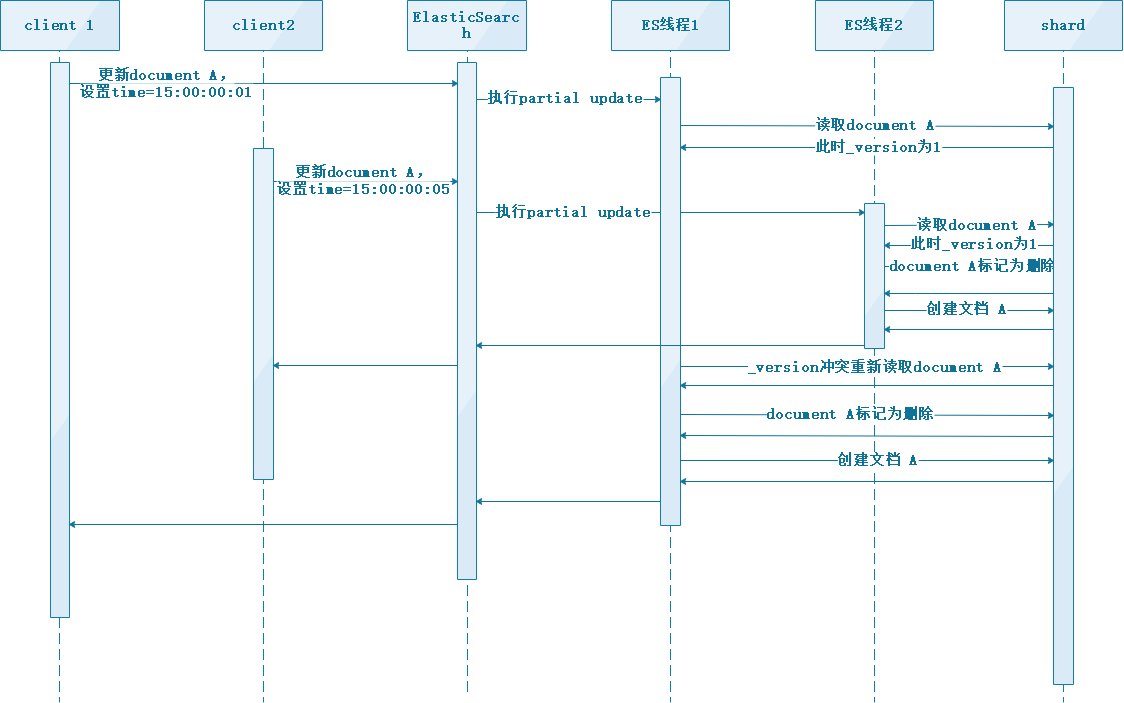
根据官方文档描述,默认retry_on_conflict为0,发生冲突时会直接失败

2.3.5 删除文档
DELETE /goods/_doc/1
输出:
{
  "_index" : "goods",
  "_type" : "_doc",
  "_id" : "1",
  "_version" : 9,
  "result" : "deleted",
  "_shards" : {
    "total" : 2,
    "successful" : 1,
    "failed" : 0
  },
  "_seq_no" : 11,
  "_primary_term" : 1
}
原理:
- ES并不会直接删除这个document,只是将这个document标记为deleted
- 标记为deleted的document将不能被检索到,此时老document并没有被物理删除
- es会在适当的时机在后台物理删除标记为deleted的document
GET /goods/_doc/1

输出:
{
  "_index" : "goods",
  "_type" : "_doc",
  "_id" : "1",
  "found" : false
}
2.3.6 检索文档(指定_source返回的fied)
GET /goods/_doc/1?_source=name,desc

{
  "_index" : "goods",
  "_type" : "_doc",
  "_id" : "1",
  "_version" : 4,
  "_seq_no" : 17,
  "_primary_term" : 5,
  "found" : true,
  "_source" : {
    "name" : "jiaqiangban gaolujie yagao",
    "desc" : "gaoxiao meibai"
  }
}
2.3.7 仅创建文档(如果文档已存在则报错)
PUT /goods/_doc/1?op_type=create
{
    "name" : "zhonghua yagao"
}

输出:
{
  "error" : {
    "root_cause" : [
      {
        "type" : "version_conflict_engine_exception",
        "reason" : "[1]: version conflict, document already exists (current version [4])",
        "index_uuid" : "_f8Bi42fTnymwg0vMsy4Kg",
        "shard" : "0",
        "index" : "goods"
      }
    ],
    "type" : "version_conflict_engine_exception",
    "reason" : "[1]: version conflict, document already exists (current version [4])",
    "index_uuid" : "_f8Bi42fTnymwg0vMsy4Kg",
    "shard" : "0",
    "index" : "goods"
  },
  "status" : 409
}
3. search API
3.1 query string search(字符串搜索)
- 传参方式:
请求行
- query string search命名由来
因为search参数都是通过http请求的query string传过来的
- 适用场景
在命令行临时使用,比如curl快速发出请求,来检索想要的信息; 对于复杂的查询,是很难去构建的 因此在生产环境中,几乎很少使用query string search
3.1.1 搜索全部
GET /goods/_search
输出:
{
  "took" : 0,
  "timed_out" : false,
  "_shards" : {
    "total" : 1,
    "successful" : 1,
    "skipped" : 0,
    "failed" : 0
  },
  "hits" : {
    "total" : {
      "value" : 3,
      "relation" : "eq"
    },
    "max_score" : 1.0,
    "hits" : [
      {
        "_index" : "goods",
        "_type" : "_doc",
        "_id" : "2",
        "_score" : 1.0,
        "_source" : {
          "name" : "jiajieshi yagao",
          "desc" : "youxiao fangzhu",
          "price" : 25,
          "producer" : "jiajieshi producer",
          "tags" : [
            "fangzhu"
          ]
        }
      },
      {
        "_index" : "goods",
        "_type" : "_doc",
        "_id" : "3",
        "_score" : 1.0,
        "_source" : {
          "name" : "zhonghua yagao",
          "desc" : "caoben zhiwu",
          "price" : 40,
          "producer" : "zhonghua producer",
          "tags" : [
            "qingxin"
          ]
        }
      },
      {
        "_index" : "goods",
        "_type" : "_doc",
        "_id" : "1_update",
        "_score" : 1.0,
        "_source" : {
          "doc" : {
            "name" : "mei bai zhong hua ya gao"
          }
        }
      }
    ]
  }
}
- took:耗费了几毫秒(为0的话表示缓存中有完整数据)
- timed_out:是否超时,这里是没有
- _shards:数据拆成了几个分片,所以对于搜索请求,会打到所有的primary - shard(或者是它的某个replica shard也可以)
- hits.total:查询结果包含多少条document
- hits.max_score:score的含义,就是document对于一个search的相关度的匹配分数,
相关度越高分数越高 - hits.hits:匹配的document的详细数据
3.1.2 根据条件搜索
搜索商品名称中包含yagao的商品,而且按照售价降序排序:
GET /goods/_search?q=name:yagao&sort=price:desc

输出:
{
  "took" : 1,
  "timed_out" : false,
  "_shards" : {
    "total" : 1,
    "successful" : 1,
    "skipped" : 0,
    "failed" : 0
  },
  "hits" : {
    "total" : {
      "value" : 2,
      "relation" : "eq"
    },
    "max_score" : null,
    "hits" : [
      {
        "_index" : "goods",
        "_type" : "_doc",
        "_id" : "3",
        "_score" : null,
        "_source" : {
          "name" : "zhonghua yagao",
          "desc" : "caoben zhiwu",
          "price" : 40,
          "producer" : "zhonghua producer",
          "tags" : [
            "qingxin"
          ]
        },
        "sort" : [
          40
        ]
      },
      {
        "_index" : "goods",
        "_type" : "_doc",
        "_id" : "2",
        "_score" : null,
        "_source" : {
          "name" : "jiajieshi yagao",
          "desc" : "youxiao fangzhu",
          "price" : 25,
          "producer" : "jiajieshi producer",
          "tags" : [
            "fangzhu"
          ]
        },
        "sort" : [
          25
        ]
      }
    ]
  }
}
3.1.3 包含与不包含
- 包含
GET /goods/_search?q=+name:yagao
name这个fied必须包含yagao才会返回 2. 不包含
GET /goods/_search?q=-name:yagao
name这个fied必须不包含yagao才会返回
3.2 query DSL(特定领域语言)
- 传参方式:
请求体
- DSL含义
Domain Specified Language,特定领域的语言
- DSL特点
以json格式构建查询语法,可以轻易构建各种复杂的语法,比query string search强大多了
3.2.1 查询所有
GET /goods/_search { "query": {"match_all": {}} }
3.2.2 简单条件查询
- 查询名称包含yagao的商品,同时按照价格降序排序
GET /goods/_search
{
  "query": {"match": {
    "name": "yagao"
  }},
  "sort": [
    {
      "price": "desc"
    }
  ]
}
- 分页查询商品,总共3条商品,每页显示2条商品,显示第2页
GET /goods/_search
{
  "query": {"match_all": {}}
  , "from": 1,
  "size": 2
}
- 指定要查询出来商品的名称和价格
GET /goods/_search
{
  "query": {"match_all": {}},
  "_source": ["name","price"]
}
3.2.3 query、filter
- 搜索商品名称包含yagao,而且售价大于25元的商品
GET /goods/_search { "query": { "bool": { "must": { "match":{ "name":"yagao" } }, "filter": { "range": { "price": {"gt": 25} } } } } }
- filter与query对比
- filter:仅仅只是按照搜索条件过滤出需要的数据而已,不计算任何相关度分数,对相关度没有任何影响
- query,会去计算每个document相对于搜索条件的相关度,并按照相关度进行排序
如果搜索需要将最匹配搜索条件的数据先返回,那么用query;如果只是要根据条件筛选出一部分数据,不关注其排序,那么用filter
- filter与query性能
- filter:不需要计算相关度分数,不需要按照相关度分数进行排序,同时还有内置cache自动缓存最常使用filter的数据
- query:相反,要计算相关度分数,按照分数进行排序,而且无法cache结果
3.2.4 full-text search(全文检索)
自带分词功能全文检索,返回根据根据_score排序
- 添加一条商品
PUT /goods/_doc/4
{
  "name":"special yagao",
  "desc":"special meibai",
  "price":50,
  "producer":"special yagao producer",
  "tags":["meibai"]
}
- 全文检索
GET /goods/_search
{
"query": {
    "match": {
      "name": "zhonghua yagao"
    }
  }
}

输出:
{
  "took" : 0,
  "timed_out" : false,
  "_shards" : {
    "total" : 1,
    "successful" : 1,
    "skipped" : 0,
    "failed" : 0
  },
  "hits" : {
    "total" : {
      "value" : 4,
      "relation" : "eq"
    },
    "max_score" : 1.3716825,
    "hits" : [
      {
        "_index" : "goods",
        "_type" : "_doc",
        "_id" : "3",
        "_score" : 1.3716825,
        "_source" : {
          "name" : "zhonghua yagao",
          "desc" : "caoben zhiwu",
          "price" : 40,
          "producer" : "zhonghua producer",
          "tags" : [
            "qingxin"
          ]
        }
      },
      {
        "_index" : "goods",
        "_type" : "_doc",
        "_id" : "2",
        "_score" : 0.110377684,
        "_source" : {
          "name" : "jiajieshi yagao",
          "desc" : "youxiao fangzhu",
          "price" : 25,
          "producer" : "jiajieshi producer",
          "tags" : [
            "fangzhu"
          ]
        }
      },
      {
        "_index" : "goods",
        "_type" : "_doc",
        "_id" : "4",
        "_score" : 0.110377684,
        "_source" : {
          "name" : "special yagao",
          "desc" : "special meibai",
          "price" : 50,
          "producer" : "special yagao producer",
          "tags" : [
            "meibai"
          ]
        }
      },
      {
        "_index" : "goods",
        "_type" : "_doc",
        "_id" : "1",
        "_score" : 0.09271726,
        "_source" : {
          "name" : "jiaqiangban gaolujie yagao",
          "desc" : "gaoxiao meibai",
          "price" : 30,
          "producer" : "gaolujie producer",
          "tags" : [
            "meibai",
            "fangzhu"
          ]
        }
      }
    ]
  }
}
3.2.5 phrase search(短语搜索)
phrase search与full text search的区别
- full text search:将搜索关键字分词,去倒排索引里匹配,只要能匹配上任意一个拆解后的单词,就会把这条document返回。
- phrase search:搜索关键字必须与filed完全匹配,才会把这条document返回
GET /goods/_search
{
"query": {
    "match": {
      "name": "zhonghua yagao"
    }
  }
}
输出:
{
  "took" : 8,
  "timed_out" : false,
  "_shards" : {
    "total" : 1,
    "successful" : 1,
    "skipped" : 0,
    "failed" : 0
  },
  "hits" : {
    "total" : {
      "value" : 1,
      "relation" : "eq"
    },
    "max_score" : 1.3716825,
    "hits" : [
      {
        "_index" : "goods",
        "_type" : "_doc",
        "_id" : "3",
        "_score" : 1.3716825,
        "_source" : {
          "name" : "zhonghua yagao",
          "desc" : "caoben zhiwu",
          "price" : 40,
          "producer" : "zhonghua producer",
          "tags" : [
            "qingxin"
          ]
        }
      }
    ]
  }
}
3.2.6 highlight search(高亮搜索结果)
GET /goods/_search
{
"query": {
    "match": {
      "name": "zhonghua yagao"
    }
  },
  "highlight": {
    "fields": {
      "name": {}
    }
  }
}

输出:
{
  "took" : 34,
  "timed_out" : false,
  "_shards" : {
    "total" : 1,
    "successful" : 1,
    "skipped" : 0,
    "failed" : 0
  },
  "hits" : {
    "total" : {
      "value" : 4,
      "relation" : "eq"
    },
    "max_score" : 1.3716825,
    "hits" : [
      {
        "_index" : "goods",
        "_type" : "_doc",
        "_id" : "3",
        "_score" : 1.3716825,
        "_source" : {
          "name" : "zhonghua yagao",
          "desc" : "caoben zhiwu",
          "price" : 40,
          "producer" : "zhonghua producer",
          "tags" : [
            "qingxin"
          ]
        },
        "highlight" : {
          "name" : [
            "<em>zhonghua</em> <em>yagao</em>"
          ]
        }
      },
      {
        "_index" : "goods",
        "_type" : "_doc",
        "_id" : "2",
        "_score" : 0.110377684,
        "_source" : {
          "name" : "jiajieshi yagao",
          "desc" : "youxiao fangzhu",
          "price" : 25,
          "producer" : "jiajieshi producer",
          "tags" : [
            "fangzhu"
          ]
        },
        "highlight" : {
          "name" : [
            "jiajieshi <em>yagao</em>"
          ]
        }
      },
      {
        "_index" : "goods",
        "_type" : "_doc",
        "_id" : "4",
        "_score" : 0.110377684,
        "_source" : {
          "name" : "special yagao",
          "desc" : "special meibai",
          "price" : 50,
          "producer" : "special yagao producer",
          "tags" : [
            "meibai"
          ]
        },
        "highlight" : {
          "name" : [
            "special <em>yagao</em>"
          ]
        }
      },
      {
        "_index" : "goods",
        "_type" : "_doc",
        "_id" : "1",
        "_score" : 0.09271726,
        "_source" : {
          "name" : "jiaqiangban gaolujie yagao",
          "desc" : "gaoxiao meibai",
          "price" : 30,
          "producer" : "gaolujie producer",
          "tags" : [
            "meibai",
            "fangzhu"
          ]
        },
        "highlight" : {
          "name" : [
            "jiaqiangban gaolujie <em>yagao</em>"
          ]
        }
      }
    ]
  }
}
可以看到yagao和zhonghua关键字旁边带上了<em>标签
3.2.7 agg(数据统计)
- 计算每个tags下的商品数量
GET /goods/_search
{
  "size": 0,
  "aggs": {
    "group_by_tags": {
      "terms": {
        "field": "tags"
      }
    }
  }
}
报错
"Text fields are not optimised for operations that require per-document field data like aggregations and sorting, so these operations are disabled by default. Please use a keyword field instead. Alternatively, set fielddata=true on [tags] in order to load field data by uninverting the inverted index. Note that this can use significant memory." 解决办法: 将tags的field的fielddata属性设置为true,即建立正排索引
PUT /goods/_mapping
{
  "properties":{
    "tags":{
      "type":"text",
      "fielddata":true
    }
  }
}
继续执行上面的统计tags请求
输出:
{
  "took" : 1,
  "timed_out" : false,
  "_shards" : {
    "total" : 1,
    "successful" : 1,
    "skipped" : 0,
    "failed" : 0
  },
  "hits" : {
    "total" : {
      "value" : 5,
      "relation" : "eq"
    },
    "max_score" : null,
    "hits" : [ ]
  },
  "aggregations" : {
    "group_by_tags" : {
      "doc_count_error_upper_bound" : 0,
      "sum_other_doc_count" : 0,
      "buckets" : [
        {
          "key" : "fangzhu",
          "doc_count" : 2
        },
        {
          "key" : "meibai",
          "doc_count" : 2
        },
        {
          "key" : "qingxin",
          "doc_count" : 1
        }
      ]
    }
  }
}
buckets:分组的结果 buckets.key:组名 buckets.doc_count:组名对应的document数量
- 名称中包含yagao的商品,计算每个tag下的商品数量
GET /goods/_search
{
  "size": 0,
  "query": {
    "match": {
      "name": "yagao"
    }
  },
  "aggs": {
    "group_by_tags": {
      "terms": {
        "field": "tags"
      }
    }
  }
}
- 根据tags分组,再算每组平均价格,根据平均价格降序排序
GET /goods/_search
{
  "size": 0,
  "aggs": {
    "group_by_tags": {
      "terms": {
        "field": "tags",
        "order": {
          "avg_price": "desc"
        }
      },
      "aggs": {
        "avg_price": {
          "avg": {
            "field": "price"
          }
        }
      }
    }
  }
}
输出:
{
  "took" : 3,
  "timed_out" : false,
  "_shards" : {
    "total" : 1,
    "successful" : 1,
    "skipped" : 0,
    "failed" : 0
  },
  "hits" : {
    "total" : {
      "value" : 5,
      "relation" : "eq"
    },
    "max_score" : null,
    "hits" : [ ]
  },
  "aggregations" : {
    "group_by_tags" : {
      "doc_count_error_upper_bound" : 0,
      "sum_other_doc_count" : 0,
      "buckets" : [
        {
          "key" : "meibai",
          "doc_count" : 2,
          "avg_price" : {
            "value" : 40.0
          }
        },
        {
          "key" : "qingxin",
          "doc_count" : 1,
          "avg_price" : {
            "value" : 40.0
          }
        },
        {
          "key" : "fangzhu",
          "doc_count" : 2,
          "avg_price" : {
            "value" : 27.5
          }
        }
      ]
    }
  }
}
- 按照指定的价格范围区间进行分组,然后在每组内再按照tag进行分组,最后再计算每组的平均价格
GET /goods/_search
{
  "size": 0,
  "aggs": {
    "group_by_price": {
      "range": {
        "field": "price",
        "ranges": [
          {
            "from": 0,
            "to":20
          },
          {
            "from": 20,
            "to":40
          }
        ]
      },
      "aggs": {
        "group_by_tags": {
          "terms": {
            "field": "tags"
          }
          , "aggs": {
            "average_price": {
              "avg": {
                "field": "price"
              }
            }
          }
        }
      }
    }
  }
}
