

参考文章以下文章,做了些笔记。
没完全写完,还在继续完善中。具体学习思路是,先看一波国内博客,有点大概的知识体系后再看官方文档。相关知识点和文章略微有点多,继续扣下去会可能打击自己的信心,所以现在先写成这样,我要开始去学习一些其他方面的知识了。后续会每隔1、2个星期的样子,再看1、2篇响应链相关的文章来继续完善这份笔记。
从触摸到响应,分2部分
- 寻找响应链
- 事件响应
响应链
寻找响应链
subViews数组倒叙查找
hitTest
判定条件
isHidden == falseuserInteractionEnabled == truealpha > 0.01- 满足以上条件,返回true,并且执行pointInside判断。
pointInside
改变响应链
预备知识
UITouch
UIKIT_EXTERN API_AVAILABLE(ios(2.0)) @interface UITouch : NSObject

@property(nonatomic,readonly) NSTimeInterval      timestamp;
@property(nonatomic,readonly) UITouchPhase        phase;
@property(nonatomic,readonly) NSUInteger          tapCount;   // touch down within a certain point within a certain amount of time
@property(nonatomic,readonly) UITouchType         type API_AVAILABLE(ios(9.0));

@property(nullable,nonatomic,readonly,strong) UIWindow                        *window;
@property(nullable,nonatomic,readonly,strong) UIView                          *view;
@property(nullable,nonatomic,readonly,copy)   NSArray <UIGestureRecognizer *> *gestureRecognizers API_AVAILABLE(ios(3.2));

- (CGPoint)locationInView:(nullable UIView *)view;
- (CGPoint)previousLocationInView:(nullable UIView *)view;
typedef NS_ENUM(NSInteger, UITouchType) {
    UITouchTypeDirect,                       // A direct touch from a finger (on a screen)
    UITouchTypeIndirect,                     // An indirect touch (not a screen)
    UITouchTypePencil API_AVAILABLE(ios(9.1)), // Add pencil name variant
    UITouchTypeStylus API_AVAILABLE(ios(9.1)) = UITouchTypePencil, // A touch from a stylus (deprecated name, use pencil)
} API_AVAILABLE(ios(9.0));
typedef NS_ENUM(NSInteger, UITouchPhase) {
    UITouchPhaseBegan,             // whenever a finger touches the surface.
    UITouchPhaseMoved,             // whenever a finger moves on the surface.
    UITouchPhaseStationary,        // whenever a finger is touching the surface but hasn't moved since the previous event.
    UITouchPhaseEnded,             // whenever a finger leaves the surface.
    UITouchPhaseCancelled,         // whenever a touch doesn't end but we need to stop tracking (e.g. putting device to face)
};
- 一个手指的第一次触摸屏幕,会形成一个UITouch对象,直到离开/取消。
- UITouchPhase
UITouchPhaseBegan开始触摸UITouchPhaseMoved移动UITouchPhaseStationary保持UITouchPhaseEnded离开UITouchPhaseCancelled被取消(手指没有结束触摸,但是系统需要停止追踪了。比如系统来电、Gesture手势识别成功。都会触发Cancelled)
UIEvent
UIKIT_EXTERN API_AVAILABLE(ios(2.0)) @interface UIEvent : NSObject

@property(nonatomic,readonly) UIEventType     type API_AVAILABLE(ios(3.0));
@property(nonatomic,readonly) UIEventSubtype  subtype API_AVAILABLE(ios(3.0));
@property(nonatomic,readonly) NSTimeInterval  timestamp;

@property(nonatomic, readonly, nullable) NSSet <UITouch *> *allTouches;
- 本文只讨论type为
UIEventTypeTouches的情况 - UIEventType
UIEventTypeTouches触摸事件UIEventTypeMotion动作事件UIEventTypeRemoteControl远程控制事件UIEventTypePresses(iOS9开始)
- 由多个UITouch组成
- 从第一个手指触摸,到最后一个手指离开屏幕。认定为一个UIEvent
- 综上,一个UIEvent就是一组UITouch
UI控件继承关系
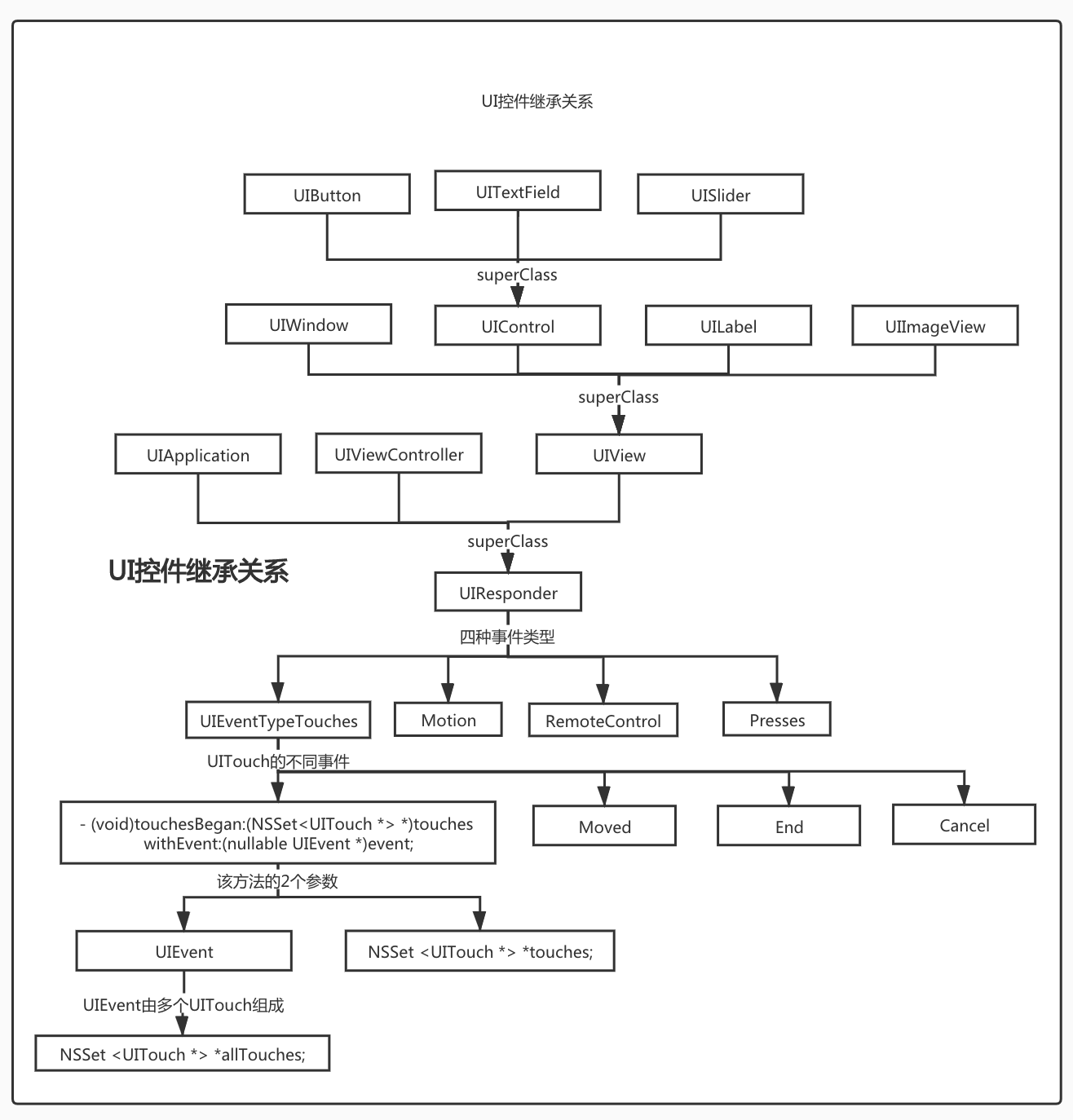
UIResponder
属性和方法
responder相关
@property(nonatomic, readonly, nullable) UIResponder *nextResponder;

@property(nonatomic, readonly) BOOL canBecomeFirstResponder;    // default is NO
- (BOOL)becomeFirstResponder;

@property(nonatomic, readonly) BOOL canResignFirstResponder;    // default is YES
- (BOOL)resignFirstResponder;

@property(nonatomic, readonly) BOOL isFirstResponder;
Event相关
//触摸事件
- (void)touchesBegan:(NSSet<UITouch *> *)touches withEvent:(nullable UIEvent *)event;
- (void)touchesMoved:(NSSet<UITouch *> *)touches withEvent:(nullable UIEvent *)event;
- (void)touchesEnded:(NSSet<UITouch *> *)touches withEvent:(nullable UIEvent *)event;
- (void)touchesCancelled:(NSSet<UITouch *> *)touches withEvent:(nullable UIEvent *)event;
- (void)touchesEstimatedPropertiesUpdated:(NSSet<UITouch *> *)touches NS_AVAILABLE_IOS(9_1);

//物理按钮,遥控器上面的按钮在按压状态等状态下的回调(这里不做讨论)
- (void)pressesBegan:(NSSet<UIPress *> *)presses withEvent:(nullable UIPressesEvent *)event NS_AVAILABLE_IOS(9_0);
- (void)pressesChanged:(NSSet<UIPress *> *)presses withEvent:(nullable UIPressesEvent *)event NS_AVAILABLE_IOS(9_0);
- (void)pressesEnded:(NSSet<UIPress *> *)presses withEvent:(nullable UIPressesEvent *)event NS_AVAILABLE_IOS(9_0);
- (void)pressesCancelled:(NSSet<UIPress *> *)presses withEvent:(nullable UIPressesEvent *)event NS_AVAILABLE_IOS(9_0);

//设备的陀螺仪和加速传感器使用(这里不做讨论)
- (void)motionBegan:(UIEventSubtype)motion withEvent:(nullable UIEvent *)event NS_AVAILABLE_IOS(3_0);
- (void)motionEnded:(UIEventSubtype)motion withEvent:(nullable UIEvent *)event NS_AVAILABLE_IOS(3_0);
- (void)motionCancelled:(UIEventSubtype)motion withEvent:(nullable UIEvent *)event NS_AVAILABLE_IOS(3_0);

//远程控制事件(这里不做讨论)
- (void)remoteControlReceivedWithEvent:(UIEvent *)event;
nextResponder可使用场景
可以通过nextResponder在响应链中,查找管理当前view或vc的控制器。
@implementation UIView (ParentController)
-(UIViewController*)parentController{
    UIResponder *responder = [self nextResponder];
    while (responder) {
    if ([responder isKindOfClass:[UIViewController class]]) {
        return (UIViewController*)responder;
    }
    responder = [responder nextResponder];
    }
    return nil;
}
@end
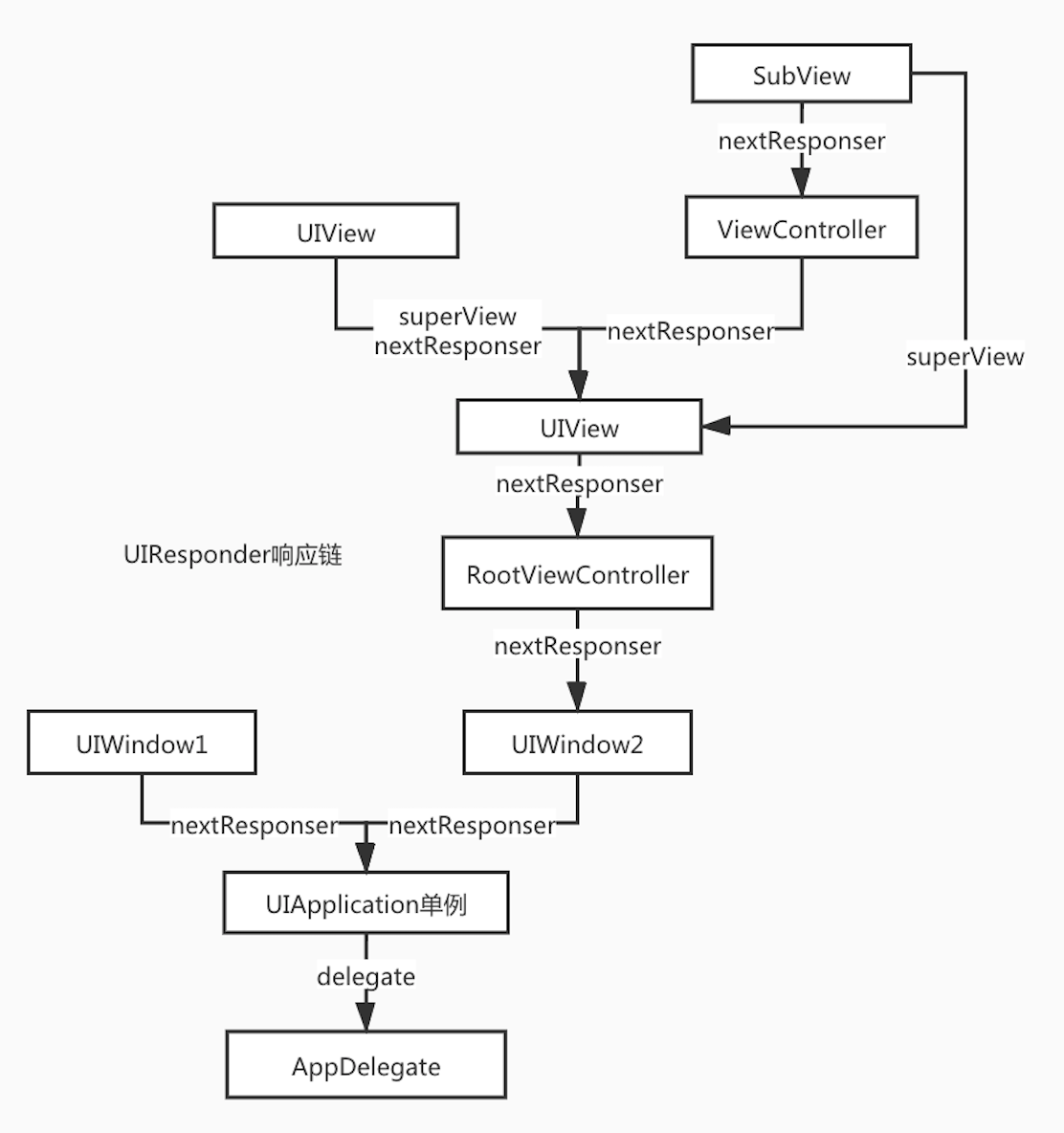
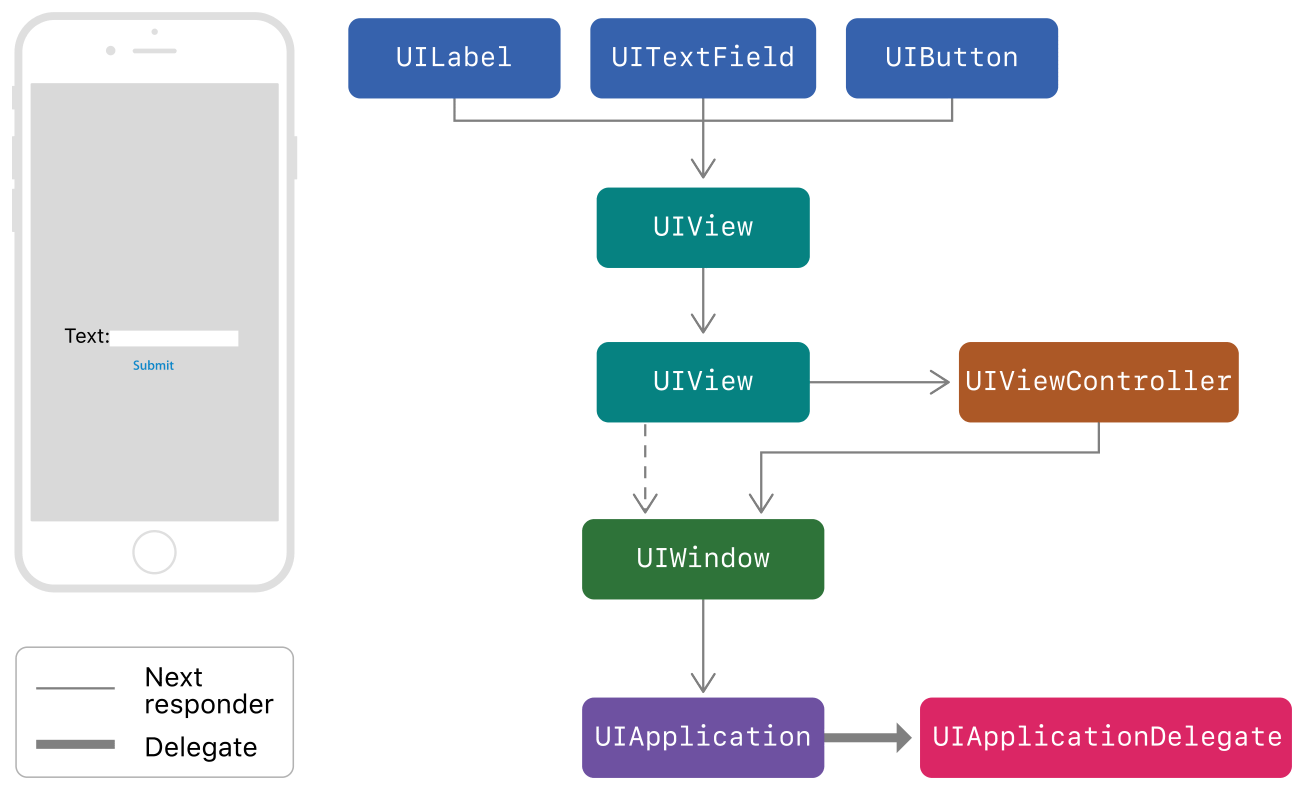
响应链/响应树
- 每条链是一个链表状结构,整个就是一棵树
- 链表的每个node都是一个UIResponder对象,所以响应链由UIResponder组成
响应链创建流程
- 1,程序启动
- App启动时,会创建UIApplication单例,并与UIAppDelegate关联起来。UIAppDelegate作为响应链的根建立起来。
- UIApplication.delegate = AppDelegate
- 2,创建UIWindow
- 任何UIWindow的创建,都会将nextResponder设置为UIApplication。
- UIWindow.nextResponder = UIApplication
- UIWindow创建RootViewController后,RootViewController.nextResponder = UIWindow
- 3,创建ViewController
- 执行
- (void)loadView方法时,vc的view的nextResponder会被设置为vc - vc.view.nextResponder = vc
- 执行
- 4,addSubView
- subView不是VC的view
- subView.nextResponder = superView
- subView是VC的view
- subView.nextResponder = subViewVC
- subViewVC.nextResponder = superView
- 若中途,subViewVC被释放,则会subView.nextResponder = superView
- subView不是VC的view
响应链构成
我的笔记
事件传递
- 只需要从响应树选择一条响应链,即可完成事件传递。
触摸硬件事件如何转化为UIEvent消息
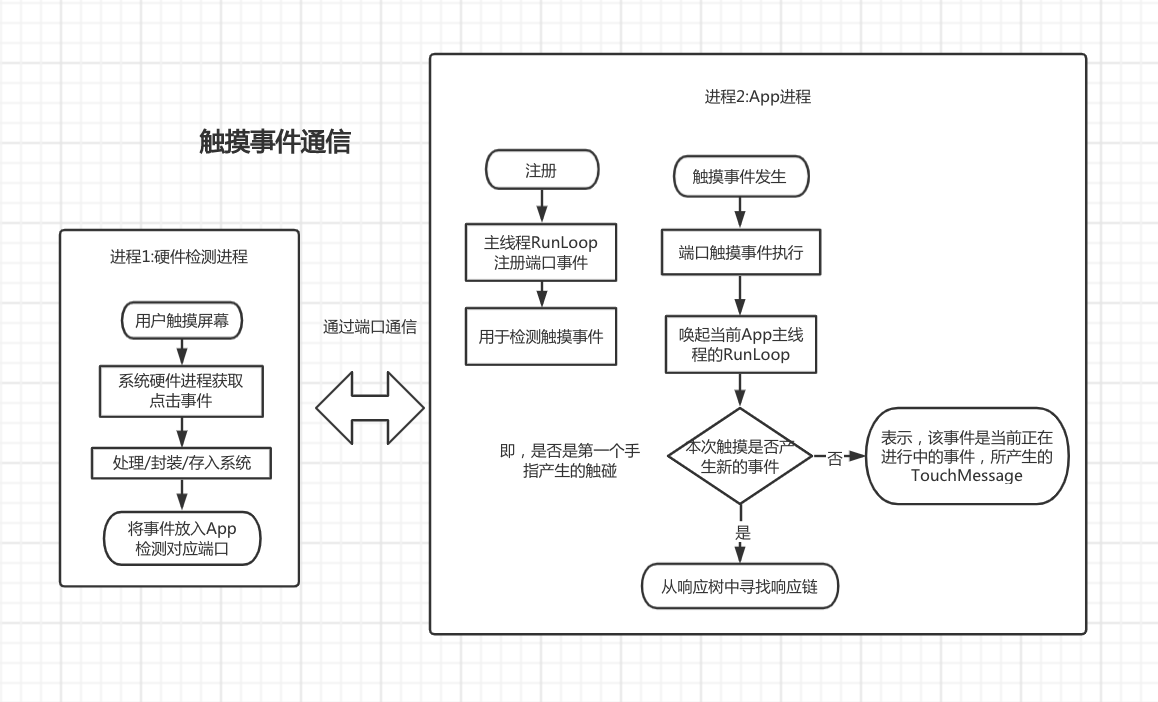
确定响应链
图示
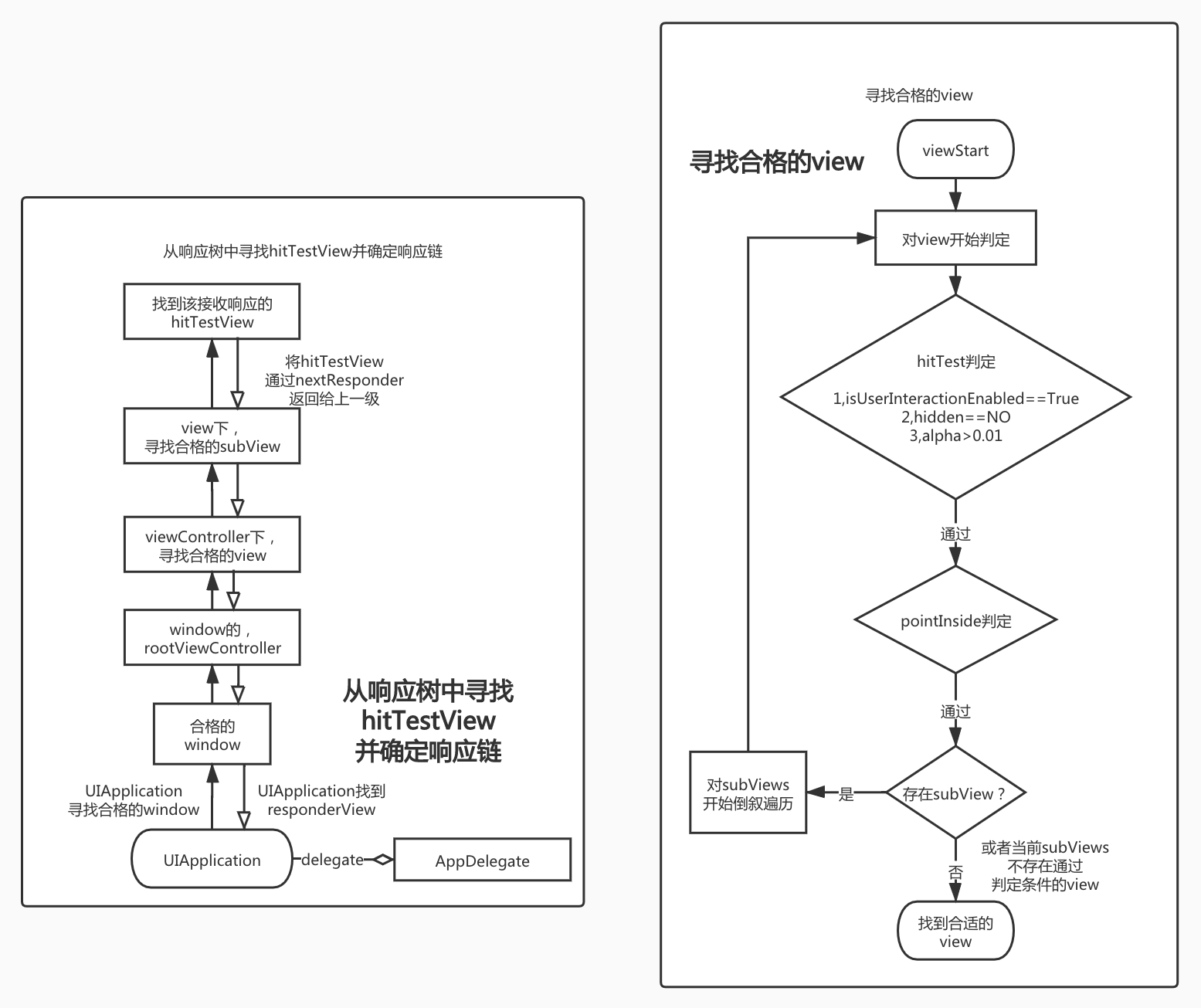
hitTest和内部实现
// 先判断点是否在View内部,然后遍历subViews
- (nullable UIView *)hitTest:(CGPoint)point withEvent:(nullable UIEvent *)event;
//判断点是否在这个View内部
- (BOOL)pointInside:(CGPoint)point withEvent:(nullable UIEvent *)event;   // default returns YES if point is in bounds
- (nullable UIView *)hitTest:(CGPoint)point withEvent:(nullable UIEvent *)event {
  //判断是否合格
    if (!self.hidden && self.alpha > 0.01 && self.isUserInteractionEnabled) {
        //判断点击位置是否在自己区域内部
        if ([self pointInside: point withEvent:event]) {
            UIView *attachedView;
            for (int i = self.subviews.count - 1; i >= 0; i--) {
                UIView *view  = self.subviews[i];
                //对子view进行hitTest
                attachedView =  [view hitTest:point withEvent:event];
                if (attachedView)
                    break;
            }
            if (attachedView)  {
                return attachedView;
            } else {
                return self;
            }
        }
    }
    return nil;
}
- 获取到hitTestView后,顺着hitTestView的nexrResponder,可以形成一条响应链
- 最后会指向AppDelegate,返回hitTestView后,系统会持有hitTestView。
- 事件不结束,hitTestView不会发生变化。手指触摸到屏幕后,即使移动到其他控件上,该事件始终绑定在hitTestView上。
- 手指离开屏幕,事件结束。再次点击,事件重新开始,以上过程再来一次。
技巧
- 可以通过pointInside来扩大按钮的点击区域。
// 将按钮的点击范围上下左右扩大10pt的范围,注意范围不要超出父视图的边界,超出范围依旧无效。
override func point(inside point: CGPoint, with event: UIEvent?) -> Bool {
    let newFrame = CGRect(x: bounds.origin.x - 10, y: bounds.origin.y - 10, width: bounds.size.width + 20, height: bounds.size.height + 20)
    return newFrame.contains(point)
}
- 可以通过hitTest来返回指定的view。
- 比如某个subview中心是透明圆形区域,点击该区域需要由superView来响应。
- (void)touchesBegan:(NSSet<UITouch *> *)touches withEvent:(nullable UIEvent *)event
{
    //do someThing
  [self.nextResponser touchesBegan: touches withEvent:event];
}
其他问题
Q:为什么hitTest会执行2次?
A:苹果的回复是,在这2次调用之间会做一些微调。并且调用2次不会有任何副作用。
UIGestureRecognizer 手势
官方手势判断图
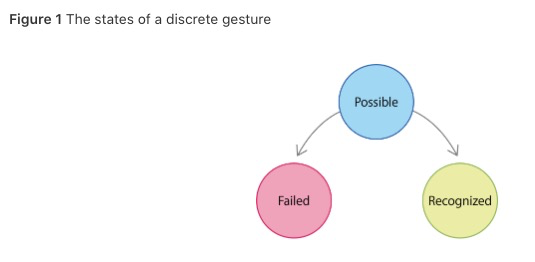
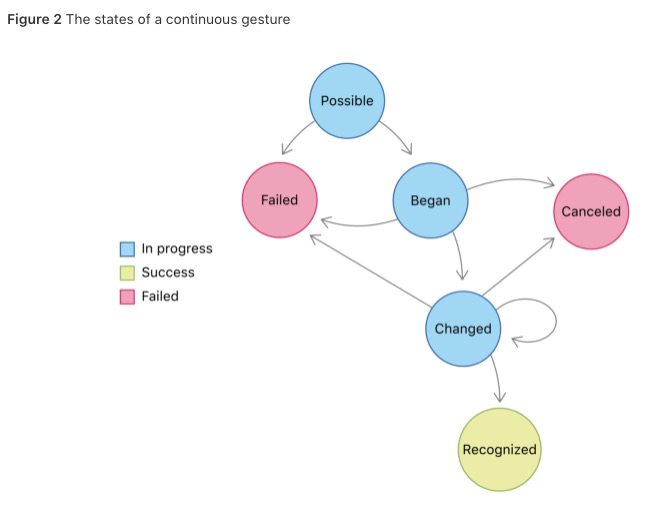
属性
@property(nonatomic) BOOL cancelsTouchesInView;       // default is YES. causes touchesCancelled:withEvent: or pressesCancelled:withEvent: to be sent to the view for all touches or presses recognized as part of this gesture immediately before the action method is called.
@property(nonatomic) BOOL delaysTouchesBegan;         // default is NO.  causes all touch or press events to be delivered to the target view only after this gesture has failed recognition. set to YES to prevent views from processing any touches or presses that may be recognized as part of this gesture
@property(nonatomic) BOOL delaysTouchesEnded;         // default is YES. causes touchesEnded or pressesEnded events to be delivered to the target view only after this gesture has failed recognition. this ensures that a touch or press that is part of the gesture can be cancelled if the gesture is recognized
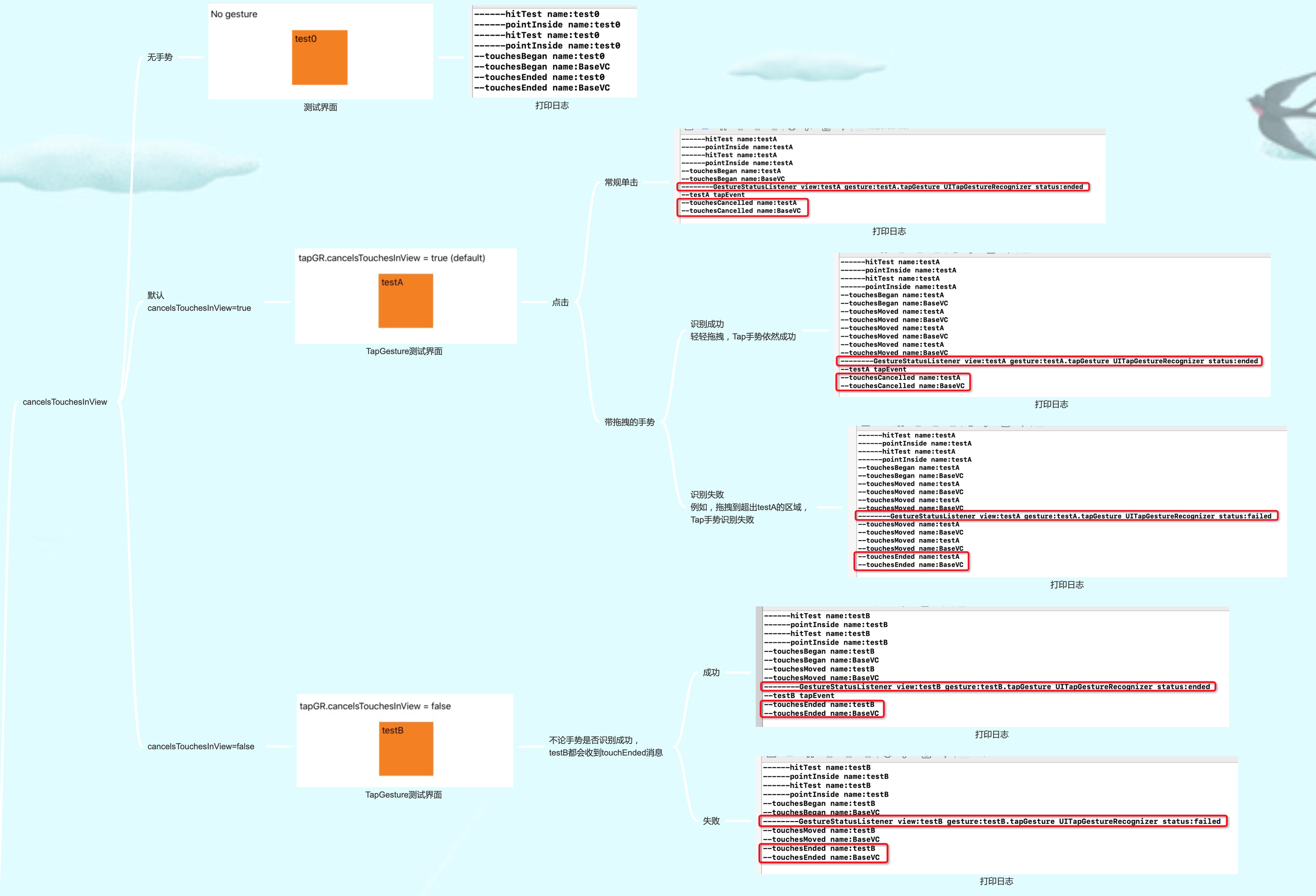
- cancelsTouchesInView
- 默认Yes,当手势识别了该事件,系统会将touchCancelled消息发送给nextResponder。并沿着nextResponder继续发送该消息
- No,当手势识别了该事件,系统会将touchEnded消息发送给nextResponder。并沿着nextResponder继续发送该消息
- 使用场景:
- 1,UIButton上,添加手势。希望手势和UIButton的事件都执行,设置
cancelsTouchesInView = false即可 - 2,比如该View原本有一套完整的touchMessage处理方法,我既想手势能成功识别,也想原有的touchMessage不作任何改动。那么就可以用该属性。
- 1,UIButton上,添加手势。希望手势和UIButton的事件都执行,设置
-
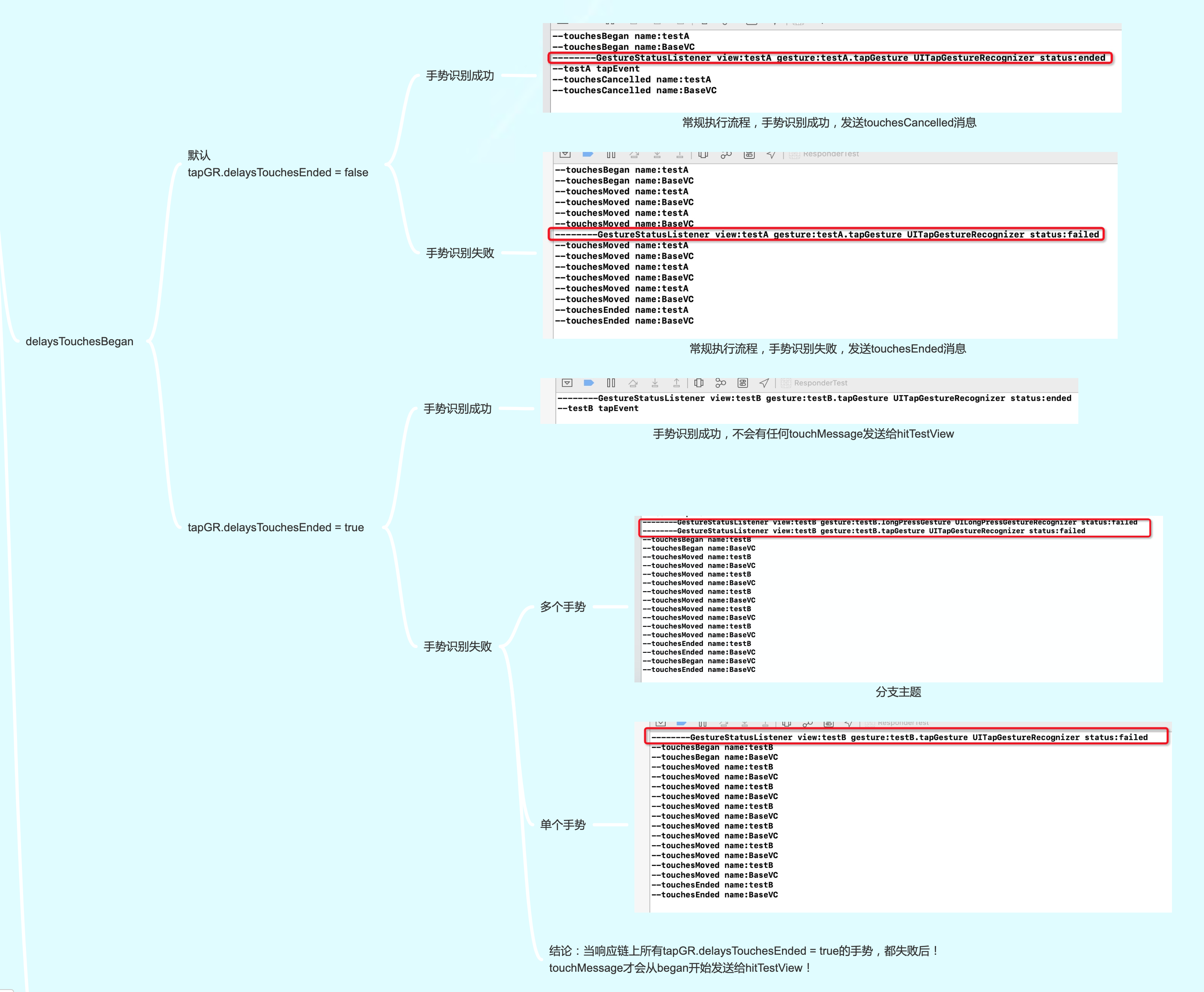
delaysTouchesBegan
- 默认NO,
- Yes,当响应链上所有tapGR.delaysTouchesEnded = true的手势,都失败后!所有的触摸消息才会依次发送给nextResponder。
- 使用场景:比如我想Gesture所有的状态改变和TouchMessage从调用时序上完全隔离开来去处理。那么就可以用该属性。
-
delaysTouchesEnded
- 默认为Yes, 和delaysTouchesBegan类似,不过它是用来控制TouchEnd message的拦截
- 不过实测发现没有什么实际用处。(如果有人知道这个属性怎么使用,如何测试的话,可以评论区提醒我一下。)
图解
思考
- UIReponder中的touchesCancelled什么时候会被gesture触发
- 常规情况下,gesture的state变为began或ended时,会被触发
- 注意:
- tap只有ended或failed状态
- 其他手势如果有began,则会因为began被触发,后面变为ended时则不再触发
- 这里的触发,即给nextResponder发送touchMessage
UIControl
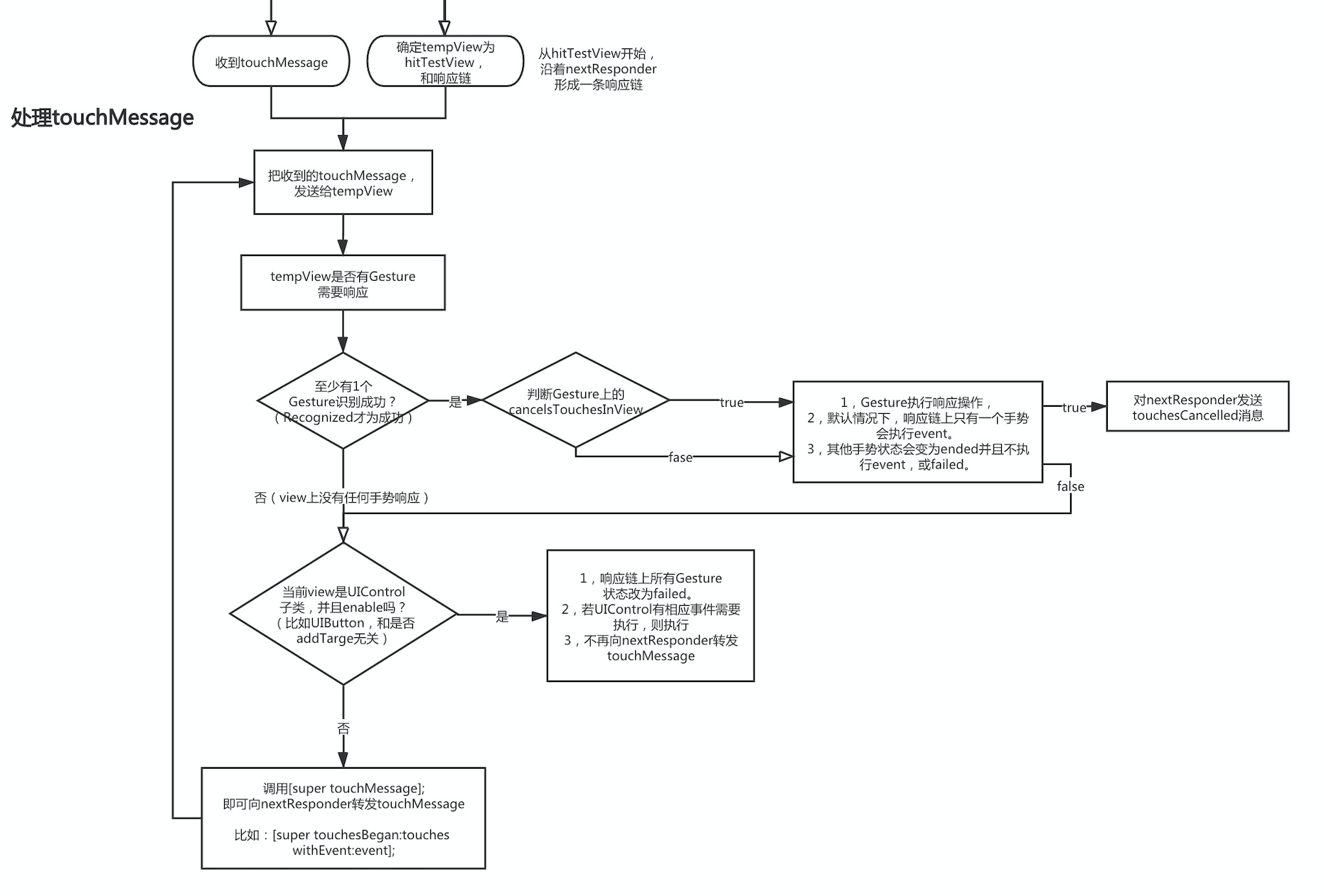
UIControl,UIGestureRecognizer响应图解
概述
- 同一个view上,优先响应UIGestureRecognizer,其次响应UIControl,
- 但是UIControl优先级高于nextResponder上的UIGestureRecognizer
- UIControl不会持有addTarget中的target
- target若为nil,则沿着nextResponder去寻找能响应的selector,并执行
- 添加多次addTarget,所有的selector都会执行。
苹果官网说明
- 文档链接
- 明天来翻译一下!!!!!!!
