

前言
本文主要分析并实践插件发布示例,然后再由插件何时加载探索到Flutter App启动源码。
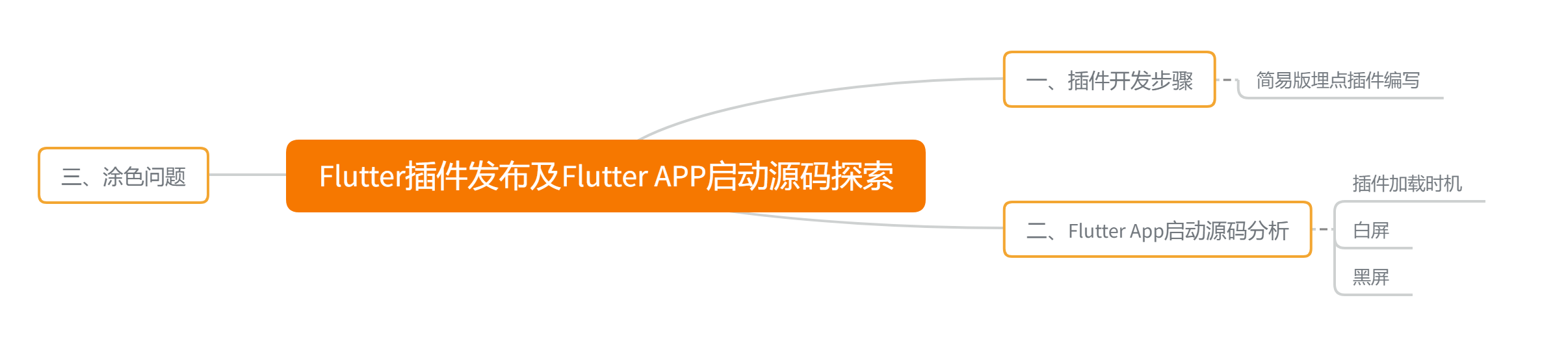
主要解决三个问题:插件编写和发布、插件加载时机、黑屏/白屏原因
ps:篇幅过长,需要耐心
环境:
Dart 2.8.4
Flutter 1.17.3
参考资料
目录
一、插件开发步骤
Android Studio -> New Flutter Project 选择 Flutter Plugin
创建后如下图
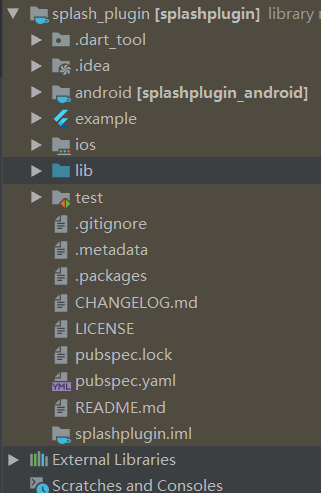
可以看出插件和Flutter工程其实一样,目录中就多了一个example (示例测试工程可用于插件的调试)。我们写插件的话,一般 代码写在 android或者ios下,Flutter代码写道lib下,其实和Flutter与Native通信一样,相当于你封装了功能,外部调用而已。
原生端开发
android模块下 或者是 ios模块下,和原生开发一样,集成与Flutter通信类代码,具体使用见上篇文章
Flutter端开发
见上篇文章讲解
配置文件 pubspec.yaml
如果你的Flutter代码依赖于第三方库,需要在这里面配置,如果里面有依赖A 、B,A里面依赖了C的1.0版本,B里面依赖了C的2.0版本,你可以直接在pubspec.yaml中指定依赖C的版本号。
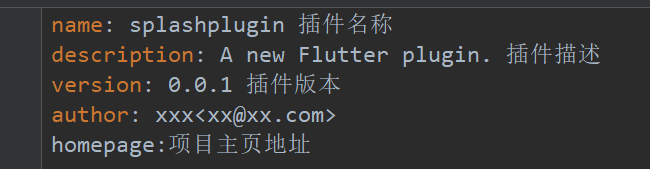
在该文件内对插件进行介绍
其它配置
在CHANGELOG.md中添加Change记录 可以查看其它插件是如何编写的 Dart Packages 随便找个插件,依葫芦画瓢
在README.md中添加使用说明
LICENSE 包含软件包许可条款的文件
检查我们项目的目录结构以及语法,以确保其内容的完整性和正确性
flutter packages pub pusblish --dry-run发布插件
想要发布插件,第一步需要有一个账号(谷歌账号)
接下来执行,发布到Pub平台
flutter packages pub publish在第一次执行过程中,会提示让你输入账户验证信息。
如果想发布到私服,可以使用
flutter packages pub publish --server==私服地址接下来就可以将项目内的埋点功能作为插件进行封装,下面举个例子,来实现Flutter调原生方法,原生方法内就需要我们自己实现一些埋点功能。大佬们可以直接忽略本小点,笔者是渣渣,要多努力实现一下。
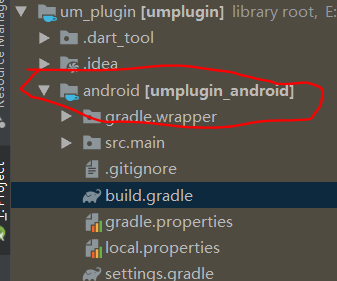
用AS打开android模块,我们可以看到目录下创建了UmpluginPlugin.kt文件,自行查阅插件的main.dart代码和该部分代码就可以发现,Flutter与Native利用MethodChannel进行通信,获取Android的Build.VERSION。
首先是Native端
PluginProxy类,业务逻辑都交给它处理,因为想着有些日志需要存到本地,到一定时候才上传的,所以实现了LifecycleCallbacks和权限回调,dart可以调用来触发,这里只关于uploadLog方法
public class PluginProxy implements Application.ActivityLifecycleCallbacks,PluginRegistry.RequestPermissionsResultListener { private final Context context; private final Application application; public PluginProxy(PluginRegistry.Registrar registrar) { this.context = registrar.context(); this.application = (Application) context; } public void uploadLog(MethodCall call,MethodChannel.Result result){ Object message = call.arguments(); if(message instanceof String) { Toast.makeText(application, (String) message, Toast.LENGTH_SHORT).show(); result.success("Native uploadLog Ok !"); } } @Override public void onActivityCreated(Activity activity, Bundle savedInstanceState) { } @Override public void onActivityStarted(Activity activity) { } @Override public void onActivityResumed(Activity activity) { } @Override public void onActivityPaused(Activity activity) { } @Override public void onActivityStopped(Activity activity) { } @Override public void onActivitySaveInstanceState(Activity activity, Bundle outState) { } @Override public void onActivityDestroyed(Activity activity) { application.unregisterActivityLifecycleCallbacks(this); } @Override public boolean onRequestPermissionsResult(int requestCode, String[] permissions, int[] grantResults) { return false; } }FlutterUmDemoPlugin类,你可以按照exmaple中的例子写插件,写完运行example就行了,也可以按照我这种方式写
public class FlutterUmDemoPlugin implements MethodChannel.MethodCallHandler,FlutterPlugin { private PluginProxy proxy; public FlutterUmDemoPlugin(){ } private FlutterUmDemoPlugin( PluginProxy proxy) { this.proxy = proxy; } public static void registerWith(PluginRegistry.Registrar registrar) { MethodChannel channel = new MethodChannel(registrar.messenger(), "umplugin"); PluginProxy proxy = new PluginProxy(registrar.context()); channel.setMethodCallHandler(new FlutterUmDemoPlugin( proxy)); } @Override public void onMethodCall(@NonNull MethodCall call, @NonNull MethodChannel.Result result) { if (call.method.equals("uploadLog")) { proxy.uploadLog(call, result); } else { result.notImplemented(); } } @Override public void onAttachedToEngine(@NonNull FlutterPluginBinding binding) { MethodChannel channel = new MethodChannel(binding.getBinaryMessenger(), "umplugin"); PluginProxy proxy = new PluginProxy(binding.getApplicationContext()); channel.setMethodCallHandler(new FlutterUmDemoPlugin(proxy)); } @Override public void onDetachedFromEngine(@NonNull FlutterPluginBinding binding) { } } 在创建插件工程时,app里自动生成的 UmpluginPlugin 类 中以下两个方法加入如下代码
    companion object {
        @JvmStatic
        fun registerWith(registrar: Registrar) {
//            val channel = MethodChannel(registrar.messenger(), "umplugin")
//            channel.setMethodCallHandler(UmpluginPlugin())
//以下为加入
            FlutterUmDemoPlugin.registerWith(registrar)
        }
    }
override fun onAttachedToEngine(@NonNull flutterPluginBinding: FlutterPlugin.FlutterPluginBinding) { // channel = MethodChannel(flutterPluginBinding.getFlutterEngine().getDartExecutor(), "umplugin") // channel.setMethodCallHandler(this); //加入 var plugin = FlutterUmDemoPlugin(); plugin.onAttachedToEngine(flutterPluginBinding); }Dar端
class UmDemoPlugin { static const MethodChannel _channel = const MethodChannel("umplugin"); static Future<String> uploadLog(String message) async { return await _channel.invokeMethod("uploadLog", message); } } 接下来就是在项目测试一下
导入本地依赖,下面的写法如果不行,那么你就换成绝对路径,例如 E:\xx\plugin\
 dependencies:
 # ....
 umplugin:
    path: ../um_plugin/
项目里接入
    floatingActionButton: FloatingActionButton(
            onPressed: _upload(),
            child: Icon(Icons.add),
          ),

Future<void>_upload() async {
    String message= await UmDemoPlugin.uploadLog("Flutter发起上传日志") ;
    setState(() {
      _counter = message;
    });
  }
效果如下
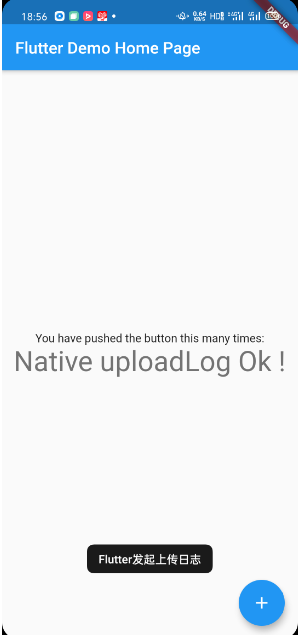
二、Flutter启动源码分析
这节主要是为了了解插件是什么时候注册的,带着这个问题顺带了解了另一个问题
创建Flutter后,在Android中生成的GeneratePluginRegistrant,里面注册插件registerWith方法是什么时候调用注册的
Flutter App启动后,黑屏是如何造成的
1、APP启动回顾
首先回顾一下App启动时,Application创建和Activity创建过程的主要调用的生命周期方法,具体源码分析看 AOSP Android8.0冷启动流程分析

这里再简单说一下,Application会去读取AndroidManifest.xml配置的Application,除非没有,否则执行的是你设置的Application
2、FlutterApplication分析
我们从创建的Flutter工程Android模块,可以看到,AndroidManifest.xml的application节点如下

所以我们这里按照原生App启动流程分析一下,主要就是看FlutterApplication的onCreate到底做了些什么
public class FlutterApplication extends Application {
@Override
@CallSuper
public void onCreate() {
super.onCreate();
FlutterMain.startInitialization(this);
}
private Activity mCurrentActivity = null;
public Activity getCurrentActivity() {
return mCurrentActivity;
}
public void setCurrentActivity(Activity mCurrentActivity) {
this.mCurrentActivity = mCurrentActivity;
}
}可以看到onCreate中执行了 FlutterMain 中的静态发方法 startInitialization(this)
public static void startInitialization(@NonNull Context applicationContext) {
    if (isRunningInRobolectricTest) {
      return;
    }
    FlutterLoader.getInstance().startInitialization(applicationContext);
  }
接下来它会执行 FlutterLoader 的 startInitialization(applicationContext)
public void startInitialization(@NonNull Context applicationContext) {
startInitialization(applicationContext, new Settings());
}
public void startInitialization(@NonNull Context applicationContext, @NonNull Settings settings) {
// Do not run startInitialization more than once.
if (this.settings != null) {
return;
}
if (Looper.myLooper() != Looper.getMainLooper()) {
throw new IllegalStateException("startInitialization must be called on the main thread");
}
// Ensure that the context is actually the application context.
applicationContext = applicationContext.getApplicationContext();
this.settings = settings;
long initStartTimestampMillis = SystemClock.uptimeMillis();
initConfig(applicationContext);
initResources(applicationContext);
System.loadLibrary("flutter");
VsyncWaiter.getInstance(
(WindowManager) applicationContext.getSystemService(Context.WINDOW_SERVICE))
.init();
// We record the initialization time using SystemClock because at the start of the
// initialization we have not yet loaded the native library to call into dart_tools_api.h.
// To get Timeline timestamp of the start of initialization we simply subtract the delta
// from the Timeline timestamp at the current moment (the assumption is that the overhead
// of the JNI call is negligible).
long initTimeMillis = SystemClock.uptimeMillis() - initStartTimestampMillis;
FlutterJNI.nativeRecordStartTimestamp(initTimeMillis);
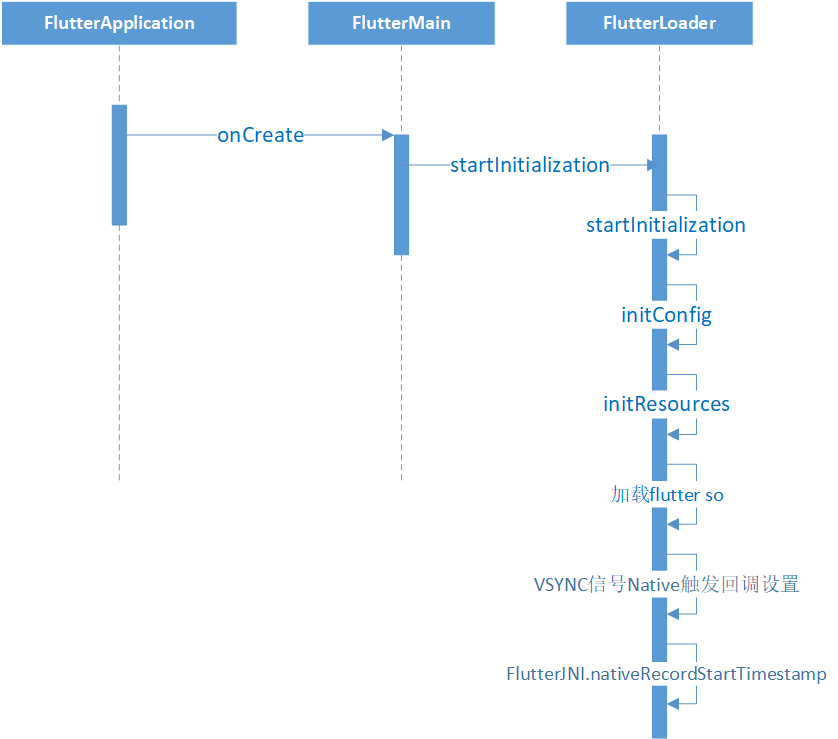
} 在 startInitialization 方法中,我们可以看到首先通过判断 settings是否为空 来保证方法执行一次
然后接下来就是检查是否主线程
再然后就是调用 initConfig 方法,读取manifest中meteData配置,初始化配置信息
然后调用initResources 来初始化在 调试 或者 JIT模式 下的一些变量,包括数据存储路径和packageName等,然后执行ResourceExtractor的start方法,拷贝asset目录下的相关资源到私有目录下 (路径地址 :applicationContext.getDir("flutter", Context.MODE_PRIVATE).getPath() )
再接下来就是通过Sytem.loadLibrary("flutter")加载so库
再然后就是通过VsyncWaiter的 init 方法调用 FlutterJNI.setAsyncWaitForVsyncDelegate(asyncWaitForVsyncDelegate) 主要是用来收到系统VSYNC信号后,调用doFrame来更新UI
最后就是调用 FlutterJNI.nativeRecordStartTimestamp(initTimeMillis) 来通知初始化耗时时间了
最后来个时序图
3、FlutterActivity 分析
按照步骤,分析完FlutterApplication,下一步就应该是配置的启动Activity分析,同样先看一下AndroidManifest.xml
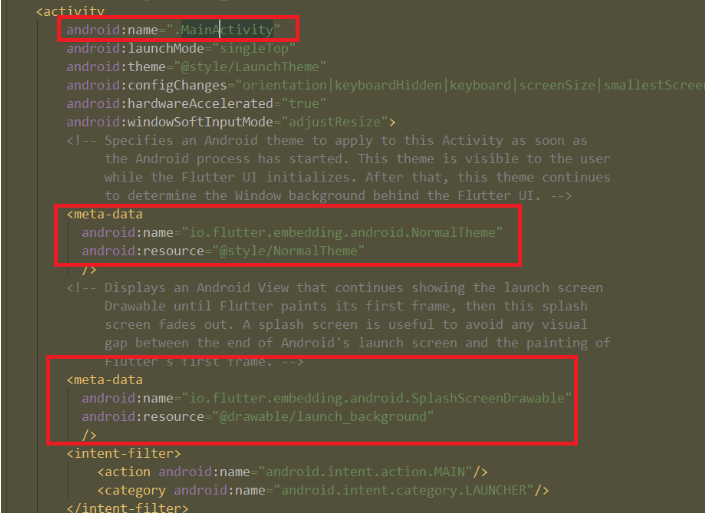
点击MainActivity可以看出,它是继承的 FlutterActivity
class MainActivity: FlutterActivity() {
}
是不是看完会想,怎么都没实现方法呢,那肯定都是FlutterActivity实现了,包括布局创建
3.1、查看 FlutterActivity 的 onCreate 方法
@Override
protected void onCreate(@Nullable Bundle savedInstanceState) {
switchLaunchThemeForNormalTheme(); //这个就是获取清单文件里面配置的NormalTheme,设置一下
super.onCreate(savedInstanceState);
lifecycle.handleLifecycleEvent(Lifecycle.Event.ON_CREATE);
delegate = new FlutterActivityAndFragmentDelegate(this);
delegate.onAttach(this);
delegate.onActivityCreated(savedInstanceState);
configureWindowForTransparency();
setContentView(createFlutterView());
configureStatusBarForFullscreenFlutterExperience(); //据当前系统版本来设置沉浸式状态栏
}可以看到布局创建和配置相关操作在这里,接下来分析下主要方法,次要方法都在代码中进行说明
3.2、 FlutterActivityAndFragmentDelegate 的 onAttach 方法
从之前的代码可以看到,在onCreate中先创建了 FlutterActivityAndFragmentDelegate,并把 this 传给了该类的持有的Host类型的host变量,接下来才是调用onAttach方法,至于它的onActivityCreated方法就是恢复一些state状态,和Activity的作用一样,只是作用对象不一样而已。
void onAttach(@NonNull Context context) {
ensureAlive();
if (flutterEngine == null) {
setupFlutterEngine();
}
platformPlugin = host.providePlatformPlugin(host.getActivity(), flutterEngine);
if (host.shouldAttachEngineToActivity()) { // 这个默认是true的
Log.v(TAG, "Attaching FlutterEngine to the Activity that owns this Fragment.");
flutterEngine
.getActivityControlSurface()
.attachToActivity(host.getActivity(), host.getLifecycle()); // 绑定生命周期
}
host.configureFlutterEngine(flutterEngine);
}a、先看ensureAlive方法,主要是通过 host 变量是否是为空来判断 FlutterActivityAndFragmentDelegate 没有被释放,那什么时候释放呢,onDetch 的时候,这里目前不是重点。如果该类释放了,就会抛异常。
b、接下来是setupFlutterEngine方法,第一次进来肯定是需要执行的,这里主要是获得FlutterEngine,这里会先通过从缓存里根据cacheEngineId获取FlutterEngine,如果没有的话,就会调用FlutterActivity的provideFlutterEngine 看看开发者实现了获取FlutterEngine,再没有就是直接new FlutterEngine,详细查看下面代码
@VisibleForTesting
/* package */ void setupFlutterEngine() {
// First, check if the host wants to use a cached FlutterEngine.
String cachedEngineId = host.getCachedEngineId();
if (cachedEngineId != null) {
flutterEngine = FlutterEngineCache.getInstance().get(cachedEngineId);
isFlutterEngineFromHost = true;
if (flutterEngine == null) {
throw new IllegalStateException(
"The requested cached FlutterEngine did not exist in the FlutterEngineCache: '"
+ cachedEngineId
+ "'");
}
return;
}
// Second, defer to subclasses for a custom FlutterEngine.
flutterEngine = host.provideFlutterEngine(host.getContext());
if (flutterEngine != null) {
isFlutterEngineFromHost = true;
return;
}
flutterEngine =
new FlutterEngine(
host.getContext(),
host.getFlutterShellArgs().toArray(),
/*automaticallyRegisterPlugins=*/ false);
isFlutterEngineFromHost = false;
}c、再接下来会调用 FlutterActivity 的 configureFlutterEngine 方法,猜猜这个方法主要做了些什么
  @Override
  public void configureFlutterEngine(@NonNull FlutterEngine flutterEngine) {
    registerPlugins(flutterEngine);
  }
    private static void registerPlugins(@NonNull FlutterEngine flutterEngine) {
    try {
      Class<?> generatedPluginRegistrant =
          Class.forName("io.flutter.plugins.GeneratedPluginRegistrant");
      Method registrationMethod =
          generatedPluginRegistrant.getDeclaredMethod("registerWith", FlutterEngine.class);
      registrationMethod.invoke(null, flutterEngine);
    } catch (Exception e) {
      Log.w(
          TAG,
          "Tried to automatically register plugins with FlutterEngine ("
              + flutterEngine
              + ") but could not find and invoke the GeneratedPluginRegistrant.");
    }
  }
反射调用了 GeneratedPluginRegistrant 的 registerWith 方法 加载插件。
3.3、configureWindowForTransparency 方法
给Window设置透明背景
  private void configureWindowForTransparency() {
    BackgroundMode backgroundMode = getBackgroundMode();
    if (backgroundMode == BackgroundMode.transparent) {
      getWindow().setBackgroundDrawable(new ColorDrawable(Color.TRANSPARENT));
    }
  }
3.4、setContentView(createFlutterView()) 方法
这里主要就是 createFlutterView 方法,接下来就是和Activity一样的操作 setContentView 创建 View相关绘制对象,显示界面
  @NonNull
  private View createFlutterView() {
    return delegate.onCreateView(
        null /* inflater */, null /* container */, null /* savedInstanceState */);
  }
可以看到,创建FlutterView的过程交给了 FlutterActivityAndFragmentDelegate ,方法如下
@NonNull
View onCreateView(
LayoutInflater inflater, @Nullable ViewGroup container, @Nullable Bundle savedInstanceState) {
ensureAlive();
if (host.getRenderMode() == RenderMode.surface) { // A
FlutterSurfaceView flutterSurfaceView =
new FlutterSurfaceView(
host.getActivity(), host.getTransparencyMode() == TransparencyMode.transparent);
// Allow our host to customize FlutterSurfaceView, if desired.
host.onFlutterSurfaceViewCreated(flutterSurfaceView);
// Create the FlutterView that owns the FlutterSurfaceView.
flutterView = new FlutterView(host.getActivity(), flutterSurfaceView);
} else {
FlutterTextureView flutterTextureView = new FlutterTextureView(host.getActivity());
// Allow our host to customize FlutterSurfaceView, if desired.
host.onFlutterTextureViewCreated(flutterTextureView);
// Create the FlutterView that owns the FlutterTextureView.
flutterView = new FlutterView(host.getActivity(), flutterTextureView);
}
// Add listener to be notified when Flutter renders its first frame.
flutterView.addOnFirstFrameRenderedListener(flutterUiDisplayListener); // B
flutterSplashView = new FlutterSplashView(host.getContext());
if (Build.VERSION.SDK_INT >= Build.VERSION_CODES.JELLY_BEAN_MR1) {
flutterSplashView.setId(View.generateViewId());
} else {
flutterSplashView.setId(486947586);
}
// C
flutterSplashView.displayFlutterViewWithSplash(flutterView, host.provideSplashScreen());
Log.v(TAG, "Attaching FlutterEngine to FlutterView.");
flutterView.attachToFlutterEngine(flutterEngine);
return flutterSplashView;
}a、我们按方法内代码从上往下分析,首先看一下 A 处的host.getRenderMode() == RenderMode.surface 这个判端默认是true
  @NonNull
  @Override
  public RenderMode getRenderMode() {
    return getBackgroundMode() == BackgroundMode.opaque ? RenderMode.surface : RenderMode.texture;
  }
    /** The mode of the background of a Flutter {@code Activity}, either opaque or transparent. */
  public enum BackgroundMode {
    /** Indicates a FlutterActivity with an opaque background. This is the default. */
    opaque,
    /** Indicates a FlutterActivity with a transparent background. */
    transparent
  }
FlutterTextureView和FlutterSurfaceView 的区别在于一个是在SurfaceTexture (从图像流中捕获帧作为OpenGL ES纹理)上绘制UI,一个是在Surface (处理到由屏幕合成到缓冲区的数据)上绘制UI
b、接下来看 B 处的 flutterView.addOnFirstFrameRenderedListener(flutterUiDisplayListener) 这里主要是用来设置监听事件,通知Android 我们已经绘制完毕
c、接下来看 C 处 代码,这里是重点。 flutterSplashView.displayFlutterViewWithSplash(flutterView, host.provideSplashScreen())
首先看这个方法内的 host.provideSplashScreen()
  public SplashScreen provideSplashScreen() {
    Drawable manifestSplashDrawable = getSplashScreenFromManifest();
    if (manifestSplashDrawable != null) {
      return new DrawableSplashScreen(manifestSplashDrawable);
    } else {
      return null;
    }
  }
还记得之前的AndroidManifest.xml 中的 meta_data 配置吗,getSplashScreenFromManifest 方法就是将 launch_background.xml (默认白的,这也就是出现白屏的问题) 转换成Drawable,主要是用来做闪屏背景图的,这里仅仅是获取到了闪屏Drawable,如果没有呢?没有那么这个闪屏页不就没有了么?那就是说启动的时候连闪个白屏都会不给机会,直接给黑屏。那么什么时候会没有,也就是meta_data啥时候会没有配置,创建flutter_module的时候就没有配置。
再跟踪 displayFlutterViewWithSplash 方法看看,下面贴出来的是主要代码
public void displayFlutterViewWithSplash( @NonNull FlutterView flutterView, @Nullable SplashScreen splashScreen) { //.... // Display the new FlutterView. this.flutterView = flutterView; addView(flutterView); // flutterView是一个FrameLayout,添加到FlutterSplashView中,onCreateView方法也是将splashView返回,然后setContetnView添加到DecorView中的 this.splashScreen = splashScreen; // Display the new splash screen, if needed. if (splashScreen != null) { if (isSplashScreenNeededNow()) { // A splashScreenView = splashScreen.createSplashView(getContext(), splashScreenState); addView(this.splashScreenView); flutterView.addOnFirstFrameRenderedListener(flutterUiDisplayListener); } else if (isSplashScreenTransitionNeededNow()) { // B splashScreenView = splashScreen.createSplashView(getContext(), splashScreenState); addView(splashScreenView); transitionToFlutter(); } else if (!flutterView.isAttachedToFlutterEngine()) { //C flutterView.addFlutterEngineAttachmentListener(flutterEngineAttachmentListener); } } }上面 A 、B、C三处条件是哪个先执行呢?A 处为false,因为此时FlutterView还没有和FlutterEngine绑定呢,B 处也为false,因为它内部也需要判断FlutterView是否和FlutterEngine绑定了。所以最终会执行 C 处判断条件,这里主要是添加一个 flutterEngineAttachmentListener ,这个是重点
private final FlutterView.FlutterEngineAttachmentListener flutterEngineAttachmentListener = new FlutterView.FlutterEngineAttachmentListener() { @Override public void onFlutterEngineAttachedToFlutterView(@NonNull FlutterEngine engine) { flutterView.removeFlutterEngineAttachmentListener(this); displayFlutterViewWithSplash(flutterView, splashScreen); } @Override public void onFlutterEngineDetachedFromFlutterView() {} };listener里的 displayFlutterViewWithSplash 是干嘛的呢?主要利用背景图 DrawableSplashScreen 生成一个ImageView对象,并设置500毫秒透明度渐变的动画,然后这样第一帧绘制完毕后再将这个闪屏页删除。但是这个 listener的 onFlutterEngineAttachedToFlutterView 方法什么时候会调用呢?
d、我们继续看 flutterView.attachToFlutterEngine(flutterEngine) 方法,这个方法主要是将FlutterView和FlutterEngine绑定,FlutterView将会将收到用户触摸事件、键盘事件等转化给FlutterEngine,我们只关注这个方法内的三行代码,如下
   for (FlutterEngineAttachmentListener listener : flutterEngineAttachmentListeners) {
      listener.onFlutterEngineAttachedToFlutterView(flutterEngine);
    }
flutterEngineAttachmentListeners 这里面存放的就是之前说的 listener对象,只要FlutterView和FlutterEngine绑定后,就会回调来设置背景图。
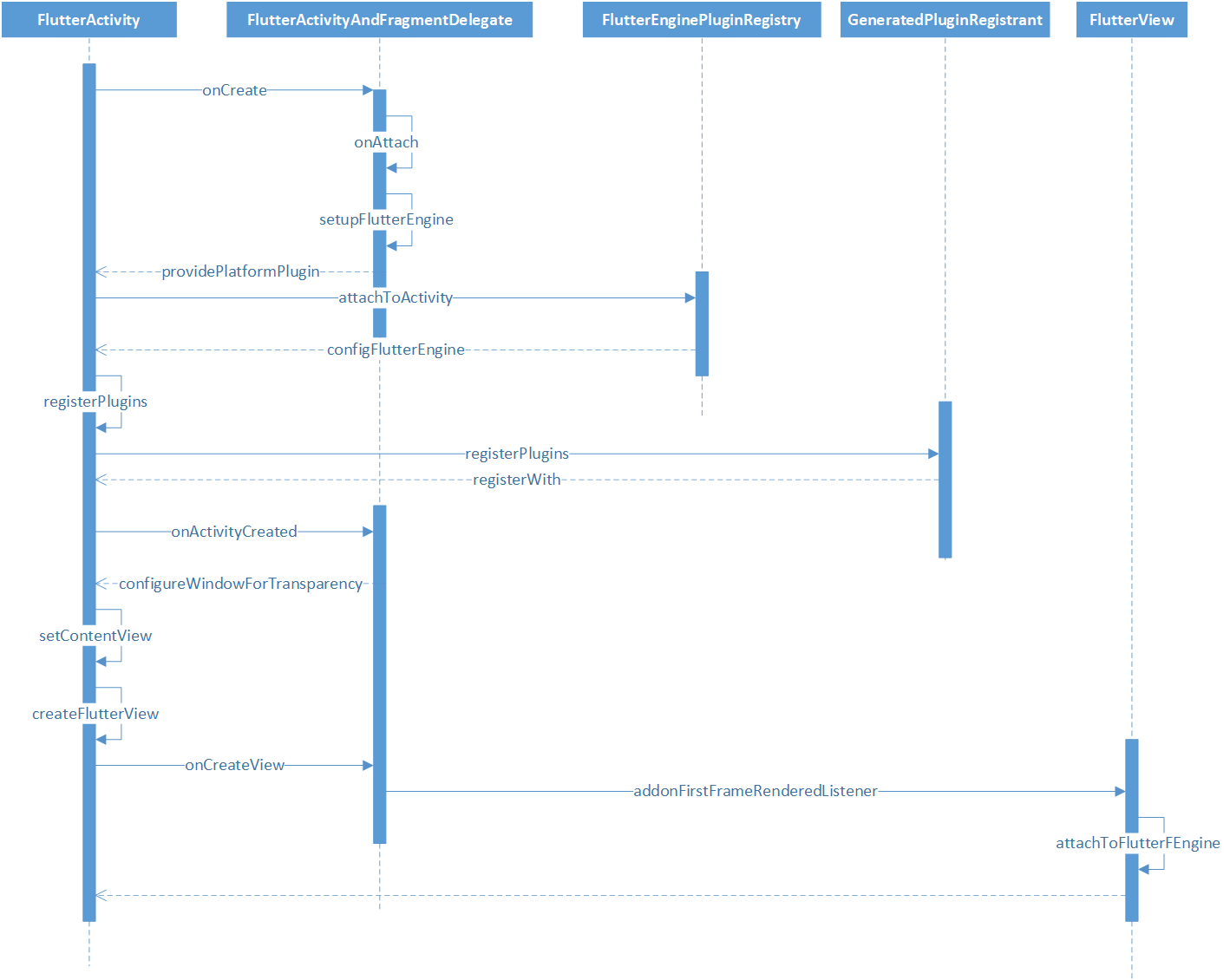
也来一个 时序图
4、总结
Flutter App 启动流程,会先执行FlutterApplication的onCreate方法,初始化meta_data的配置,在调试或者JIT模式下,拷贝asset目录下的相关资源到flutter私有目录下,加载flutter so库,设置VSYNC信号回调给Native触发,初始化完成后通知Native耗时时间。
然后就到了FlutterActivity的onCreate方法,主要是调用registerWith加载插件,通过创建FlutterSplashView,传递给setContentView显示的,其中FlutterSplashView会先add FlutterView,然后再add 背景图 DrawableSplashScreen 生成的ImageView,在FlutterView和FlutterEngine绑定后,也就是第一帧绘制完后,会把背景图生成的ImageView删除。由于背景图默认是根据 launch_background.xml生成的,默认是白色的,所以会出现白屏现象,又因为在创建Flutter Module时,在AndroidManifest.xml中不存在获取背景图的Meta_Data配置,所以出现黑屏。
三、涂色问题
你要在一个n * m的格子图上涂色,你每次可以选择一个未涂色的格子涂上你开始选定的那种颜色。同时为了美观,我们要求你涂色的格子不能相邻,也就是说,不能有公共边,现在问你,在采取最优策略的情况下,你最多能涂多少个格子?给定格子图的长 n 和宽m。请返回最多能涂的格子数目。测试样例:1,2 返回 :1
PS:主要是为了偷懒,太晚了,写不动了。
思路:左上角涂上选定的颜色,例如红色,那么可以理解为相邻的颜色填为白色,所以剩下的颜色基本就定了,如果是偶数的话,那就是 (n * *m)/2,奇数的话,那就是(n*m + 1)/2。画个矩阵品品就出来了。
public class DemoOne {

	public static int getMost(int n,int m) {
		return (n*m + 1)/2;
	}
}
笔记六
