手写instanceof
instanceof是用来判断一个对象的实例是否在另一个对象的prototype中。
instanceof 运算符用来测试一个对象在其原型链中是否存在一个构造函数的 prototype 属性。
function myInstaceof(left,right) {
   const leftprop = left.__proto__
   const rightprop = left.prototype
 while(true) {
  if(leftprop === null) {
   return false
}
  if(leftprop === rightprop) {
   return true
}
   leftprop = leftprop.__proto__
}
}
手写节流和防抖
防抖:在定时器指定时间内如果再次触发的话就清楚原来的定时器,这样就能保证我只运行最后一次的定时器。
<!DOCTYPE html><html lang="en"><head> <meta charset="UTF-8"> <meta name="viewport" content="width=device-width, initial-scale=1.0"> <title>Document</title></head><body> <button id="btn">提交成功</button> <script> function success(e) { console.log('yes'); } function fangdou(fn,delay) { let timer = null return (...args) =>{ clearTimeout(timer) timer = setTimeout(()=>{ fn() },delay) } } const a= fangdou(success,1000) const btn = document.getElementById('btn') btn.addEventListener('click',a) </script></body></html>节流:在定时器规定的时间的内重复点击的话,将重复点击的事件直接return掉,这样就可以保证2秒内,只发生一次点击事件。这个通过一个flag开关来控制,如果定时器的时间还没执行完则会flag开关一直会为false,retuen 掉,等执行完后,开关打开flag为true,则执行完毕开启下一个。
<!DOCTYPE html><html lang="en"><head>    <meta charset="UTF-8">    <meta name="viewport" content="width=device-width, initial-scale=1.0">    <title>Document</title></head><body>    <button id="btn">提交成功</button>
 <script>      function success(e) {          console.log('yes');      }function jieliu(fn,delay) {          let flag = true          return (...args) =>{             if(flag==fales) return
              flag= false              timer = setTimeout(()=>{                  fn()
                  flag = true              },delay)          }      }const a= jieliu(success,1000)               const btn = document.getElementById('btn')     btn.addEventListener('click',a)    </script></body></html>
手写promise
手写promise首先要知道promise的基本功能和内部构建。
首先promise是个构造函数,它里面接受两个参数,resolved和rejected,resolved是成功时候的回填函数,reject是返回失败时的回调函数。它有三种状态,pending resolved rejected 分别表示 等待中,成功时 失败时。他们之间的状态时不可逆的,promise一般配合then使用来处理异步,要等promise中的函数执行状态变成rejected和resolved才能进行then的函数。如果状态还是pending就把结果给到then,那么then 就要将结果重新丢到promise函数中执行。
const PENDING = 'pending'const RESOLVED = 'resolved'const REJECTED = 'rejected'function myPromise (foo) { const that = this that.state= PENDING that.value = null that.resolvedCallback = [] that.rejectedCallback = [] function resolved (value) { that.state = RESOLVED that.value = value that.resolvedCallback.map(cb =>cb(that.value)) } function rejected (value) { that.state = REJECTED that.value = value that.rejectedCallback.map(cb =>cb(that.value)) } try{ foo(resolved,rejected) }catch(error){ rejected(error) }}myPromise.prototype.then= function (onresolved,onrejected) { const that = this if(that.state === PENDING){ that.resolvedCallback.push(onresolved) that.rejectedCallback.push(onrejected) } if(that.state === RESOLVED) { onresolved(that.value) } if(that.state === REJECTED) { onrejected(that.value) }}var a = new myPromise((resolved,rejected)=> { setTimeout(()=>{ resolved(1) console.log(123); },1000) }) function b () { return new myPromise((resolved,rejected)=> { setTimeout(()=>{ resolved(2) console.log(456); },500) }) } a.then(b)手写call,apply,bind
三者都是用来绑定this作用域的,call和apply主要的区别是传的参数的方式不同,call是a.call(foo,123) apply传递的参数是一个数组a.call(foo,[123]).bind返回的是一个函数,未执行的函数。手写主要的方法是将foo放到a函数中去执行。
call
const foo = {
  name:'lsj'
}
function fn(x) {
  console.log(this.name)
console.log(x)
}
Function.prototype.myCall = function(foo) {
  foo = foo || window
  foo.fn = this
  const args = [...arguments].slice(1)  const result = foo.fn(...args)
  delete foo.fn
  return result
}
fn.myCall(foo,1)
apply
原理和bind基本相同,只需要判断第二参数是否存在即可。
const foo = { name:'lsj' } function fn(x) { console.log(this.name) console.log(x) }Function.prototype.myApply= function (foo) { foo= foo || window foo.fn = this let result if(arguments[1]){ result = foo.fn(arguments[1]) }else { result = foo.fn() } return result}fn.myApply(foo,[123])bind
bind和上面两者的区别就是它返回的是一个未执行的函数
const foo = { name:'lsj' } function fn(x) { console.log(this.name) console.log(x) }Function.prototype.myBind = function (foo) { const that = this // foo = foo || window const args = arguments[1] return function F() { // if(this instanceof F) { // return new that(...args) // } return that.call(foo,...args) }}fn.myBind(foo,[123])()手写new
new 的实现和组合继承有点相似,主要分为5步:
第一步新建一个obj的对象
第二步将传进来的参数使用shift切割出来
第三步将切出来的函数的显示原型链指向新建的obj的隐式原型链。
第四步绑定this作用域
第五步 返回obj
function myNew (fn) {
  let obj = {}   //1
  const args = [].shift.call(arguments) // arguments是类数组,所以我们需要使用数组的shift方法
  obj.__proto__ = args.prototype
  const result = args.apply(obj,arguments)
  return obj
}
function foo (x) {
  this.name = 'lsj'
  this.age = x
}
foo.prototype.num = 20
console.log(myNew(foo,18))
手写深拷贝
浅拷贝只是对指针的拷贝,拷贝后两个指针指向同一个内存空间,深拷贝不但对指针进行拷贝,而且对指针指向的内容进行拷贝,经深拷贝后的指针是指向两个不同地址的指针。
手写深拷贝的重点就是要递归,因为拷贝一个对象时可能对象里面还有对象,所以要递归式的拷贝。
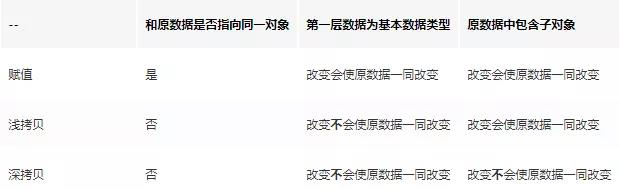
function copy (foo) { let obj = foo instanceof Array ? [] :{} for (let key in foo) { obj[key] = typeof foo[key] === 'object' ?copy(foo[key]) : foo[key] } return obj}const foo = { name: 'lsj', num: { a:12, n:13 } }let b = copy (foo)foo.name='lll'foo.num.a=18 console.log(foo); console.log(b);手写组合继承
function Parent() { this.name = '大帅逼' } Parent.prototype.getValue = function () { console.log('你好'); } function Child() { Parent.call(this) //继承函数内部的属性 (构造函数继承) } Child.prototype = new Parent() //继承原型链上的 (原型继承) const child = new Child() child.getValue() console.log(child.name);