Homebrew是什么?
Homebrew是一款自由及开放源代码的软件包管理系统,用以简化macOS系统上的软件安装或卸载过程,最初由马克斯·霍威尔(Max Howell)写成。因其可扩展性得到了一致好评,而在Ruby on Rails社区广为人知。Homebrew会将软件统统安装到 /usr/local/Cellar 目录中,并在 /usr/local/bin 中创建符号链接。
安装方法:
方法一:Homebrew官网
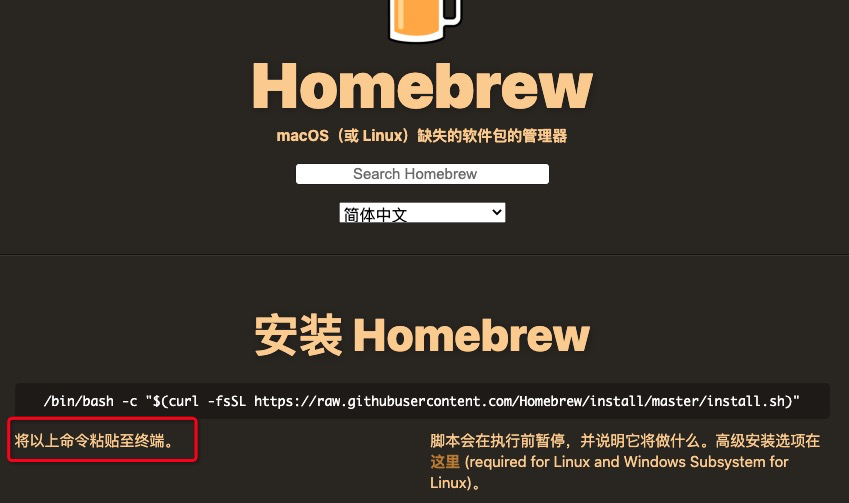
耐心等待,若出现Homebrew | curl: (7) Failed to connect to raw.githubusercontent.com port 443: Connection refused则使用方法二安装
方法二:通过brew_install.rb安装
解决方法一安装过程中出现:Homebrew | curl: (7) Failed to connect to raw.githubusercontent.com port 443: Connection refused问题
-
brew_install.rb下载链接: pan.baidu.com/s/1BSuyui4n… 密码: 7jdj
-
ruby安装brew_install.rb
-
终端输入:ruby [/Users/gavin/brew_install.rb] ruby [brew_install.rb 地址]
如图所示:
-
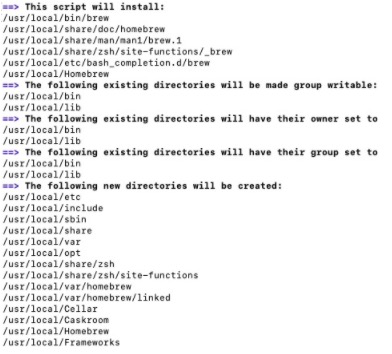

终端执行whoami     获取当前用户名  如gavin
终端输入sudo chown -R gavin:staff
终端输入brew doctor
若一直卡在此画面:

Step1:切换成中科院镜像
git clone git://mirrors.ustc.edu.cn/homebrew-core.git/ /usr/local/Homebrew/Library/Taps/homebrew/homebrew-core --depth=1
Step2: 把homebrew-core镜像地址切换成中科院镜像
cd "$(brew --repo)"
git remote set-url origin https://mirrors.ustc.edu.cn/brew.git
cd "$(brew --repo)/Library/Taps/homebrew/homebrew-core"
git remote set-url origin https://mirrors.ustc.edu.cn/homebrew-core.git
Step3: brew doctor
安装成功信息:
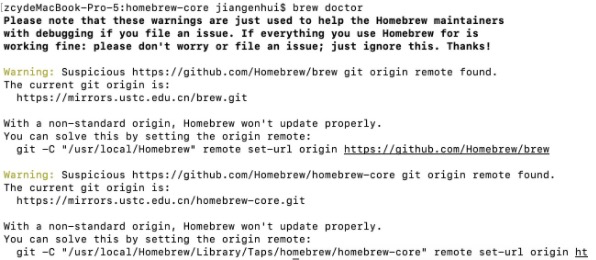
更改默认源:将默认源替换为国内 USTC 源的方法。 如下:
- 替换核心软件仓库
cd "$(brew --repo)/Library/Taps/homebrew/homebrew-core"
git remote set-url origin https://mirrors.ustc.edu.cn/homebrew-core.git
替换 cask 软件仓库(提供 macOS 应用和大型二进制文件)
cd "$(brew --repo)"/Library/Taps/caskroom/homebrew-cask
git remote set-url origin https://mirrors.ustc.edu.cn/homebrew-cask.git
替换 Bottles 源(Homebrew 预编译二进制软件包)
bash(默认 shell)用户:
echo 'export HOMEBREW_BOTTLE_DOMAIN=https://mirrors.ustc.edu.cn/homebrew-bottles' >> ~/.bash_profile source ~/.bash_profile
zsh 用户:
echo 'export HOMEBREW_BOTTLE_DOMAIN=https://mirrors.ustc.edu.cn/homebrew-bottles' >> ~/.zshrc source ~/.zshrc
应用生效:brew update
Homebrew使用:
-
安装软件:brew install 软件名,例:brew install wget
-
搜索软件:brew search 软件名,例:brew search wget
-
卸载软件:brew uninstall 软件名,例:brew uninstall wget
-
更新所有软件:brew update
- ⚠️通过 update 可以把包信息更新到最新,不过包更新是通过git命令,所以要先通过 brew install git 命令安装git。
-
更新具体软件:brew upgrade 软件名 ,例:brew upgrade git
-
显示已安装软件:brew list
-
查看软件信息:brew info/home 软件名 ,例:brew info git / brew home git
- ⚠️brew home指令是用浏览器打开官方网页查看软件信息
-
查看那些已安装的程序需要更新: brew outdated
-
显示包依赖:brew reps