Activities
Change default activity style directory: Android Studio/plugins/android/lib/templates/activities/common/root/res/layout
-
Lifecycle
-
onCreate(): fires when the system first creates the activity [Initialization]
-
onStart(): makes the activity visible to the user [Invisible -> Visible]
-
onResume: interacts with the user, initializes components released during onPause() [Interaction & Initialization]
-
onPause(): user leaves the activity, no longer in foreground (maybe visible in multi-window mode), release system resources [No focus]
- interruption
- Android 7.0 or higher, multi-window mode, only one has focue at any time
- new, semi-transparent activity opens, visible but not in focus
-
onStop(): no longer visible, release resources [Invisible]
-
newly launched activity covers the entire screen
-
finish running
-
如果启动的是对话框式活动,会执行onPause(),而不会执行onStop()
<activity android:name=".DialogActivity"
          android:theme="@style/Theme.AppCompat.Dialog">
</activity>
-
-
onDestroy(): [Destroyed]
- activity is finishing
- configuration change, such as device rotation or multi-window mode
-
onRestart(): onStop() -> onRestart() -> onStart()
-
-
Intent (Navigating between activities)**
-
显式Intent
Intent intent = new Intent(this, SecondActivity.class);
startActivity(intent);
val intent = Intent(this, SecondActivity::class.java) startActivity(intent) -
隐式Intent
- startActivity()
Intent intent = new Intent(Intent.ACTION_SEND);
intent.putExtra(Intent.EXTRA_EMAIL, recipientArray);
startActivity(intent);
val intent = Intent(Intent.ACTION_SEND).apply { putExtra(Intent.EXTRA_EMAIL, recipientArray) } startActivity(intent)<activity android:name".ThirdActivity"> <intent-filter> <action android:name="android.intent.action.VIEW"/> <category android:name:"android.intent.category.DEFAULT"/> <data android:scheme="http"/> </intent-filter> </activity>- startActivityForResult(Intent, int) & onActivityResult(int, int, Intent)
public class MyActivity extends Activity {

     static final int PICK_CONTACT_REQUEST = 0;

     public boolean onKeyDown(int keyCode, KeyEvent event) {
         if (keyCode == KeyEvent.KEYCODE_DPAD_CENTER) {
             // When the user center presses, let them pick a contact.
             startActivityForResult(
                 new Intent(Intent.ACTION_PICK,
                 new Uri("content://contacts")),
                 PICK_CONTACT_REQUEST);
            return true;
         }
         return false;
     }

     protected void onActivityResult(int requestCode, int resultCode,
             Intent data) {
         if (requestCode == PICK_CONTACT_REQUEST) {
             if (resultCode == RESULT_OK) {
                 // A contact was picked.  Here we will just display it
                 // to the user.
                 startActivity(new Intent(Intent.ACTION_VIEW, data));
             }
         }
     }
 }
-
-
活动被回收后的临时数据保留
public class MyActivity extends Activity { @Override protected void onCreate(Bundle savedInstanceState) { super.onCreate(savedInstanceState); setContentView(R.layout.activity_main); if (savedInstanceState != null) { String tempData = savedInstanceState.getString("data_key"); } } @Override protect void onSaveInstanceState(Bundle outState) { super.onSaveInstanceState(outState); String tempData = "Something you just typed"; outState.putString("data", tempData); } } -
Launch modes
-
Using the manifest file
-
standard: 每次启动创建一个新的实例。
-
singleTop: 如果栈顶是该活动,直接使用,否则新建实例;系统调用onNewIntent()将intent传给该实例;当由Activity现有实例处理新intent时,用户我无法按通过返回按钮返回到onNewIntent()收到新intent之前的Activity状态。
-
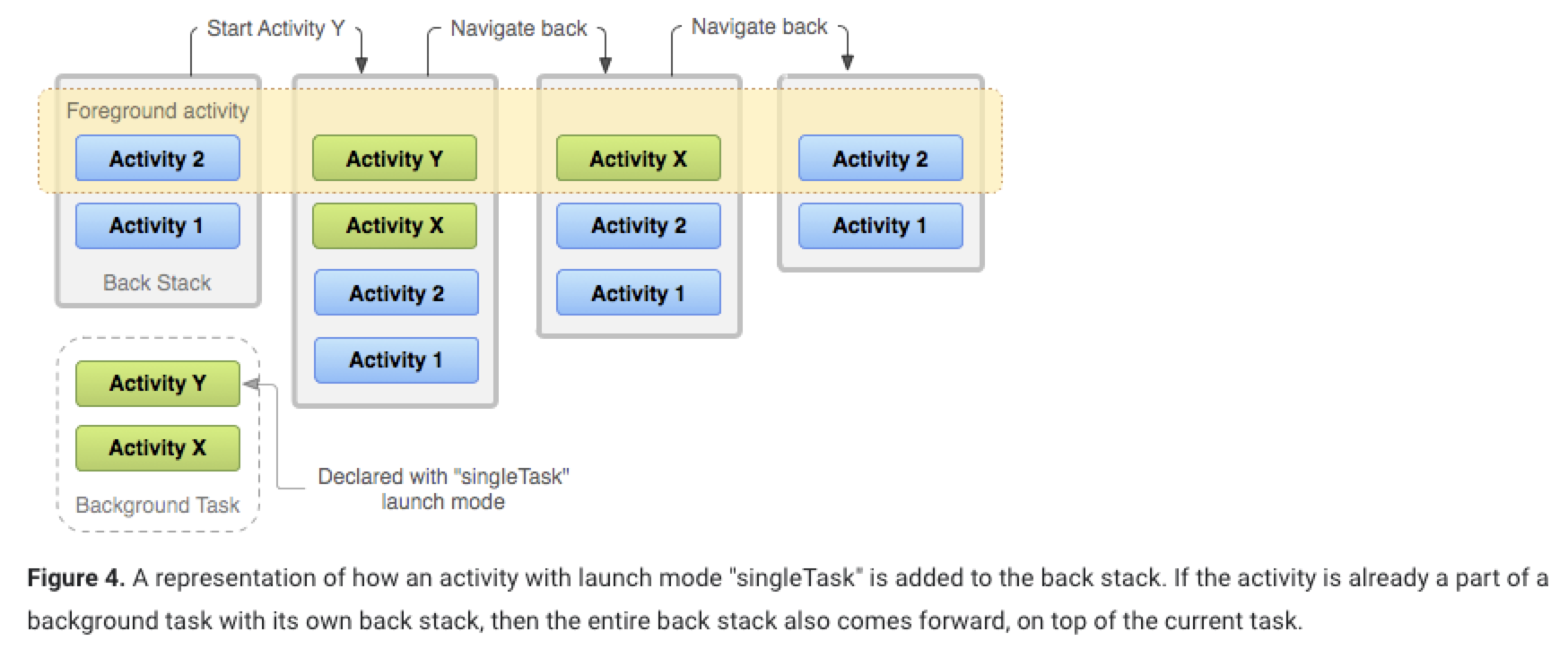
singleTask: 该栈有此活动的实例,该活动栈上面的全部出栈;后台task里有该活动实例,后台任务切换到前台,活动都放到前台栈里,且该活动栈上面的全部出栈(如图);否则新建实例。
-
singleInstance: 一个单独的返回栈管理此活动,无论哪个应用程序访问该活动,都公用同一个返回栈。
-
-
Using Intent flags
- FLAG_ACTIVITY_NEW_TASK: singleTask
- FLAG_ACTIVITY_SINGLE_TOP: singleTop
- FLAG_ACTIVITY_CLEAR_TOP: 如果要启动的 Activity 已经在当前任务中运行,则不会启动该 Activity 的新实例,而是会销毁位于它之上的所有其他 Activity,并通过
onNewIntent()将此 intent 传送给它的已恢复实例(现在位于堆栈顶部)。
-
Handling affinities
The affinity indicates which task an activity prefers to belong to. By default, all the activities from the same app hava an affinity. So, by default, all activities prefer to be in the same task. Activities defined in different apps can share an affinity, or activities defined in the same app can be assigned different task affinities. Modify with the taskAffinity attribute of .
The affinity comes into play in two circumstances:
-
When the intent that launches an activity contains the FLAG_ACTIVITY_NEW_TASK flag.
If there's already an existing task with the same affinity as the new activity, the activity is launched into that task. If not, it begins a new task (such as the notification manager). There must be some way for the user to navigate back to the task (such as with a launcher icon).
-
When an activity has its allowTaskReparenting attribute set to "true"
In this case, the activity can move from the task it starts to the task it has an affinity for, when that task comes to the foreground.
-
-
Starting a task
<activity ... >
    <intent-filter ... >
        <action android:name="android.intent.action.MAIN" />
        <category android:name="android.intent.category.LAUNCHER" />
    </intent-filter>
    ...
</activity>
-
-
Button
-
单一按钮
Button button = findViewById(R.id.button_id); button.setOnClickListener(new View.OnClickListener() { @Override public void onClick(View v) { // Code here executes on main thread after user presses button } }); -
多个按钮
public class MyActivity extends Activity implements View.OnClickListener {

  @Override
  protected void onCreate(Bundle savedInstanceState) {
    super.onCreate(savedInstanceState);
    setContentView(R.layout.activity_main);
    Button button1 = findViewById(R.id.button_id1);
  	Button button2 = findViewById(R.id.button_id2);
  	button1.setOnClickListener(this);
  	button2.setOnClickListener(this);
  }

  @Override
  public void onClick(View v) {
    switch (v.getId()) {
      case R.id.button_id1:
        // Code here executes on main thread after user presses button1
        break;
      case R.id.button_id2:
        // Code here executes on main thread after user presses button2
        break;
      default:
        break;
    }
  }

}
-
Broadcast Receivers
-
Receiving broadcasts
-
Manifest-declared receivers
- 修改manifest.xml
<receiver android:name=".MyBroadcastReceiver" android:enabled="true" android:exported="true"> <intent-filter> <action android:name="android.intent.action.BOOT_COMPLETED"/> </intent-filter> </receiver>- 继承BroadcastReceiver和重写onReceive(Context, Intent)
public class MyBroadcastReceiver extends BroadcastReceiver { @Override public void onReceive(Context context, Intent intent) { Toast.makeText(context, "Boot Complete", Toast.LENGTH_LONG).show(); } } -
Context-register receivers
-
创建一个BroadcastReceiver的实例
BroadcastReceiver br = new MyBroadcastReceiver(); -
创建一个IntentFilter实例和注册receiver通过registerReceiver(BroadcastReceiver, IntentFilter)
IntentFilter filter = new IntentFilter(); filter.addAction(Intent.ACTION_AIRPLANE_MODE_CHANGED); this.registerReceiver(br, filter); -
Broadcast receiver要注销
unregisterReceiver(br);如果**onCreate()注册,要在onDestroy()**注销,防止receiver从activity context泄露;
如果onResume(),要在**onPause()**注销,以防多次注册接收器。
-
-
-
Sending broadcasts
-
sendBroadcast(Intent): sends broadcasts to all receivers in an undefined order.
Intent intent = new Intent(); intent.setAction("com.example.broadcast.MY_NOTIFICATION"); sendBroadcast(intent); -
sendOrderedBroadcast(Intent, String): sends broadcasts to one receiver at a time. As each receiver executes in turn, it can propagate a result to the next receiver, or it can completely abort the broadcast so that it won't be passed to other receivers. The order receivers run in can be controlled with the android:priority attribute of the matching intent-filter; receivers with the same priority will be run in an arbitrary order.
sendOrderedBroadcast(intent, null);Set priority
<receiver
          android:name=".MyBroadcastReceiver"
          android:enabled="true"
          android:exported="true">
  <intent-filter android:priority="100">
    <action android:name="android.intent.action.BOOT_COMPLETED"/>
  </intent-filter>
</receiver>
Abort the broadcast
public class MyBroadcastReceiver extends BroadcastReceiver { @Override public void onReceive(Context context, Intent intent) { Toast.makeText(context, "Boot Complete", Toast.LENGTH_LONG).show(); abortBroadcast(); } } -
LocalBroadcastManager.sendBroadcast(Intent): sends broadcasts to receivers that are in the same app. More efficient and no need to worry about any security issues.
LocalBroadcastManager lbm = LocalBroadcastManager.getInstance(this);
Intent intent = new Intent(); intent.setAction("com.example.broadcast.LOCAL_BROADCAST"); lbm.sendBroadcast(intent);
-
Content Providers
-
Storage
-
app-specific files: files that other apps cannot access; when uninstall the app, the files saved in app-specific storage are removed.
-
Locations
- Internal storage dierectories: prevent other apps; encrypted
- external storage directories: other apps access with permission
-
Java Stream(知识补充)
FileOutputStream fileOutputStream = new FileOutputStream(file1); OutputStreamWriter outputStreamWriter = new OutputStreamWriter(fileOutputStream); BufferedWriter bufferedWriter = new BufferedWriter(outputStreamWriter); -
Access from internal storage: small; before write, query the free space
File file = new File(context.getFilesDir(), filename); // Store a file using a stream // Call "openFileOutput()" to get a "FileOutputStream" String filename = "myfile"; String fileContents = "Hello world"; try (FileOutputStream fos = context.openFileOutput(filename, Context.MODE_PRIVATE)) { fos.write(fileContents.toByteArray()); } // Access a file using a stream // read a file as a stream using "openFileInput()" FileInputStream fis = context.openFileInput(filename); InputStreamReader inputStreamReader = new InputStreamReader(fis, StandardCharsets.UTF_8); StringBuilder stringBuilder = new StringBuilder(); try (BufferedReader reader = new BufferedReader(inputStreamReader)) { String line = reader.readLine(); while (line != null) { stringBuilder.append(line).append("\n"); line = reader.readLine(); } } catch (IOException e) { } finally { String contents = stringBuilder.toString(); } // View list of files // Get an array containing the names of all files within the "fileDir" directory by calling "fileList()" Array<String> files = context.fileList(); // Create nested directories File directory = context.getFileDir(); File file = new File(directory, filename); // Create cache files File.createTempFile(filename, null, context.getCacheDir()); // Access cache files File cacheFile = new File(context.getCacheDir(), filename); -
Access from external storage: internal storage no enough space to store app-specific files; Android 9及以前,只要有权限,即可访问; Android 10以后引入scoped storage, apps cannot access the app-specific directories that belong to other apps.
// Check if a volume containing external storage is available by calling "Environment.getExternalStorageState()"
// read and write
return Environment.getExternalStorageState() == Environment.MEDIA_MOUNTED;
// at least read
return Environment.getExternalStorageState() == Environment.MEDIA_MOUNTED || Environment.getExternalStorageState() == Environment.MEDIA_MOUNTED_READ_ONLY;
// Select a physical storage location File[] externalStorageVolumes = ContextCompat.getExternalFilesDirs(getApplicationContext(), null); File primaryExternalStorage = externalStorageVolumes[0]; // Access persistent files File appSpecificExternalDir = new File(context.getExternalFilesDir(), filename); // Create cache files File externalCacheFile = new File(context.getExternalCacheDir(), filename); // It is best to store media files in app-specific directories within external storage // Get the pictures directory that's inside the app-specific directory on external storage File file = new File(context.getExternalFileDir(Environment.DIRECTORY_PICTURES), albumName); -
Query free space
private static final long NUM_BYTES_NEEDED_FOR_MY_APP = 1024 * 1024 * 10L;

StorageManager storageManager = getApplicationContext().getSystemService(StorageManager.class);
UUID appSpecificIInternalDirUuid = storageManager.getUuidForPath(getFilesDir());
long availableBytes = storageManger.getAllocatableBytes(appSpecificIInternalDirUuid);
if (availableByte >= NUM_BYTES_NEEDED_FOR_MY_APP) {
  storageManager.allocateBytes(appSpecificIInternalDirUuid, NUM_BYTES_NEEDED_FOR_MY_APP);
} else {
  Intent storageIntent = new Intent();
  storageIntent.setAction(ACTION_MANAGE_STORAGE);ge
}
-
-
SharedPreference
-
getSharedPreferences(): multiple shared preference files; call from Context
-
getPreferences(): only one shared preference file; call from Activity
// Write to shared preferences
SharedPreferences sharedPref = getActivity().getPreferences(Context.MODE_PRIVATE);
SharedPreferences.Editor editor = sharedPref.edit();
editor.putInt(getString(R.string.saved_high_score_key), newHighScore);
editor.commit();

// Read from shared preferences
SharedPreferences sharedPref = getActivity().getPreferences(Context.MODE_PRIVATE);
int defaultValue = getResource().getInteger(R.integer.saved_high_score_default_key);
int highScore = sharedPref.getInt(getString(R.string.saved_high_score_key), defaultValue);
-
-
Room: Abstract layer over SQLite
- Database
- Entity
- DAO
-
-
Content Provider
-
Accessing a provider: use ContentResolver object in the Context to communicate with the provider as a client.
cursor = getContentResolver().query(
		UserDictionary.Words.CONTENT_URI,
		projection,
		selectionClause,
		selectionArgs,
		sortOrder
);
Full URI for "words" table is:
content://user_dictionary/wordsPermissions
<uses-permission android:name="android.permission.READ_USER_DICTIONARY"/>-
Insert data
Uri newUri;
ContentValues newValues = new ContentValues();
newValues.put(UserDictionary.Words.APP_ID, "example.user");
newValues.put(UserDictionary.Words.LOCALE, "en_US");
newUri = getContentResolver().insert(
		UserDictionary.Words.CONTENT_URI,
		newValues
);
-
-
Creating a content provider
-
Before start building
- Decide: You want to ...
- Offer complex data of files to other applications
- Allow users to copy complex data from your app into other apps
- Provide custom search suggestions using the search framework
- Expose you application data to widgets
- Implement the AbstractThreadedSyncAdapter, CursorAdapter or CursorLoader classes
- Design the raw storage for your data: File data & "Structured" data (database)
- Implement ContentProvider class and its required methods
- Define provider's authority string, its content URIs, and content names
- Decide: You want to ...
-
Designing content URIs: identifiy data in a provider
URI = authority (symbolic name of provider) + path (name point to a table or file)
authority:
package name: com.example.
authority: com.example..provider
Content URIs:
content://com.example..provider/table1: A table called table1
content://com.example..provider/table1/1: The row identified by 1 (row ID) in table1
content://com.example..provider/*: Matches any content URI in the provider
addURI() maps an authority and path to an integer value; match() returns the integer value for a URI.
public class ExampleProvider extends ContentProvider { private static final UriMatcher uriMatcher = new UriMatcher(UriMatcher.NO_MATCH); static { uriMatcher.addURI("com.example.app.provider", "table3", 1); uriMatcher.addURI("com.example.app.provider", "table3/#", 2); } public Cursor query( Uri uri, String[] projection, String selection, String[] selectionArgs, String sortOrder) { switch (uriMatcher.match(uri)) { // If the coming URI was for all of table3 case 1: break; // If the coming URI was for a single row case 2: break; default: } } } -
Required methods
-
query()
-
insert()
-
delete()
-
update()
-
getType()
-
MIME types for tables
-
Type part: vnd
-
Subtype part:
- Single row: android.cursor.item/
- more than one row: android.cursor.dir/
-
Provider-specific part: vnd..
- should be global unique: good choice -- company's name or some part of the application's Android package name
- should be unique to the corresponding URI pattern: good choice -- a string that identifies the table
For example, if the provider's authority is
com.example.app.provider, and table istable1, the MIME type for multiple row intable1is:vnd.android.cursor.dir/vnd.com.example.app.provider.table1
-
-
MIME types for files
-
Implement
getStreamTypes()returns aStringarray of MIME types.For example, a provider offers photo images as files in
.jpg,.pngand.gif. should return the array:{"image/jpeg", "image/png", "image/gif"}
-
-
-
onCreate()
public class ExampleProvider extends ContentProvider {
  	private AppDatabase appDatabase;
  	private UserDao userDao;
  	private static final String DBNAME = "mydb";
  	public boolean onCreate() {
      	appDatabase = Room.databaseBuilder(getContext(), AppDatabase.class, DBNAME).build();
      	userDao = appDatabase.getUserDao();
      	return true;
    }
}
- All of these methods except onCreate() can be called by multiple threads at once, so they must be thread-safe
- Avoid lengthy operations in onCreate()
- Does not have to do anything except return the expected data type
-
-
Implementing permissions
Set permissions for your provider in your manifest file, using attributes or child elements of the
<provider>element.
-
-
Services
-
Background threads
main thread: handle UI operations
background threads: handle long-running operations
-
Creating multiple threads: Be sure to save the instance of the
ExecutorServiceeither in yourApplicationclass or in a dependency injection container.public class MyApplication extends Application { ExecutorService executorService = Executors.newFixedThreadPool(4); Handler mainThreadHandler = HandlerCompat.createAsync(Looper.getMainLooper()); } -
Executing in a background thread
(The repository layer is in charge of moving the execution of the network request off the main thread and posting the result back to the main thread using a callback.)
First,
Repositoryis making the network request:// Result.java public abstract class Result<T> { private Result(){} public final static class Success<T> extends Result<T> { public T data; public Success(T data) { this.data = data; } } public final static class Error<T> extends Result<T> { public Exception exception; public Error(Exception exception) { this.exception = exception; } } } interface RepositoryCallback<T> { void onComplete(Result<T> result); } // LoginRepository.java public class LoginRepository { private final String loginUrl = "http://example.com/login"; private final LoginResponseParser responseParser; private final Executor executor; private final Handler resultHandler; public LoginRepository(LoginResponseParser responseParser, Executor executor, Handler resultHandler) { this.responseParser = responseParser; this.executor = executor; this.resultHandler = resultHandler; } public void makeLoginRequest( final String jsonBody, final RepositoryCallback<LoginResponse> callback ) { executor.execute(new Runnable() { @Override public void run() { try { Result<LoginResponse> result = makeSynchronousLoginRequest(jsonBody); notifyResult(result, callback); } catch (Exception e) { Result<LoginResponse> errorResult = new Result.Error<>(e); notifyResult(errorResult, callback); } } }); } private void notifyResult( final Result<LoginResponse> result, final RepositoryCallback<LoginResponse> callback) { resultHandler.post(new Runnable() { @Override public void run() { callback.onComplete(result); } }) } public Result<LoginResponse> makeSynchronousLoginRequest(String jsonBody) { try { URL url = new URL(loginUrl); HttpURLConnection httpConnection = (HttpURLConnection) url.openConnection(); httpConnection.setRequestMethod("POST"); httpConnection.setRequestProperty("Content-Type", "application/json: utf-8"); httpConnection.setRequestProperty("Accept", "application/json"); httpConnection.setDoOutput(true); httpConnection.getOutputStream().write(jsonBody.getBytes("utf-8")); LoginResponse loginResponse = responseParser.parse(httpConnection.getInputStream()); return new Result.Success<LoginResponse>(loginResponse); } catch (Exception e) { return new Result.Error<LoginResponse>(e); } } } public class LoginViewModel { private final LoginRepository loginRepository; public LoginViewModel(LoginRepository loginRepository) { this.loginRepository = loginRepository; } public void makeLoginRequest(String username, String token) { String jsonBody = "{ username :\"" + username + "\", token: \"" + token + "\" }"; loginRepository.makeLoginRequest(jsonBody, new RepositoryCallback<LoginResponse>() { @Override public void onComplete(Result<LoginResponse> result) { if (result instanceof Result.Success) { // Happy path } else { // Show error in UI } } }); } } -
Configuring a thread pool
public class MyApplication extends Application {
  	private static int NUMBER_OF_CORES = Runtime.getRuntime().availableProcessors();
  	private final BlockingQueue<Runnable> workQueue = new LinkedBlockingQueue<Runnable>();
  	private static final int KEEP_ALIVE_TIME = 1;
  	private static final TimeUnit KEEP_ALIVE_TIME_UNIT = TimeUnit.SECONDS;

  	ThreadPoolExecutor threadPoolExecutor = new ThreadPoolExecutor(
    				NUMBER_OF_CORES,
    				NUMBER_OF_CORES,
    				KEEP_ALIVE_TIME,
    				KEEP_ALIVE_TIME_UNIT,
    				workQueue
    );
}
-
-
Service: an application component that can perform long-running operations in the background.
-
Types of Services
- Foreground: noticable to user; must display a Notification; WorkManager API; e.g. An audio app used a foreground service to play an audio track.
- Background: not directly noticed by the used; e.g. An app used a service to compact its storage
- Bound: A service is bound when a application component binds to it by bindService(). A bound service offers a client-server interface that allows components to interact with the service, send requests, receive results, and even do so across processes with IPC. Multiple components can bind to the service at once, but when all of them unbind, the service is destroyed.
-
Service or Thread
Service: A component can run in the background, even when the user is not interacting with your application.
Thread: If you must perform work outside of your main thread, but only while the user is interacting with your application
-
Basics: To create a service, you must create a subclass of
Serviceor use one of its existing subclasses.- onStartCommand()
- Invoked by calling
startService()when another component (such as an activity) requests the service to be started. - If implementing this, it is your responsibility to stop the service when its work is complete by calling
stopSelf()orstopService(). - If only binding, no need to implement this method.
- Invoked by calling
- onBind()
- Invoked by calling
bindService()when another component (such as an activity) requests that the service be started (such as to perform RPC). - In the implementation, you must provide an interface that clients use to communicate with the service by returning an
IBinder. - You must always implement this method; however, if you don't want to allow binding, you should return null.
- Invoked by calling
- onCreate()
- Perform one-time setup procedure.
- If the service is already running, this method is not called.
- onDestroy()
- No longer used and being destroyed
- Your service should implement this to clean up any resources such as threads, registered listeners, or receivers.
Caution: To ensure the app is secure, always use an explicit intent and don't declare intent filters.
- onStartCommand()
-
Creating a Started Service
-
Extending the Service class
public class HelloService extends Service { private Looper serviceLooper; private ServiceHandler serviceHandler; // Handler that receives messages from the thread private final class ServiceHandler extends Handler { public ServiceHandler(Looper looper) { super(looper); } @Override public void handleMessage(Message msg) { try { Thread.sleep(5000); } catch (InterruptedException e){ Thread.currentThread().interrupt(); } stopSelf(msg.arg1); } } @Override public void onCreate() { HandlerThread thread = new HandlerThread("ServiceStartArguments", Process.THREAD_PRIORITY_BACKGROUND); thread.start(); serviceLooper = thread.getLooper(); serviceHandler = new ServiceHandler(serviceLooper); } @Override public int onStartCommand(Intent intent, int flags, int startId) { Toast.makeText(this, "service starting", Toast.LENGTH_SHORT).show(); Message msg = serviceHandler.obtainMessage(); msg.arg1 = startId; serviceHandler.sendMessage(msg); // 用于描述系统应如何在系统终止服务的情况下继续运行服务 // START_NOT_STICKY: 除非有代传递的挂起Intent,否则系统不会重建服务 // START_STICKY: 会重建服务并调用onStartCommand(),但不会重新传递最后一个Intent。 // 相反,除非有挂起Intent要启动服务,否则系统会调用包含空Intent的onStartCommand()。 // 适用于不执行命令、但无限期运行并等待作业的媒体播放器。 // START_REDELIVER_INTENT: 会重建服务,并通过传递给服务的最后一个Intent调用onStartCommand()。 // 所有挂起Intent均依次传递。 // 适用于主动执行应立即回复的作业(例如下载文件)的服务。 return START_STICKY; } @Override public IBinder onBind(Intent intent) { return null; } @Override public void onDestroy() { Toast.makeText(this, "service done", Toast.LENGTH_SHORT).show(); } } -
Starting a service
Intent intent = new Intent(this, HelloService.class);
startService(intent);
Multiple requests to start the service result in multiple corresponding calls to the service's
onStartCommand(). However, only one request to stop the service (withstopSelf()orstopService()) is required to stop it. -
Stopping a service
Use
stopSelf(int)to ensure that your request to stop the service is always based on the most recent start request.
-
-
Foreground Service: must provide a notification status bar, which is placed under the Ongoing heading. Foreground service must show a status bar notification with a priority of PRIORITY_LOW or higher. If the action is of low enough importance that you want to use a minimum-priority notification, you probably shouldn't be using a service; instead, consider using a scheduled job.
To request that your service run in the foreground, call
startForeground(). This method takes two parameters: an integer that uniquely identifies the notification and theNotificationfor the status bar. The notification must have a priority ofPRIORITY_LOWor higher.Intent notificationIntent = new Intent(this, ExampleActivity.class); PendingIntent pendingIntent = PendingIntent.getActivity(this, 0, notificationIntent, 0); Notification notification = new Notification.Builder(this, CHANNEL_DEFAULT_IMPORTANCE) .setContentTitle(getText(R.string.notification_title)) .setContentText(getText(R.string.notification_message)) .setSmallIcon(R.drawable.icon) .setContentIntent(pendingIntent) .setTicker(getText(R.string.ticker_text)) .build(); startForeground(ONGOING_NOTIFICATION_ID, notification);
-