

1.加载配置文件
- 背景:在代理模式下,增强Request对象的getParameter()方法。
- 文件:加载src目录下的敏感文件
- 代码
   private List<String> list = new ArrayList<String>();//敏感词汇的list集合
    public void init(FilterConfig config) throws ServletException {
        //在init资源加载配置文件:因为init只加载一次

        try{
            //1.加载文件:获取文件的真实路劲:ServletContext().getRealPath()
            //ServletContext可以通过req获取,也可以通过config获取。
            ServletContext servletContext = config.getServletContext();
            //在src下的资源路径写法要注意:
            String realPath = servletContext.getRealPath("/WEB-INF/classes/敏感词汇.txt");

            //2.读取文件:本地的流默认创建出来都是GBK的。
            BufferedReader br = new BufferedReader(new FileReader(realPath));

            //3.将文件的每一行数据添加到list中
            String line = null;
            while((line = br.readLine()) != null){
                list.add(line);
            }

            br.close();
        }catch (Exception e){
            e.printStackTrace();
        }
    }
2 java文件路径的一些思考:
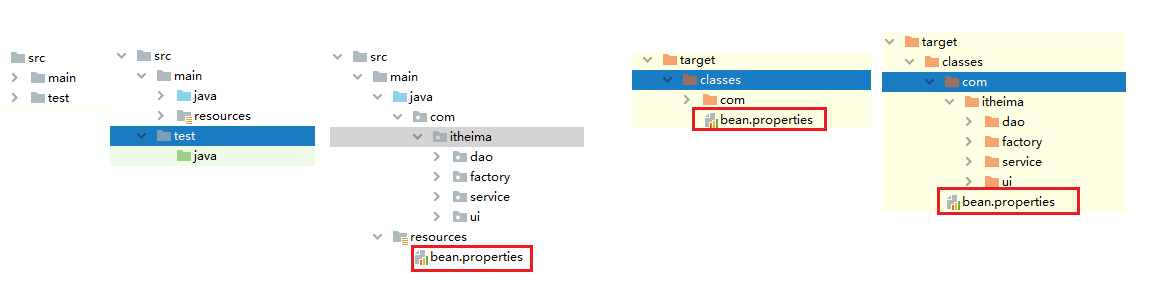
总结一下,就是你想获得文件,你得从最终生成的.class文件为着手点,不要以.java文件的路径为出发点,因为真正使用的就是.class,不会拿个.java文件就使用
3 约束头
1.基础SpringIOC:
    ```
    <?xml version="1.0" encoding="UTF-8"?>
    <beans xmlns="http://www.springframework.org/schema/beans"
        xmlns:xsi="http://www.w3.org/2001/XMLSchema-instance"
        xsi:schemaLocation="http://www.springframework.org/schema/beans
            http://www.springframework.org/schema/beans/spring-beans.xsd">

    </beans>
    ```

2. springIOC 基于注解
    ```
    <?xml version="1.0" encoding="UTF-8"?>
    <beans xmlns="http://www.springframework.org/schema/beans"
           xmlns:xsi="http://www.w3.org/2001/XMLSchema-instance"
           xmlns:context="http://www.springframework.org/schema/context"
           xsi:schemaLocation="http://www.springframework.org/schema/beans
            http://www.springframework.org/schema/beans/spring-beans.xsd
            http://www.springframework.org/schema/context
            http://www.springframework.org/schema/context/spring-context.xsd">

    </beans>
    ```


3.spring中基于XML的配置
    ```
    <beans xmlns="http://www.springframework.org/schema/beans"
        xmlns:xsi="http://www.w3.org/2001/XMLSchema-instance"
        xmlns:aop="http://www.springframework.org/schema/aop"
        xsi:schemaLocation="
            http://www.springframework.org/schema/beans http://www.springframework.org/schema/beans/spring-beans.xsd
            http://www.springframework.org/schema/aop http://www.springframework.org/schema/aop/spring-aop.xsd">

    </beans>
    ```


4.spring中基于XML和注解的 AOP控制事务的配置
    ```
    <?xml version="1.0" encoding="UTF-8"?>
    <beans xmlns="http://www.springframework.org/schema/beans"
           xmlns:xsi="http://www.w3.org/2001/XMLSchema-instance"
           xmlns:aop="http://www.springframework.org/schema/aop"
           xmlns:context="http://www.springframework.org/schema/context"
           xsi:schemaLocation="http://www.springframework.org/schema/beans
            http://www.springframework.org/schema/beans/spring-beans.xsd
            http://www.springframework.org/schema/aop
            http://www.springframework.org/schema/aop/spring-aop.xsd
            http://www.springframework.org/schema/context
            http://www.springframework.org/schema/context/spring-context.xsd">
    ```
4. @PropertySource
@PropertySource("classpath:jdbcConfig.properties")
@PropertySource("jdbcConfig.properties")
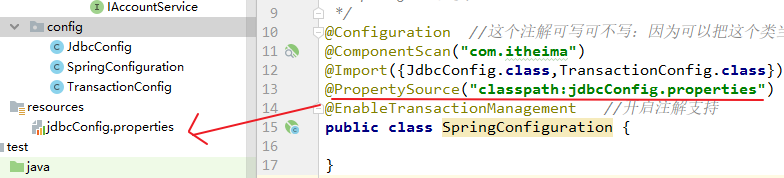
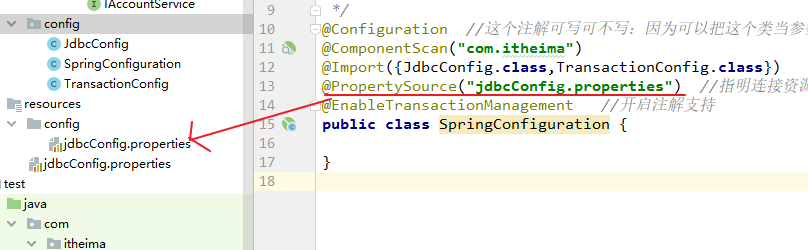
所以要指明类路径
5. @Value("${....}}")
@Value("$(jdbc.driver)")  错误写法
@Value("${jdbc.driver}")  正确写法
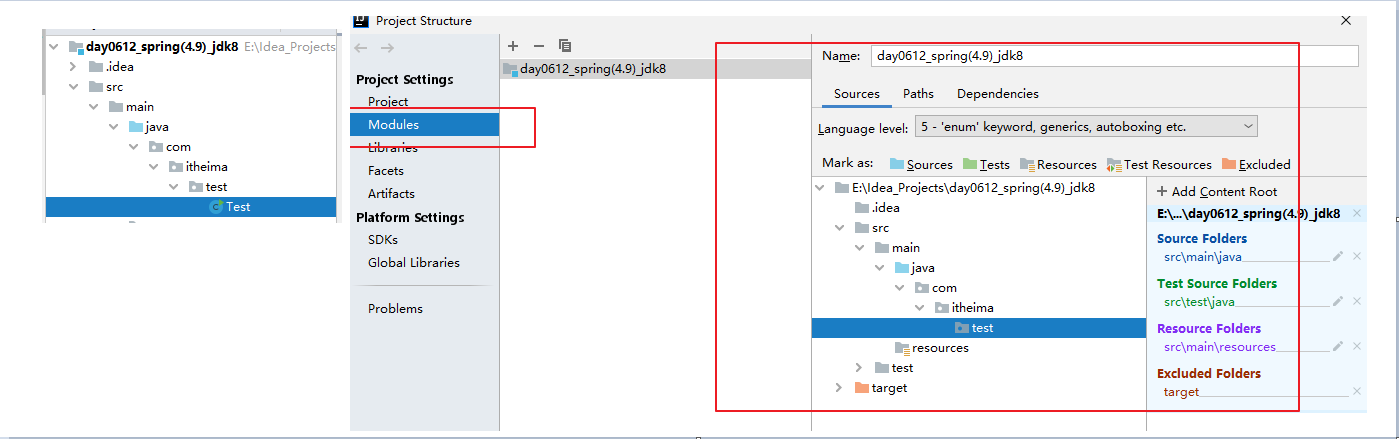
6. IDEA一直提示找不到或无法加载主类
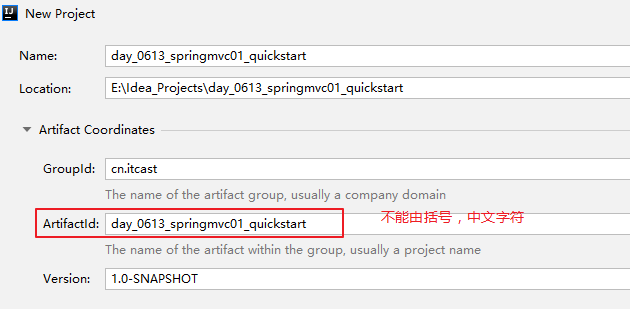
7. 'artifactId' with value '...' does not match a valid id pattern.
Maven项目构建出错

无论在< groupId> 还是< artifactId>中的命名都只能是数字字母下划线,括号和汉字都不能出现!
需要修改模块名,然后在对应的pom.xml配置文件中修改即可.
8. WEB-INF安全目录下资源不能直接访问
    应用服务器把WEB-INF指为禁访目录,不能在浏览器里直接访问的。即不能通过
直接发送请求访问WEB-INF目录下的资源。
    客户端无法访问,只有服务端可以访问的目录。

    但是可以通过servlet进行访问:
        1.通过转发访问:转发没有发送新的请求
        request.getRequestDispatcher(".WEB-INF/pages/success.jsp").forword(req,resp);

    重定向会发送新的请求,相当于从客户端访问了路径,所以无法实现访问WEB-INF目录下的
资源。只有程序内部转发的时候才能转发到WEB-INF目录下的资源。

    注意:如果想访问WEB-INF目录下的html文件的话,用转发是访问不了的。原因是:jsp是
servlet,会被编译成class文件,而html就不行了。

    所以我们通常把哪些想要限制访问的资源(jsp源码)放到Web应用的WEB-INF目录下,于
/web-INF/及其子目录,不允许直接的公共访问,所以就可以起到保护这些代码未经授权的访问和窥视,更好的保护了源代码。
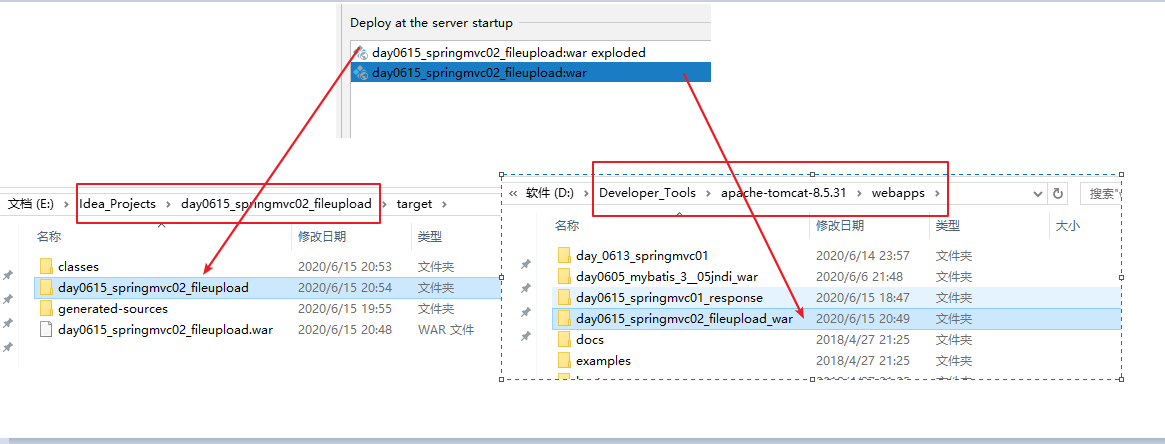
9. 项目的两种部署
10. Test不写在类路径下和Junit的依赖范围
    首先我们要知道测试类不应当建在classpath路径下,因为Test类不需要
打进包里,应该在src下建一个test文件夹,测试类写在里面,就不会打进包
里。

    ```
    <dependency>
        <groupId>junit</groupId>
        <artifactId>junit</artifactId>
        <version>4.12</version>
        <scope>test</scope>
    </dependency>
    ```

    注意JUNIT依赖的作用范围时test,所以如果在classpath用@Test的用不
了。如果把作用范围改成compile那么可以在源码中用。

    但是我们不在classpath下写测试类,因为会把测试类打进包里。所以
在src下建一个test文件夹,测试类写在里面,这样即使依赖的作用范围时
test也一样可以用。

