

认证流程
登陆流程
一个以用户名、密码登陆的网站,的典型处理流程
- 客户端发送用户名、密码
- 服务端将用户名、密码封装成登陆对象
- 查询根据登陆对象查询数据库中的用户
- 将用户输入的密码与存储的密码进行对比
- 将用户信息保存到 session 中,并返回 sessionId
Spring Security 的认证就是对以上的流程的抽象和实现
Spring Security 认证流程
- 客户端发送认证请求,携带认证信息(比如:用户名、密码 或 手机号、短信验证码)
- 认证请求到达
FilterChainProxy过滤器链,被某个过滤器(比如:UsernamePasswordAuthenticationFilter)封装成Authentication(类型上面的登陆对象) AuthenticationManager的实现类ProviderManager将Authentication委托给AuthenticationProvider链处理。AuthenticationProvider链中的某一个AuthenticationProvider(比如: DaoAuthenticationProvider) 将使用内部属性 ——UserDetailsService对象调用自己的loadUserByUsername()方法获取UserDetails(相当于上面的数据库中的用户)AuthenticationProvider将第3步中查询到的UserDetails中的认证信息,与 Authentication 中用户输入的认证信息比较,一致则认证成功AuthenticationProvider将UserDetails中的数据封装成一个新的Authentication返回。- 将返回的
Authentication设置到SecurityContext并将SecurityContext放入SecurityContextHolder中
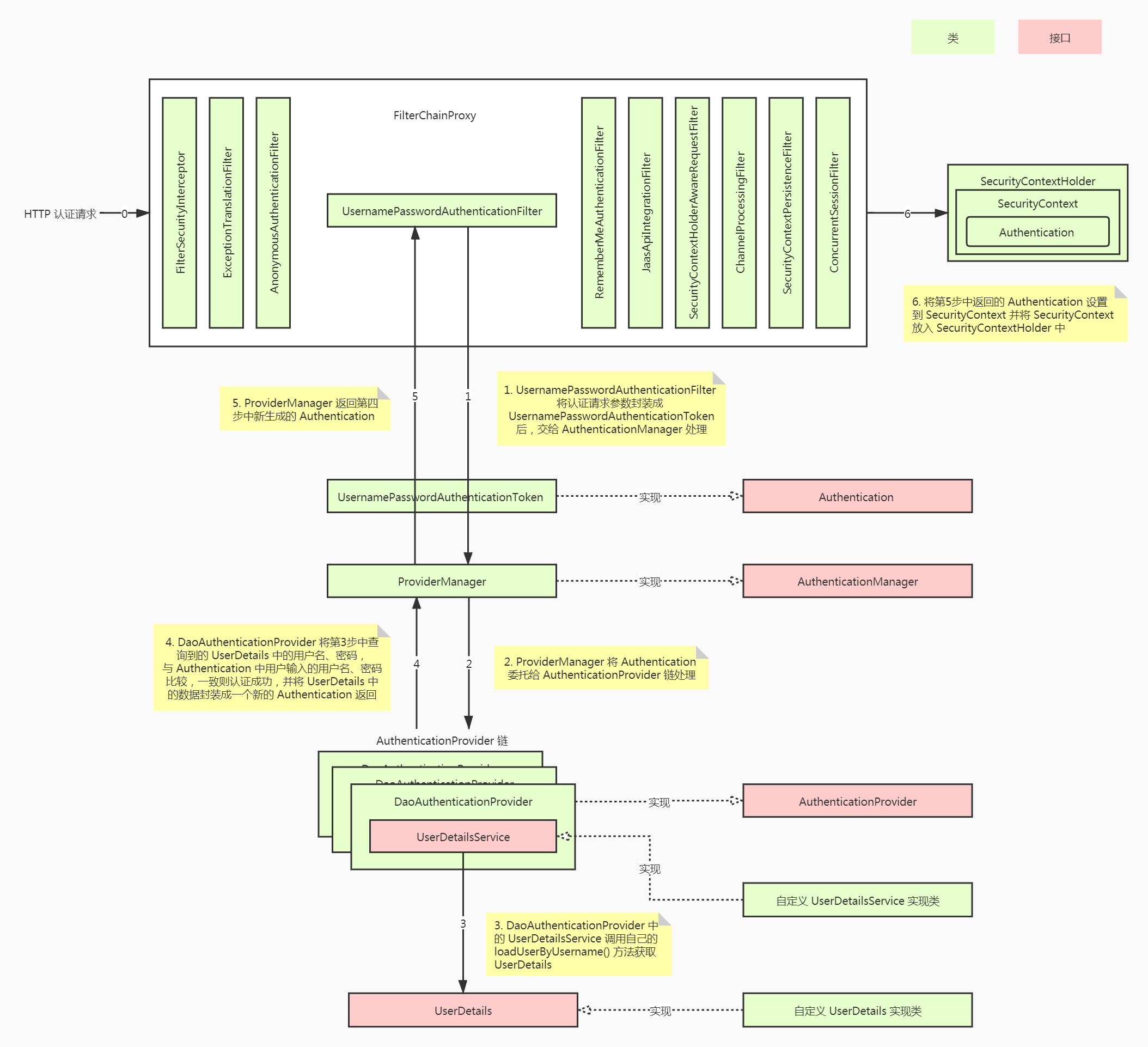
Spring Security 核心组件
在上面的 Spring Security 认证流程中提到了各种各样的类和接口,它们共同构成了 Spring Security 核心组件。了解这些类的作用有利于我们更好的理解 Spring Security 框架
SecurityContextHolder
SecurityContextHolder 持有安全上下文(security context)的信息。
当前操作的用户是谁,该用户是否已经被认证,他拥有哪些角色权等等,这些都被保存在 SecurityContextHolder 中。
SecurityContextHolder 默认使用 ThreadLocal 策略来存储认证信息。看到 ThreadLocal 也就意味着,这是一种与线程绑定的策略。在 web 环境下,Spring Security 在用户登录时自动绑定认证信息到当前线程,在用户退出时,自动清除当前线程的认证信息。
获取当前用户的信息
Object principal = SecurityContextHolder.getContext().getAuthentication().getPrincipal();
if (principal instanceof UserDetails) {
    String username = ((UserDetails)principal).getUsername();
} else {
    String username = principal.toString();
}
- getAuthentication() 返回了认证信息
- getPrincipal() 返回了身份信息
- UserDetails 是 Spring 对身份信息封装的一个接口
SecurityContext
安全上下文,主要持有 Authentication 对象,如果用户未鉴权,那 Authentication 对象将会是空的。
public interface SecurityContext extends Serializable {

    Authentication getAuthentication();

    void setAuthentication(Authentication authentication);
}
Authentication
鉴权对象,该对象主要包含了用户的详细信息(UserDetails)和用户鉴权时所需要的信息(如用户提交的用户名密码、Remember-me Token 或者 digest hash值等)。
不同鉴权方式对应不同的Authentication实现
public interface Authentication extends Principal, Serializable {

    Collection<? extends GrantedAuthority> getAuthorities();

    Object getCredentials();

    Object getDetails();

    Object getPrincipal();

    boolean isAuthenticated();

    void setAuthenticated(boolean isAuthenticated) throws IllegalArgumentException;
}
Authentication 是 spring security 包中的接口,直接继承自 Principal 类,而 Principal 是位于 java.security 包中的。可以见得,Authentication 在 spring security 中是最高级别的身份/认证的抽象。由这个顶级接口,我们可以得到用户拥有的权限信息列表,密码,用户细节信息,用户身份信息,认证信息。
- getAuthorities() : 获取权限信息列表,默认是 GrantedAuthority 接口的一些实现类,通常是代表权限信息的一系列字符串。
- getCredentials() : 获取用户输入的密码,在认证过后通常会被移除
- getDetails() : 获取细节信息,web 应用中的实现接口通常为 WebAuthenticationDetails,它记录了访问者的 ip 地址和 sessionId
- getPrincipal() : 敲黑板!!!获取最重要的身份信息,大部分情况下返回的是 UserDetails 接口的实现类
GrantedAuthority
该接口表示了当前用户所拥有的权限(或者角色)信息。这些信息由授权负责对象 AccessDecisionManager 来使用,并决定最终用户是否可以访问某资源(URL或方法调用或域对象)。鉴权时并不会使用到该对象。
public interface GrantedAuthority extends Serializable {
	String getAuthority();
}
UserDetails
UserDetails 接口代表着用户的详细信息,我们使用 Spring Security 框架时,一般会实现 UserDetails 接口,并加上其他用户信息。
public interface UserDetails extends Serializable {

    Collection<? extends GrantedAuthority> getAuthorities();

    String getPassword();

    String getUsername();

    boolean isAccountNonExpired();

    boolean isAccountNonLocked();

    boolean isCredentialsNonExpired();

    boolean isEnabled();
}
UserDetailsService
public interface UserDetailsService {
    UserDetails loadUserByUsername(String username) throws UsernameNotFoundException;
}
这个接口只提供 loadUserByUsername(String username) 方法用于获取 UserDetails
认证过程中, AuthenticationProvider 会拿着用户输入的用户名来调用 loadUserByUsername() 方法来获取系统用的用户详情信息
之后查询到的用户详情信息会与用户输入的认证信息进行对比,以判断是否认证成功
AuthenticationManager
初次接触 Spring Security 的朋友相信会被 AuthenticationManager,ProviderManager ,AuthenticationProvider …这么多相似的 Spring 认证类搞得晕头转向,但只要稍微梳理一下就可以理解清楚它们的联系和设计者的用意。
AuthenticationManager(接口)是认证相关的核心接口,也是发起认证的出发点,在实际需求中,我们可能会允许用户使用 用户名+密码登录,同时允许用户使用邮箱+密码,手机号码+密码登录,甚至,可能允许用户使用指纹、声纹、面容ID 登录。所以 AuthenticationManager 一般不直接认证。
AuthenticationManager 接口的常用实现类 ProviderManager 内部会维护一个 List<AuthenticationProvider> 列表,存放多种认证方式(其实就是委托者模式的应用)。也就是说,核心的认证入口始终只有一个:AuthenticationManager。不同的认证方式:用户名+密码(UsernamePasswordAuthenticationToken),邮箱+密码,手机号码+密码登录则对应了三个AuthenticationProvider。
public interface AuthenticationManager {
	Authentication authenticate(Authentication authentication) throws AuthenticationException;
}
ProviderManager
public class ProviderManager implements AuthenticationManager, MessageSourceAware, InitializingBean {

	private static final Log logger = LogFactory.getLog(ProviderManager.class);


	private AuthenticationEventPublisher eventPublisher = new NullEventPublisher();
	private List<AuthenticationProvider> providers = Collections.emptyList();
	protected MessageSourceAccessor messages = SpringSecurityMessageSource.getAccessor();
	private AuthenticationManager parent;
	private boolean eraseCredentialsAfterAuthentication = true;

	public ProviderManager(List<AuthenticationProvider> providers) {
		this(providers, null);
	}

	public ProviderManager(List<AuthenticationProvider> providers,
			AuthenticationManager parent) {
		Assert.notNull(providers, "providers list cannot be null");
		this.providers = providers;
		this.parent = parent;
		checkState();
	}

	public void afterPropertiesSet() throws Exception {
		checkState();
	}

	private void checkState() {
		if (parent == null && providers.isEmpty()) {
			throw new IllegalArgumentException(
					"A parent AuthenticationManager or a list "
							+ "of AuthenticationProviders is required");
		}
	}


	public Authentication authenticate(Authentication authentication)
			throws AuthenticationException {
		Class<? extends Authentication> toTest = authentication.getClass();
		AuthenticationException lastException = null;
		AuthenticationException parentException = null;
		Authentication result = null;
		Authentication parentResult = null;
		boolean debug = logger.isDebugEnabled();

		for (AuthenticationProvider provider : getProviders()) {
			if (!provider.supports(toTest)) {
				continue;
			}

			if (debug) {
				logger.debug("Authentication attempt using "
						+ provider.getClass().getName());
			}

			try {
				result = provider.authenticate(authentication);

				if (result != null) {
					copyDetails(authentication, result);
					break;
				}
			}
			catch (AccountStatusException e) {
				prepareException(e, authentication);
				throw e;
			}
			catch (InternalAuthenticationServiceException e) {
				prepareException(e, authentication);
				throw e;
			}
			catch (AuthenticationException e) {
				lastException = e;
			}
		}

		if (result == null && parent != null) {
			try {
				result = parentResult = parent.authenticate(authentication);
			}
			catch (ProviderNotFoundException e) {
			}
			catch (AuthenticationException e) {
				lastException = parentException = e;
			}
		}

		if (result != null) {
			if (eraseCredentialsAfterAuthentication
					&& (result instanceof CredentialsContainer)) {
				((CredentialsContainer) result).eraseCredentials();
			}
			AuthenticationSuccessEvent
			already published it
			if (parentResult == null) {
				eventPublisher.publishAuthenticationSuccess(result);
			}
			return result;
		}

		if (lastException == null) {
			lastException = new ProviderNotFoundException(messages.getMessage(
					"ProviderManager.providerNotFound",
					new Object[] { toTest.getName() },
					"No AuthenticationProvider found for {0}"));
		}

		 AbstractAuthenticationFailureEvent
		 already published it
		if (parentException == null) {
			prepareException(lastException, authentication);
		}

		throw lastException;
	}

	@SuppressWarnings("deprecation")
	private void prepareException(AuthenticationException ex, Authentication auth) {
		eventPublisher.publishAuthenticationFailure(ex, auth);
	}

	private void copyDetails(Authentication source, Authentication dest) {
		if ((dest instanceof AbstractAuthenticationToken) && (dest.getDetails() == null)) {
			AbstractAuthenticationToken token = (AbstractAuthenticationToken) dest;

			token.setDetails(source.getDetails());
		}
	}

	public List<AuthenticationProvider> getProviders() {
		return providers;
	}

	public void setMessageSource(MessageSource messageSource) {
		this.messages = new MessageSourceAccessor(messageSource);
	}
}

