

Spring第二天:spring基于注解的IOC以及IOC的案例
    1.spring中的IOC的常用注解
    2.案例使用xml方式和注解方式实现单标的CRUD操作
        持久层技术选择:dbutils
    3.改造基于注解的ioc案例,使用纯注解的方式实现
        spring的一些新注解使用
    4.spring和Junit整合
1. spring中的IOC的常用注解
1.1 用于创建对象的注解
    曾经的XML配置
    ```
    <bean id="accountService" class="com.itheima.service.impl.IAccountServiceImpl"
           scope="" init-method="" destroy-method="">
         <property name="" value=""/ref=""></property>
    </bean>
    ```
    现在我们要将这个XML配置,用注解来完成

    1.@Component: 一般不属于三层的会用这个
        使用步骤:
        1. 配置在你要创建的对象上
        作用:反射创建一个当前类对象,并把当前类对象存入spring容器中
        属性:
            value:用于指定bean的id。默认值是当前类名且首字母小写,
                   如果连着首字母2个或多个大写那么id是当前类名。

        2. 光配置完还不够:解析完配置文件后,怎么知道在哪写了注解呢?
           配置bean.xml文件:修改头文件,并配置context标签。
            ```
            <?xml version="1.0" encoding="UTF-8"?>
            <beans xmlns="http://www.springframework.org/schema/beans"
                   xmlns:xsi="http://www.w3.org/2001/XMLSchema-instance"
                   xmlns:context="http://www.springframework.org/schema/context"
                   xsi:schemaLocation="http://www.springframework.org/schema/beans
                    http://www.springframework.org/schema/beans/spring-beans.xsd
                    http://www.springframework.org/schema/context
                    http://www.springframework.org/schema/context/spring-context.xsd">

                <!--告知spring在创建容器时,要扫描的包(扫描这个包就可以扫描到这个注解)
                    注意:配置的标签不是在beans的的约束中,而是一个名为context名称空间和约束中
                    此时就会扫描com.itheima包下包括子包的所有类或接口上的注解
                -->

                <context:component-scan base-package="com.itheima"></context:component-scan>

            </beans>
        ```


    2.@Controller:一般用在表现层
    3.@Service:一般用在业务层
    4.@Repository:一般用在持久层

        这三个注解他们的作用和属性与@Component是一摸一样的。他们三个是spring框架为我们提
    供的明确的三层使用的注解,使我们对三层对象更加清晰
    *
    ```
    @Service("iAccountServiceImpl")
    public class IAccountServiceImpl implements IAccountService {
    }
    ```
1.2 用于注入数据的注解----注入其他bean对象
注入引用类型的成员变量。
1.2.1 @Autowired
    ```
    public class IAccountServiceImpl implements IAccountService {
        @Autowired
        private IAccountDao accountDao1 = null;

        //构造函数:只能在本类中创建。
        public IAccountServiceImpl(){
            System.out.println("对象创建了");
        }

        public void saveAccount() {
            accountDao1.saveAccount();
        }
    }
    ```
    他们的作用就和在XML配置文件中的<bean/>标签的<property/>标签类似

    * Autowired:
        作用:自动按照类型注入。
        只要容器中有唯一的一个bean对象类型和要注入的变量类型匹配就可以注入成功。
    注意这里是唯一。如果没有匹配的就会报错。

    * 如果有多个能匹配的bean对象类型:
        比如:注解标注在接口成员变量上,但是容器中有两个实现类。
        ```
        @Autowired
        private IAccountDao accountDao1, = null;

        @Repository("accountDao2")
        public class IAccountDaoImpl2 implements IAccountDao {
        }

        @Repository("accountDao1")
        public class IAccountDaoImpl implements IAccountDao {
        }
        ```

       此时,想要注入的是 IAccountDao accountDao1,但是容器中有两个IAccountDao的实现类。
    那么就会让变量名accountDao1再去匹配key--->匹配到@Repository("accountDao1")。就可以
    成功注入了。
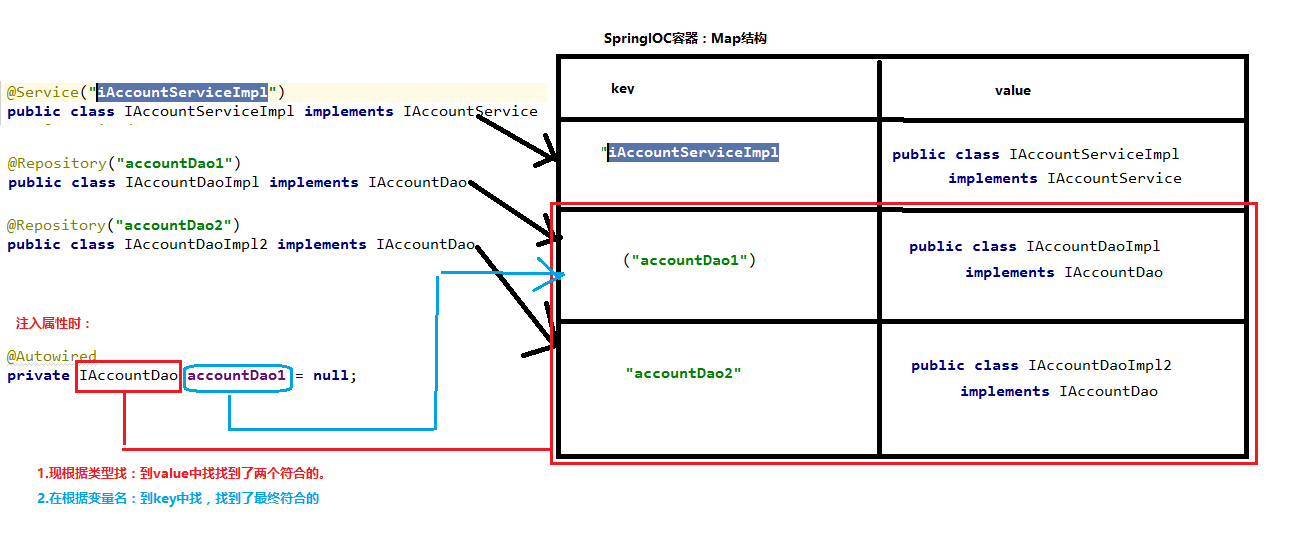
    * Autowired的缺陷也就很明显了:
        当有IOC容器中有多个bean对象能和要注入的属性匹配上,而且这几个bean对象的在容器中的key
    也无法和变量名对应上,那么该注解就无法注入了。
1.2.2 @Qualifier和@Resource
    1.@Qualifier
    作用:在按照类中注入的基础上在按照名称注入。它在给成员注入时不能单独使用(搭配@Autowired)。
          但是在给方法参数注入时可以单独使用。
    value:用于指定注入bean的id

    ```
    @Autowired
    @Qualifier("accountDao1")
    private IAccountDao accountDao1 = null;
    ```
    2. @Resource
    作用:直接按照bean的id注入。它可以独立使用
    属性:name用于指定bean的id
    ```
    @Resource(name="accountDao1")
    private IAccountDao accountDao1 = null;
    ```

    3.以上三个注入都只能注入其他bean类型的数据,而基本类型和String类型无法使用上述注解实现,
      另外集合类型的注入只能通过XML来实现。
1.2.3 注入基本类型
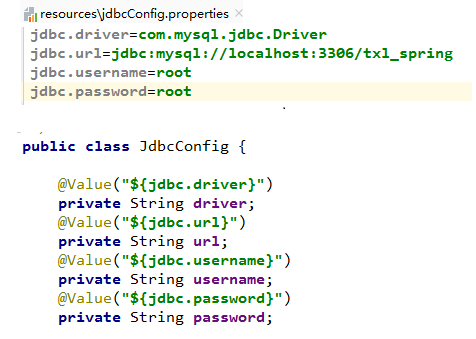
    @Value:
    作用:用于注入基本类型和String类型的数据
    属性:value用于指定数据的值,它可以使用spring中的SpEl(也就是spring的el表达式)
          SpEL的写法:$(表达式)
1.3 用于改变作用范围的--@Scope
    用于指定ApplicationContext接口是创建单例还是多例对象的:
    ApplicationContext接口可以根据我们的需要来创建单例/多例:我们怎么发出需求,
通过scope。如果配置的scope取值为singleton那么单例创建,如果配置的scope取值为
prototype那么多例创建。

    属性:value
    指定范围的取值,常用取值:singleton prototype(默认情况下是单例的)
    ```
    @Scope(value = "prototype")
    public class IAccountServiceImpl implements IAccountService
    ```
1.4 和生命周期相关的标签
    @PreDestroy和@PostConstruct
    他们的作用就和在XML配置文件中<bean/>标签的init-method="" destroy-method=""类似。

    ```
    public static void main(String[] args) {
        ClassPathXmlApplicationContext ac = new ClassPathXmlApplicationContext("bean.xml");
        IAccountService as = (IAccountService)ac.getBean("iAccountServiceImpl");
        as.saveAccount();
        ac.close();
    }


    @Scope(value = "singleton")
    public class IAccountServiceImpl implements IAccountService {
        @Resource(name="accountDao1")
        private IAccountDao accountDao1 = null;

        @PostConstruct
        public void init(){
            System.out.println("初始化方法执行");
        }
        @PreDestroy
        public void destroy(){
            System.out.println("销毁方法执行了");
        }
    }
    ```
    1.PostConstruct:用于指定初始化方法
    2.PreDestroy:用于指定销毁方法
        ---IOC容器关闭时.close()才会执行该方法。
        注意:其关闭容器的close()方法,是ApplicationContext子类的方法,@PreDestroy要想起作用。
    容器对象必须是ClassPathXmlApplicationContext对象。
        注意:如果注解的方法所在的类,是通过构造器多例创建的那么容器不能通过close()方法关闭,
    spring不负责销毁。因为它不知道你什么时候用完,所以只有单例时才可以用这个注解。
2. 案例:使用xml方式和注解方式实现单表的CRUD操作
2.1 使用xml方式实现单表的CRUD操作
    1.bean.xml
    ```
    <?xml version="1.0" encoding="UTF-8"?>
    <beans xmlns="http://www.springframework.org/schema/beans"
           xmlns:xsi="http://www.w3.org/2001/XMLSchema-instance"
           xsi:schemaLocation="http://www.springframework.org/schema/beans
            http://www.springframework.org/schema/beans/spring-beans.xsd">

        <!--配置service对象-->
        <bean id="accountService" class="com.itheima.service.impl.AccountServiceImpl">
            <!--通过set方法:注入dao-->
            <property name="accountDao" ref="accountDao"></property>
        </bean>

        <!--配置Dao对象-->
        <bean id="accountDao" class="com.itheima.dao.impl.AccountDaoImpl">
            <!--通过set方法:注入QueryRunner-->
            <property name="runner" ref="queryRunner"></property>
        </bean>

        <!--配置注入QueryRunner对象:由于现在是单表的CRUD操作,所以可以选择传入数据源(连接池)。
            注意这里获取的QueryRunner默认是单例的,这样就可能出现线程问题,所以用多例模式创建
            即:每次使用QueryRunner对象都会创建一个新的QueryRunner对象。
        -->
        <bean id="queryRunner" class="org.apache.commons.dbutils.QueryRunner" scope="prototype">
            <!--注入数据源-->
            <constructor-arg name="ds" ref="dataSource"></constructor-arg>
        </bean>

        <!--配置数据源-->
        <bean id="dataSource" class="com.mchange.v2.c3p0.ComboPooledDataSource">
            <!--连接数据库的必备信息-->
            <property name="driverClass" value="com.mysql.jdbc.Driver"></property>
            <property name="jdbcUrl" value="jdbc:mysql://localhost:3306/txl_spring"></property>
            <property name="user" value="root"></property>
            <property name="password" value="root"></property>
        </bean>
    </beans>
    ```

        注意:
        1.配置AccountServiceImpl Bean对象
            2.通过set属性方法(property),注入AccountServiceImpl中的Bean类型的成员变量:AccountDaoImpl
            3.配置AccountDaoImpl Bean对象
                4.通过set属性方法(property),注入AccountDaoImpl的Bean类型的成员变量:QueryRunner
                5.配置QueryRunner Bean对象
                    *6.通过构造方法(constructor-arg)注入DataSource
                        ```
                        public QueryRunner(DataSource ds) {
                            super(ds);
                        }
                        ```
                        *7注入(property)DataSource的4个属性


        2.注入QueryRunner对象:

            1.由于现在是单表的CRUD操作,所以可以选择传入数据源(连接池)。(考虑到事务)

            2.注意这里获取的QueryRunner默认是单例的,这样就可能出现线程问题,所以用多例模式创建
              每次使用QueryRunner对象都会创建一个新的QueryRunner对象。

            ```
            <bean id="queryRunner" class="org.apache.commons.dbutils.QueryRunner" scope="prototype">
                <!--注入数据源-->
                <constructor-arg name="ds" ref="dataSource"></constructor-arg>
            </bean>
            ```

    2. Test
        ```
            public void testfindAll() {
            //1.获取容器
            ApplicationContext container = new ClassPathXmlApplicationContext("bean.xml");
            /**
             * 2.得到业务层对象:
             *      由于IAccountServiceImpl有IAccountDaoImpl成员属性
             *      IAccountDaoImpl有QueryRunner成员属性
             *      所以同时得到了IAccountServiceImpl对象,IAccountDaoImpl对象,QueryRunner对象
             */
            IAccountService accountService = container.getBean("accountService", IAccountService.class);
            //3.执行方法
            List<Account> accounts = accountService.findAllAccount();
            for (Account account : accounts) {
                System.out.println(account);
            }
        }
        ```
        注意:得到业务层对象时
            由于IAccountServiceImpl有IAccountDaoImpl成员属性
            IAccountDaoImpl有QueryRunner成员属性
            所以同时得到了IAccountServiceImpl对象,IAccountDaoImpl对象,QueryRunner对象。
2.2 使用注解方式实现单表的CRUD操作
1. bean.xml

    * 文件头要改:context
    * 告知spring:在创建容器时要扫描的包
      <context:component-scan base-package="com.itheima"></context:component-scan>
    * 只留下注入QueryRunner和数据源
    ```
    <?xml version="1.0" encoding="UTF-8"?>
    <beans xmlns="http://www.springframework.org/schema/beans"
           xmlns:xsi="http://www.w3.org/2001/XMLSchema-instance"
           xmlns:context="http://www.springframework.org/schema/context"
           xsi:schemaLocation="http://www.springframework.org/schema/beans
            http://www.springframework.org/schema/beans/spring-beans.xsd
            http://www.springframework.org/schema/context
            http://www.springframework.org/schema/context/spring-context.xsd">

        <context:annotation-config/>

        <!--告知spring:在创建容器时要扫描的包-->
        <context:component-scan base-package="com.itheima"></context:component-scan>

        <!--配置注入QueryRunner对象:由于现在是单表的CRUD操作,所以可以选择传入数据源(连接池)。
            注意这里获取的QueryRunner默认是单例的,这样就可能出现线程问题,所以用多例模式创建
            即:每次使用QueryRunner对象都会创建一个新的QueryRunner对象。
        -->
        <bean id="queryRunner" class="org.apache.commons.dbutils.QueryRunner" scope="prototype">
            <!--注入数据源-->
            <constructor-arg name="ds" ref="dataSource"></constructor-arg>
        </bean>

        <!--配置数据源-->
        <bean id="dataSource" class="com.mchange.v2.c3p0.ComboPooledDataSource">
            <!--连接数据库的必备信息-->
            <property name="driverClass" value="com.mysql.jdbc.Driver"></property>
            <property name="jdbcUrl" value="jdbc:mysql://localhost:3306/txl_spring"></property>
            <property name="user" value="root"></property>
            <property name="password" value="root"></property>
        </bean>
    </beans>
    ```

2.  AccountServiceImpl和AccountDaoImpl

        * 需要注入的属性就不需要set方法了。
        * 创建Bean:
            @Service("accountService")
            @Repository("accountDao")
        * 注入(引用类型)属性
            @Resource(name="accountDao")
            @Resource(name="queryRunner")
2.3 面临的一些问题
    1. 我们目前学习的注解:
       *1 只能加到我们自己的类上面,所以如果将其他jar包中的类也交给spring    来创建或注入的话,
          能用xml来配置,这是我们目前面临的一个问题。

          比如此例中:QueryRunner是外部jar包中的一个类,显然不能在上面加注解。

       *2 还有告知spring要扫描的包,我们也要在xml中写。

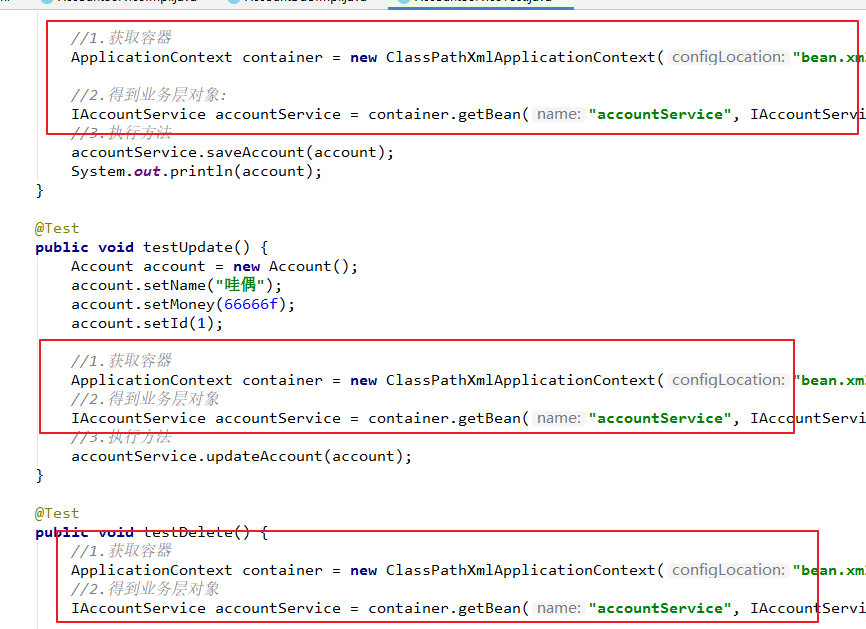
    2. 还有一个问题test类中重复代码太多。
3 解决仍然Anno有xml的问题@Bean
3.1 让其他jar包中的类也交给spring来创建或注入:@Bean
    想要去掉XML中的配置,全部用注解Anno来完成这个案例:
    我们可以手动创建一个配置类来完成之前XML配置中剩下的内容。

    SpringConfiguration类
    ```
    package config; //在java资源文件下建立config包
    @Configuration
    @ComponentScan(value={"com.itheima"})
    public class SpringConfiguration {
    }
    ```

    1.来看一下这两个注解
        * 1.@Configuration
            作用:指定当前类是一个配置类 SpringConfiguration

        * 2.ComponentScan
            作用:通过该注解指定spring在创建容器时要扫描的包
            属性:value和basePackages互为别名,所以是一样的。
                  都是数组,所以标准写法:
                  value={"com.itheima", "xxx"}
                  @ComponentScan(value={"com.itheima"}):用于指定创建容器时要扫描的包。


    * 那么现在我们就解决了遗留的第一个XML配置
        ```
            <!--告知spring:在创建容器时要扫描的包-->
            <context:component-scan base-package="com.itheima"></context:component-scan>
        ```

    2. 第二个问题:怎么通过注解的方式让其他jar包中的类也交给spring来创建或注入

        <bean id="queryRunner" class="org.apache.commons.dbutils.QueryRunner" scope="prototype">

        <bean id="dataSource" class="com.mchange.v2.c3p0.ComboPooledDataSource">

        发现:可以通过调用构造函数来实例化QueryRunner和DataSource,QueryRunner是有参构造,
              DataSource是无参构造。


        1 继续完善SpringConfiguration

        我们分析一下:
            ```
            1.<bean id="queryRunner" class="org.apache.commons.dbutils.QueryRunner" scope="prototype">
            ```
            ```
            2.public QueryRunner creatQueryRunner(DataSource dataSource){
                return new QueryRunner(dataSource);
            }
            ```
            这两者都可以创建一个quertRunner对象,但是前者创建后会放到IOC容器中,而后者仅仅是
        为调用这实例化了一个queryRunner对象,不会放在IOC中。

        2 新的注解:@Bean  标注在方法上,将返回值放到容器中。

            作用:用于把当前方法中的返回值bean对象存入springIOC容器中。
            属性:
                name:用于指定bean的id。默认值:当不指定时:当前方法的名称
            细节:
                1.当我们使用注解配置时,如果方法有参数,spring框架会去容器中
                  查找有没有可用的bean对象。查找的方式和AutoWired的注解方式
                  是一样的:自动按照类型注入,如果有唯一的类型直接注入,如果
                  有多个再按照变量名注入。

                  ```
                  @Bean(name="queryRunner")
                  @Scope(value="prototype")   //注意QueryRunner我们需要多例创建
                  public QueryRunner creatQueryRunner(DataSource dataSource){
                    return new QueryRunner(dataSource);
                  }
                  ```

                  即参数DataSource dataSource也会去容器中匹配相应的bean对象,匹配
                  方式同@AutoWerid的引用类型注入。

                2.注意这里指定的@Bean(name="queryRunner"),也就是要用queryRunner取
                  容器中匹配QueryRunner对象,所以如果其他类中要注入QueryRunner对象时,
                  要注意指明name是queryRunner。

                3.这种也是调用构造方法创建的QueryRunner对象,而且我们没有指明是多例创建,
                  所以默认也是单例创建,针对这个获取数据源连接池的QueryRunner对象多例
                  创建,再加上:
                  @Scope(value="prototype")

                ```
                    @Bean(name="queryRunner")
                    @Scope(value="prototype")   //注意QueryRunner我们需要多例创建
                    public QueryRunner creatQueryRunner(DataSource dataSource){
                        return new QueryRunner(dataSource);
                    }

                    @Bean("dataSource")
                    public DataSource creatDataSource(){
                        ComboPooledDataSource ds = new ComboPooledDataSource();
                        try {
                            ds.setDriverClass("com.mysql.jdbc.Driver");
                            ds.setJdbcUrl("jdbc:mysql://localhost:3306/txl_spring");
                            ds.setUser("root");
                            ds.setPassword("root");

                            return ds;
                        } catch (Exception e) {
                            throw new RuntimeException(e);
                        }
                    }
                ```

        3. 这个时候我们就完全用注解实现了这个案例:可以不用xml配置文件了

           最后:修改一下获取容器的方式
           用注解方式获容器,不用加载配置文件的方式。

        Test方法中:

           * 之前的获取方式:
            //获取容器
            ApplicationContext container = new ClassPathXmlApplicationContext("bean.xml");

           * 现在的方式
            //注解方式:获取容器的方法也变了,参数是被@Configuration注解过的类(可以使多个)。
            ApplicationContext container  = new AnnotationConfigApplicationContext(SpringConfiguration.class);

           注意:参数是被@Configuration注解过的类(可以有多个)。
3.2 如果需要些多个配置类:
    * 背景:
            主配置类  SpringConfiguration
            子配置类  JdbcConfig


    1.注意
        new AnnotationConfigApplicationContext(SpringConfiguration.class, JdbcConfig.class);
    是一个可变参的构造函数,而且指向性很强大明确,因为我没有在JdbcConfig类上写:
        @Configuration
        @ComponentScan(value={"com.itheima.config"})
    这些注解。
        只要你给了相应的字节码参数,用容器构造方法都可以把相应的bean对象加载到容器中。

    2. 但是
        如果你想在实例化容器时,直传主配置类字节码对象作为参数。那么在不使用其他注解的情况下:

        要再JdbcConfig子配置类加上@Configuration,同时还要在主配置类SpringConfiguration指明
    扫描的包@ComponentScan(value={"com.itheima.config"})。这显然又要用到不少重复的注解,
    显得臃肿。

    3. 引出新的注解:@Import

        作用:用于导入其他的配置类。
              可以把其他的子配置类都导入到主配置类中,相当于把这些细小的配置类都加载进主配置文件里了。
        那么就不用在主配置类专门指定扫描子配置类的包、给子配置类加上@Configuration,在实例化容器
        时传入子配置类的字节码文件这些操作。

        属性:
            value:用于指定其他配置类的字节码

        @Import(value={JdbcConfig.class})

        *注意:一般注解在主配置类上。
3.3 继续解决问题:
配置数据源属性时,我们将这些属性写死了,这肯定是不合适的。
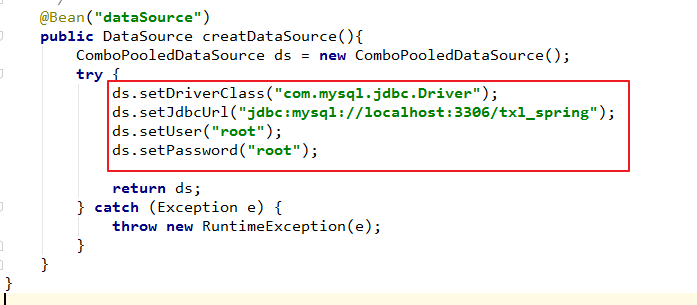
1. 在resources文件下,写一个properties配置文件:jdbcConfig.properties

    2. 改造原来配置数据源连接属性的子配置类:JdbcConfig

    ```
        @Value("${jdbc.driver}")
        private String driver;

        @Value("${jdbc.url}")
        private String url;

        @Value("${jdbc.username}")
        private String username;

        @Value("${jdbc.password}")
        private String password;

        @Bean("dataSource")
        public DataSource creatDataSource(){
            ComboPooledDataSource ds = new ComboPooledDataSource();
            try {
                ds.setDriverClass(driver);
                ds.setJdbcUrl(url);
                ds.setUser(username);
                ds.setPassword(password);

                return ds;
            } catch (Exception e) {
                throw new RuntimeException(e);
            }
        }
    ```
    注意:
        1.这里我们用到@Value注解,它是用来注入基本类型数据的。在这里为基本类型成员变量注入数据,
          语法是EL表达式:
          ("${jdbc.driver}")


    3. 指明jdbcConfig.properties所在的位置----@PropertySource/@PropertySources
        PropertySources : 可以指定多个PropertySource
        PropertySource  : String[] value();

        作用:用于指定properties文件的位置


    4. 我们要知道resources/jdbcConfig.properties在项目部署运行后后,
       是在类路径根目录下:target/classes/config目录下。
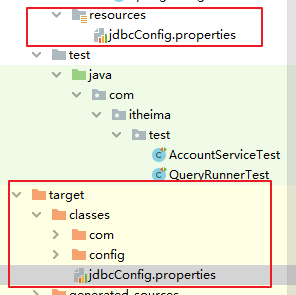
        属性:
            value:指定文件的名称和路径
            关键字:classpath,表示类路径下classpath=target/classes目录中的文件
                    value={"classpath:jdbcConfig.properties"}
                    表示后面的路径是一个类路径,从而让他找到来加载

            有包的话还可以指明包 :
                    value={"classpath:config/spring/jdbcConfig.properties"}

        注意:@PropertySources挡在主配置类中。
3.4 @Qualifier单独使用的情况
    1.  背景
        我们知道@Bean标注在方法上时,将返回值放到容器中。而且如果方法中有参数时:
        spring框架会去容器中查找有没有可用的bean对象。查找的方式和AutoWired的注解方式。

    2.  示例:
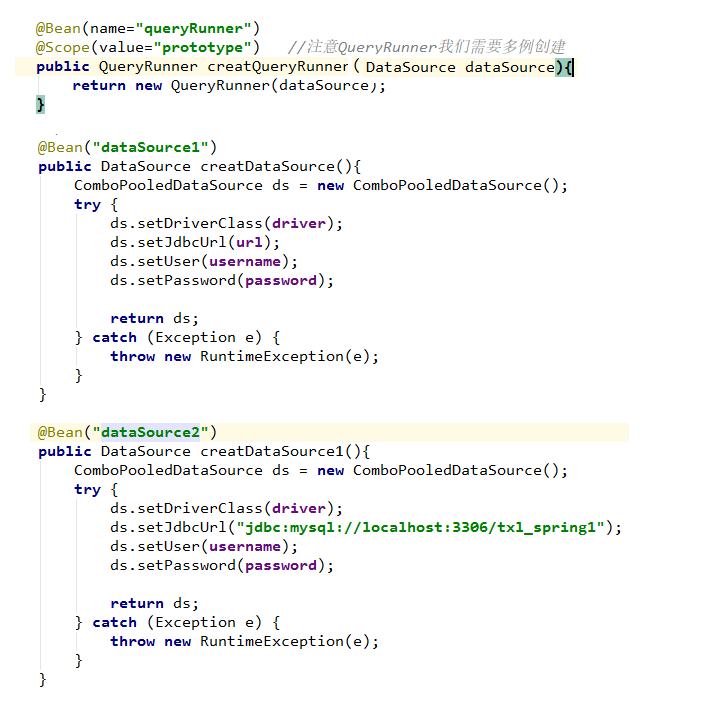
        即形参dataSource:在容器中匹配的类型有两个而且key分别是dataSource1和dataSource2。
    此时id和key值也不匹配,那么此时就会报错。
        同@Autowired注解规则一样。我们想到@Qualifier,但是@Qualifier在给类成员标注时
    必须搭配@Autowired。我们又发现:
        @Qualifier是可以标注在方法参数中的: ElementType.PARAMETER,而且此时不需要搭配
    同@Autowired。所以我们为形参指定id(key):

    3.注意:
        @Qualifier优先级高于其本身的匹配规则的。
3.5 小结
        在去掉所有的xml配置时,用纯注解的方式来开发。我们发现:反而更费事了,
    还没有保留一部分XML注解更方便。
        一般来说如果这个类是jar中的还是用xml文件配置好一些,如果是我们自己写的
    注解也可能更方便。

        所以一般原则(思考方向):哪个更方便,就选择哪个。
4. Spring和Junit整合
------解决我们测试类中出现许多重复的代码
4.1 先用JUNIT来改进
```
    private ApplicationContext container;
    private IAccountService accountService;

    @Before
    public void init(){
        //1.获取容器
        container = new AnnotationConfigApplicationContext(SpringConfiguration.class);
        //2.得到业务层对象:
        accountService = container.getBean("accountService", IAccountService.class);
    }


```
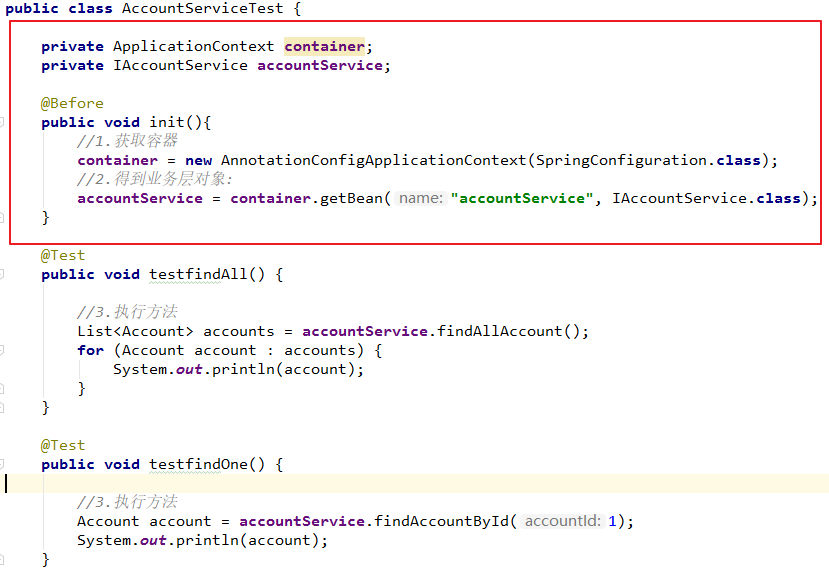
        有个说法(我不太理解):开发工程师和测试工程师的着眼点不一样。测试工程师不一定知道spring框架
    测试工程师拿到手的测试代码:
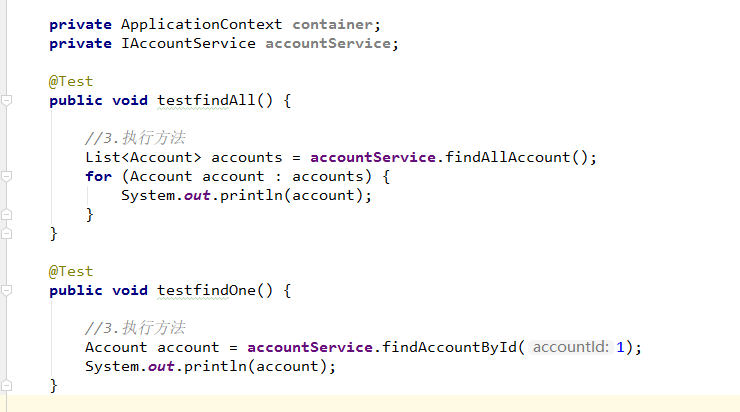
显然这会报空指针异常。
4.2 解决方法
    1.我们先理一下这些概念:

        1.应用程序的入口:
            main方法
        2.JUNIT单元测试,没有main方法也能执行,原因:
            junit继承了一个main方法
            该方法会判断当前测试类中哪些方法有@Test注解
            junit会让有注解的方法执行
        3.JNUITT不会管我们是否采用了spring矿建
            在执行测试方法时,JUNIT根本不知道我们是不是使用了spring框架
            所以也就不会为我们读取配置文件/配置类创建spring核心容器了。
        4.由以上三点可知
            当测试方法执行时,没有IOC核心容器。
            就算写了@Autowired注解,也无法实现注入。

        注意:测试方法执行时,没有IOC核心容器

    2.Spring整个JUNIT的配置:
        想办法把JUNIT原来不能加载IOC容器的main方法换掉,换成一个能加载IOC容器的。

        1.导入spring整合junit的jar包(坐标)
            ```
                <!--spring整合junit的jar包-->
                <dependency>
                    <groupId>org.springframework</groupId>
                    <artifactId>spring-test</artifactId>
                    <version>5.0.2.RELEASE</version>
                </dependency>
            ```
        2.使用JUNIT提供的一个注解把原有的main方法替换掉,替换成spring提供的

            @RunWith(SpringJUnit4ClassRunner.class)

                Class<? extends Runner> value(); 里面的值必须是一个继承Runner的字节码类。
                SpringJUnit4ClassRunner extends BlockJUnit4ClassRunner

                SpringJUnit4ClassRunner是Spring提供的,它一定会为我们提供容器。它还得知道
            你有的是XML配置文件还是注解。配置文件放哪了,配置类是谁?

        3. 告知Spring的运行器:
            spring的IOC创建是基于 是XML配置文件还是注解,并且说明位置。
            @ContextConfiguration
                locations:指定xml文件的位置,加上classpath关键字,表示在类路径下。
                classes:指定注解类所在的位置

                @ContextConfiguration(locations = "classpath:bean.xml")
                @ContextConfiguration(classes = SpringConfiguration.class)

        4. 小细节:版本要求
            当我们使用spring 5.x版本时,要求junit的jar必须是4.12及以上。这样
        在运行测试方法时,SpringJUnit4ClassRunner才会为我们创建IOC容器。
            而且测试方法报错时:不会提示版本错误
            运行整个测试类是:展开所有的异常提示,才会发现版本要求。

        * 最后我们分析一下:
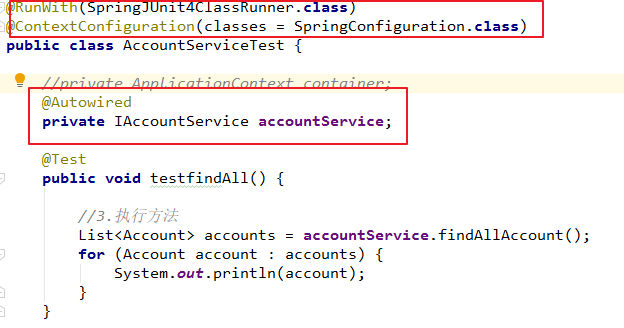
运行测试方法时: 1.SpringJUnit4ClassRunner是spring运行器会为我们提供容器 2.@ContextConfiguration(classes = SpringConfiguration.class) 告知了spring运行器,我们是xml配置的还是注解配置的,并且指定了位置。
              然后就会将需要生成的Bean对象放到IOC容器里。

            3.所以我们就不需要在定义容器对象属性了,
              而且@Autowired也会为我们注入对应的bean对象。
              当然也可以用:
              @Resource(name = "accountService")

