基于自定义指标
除了基于 CPU 和内存来进行自动扩缩容之外,我们还可以根据自定义的监控指标来进行。这个我们就需要使用 Prometheus Adapter,Prometheus 用于监控应用的负载和集群本身的各种指标,Prometheus Adapter 可以帮我们使用 Prometheus 收集的指标并使用它们来制定扩展策略,这些指标都是通过 APIServer 暴露的,而且 HPA 资源对象也可以很轻易的直接使用。
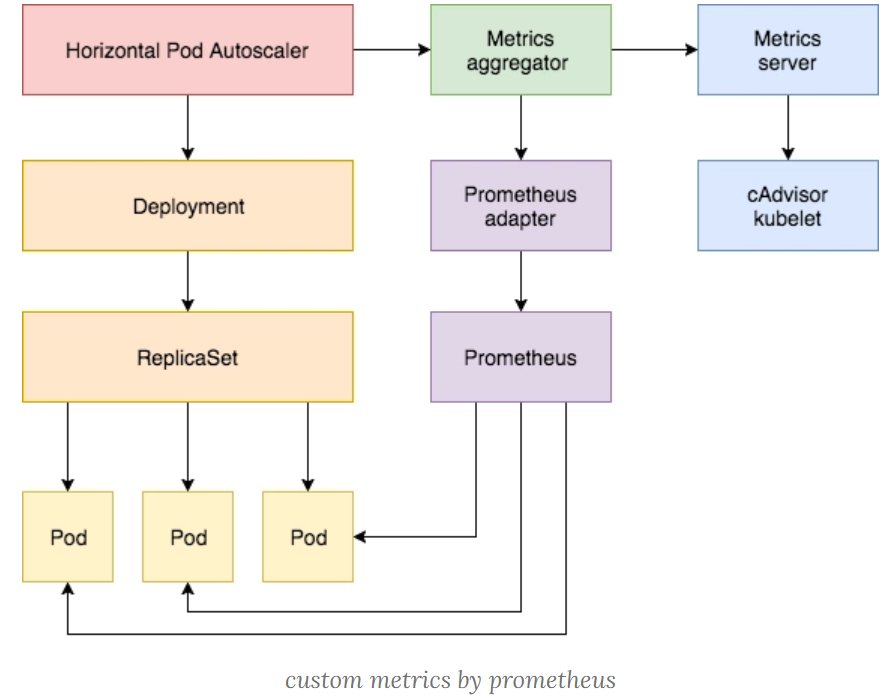
下面来看具体怎么实现的!
部署应用
首先,我们部署一个示例应用,在该应用程序上测试 Prometheus 指标自动缩放,资源清单文件如下所示:(podinfo.yaml)
---
apiVersion: apps/v1
kind: Deployment
metadata:
  name: podinfo
spec:
  selector:
    matchLabels:
      app: podinfo
  replicas: 1
  template:
    metadata:
      labels:
        app: podinfo
      annotations:
        prometheus.io/scrape: 'true'
    spec:
      containers:
      - name: podinfod
        image: stefanprodan/podinfo:0.0.1
        imagePullPolicy: Always
        command:
          - ./podinfo
          - -port=9898
          - -logtostderr=true
          - -v=2
        volumeMounts:
          - name: metadata
            mountPath: /etc/podinfod/metadata
            readOnly: true
        ports:
        - containerPort: 9898
          protocol: TCP
        readinessProbe:
          httpGet:
            path: /readyz
            port: 9898
          initialDelaySeconds: 1
          periodSeconds: 2
          failureThreshold: 1
        livenessProbe:
          httpGet:
            path: /healthz
            port: 9898
          initialDelaySeconds: 1
          periodSeconds: 3
          failureThreshold: 2
        resources:
          requests:
            memory: "32Mi"
            cpu: "1m"
          limits:
            memory: "256Mi"
            cpu: "100m"
      volumes:
        - name: metadata
          downwardAPI:
            items:
              - path: "labels"
                fieldRef:
                  fieldPath: metadata.labels
              - path: "annotations"
                fieldRef:
                  fieldPath: metadata.annotations
---
apiVersion: v1
kind: Service
metadata:
  name: podinfo
  labels:
    app: podinfo
spec:
  type: NodePort
  ports:
    - port: 9898
      targetPort: 9898
      nodePort: 31198
      protocol: TCP
  selector:
    app: podinfo
接下来我们将 Prometheus-Adapter 安装到集群中,这里选用helm安装,当然也可以直接yaml文件安装。
Prometheus-Adapter规则
Prometheus-Adapter 规则大致 可以分为以下几个部分:
-
seriesQuery:查询 Prometheus 的语句,通过这个查询语句查询到的所有指标都可以用于 HPA -
seriesFilters:查询到的指标可能会存在不需要的,可以通过它过滤掉。 -
resources:通过seriesQuery查询到的只是指标,如果需要查询某个 Pod 的指标,肯定要将它的名称和所在的命名空间作为指标的标签进行查询,resources就是将指标的标签和 k8s 的资源类型关联起来,最常用的就是 pod 和 namespace。有两种添加标签的方式,一种是overrides,另一种是template。overrides:它会将指标中的标签和 k8s 资源关联起来。上面示例中就是将指标中的 pod 和 namespace 标签和 k8s 中的 pod 和 namespace 关联起来,因为 pod 和 namespace 都属于核心 api 组,所以不需要指定 api 组。当我们查询某个 pod 的指标时,它会自动将 pod 的名称和名称空间作为标签加入到查询条件中。比如pod: {group: "apps", resource: "deployment"}这么写表示的就是将指标中 podinfo 这个标签和 apps 这个 api 组中的deployment资源关联起来;- template:通过 go 模板的形式。比如
template: "kube_<<.Group>>_<<.Resource>>"这么写表示,假如<<.Group>>为 apps,<<.Resource>>为 deployment,那么它就是将指标中kube_apps_deployment标签和 deployment 资源关联起来。
-
name:用来给指标重命名的,之所以要给指标重命名是因为有些指标是只增的,比如以 total 结尾的指标。这些指标拿来做 HPA 是没有意义的,我们一般计算它的速率,以速率作为值,那么此时的名称就不能以 total 结尾了,所以要进行重命名。matches:通过正则表达式来匹配指标名,可以进行分组as:默认值为$1,也就是第一个分组。as为空就是使用默认值的意思。
-
metricsQuery:这就是 Prometheus 的查询语句了,前面的seriesQuery查询是获得 HPA 指标。当我们要查某个指标的值时就要通过它指定的查询语句进行了。可以看到查询语句使用了速率和分组,这就是解决上面提到的只增指标的问题。Series:表示指标名称LabelMatchers:附加的标签,目前只有pod和namespace两种,因此我们要在之前使用resources进行关联GroupBy:就是 pod 名称,同样需要使用resources进行关联。
安装
我们新建
hpa-prome-adapter-values.yaml文件覆盖默认的 Values 值 ,安装Prometheus-Adapter,我用的helm2文件如下:
rules:
  default: false
  custom:
  - seriesQuery: 'http_requests_total'
    resources:
      overrides:
        kubernetes_namespace:
          resource: namespace
        kubernetes_pod_name:
          resource: pod
    name:
      matches: "^(.*)_total"
      as: "${1}_per_second"
    metricsQuery: (sum(rate(<<.Series>>{<<.LabelMatchers>>}[1m])) by (<<.GroupBy>>))
prometheus:
  url: http://prometheus-clusterip.monitor.svc.cluster.local
安装
helm repo add apphub https://apphub.aliyuncs.com/
helm install --name prome-adapter --namespace monitor -f hpa-prome-adapter-values.yaml  apphub/prometheus-adapter
等一小会儿,安装完成后,可以使用下面的命令来检测是否生效了:
[root@prometheus]# kubectl get --raw="/apis/custom.metrics.k8s.io/v1beta1" | jq
{
  "kind": "APIResourceList",
  "apiVersion": "v1",
  "groupVersion": "custom.metrics.k8s.io/v1beta1",
  "resources": [
    {
      "name": "namespaces/http_requests_per_second",
      "singularName": "",
      "namespaced": false,
      "kind": "MetricValueList",
      "verbs": [
        "get"
      ]
    },
    {
      "name": "pods/http_requests_per_second",
      "singularName": "",
      "namespaced": true,
      "kind": "MetricValueList",
      "verbs": [
        "get"
      ]
    }
  ]
}
我们可以看到 http_requests_per_second 指标可用。 现在,让我们检查该指标的当前值:
[root@prometheus]# kubectl get --raw "/apis/custom.metrics.k8s.io/v1beta1/namespaces/default/pods/*/http_requests_per_second" | jq .
{
  "kind": "MetricValueList",
  "apiVersion": "custom.metrics.k8s.io/v1beta1",
  "metadata": {
    "selfLink": "/apis/custom.metrics.k8s.io/v1beta1/namespaces/default/pods/%2A/http_requests_per_second"
  },
  "items": [
    {
      "describedObject": {
        "kind": "Pod",
        "namespace": "default",
        "name": "podinfo-5cdc457c8b-99xtw",
        "apiVersion": "/v1"
      },
      "metricName": "http_requests_per_second",
      "timestamp": "2020-06-02T12:01:01Z",
      "value": "888m",
      "selector": null
    },
    {
      "describedObject": {
        "kind": "Pod",
        "namespace": "default",
        "name": "podinfo-5cdc457c8b-b7pfz",
        "apiVersion": "/v1"
      },
      "metricName": "http_requests_per_second",
      "timestamp": "2020-06-02T12:01:01Z",
      "value": "888m",
      "selector": null
    }
  ]
}
下面部署hpa对象
apiVersion: autoscaling/v2beta1
kind: HorizontalPodAutoscaler
metadata:
  name: podinfo
spec:
  scaleTargetRef:
    apiVersion: extensions/v1beta1
    kind: Deployment
    name: podinfo
  minReplicas: 2
  maxReplicas: 5
  metrics:
  - type: Pods
    pods:
      metricName: http_requests_per_second
      targetAverageValue: 3
部署之后,可见:
[root@prometheus-adapter]# kubectl get hpa
NAME      REFERENCE            TARGETS   MINPODS   MAXPODS   REPLICAS   AGE
podinfo   Deployment/podinfo   911m/10   2         5         2          70s


[root@prometheus-adapter]# kubectl describe hpa
Name:                                  podinfo
Namespace:                             default
Labels:                                <none>
Annotations:                           kubectl.kubernetes.io/last-applied-configuration:
                                         {"apiVersion":"autoscaling/v2beta1","kind":"HorizontalPodAutoscaler","metadata":{"annotations":{},"name":"podinfo","namespace":"default"},...
CreationTimestamp:                     Tue, 02 Jun 2020 17:53:14 +0800
Reference:                             Deployment/podinfo
Metrics:                               ( current / target )
  "http_requests_per_second" on pods:  911m / 10
Min replicas:                          2
Max replicas:                          5
Deployment pods:                       2 current / 2 desired
Conditions:
  Type            Status  Reason               Message
  ----            ------  ------               -------
  AbleToScale     True    ScaleDownStabilized  recent recommendations were higher than current one, applying the highest recent recommendation
  ScalingActive   True    ValidMetricFound     the HPA was able to successfully calculate a replica count from pods metric http_requests_per_second
做一个ab压测:
ab -n 2000 -c 5 http://sy.test.com:31198/观察下hpa变化:
Events:
  Type    Reason             Age    From                       Message
  ----    ------             ----   ----                       -------
  Normal  SuccessfulRescale  9m29s  horizontal-pod-autoscaler  New size: 3; reason: pods metric http_requests_per_second above target
  Normal  SuccessfulRescale  9m18s  horizontal-pod-autoscaler  New size: 4; reason: pods metric http_requests_per_second above target
  Normal  SuccessfulRescale  3m34s  horizontal-pod-autoscaler  New size: 3; reason: All metrics below target
  Normal  SuccessfulRescale  3m4s   horizontal-pod-autoscaler  New size: 2; reason: All metrics below target
发现触发扩容动作了,副本到了4,并且压测结束后,过了5分钟左右,又恢复到最小值2个。
参考链接
---本文结束感谢您的阅读。微信扫描二维码,关注我的公众号---