一 优化数据结构
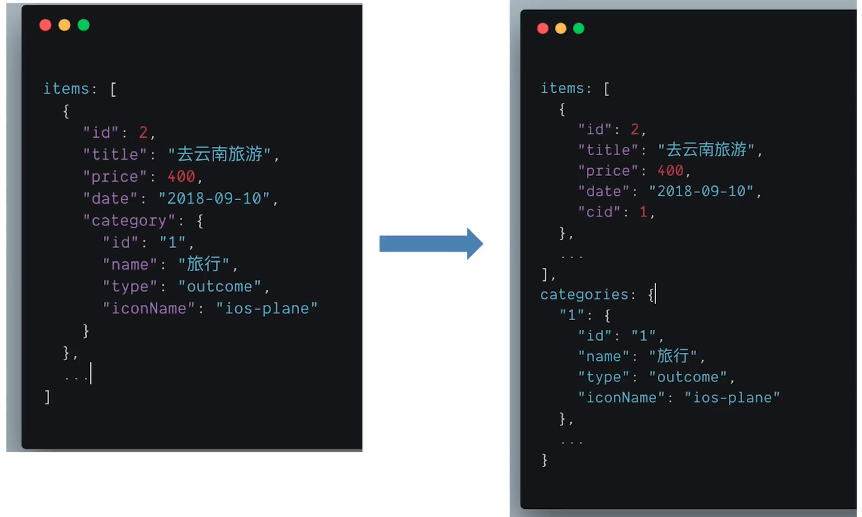
const itemsWithCategory = items.map(item =>{
    item.category = categoies[item.cid]
    return item
})
Flatten State
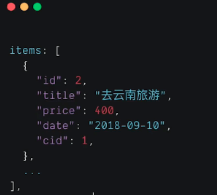
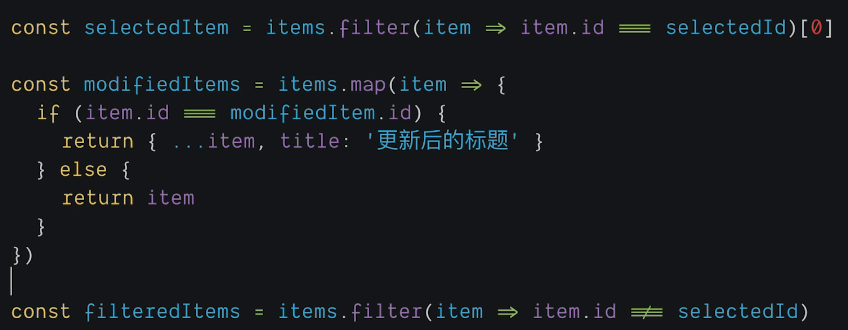
数据结构更改后, 操作数据的方法
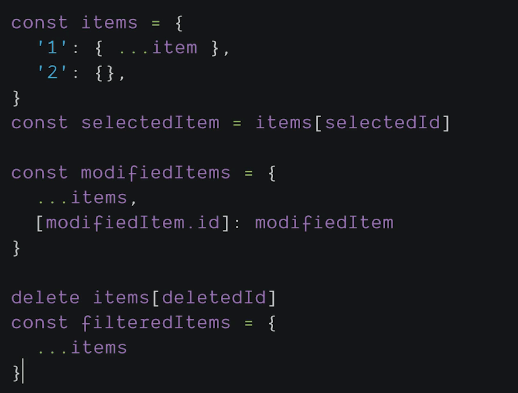
- 解决数据冗余
- 数据处理更容易
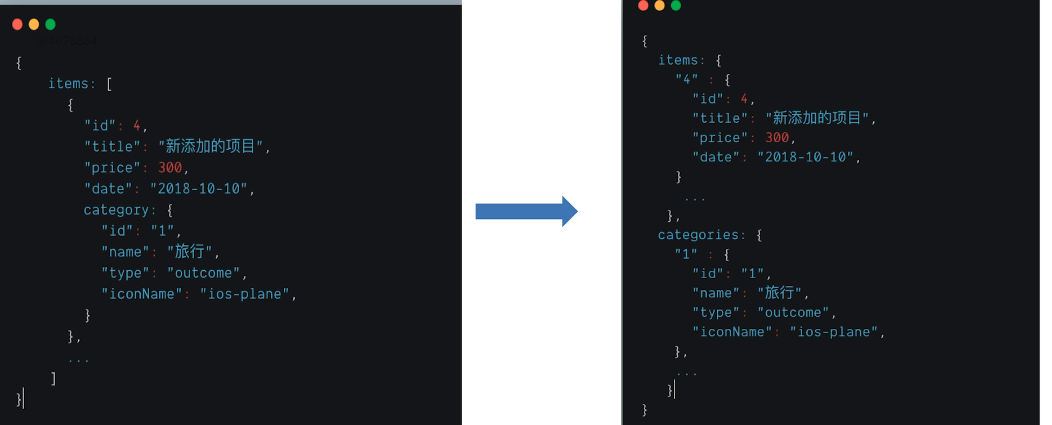
export const flatternArr = (arr) => {
  return arr.reduce((map, item) => {
    map[item.id] = item
    return map
  }, {})
}
数组去重归类
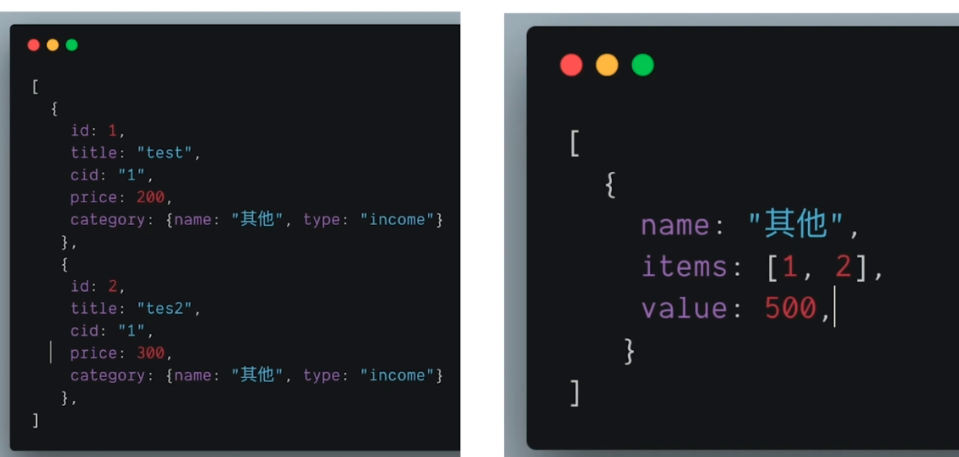
const generateChartDataByCategory = (items, type = TYPE_INCOME){
    let categoryMap = {}
    items.filter(item => item.category.type === type).forEach(item => {
        if(categoryMap[item.cid]){
            categoryMap[item.cid].value += (item.price * 1)
            categoryMap[item.cid].items.push(item.id)
        }else{
            categoryMap[item.cid] = {
                name: item.category.name,
                value: item.price * 1,
                items: [item.id]
            }
        }
    })
    return Object.keys(categoryMap).map(mapKey => (     {...categoryMap[mapKey]}
    ))
}
二 数组
删除数组项
deleteItem =(deletedItem)=>{
    const filteredItems = this.state.items.filter(
        item => item.id != deletedItem
    )
    this.setState({
        items.filteredItems
    })
}
修改数组项
modifyItem = (modifiedItem) =>{
    const modifiedItems = this.state.items.map(item =>{
        if(item.id === modifiedItem.id){
            return {...item, title: '更新后的title'}
        }else{
            return item
        }
    })
    this.setState({
        items: modifiedItems
    })
}
过滤数组项
const itemsWithCategory = items.map(item => {
    item.category = categoies[item.cid]
    return item
}).filter(item => {
    return item.date.includes(`${currentDate.year}`)
})
01 使用React Router 管理路由授权
- 实现基础:React Router 的动态路由机制
- 区分受保护路由和公开路由
- 访问未授权路由时重定向到登录页面
features/examples/counter/router.js
{path: 'counter', protected: true, component: CounterComponent}
Root.js
import {Redirect} from 'react-router-dom';
let loggedIn;
const renderRoute = (item, routeContextPath) =>{
    if(item.proected && !loggedIn){
        item = {
            ...item,
            component: <Redirect to="/403" />,
            children: []
        }
    }
}
export default class Root extends React.Component {
    componentDidMount(){
        this.store.subscribe(()=>{
            this.forceUpdate();
        })
    }
    render(){
        loggedIn = this.store.getState().examples.loggedIn;
    }
}
02 表单:初始数据、提交和跳转
const formMeta = {
    columns: 1,
    elements: [
        {
            key: 'userName',
            label: 'User Name',
            initialValue: 'Lily',
            tooltip: 'user name',
            widget: Input,
            required: true
        },
        {
            key: 'password',
            label: 'Password',
            initialValue: '123456',
            widget: Input,
            type: 'password'
        },
        {
            key: 'date',
            label: 'Birth date',
            initialValue: '2020/02/02',
            widget: DatePicker,
            widgetProps: { stype: {width: "100%"}}
        }
    ]
}
//...
render(){
    <FormBuilder meta={formMeta}, form={this.props.form}/>
}
03 列表:数据缓存和分页
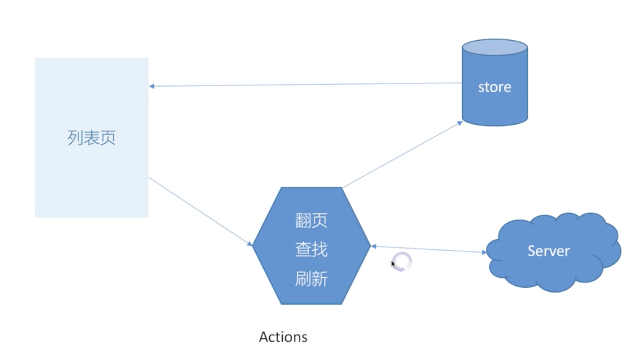
设计Redux的store模型
- listItems: array // 保存item ID : ['id1', 'id2', ...]
- keyword: string
- page: number // 当前页码
- byId: object // {id1: {name: 'Natet'}, id2: {name: 'Lily'}, ...}
- fetchListPending: bool
- fetchListError: object
- listNeedReload: bool
URL设计以及和Store同步
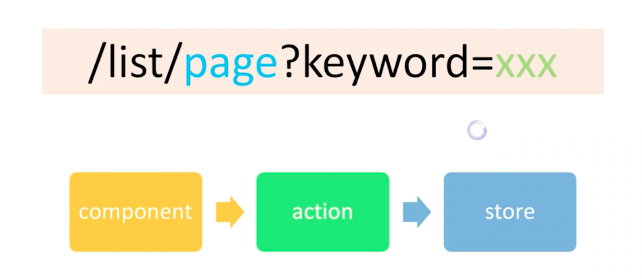
getDataSource(){
    const {items, byId}  = this.props.list;
    if(!items) return [];
    reutnr items.map(id=>byId[id]);
}
04 使用router 实现step业务
getSteps() {
    return [
      { title: "验证邮件", path: "/wizard/step/1", component: Step1 },
      { title: "账号信息", path: "/wizard/step/2", component: Step2 },
      { title: "完成", path: "/wizard/step/3", component: Step3 }
    ];
}
//...
<Router>
    <Form>
      <div style={{ width: "600px" }}>
        <Steps step={this.getCurrentStep()}> </Steps>
        <div className="step-container" >
          <Route
            path="/wizard/step/:stepId"
            render={this.renderComponent}
          />
        </div>
      </div>
    </Form>
 </Router>
05 使用 React Portals 实现悬浮层UI控件
将当前component注入到指定DOM中
render() {
    if (!this.state.visible) return this.renderButton();
    return ReactDOM.createPortal(
      this.renderDialog(),
      document.getElementById("dialog-container"),
    );
  }
06 dropdown 点击外部关闭
thisComponent = React.createRef();
componentDidMount(){
    document.addEventListener('click', this.handleClick, false)
}
componentWillUnmount(){
    document.removeEventListener('click', this.handleClick, false)
}
handleClick = (event)=>{
    if(this.thisComponent.contains(event.target)){
        return;
    }
    this.setState({
        isOpen: false
    })
}
render() {
    return <div ref={this.thisComponent} />;
  }
Jest模拟document
test('after the dropdown is shown, click document should close the dropdown', ()=>{
    let eventMap = {}
    document.addEventListener = jest.fn((event, cb) => {
        eventMap[event] = cb
    })
    const wrapper = shallow(<TotalPrive {...props} />)
    wrapper.find('.dropdown-toggle').simulate('click')
    expect(wrapper.state('isOpen')).toEqual(true)
    expect(wrapper.find('.dropdown-ment').length).toEqual(1)

    eventMap.click({
        target: ReactDOM.findDOMNode(wrapper.instance())
    })
    expect(wrapper.state('isOpen')).toEqual(true)

    eventMap.click({
        target: document
    })
    expect(wrapper.state('isOpen')).toEqual(false)
})
07 tabs 灵活渲染
<Tabs activeIndex={0} onTabChange={onTabChange}>
    <Tab>1st</Tab>
    <Tab>2nd</Tab>
</Tabs>
Tab.js
export class Tabs extends React.Component {
    constructor(props){
        super(props)
        this.state = {
            activeIndex: props.activeIndex
        }
    }
    tabChange = (event, index) =>{
        event.preventDefault()
        this.setState({
            activeIndex: index
        })
        this.props.onTabChange(index)
    }
    render(){
        const {Children, activeIndex} = this.props;
        return (
            <ul>
                {React.Children.map(children, (child, index)=>{
                    const activeName = (activeIndex === index) ? 'nav-link active': 'nav-link'
                   return (
                    <li>
                        <a onClick={event => {
                            this.tabChange(event, index)
                        }}>{child}</a>
                    </li>
                )
                })}
            </ul>
        )
    }
}
export const Tab = ({children}) => (
    <React.Fragment>{children}</React.Fragment>
)
#08 window调用react方法
componentDidMount(){
    this.bindEvents()
}
componentWillUnmount(){
    window.removeEventListener('scroll', this.props.changeScroll)
}
bindEvents(){
    window.addEventListener('scroll', this.props.changeScroll)
}
09 高阶组件 HOC
高阶组件接受组件作为参数,返回新组件
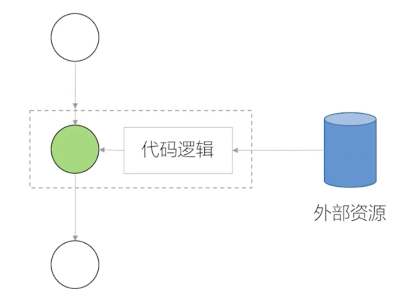
const EnhancedComponent = higherOrderComponent(WrappedComponent);
withTimer.js
export default function withTimer(WrappedComponent){
    return class extends React.Component {
        state = {time: nuew Date()};
        componentDidMount(){
            this.timerID = setInterval(()=>this.tick(), 1000);
        }

        componentWillUnmount(){
            clearInterval(this.timerID)
        }

        tick(){
            this.setState({
                time: new Date()
            })
        }

        render(){
            return <WrappedComponent time={this.state.time} {...this.props} />
        }
    }
}
10 高阶函数
const withLoaging = (cb)=>{
    return (...args) => {
        this.setState({
            isLoading: true
        })
        return cb(...args)
    }
}
11 函数作为子组件
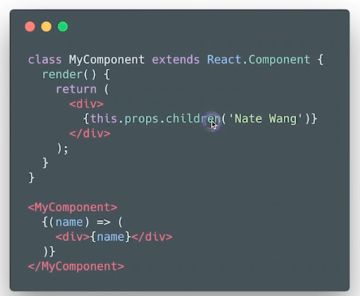
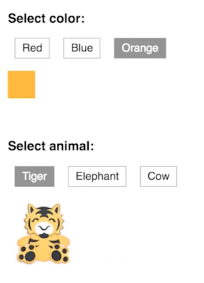
import PropTypes from 'prop-types';

export default class AdvancedTabSelector extends PureComponent {
    static propTypes = {
        value: PropTypes.object,
        children: PropTypes.func
    }

    static defaultProps = {
        children: ()=>{}
    }

    render(){
        const {value, children} = this.props;
        return (<div>
            {value && children(value)}
        </div>)
    }
}
index.js
render(){
    //...
    <AdvancedTabSelector value = {color}
        { color => (<span className={`${color}`}></span>)}
    </AdvancedTabSelector>
    //...
    <AdvancedTabSelector value = {animal}
        { animal => (<span className={`${animal}`}></span>)}
    </AdvancedTabSelector>
}