

前段时间做了一个信息服务网站项目,已基本完成,现在把开发中的经验和教训总结一下。(有不当之处敬请指正)
一、技术选型 vue+ElementUI作为主体框架
     "vue": "^2.5.2",
     "element-ui": "^2.13.0",
二、部分开发技术总结
   1、elementUI 组件按需引入

     import element from './ElementUI/ElementUI';
     Vue.use(element);
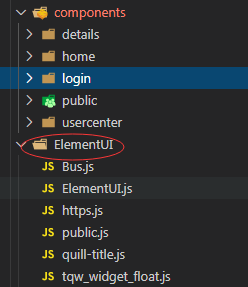
  2、axios接口封装

      import https from "./ElementUI/https";       //axios接口封装
      Vue.prototype.$https = https;//全局注册,使用方法为:this.$https

  3、线上代理路径封装
       import apiConfig from '../config/api.config' //代理封装

        const isPro = Object.is(process.env.NODE_ENV, 'production')
        // console.log(isPro);
        module.exports = {
        baseUrl: isPro ? '********' : '/api'

         }

  4、添加天气预报接口

       请求免费天气接口

       https://www.sojson.com/blog/305.html

  5、城市切换组件

    import RegionPicker from 'vue-region-picker';//引入城市切换
    import REGION_DATA from 'china-area-data';
       Vue.use(RegionPicker, {
           region: REGION_DATA
         });

       <region-picker
           two-select
           :province="province"
           :city="city"
           @onchange="change">
           </region-picker>


  6、组件抽屉式收起

        <transition name="hot">  </transition>
     .hot-enter {
        opacity: 0;
        height: 0;
    }
    .hot-enter-active {
        transition: height 0.6s;
    }
    .hot-leave-to {
        opacity: 0;
        height: 0;
    }
    .hot-leave-active {
        transition: height 0.6s;
    }

  7、轮播组件自动轮播功能
           https://github.com/staskjs/vue-slick
  $ npm install vue-slick

  8、二维码的读取监听功能
        vue qrcode生成二维码 并拼装url参数

    https://blog.csdn.net/u014678583/article/details/105226086

  9 、文章的富文本上传

     "vue-quill-editor": "^3.0.6",
     "vue-quill-editor-upload": "^1.1.0",

   import {
       Quill, quillEditor
     } from 'vue-quill-editor'
   import { quillRedefine } from 'vue-quill-editor-upload'//引入图片上传
   import 'quill/dist/quill.core.css'
   import 'quill/dist/quill.snow.css'
   import 'quill/dist/quill.bubble.css'
   import '../../assets/css/font.css'


10、登录注册的规则校验以及支付对接验证

       ElementUI和微信支付对接
三、开发重难点
-
自定义天气预报(带城市切换) 农历换算,以及传统节日的计算和展示功能;
-
页面的全体换肤功能 (实现页面的点击后所有页面的背景换肤);
-
富文本的自定义头部控件和内部换肤功能。
四、开发经验和教训
-
因项目紧急和思考不足,在开发中未进行flex布局(未熟悉使用,怕出问题);
-
未对所有颜色换肤进行统一css处理,导致后续护肤功能实现比较繁琐,效果一般;
-
整体网站页面逻辑发布稍显不足,对页面的设计处理在开发中不断调整,当然这也和产品客户沟通想法等不同有关系;
-
因时间紧急在开发中也犯一些低级错误等,造成开发效率有所降低,以后要尽量杜绝;。
-
个人vue技术栈还有待提高,需要进一步学习使用vue。
**星辰大海,目至心愿。**
