SystemUI 主要模块
- StatusBar:通知消息提示和状态展现
- NavigationBar:返回,HOME,Recent
- KeyGuard:锁屏模块可以看做单独的应用,提供基本的手机个人隐私保护
- Recents:近期应用管理,以堆叠栈的形式展现。
- Notification Panel:展示系统或应用通知内容。提供快速系统设置开关。
- Volume:来用展示或控制音量的变化:媒体音量、铃声音量与闹钟音量
- 截屏界面:长按电源键+音量下键后截屏,用以展示截取的屏幕照片/内容
- PowerUI:主要处理和Power相关的事件,比如省电模式切换、电池电量变化和开关屏事件等。
- RingtonePlayer:铃声播放
- StackDivider:控制管理分屏
- PipUI:提供对于画中画模式的管理
简单的说下 SystemUI 的启动过程
由init进程->Zygote进程->SystemServer进程。
那init进程又是怎么起来的?当你按下电源键,系统上电,从固定地址开始加载固化在ROM的Bootloader代码到RAM中并执行,Bootloader引导程序负责将系统OS拉起。当系统OS被拉起,并完成一些列初始化和系统设置后,就会首先在系统文件中寻找“init”文件并启动这个咱们用户空间的第一个进程。
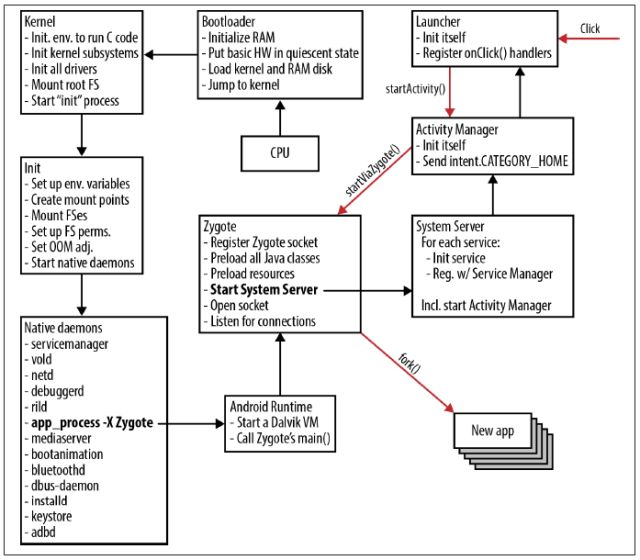
SystemUI
每个模块的公共方法 所以系统抽取了 SystemUI 公共类
- 处理各自模块的初始化
- 处理系统的状态变化
- 执行dump
- 系统启动完成时,要处理相应逻辑
// SystemUI
public abstract class SystemUI implements SysUiServiceProvider {
    public Context mContext;
    public Map<Class<?>, Object> mComponents;

    // 完成初始化操作
    public abstract void start();

    // 是处理系统状态变化的回调,这里的状态变化包括:时区变更,
    // 字体大小变更,输入模式变更,屏幕大小变更,屏幕方向变更等。
    protected void onConfigurationChanged(Configuration newConfig) {
    }

    // dump方法用来将模块的内部状态dump到输出流中,这个方法主要是辅助
    // 调试所用。开发者可以在开发过程中,通过adb shell执行dump来了解系统的内部状态。
    public void dump(FileDescriptor fd, PrintWriter pw, String[] args) {
    }

    // 系统启动完成的回调方法
    protected void onBootCompleted() {
    }

    @SuppressWarnings("unchecked")
    public <T> T getComponent(Class<T> interfaceType) {
        return (T) (mComponents != null ? mComponents.get(interfaceType) : null);
    }

    public <T, C extends T> void putComponent(Class<T> interfaceType, C component) {
        if (mComponents != null) {
            mComponents.put(interfaceType, component);
        }
    }

    public static void overrideNotificationAppName(Context context, Notification.Builder n,
            boolean system) {
        final Bundle extras = new Bundle();
        String appName = system
                ? context.getString(com.android.internal.R.string.notification_app_name_system)
                : context.getString(com.android.internal.R.string.notification_app_name_settings);
        extras.putString(Notification.EXTRA_SUBSTITUTE_APP_NAME, appName);

        n.addExtras(extras);
    }

    public interface Injector extends Function<Context, SystemUI> {
    }
}
除了截屏服务,提及模块均继承抽象类SystemUI并在应用启动时被分别初始化。从这种角度来看,SystemUI应用更像是这些功能模块的容器。
SystemUIApplication
从 AndroidManifest.XML 中可以看到
 <application
        android:name=".SystemUIApplication"
        android:persistent="true"
        android:allowClearUserData="false"
        android:allowBackup="false"
        android:hardwareAccelerated="true"
        android:label="@string/app_label"
        android:icon="@drawable/icon"
        android:process="com.android.systemui"
        android:supportsRtl="true"
        android:theme="@style/Theme.SystemUI"
        android:defaultToDeviceProtectedStorage="true"
        android:directBootAware="true"
        android:appComponentFactory="androidx.core.app.CoreComponentFactory">
        <!-- Keep theme in sync with SystemUIApplication.onCreate().
所以我们去康康 SystemUIApplication 的 Oncreate 方法
   @Override
    public void onCreate() {
        super.onCreate();
        // Set the application theme that is inherited by all services. Note that setting the
        // application theme in the manifest does only work for activities. Keep this in sync with
        // the theme set there.
        setTheme(R.style.Theme_SystemUI);

        SystemUIFactory.createFromConfig(this);

        // 这里有设置一个广播 但是只接受一次
        if (Process.myUserHandle().equals(UserHandle.SYSTEM)) {
            IntentFilter bootCompletedFilter = new IntentFilter(Intent.ACTION_BOOT_COMPLETED);
            bootCompletedFilter.setPriority(IntentFilter.SYSTEM_HIGH_PRIORITY);
            registerReceiver(new BroadcastReceiver() {
                @Override
                public void onReceive(Context context, Intent intent) {
                    if (mBootCompleted) return;

                    if (DEBUG) Log.v(TAG, "BOOT_COMPLETED received");
                    unregisterReceiver(this);
                    mBootCompleted = true;
                    if (mServicesStarted) {
                        final int N = mServices.length;
                        for (int i = 0; i < N; i++) {
                            mServices[i].onBootCompleted();
                        }
                    }
                }
            }, bootCompletedFilter);

            IntentFilter localeChangedFilter = new IntentFilter(Intent.ACTION_LOCALE_CHANGED);
            registerReceiver(new BroadcastReceiver() {
                @Override
                public void onReceive(Context context, Intent intent) {
                    if (Intent.ACTION_LOCALE_CHANGED.equals(intent.getAction())) {
                        if (!mBootCompleted) return;
                        // Update names of SystemUi notification channels
                        NotificationChannels.createAll(context);
                    }
                }
            }, localeChangedFilter);
        } else {
            ···
            startSecondaryUserServicesIfNeeded();
        }
    }
/**
     * Ensures that all the Secondary user SystemUI services are running. If they are already
     * running, this is a no-op. This is needed to conditinally start all the services, as we only
     * need to have it in the main process.
     * <p>This method must only be called from the main thread.</p>
     */
    void startSecondaryUserServicesIfNeeded() {
        String[] names =
                  getResources().getStringArray(R.array.config_systemUIServiceComponentsPerUser);
        startServicesIfNeeded(names);
    }
    private void startServicesIfNeeded(String[] services) {
        if (mServicesStarted) {
            return;
        }
        mServices = new SystemUI[services.length];
        ···
        Log.v(TAG, "Starting SystemUI services for user " +
                Process.myUserHandle().getIdentifier() + ".");
        TimingsTraceLog log = new TimingsTraceLog("SystemUIBootTiming",
                Trace.TRACE_TAG_APP);
        log.traceBegin("StartServices");
        final int N = services.length;
        for (int i = 0; i < N; i++) {
            ···
            mServices[i].mContext = this;
            mServices[i].mComponents = mComponents;
            if (DEBUG) Log.d(TAG, "running: " + mServices[i]);
            // 这里可以看到启动了每个 Service
            mServices[i].start();
            ···
        }
        ···
    }
到这里SystemUI的启动流程就完了
如有错误欢迎指出 共同学习 共同进步哈~