核心要点理解
stroke-dasharray
stroke-dasharray用于创建虚线,表示虚线长度和每段虚线之间的间距
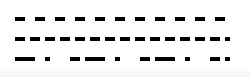
stroke-dasharray = '10' //表示虚线长10,间距10,然后重复 虚线长10,间距10
stroke-dasharray = '10, 5' //表示虚线长10,间距5,然后重复 虚线长10,间距5
stroke-dasharray = '20, 10, 5' //表示虚线长20,间距10,虚线长5,接着是间距20,虚线10,间距5,之后开始如此循环
效果图
stroke-dashoffset
stroke-dashoffset是相对于起始点的偏移,值为正向左偏移,为负向右偏移
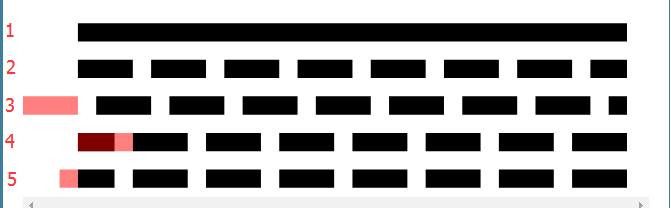
- 没有虚线
- stroke-dasharray="3 1" ,虚线没有设置偏移,也就是stroke-dashoffset值为0
- stroke-dashoffset="3",偏移正数,虚线整体左移了3个单位,图中3后面的红线段,就是起始线段,线段之后是1个单位的间隔,我们可见区域从这个间隔开始,然后循环 3-1,3-1的虚线-间隔-虚线-间隔
- stroke-dashoffset="-3",偏移负数,虚线整体右移动了3个单位,由于dasharray 是循环的,前面偏移的位置会有dasharray 填充上
- stroke-dashoffset="1",偏移正数,虚线整体左移了1个单位,最终呈现出来的效果跟 线段4 一样
绘制(Vue)
CSS样式
<style lang="scss" scoped>
circle{
  stroke-width: 8px;
  transform-origin: center;
  &.progress-background{
    transform: scale(0.9);
    stroke: rgba(255, 205, 49, 0.5);
  }
  &.progress-bar{
    /* 旋转90度的目的是为了调整起始点 */
    transform: scale(0.9) rotate(-90deg);
    stroke: #ffcd32;
  }
}
</style>
HTML结构
<template>
  <div>
    <svg width="100" height="100" @click="playMusic">
      <circle r="50" cx="50" cy="50" fill="transparent" class="progress-background"></circle>
      <circle r="50" cx="50" cy="50" fill="transparent" class="progress-bar" ref="progress-bar" :stroke-dasharray="dasharray" :stroke-dashoffset="dashoffset"></circle>
    </svg>
	  <audio src="https://m8.music.126.net/20200602222810/2b7e73b3efe9e2750c0646bc1bac6b2d/ymusic/8972/6e6e/7b86/bddf788bf92e62d7c5c9aa457dd27bf5.mp3" @timeupdate="updateTime()" ref="audio"></audio>
  </div>
</template>
JavaScript行为
timeupdate 事件在音频(audio)的播放位置发生改变时触发。
<script>
export default {
  data() {
    return {
      flag: true,
      dasharray: Math.PI * 100,
      dashoffset: Math.PI * 100
    }
  },
  mounted() {
    //获取DOM对象audio
    this.audio = this.$refs.audio;
  },
  methods: {
    //音乐的播放与暂停
    playMusic() {
	if (this.flag) {
		this.audio.play()
		this.flag = false
	}else {
		this.audio.pause()
		this.flag = true
	}
    },
    updateTime(){
      // 获取当前的播放时间
      this.currentTime = this.audio.currentTime
      // 获取整首歌的时间
      this.duration = this.audio.duration
      // 改变偏移量
      this.dashoffset = (1 - this.currentTime / this.duration) * this.dasharray
    }
  }
}
</script>