import { createStore } from "redux";
reducer 的使用方法
const countReducer = (state = { count: 1 }, action) => {
  return state;
};
const store = createStore(countReducer);
console.log("======redux===store=====", store.getState());
// ======redux===store===== {count: 1}
改变reducer的值用dispath派发action, action需要 type,payload做参数
const countReducer = (state = { count: 1 }, action) => {
  console.log(action);
  let { type } = action;
  switch (type) {
    case "COUNT_ADD":
      return {
        ...state,
        count: state.count + 1,
      };
    default:
      return state;
  }
};
const store = createStore(countReducer);
store.dispatch({
  type: "COUNT_ADD",
  payload: {},
});

// const state = store.getState();

console.log("======redux===store=====", store.getState());
合并多个reducer
import { createStore, combineReducers } from "redux";
const countReducer = (state = { count: 1 }, action) => {
  let { type } = action;
  switch (type) {
    case "COUNT_ADD":
      return {
        ...state,
        count: state.count + 1,
      };
    default:
      return state;
  }
};

const postReducer = (state = { list: [] }, action) => {
  let { type, payload } = action;
  switch (type) {
    case "LOAD_POSTS":
      return {
        ...state,
        list: payload,
      };
    default:
      return state;
  }
};

const rootRouducer = combineReducers({
  counter: countReducer,
  poster: postReducer,
});

const store = createStore(rootRouducer);
请求接口
安redux-thunk axios, 要改变redux的state中的值只有dispath触发,但是dispatch的触发默认是同步的,异步触发要安装redux-thunk, 可以使用JSONPlaceholder做接口请求
import { createStore, combineReducers, compose, applyMiddleware } from "redux";
import axios from "axios";
import thunk from "redux-thunk";
const store = createStore(rootRouducer, compose(applyMiddleware(...[thunk])));
const countReducer = (state = { count: 1 }, action) => {
  let { type } = action;
  switch (type) {
    case "COUNT_ADD":
      return {
        ...state,
        count: state.count + 1,
      };
    default:
      return state;
  }
};

const postReducer = (state = { list: [] }, action) => {
  let { type, payload } = action;
  switch (type) {
    case "LOAD_POSTS":
      return {
        ...state,
        list: payload,
      };
    default:
      return state;
  }
};

const rootRouducer = combineReducers({
  counter: countReducer,
  poster: postReducer,
});

const store = createStore(rootRouducer, compose(applyMiddleware(...[thunk])));

// 获取接口数据
const getRequest = () => {
  return axios.get("http://jsonplaceholder.typicode.com/posts");
};
store.dispatch(async (dispatch) => {
  let res = await getRequest();
  dispatch({
    type: "LOAD_POSTS",
    payload: res.data,
  });

  console.log("======redux===store=====", store.getState());
});
分割代码
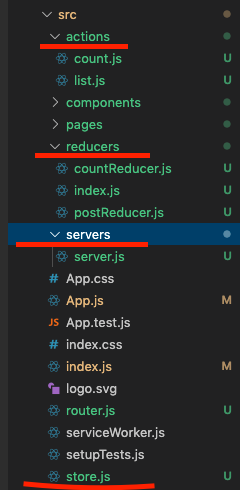
当前所有的操作都写在index.js文件内,比较混乱,代码分割一下以便于更好的维护
创建actions,reducers,servers文件夹,
- count.js
export const countAddAction = {
  type: "COUNT_ADD",
};
- list.js
import { getRequest } from "../servers/server";
export const loadList = async (dispatch) => {
  const res = await getRequest();
  dispatch({
    type: "LOAD_POSTS",
    payload: res.data,
  });
};
- countReducer.js
export const countReducer = (state = { count: 1 }, action) => {
  let { type } = action;
  switch (type) {
    case "COUNT_ADD":
      return {
        ...state,
        count: state.count + 1,
      };
    default:
      return state;
  }
};
- postReducer.js
export const postReducer = (state = { list: [] }, action) => {
  let { type, payload } = action;
  switch (type) {
    case "LOAD_POSTS":
      return {
        ...state,
        list: payload,
      };
    default:
      return state;
  }
};
- index.js 合并reducers文件夹下的reducer
import { combineReducers } from "redux";
import { countReducer } from "./countReducer";
import { postReducer } from "./postReducer";
export const rootRouducer = combineReducers({
  counter: countReducer,
  poster: postReducer,
});
- server.js 接口api
import axios from "axios";
// 获取接口数据
export const getRequest = () => {
  return axios.get("http://jsonplaceholder.typicode.com/posts");
};
- store.js 集中管理数据
import { createStore, compose, applyMiddleware } from "redux";
import thunk from "redux-thunk";

import { rootRouducer } from "./reducers/index";

export const store = createStore(
  rootRouducer,
  compose(applyMiddleware(...[thunk]))
);
- dispatch 触发改变
import { store } from "./store";
import { countAddAction } from "./actions/count";
import { loadList } from "./actions/list";
store.dispatch(countAddAction);
store.dispatch(loadList);
redux 和 react 结合在组件中使用数据
npm install react-redux --save
index.js做配置
import { Provider } from "react-redux";
ReactDOM.render(
  <React.StrictMode>
    <Provider store={store}>
      <Router />
      <App />
    </Provider>
  </React.StrictMode>,
  document.getElementById("root")
);
组件页面用connet连接取值
import { connect } from "react-redux";
const list = [
  { id: 1, name: "电视", price: 1000 },
  { id: 2, name: "冰箱", price: 1000 },
  { id: 3, name: "洗衣机", price: 1000 },
];
const PostList = (props) => {
  let list = props.props.loadList || [];
  console.log("=====postList=====", props);
  return (
    <>
      {list.map((item, index) => {
        return <p key={index}>{item.title}</p>;
      })}
    </>
  );
};
const mapStateToProps = (state, ownProps) => {
  return {
    loadList: state.poster.list,
  };
};
const ListItems = (props) => {
  return (
    <>
      {list.map((item) => {
        return (
          <ListItem item={item} key={item.id} onDelete={itemDelete}></ListItem>
        );
      })}

      <PostList props={props}></PostList>
    </>
  );
};

export default connect(mapStateToProps)(ListItems);