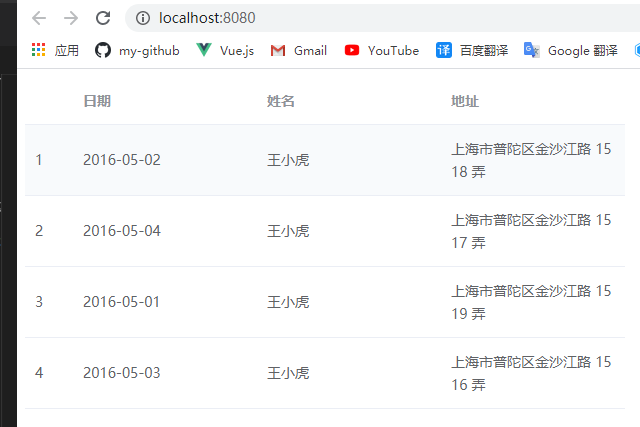
基于el-table组件进行二次封装,通过传入一个配置对象直接生成表格,在需要用到大量表格的项目中可以很方便的生产一个表格(主要为了划水)。
使用方式
<template>
  <xf-table :config="config"></xf-table>
</template>

<script>
import XfTable from '@/components/XfTable';
export default {
  components: {
    XfTable
  },
  data() {
    return {
      config: {
        config: [
          { type: "index" },
          { prop: "date", label: "日期" },
          { prop: "name", label: "姓名" },
          { prop: "address", label: "地址" },
        ],
        table: [
          {
            date: "2016-05-02",
            name: "王小虎",
            address: "上海市普陀区金沙江路 1518 弄",
          },
          {
            date: "2016-05-04",
            name: "王小虎",
            address: "上海市普陀区金沙江路 1517 弄",
          },
          {
            date: "2016-05-01",
            name: "王小虎",
            address: "上海市普陀区金沙江路 1519 弄",
          },
          {
            date: "2016-05-03",
            name: "王小虎",
            address: "上海市普陀区金沙江路 1516 弄",
          },
        ],
      },
    };
  },
};
</script>
前置知识
看之前你需要了解下面几个vue的api:
解决了什么问题
我是做管理系统的,系统中经常会遇到大量展示型表格,开发没什么难度,但是维护的时候,客户经常改来改去的,今天加个字段,明天改个表头。每次加字段什么的都需要前后端一起改。
所以就萌生了一个需求,简单的表格能通过后端维护一个配置对象来直接生成,复杂一些的列可以交由前端控制,并且前端最好能够对所有的列拥有手动干预的权利,这样大部分情况下,表格的一些增删改之类的都是后端来做,当出现一些复杂的情况时,前端就可以手动干预控制。
开搞
得益于vue的一些高级api,代码非常简单,如下:
<template>
  <!-- v-bind="$attrs"接收父组件中不作为 prop的 attribute 绑定 -->
  <!-- v-on="$listeners"将当前组件的Table Events发送到父组件 -->
  <el-table
    class="bm-table-wrapper"
    :data="config.table"
    v-bind="$attrs"
    v-on="$listeners"
  >
    <!-- 前置插槽预留,主要是为expand留的,这种后端处理开来比较麻烦,就可以通过slot发送到父组件,让前端来处理 -->
    <slot name="prepend"></slot>
    <template v-for="column in config.config">
      <!-- 这里通过slot增加灵活性,将来如果某个列变负责了,后端处理不了了,就可以通过前端来处理 -->
      <slot :name="column.prop">
        <el-table-column v-bind="column" :key="column.prop + column.type"></el-table-column>
      </slot>
    </template>
    <!-- 后置插槽预留 -->
    <slot name="append"></slot>
  </el-table>
</template>

<script>
export default {
  props: {
    config: {
      type: Object,
      required: true
    }
  }
};
</script>
使用方式:
<template>
  <bm-table :config="config"></bm-table>
</template>

<script>
import BmTable from '@/components/BmTable';
export default {
  components: {
    BmTable
  },
  data() {
    return {
      // 实际开发中,这个配置对象时后台来维护的
      config: {
        config: [
          { type: "index" },
          { prop: "date", label: "日期" },
          { prop: "name", label: "姓名" },
          { prop: "address", label: "地址" },
        ],
        table: [
          {
            date: "2016-05-02",
            name: "王小虎",
            address: "上海市普陀区金沙江路 1518 弄",
          },
          {
            date: "2016-05-04",
            name: "王小虎",
            address: "上海市普陀区金沙江路 1517 弄",
          },
          {
            date: "2016-05-01",
            name: "王小虎",
            address: "上海市普陀区金沙江路 1519 弄",
          },
          {
            date: "2016-05-03",
            name: "王小虎",
            address: "上海市普陀区金沙江路 1516 弄",
          },
        ],
      },
    };
  },
};
</script>
效果