1.没有宽度的盒子和有宽度的盒子
没有宽度的盒子
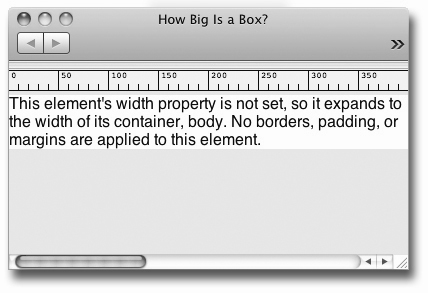
没有宽度是指没有显式的设置元素的width属性,该属性的默认值为auto,结果会让元素宽度扩展到与父元素同宽。
html:
<body>
   <p>This element's width property is not set…</p>
</body>
css:
body {
    font-family:helvetica, arial, sans-serif;
    font-size:1em; margin:0px;
    background-color:#caebff;
}
p {
    margin:0;
    background-color:#fff;
}
p {
    margin:0;
    background-color:#fff;
    padding:0 20px;
    border:solid red;
    border-width:0 6px 0 6px;
}
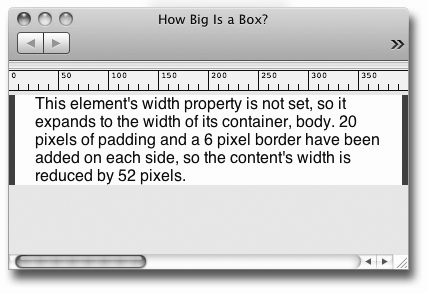
盒模型结论一:没有设置width的盒子,宽度始终会扩展到填满父元素的宽度为止。添加外边距、内边距、边框会时内容区的宽度减小,减少量=边框+外边距+内边距。
有宽度的盒子
当为元素设置了width属性时,块级元素的宽度就不会再扩展到与父元素同宽了。 此时若给元素添加边框或外边距、内边距则会将盒子变宽,内容区宽度不变。实际上,width属性设定的只是盒子内容区的宽度,而不是盒子要占据的水平宽度。
Tips:css3新增了一个border-sizing属性,通过它可以将有宽度的盒子也设定成具有默认的auto状态下的行为。详情请阅读 www.w3school.com.cn/cssref/pr_b…