准备工作
我们先去vue官网看一下怎么使用: 使用文档
在学习这个之前我建议大家先看一下vue的render函数中的data属性是怎么回事儿,弄明白这个是搞明白下面原理的前提条件,render说明文档
通过举栗子来揭秘vue的指令原理
<!DOCTYPE html>
<html lang="en">
<head>
  <meta charset="UTF-8">
  <meta name="viewport" content="width=device-width, initial-scale=1.0">
  <meta http-equiv="X-UA-Compatible" content="ie=edge">
  <title>Document</title>
  <script src="../../vue-dev/dist/vue.js"></script>
</head>
<body>
  <div id="container">
    <h3>Scroll down inside this section ↓</h3>
    <p v-pin:[direction]="200">I am pinned onto the page at 200px to the left.</p>
  </div>
  <script>
    new Vue({
      el: '#container',
      data: function () {
        return {
          direction: 'left'
        }
      },
      directives: {
        'pin': {
          bind: function (el, binding, vnode) {
            el.style.position = 'fixed'
            var s = (binding.arg == 'left' ? 'left' : 'top')
            el.style[s] = binding.value + 'px'
          }
        }
      }
    })
  </script>

</body>
</html>
在element的抽象语法树中的结构如图:
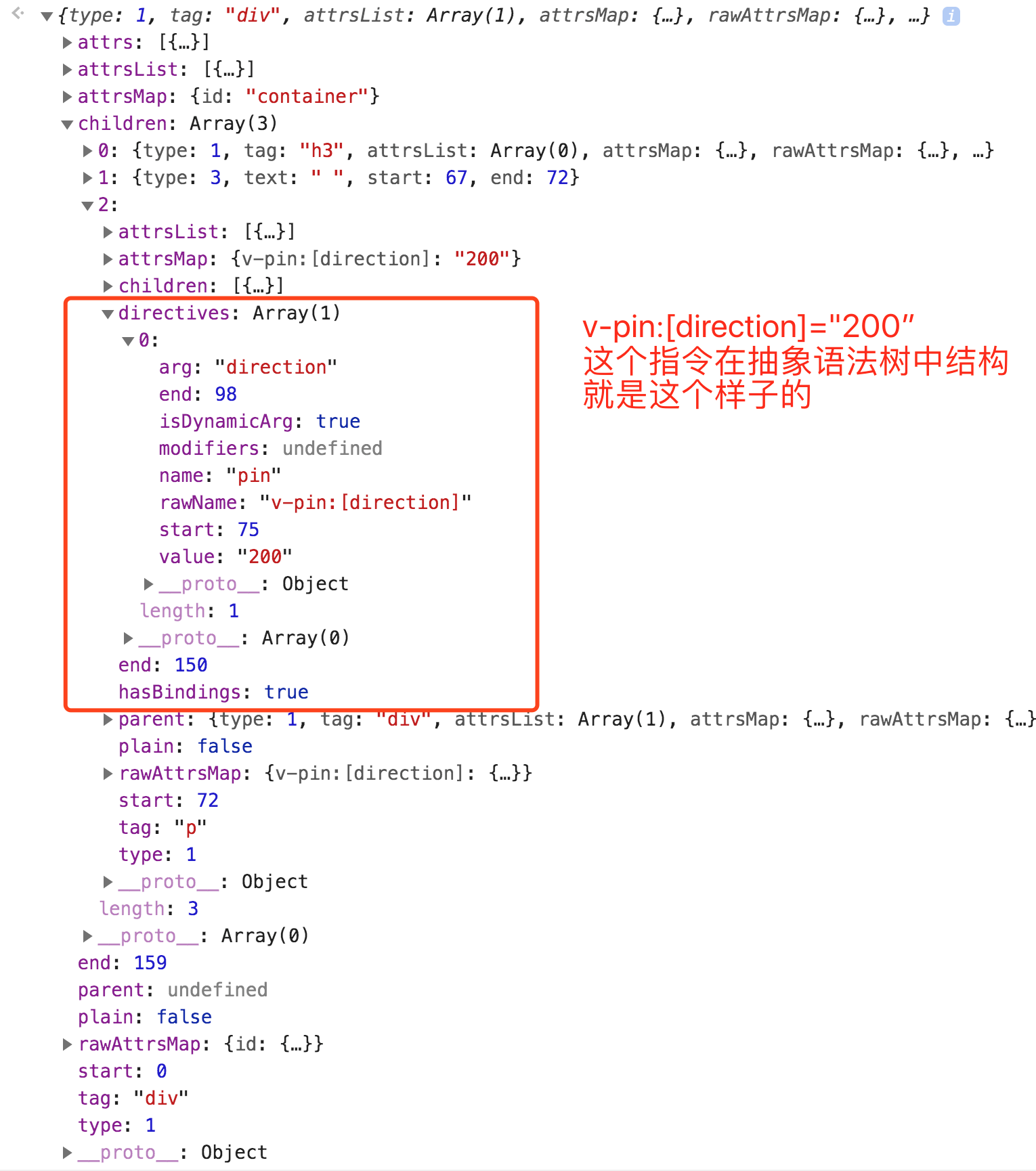
render函数是一个样子的:
"with(this) {
    return _c('div', {
        attrs: {
            "id": "container"
        }
    },
    [_c('h3', [_v("Scroll down inside this section ↓")]), _v(" "), _c('p', {
        directives: [{
            name: "pin",
            rawName: "v-pin:[direction]",
            value: (200),
            expression: "200",
            arg: direction
        }]
    },
    [_v("I am pinned onto the page at 200px to the left.")])])
}
"
例子总结:directives部分最终会放入到vnode的data中
directive执行的源码分析
src/core/vdom/modules/directives.js
/* @flow */

import { emptyNode } from 'core/vdom/patch'
import { resolveAsset, handleError } from 'core/util/index'
import { mergeVNodeHook } from 'core/vdom/helpers/index'

// 当组件创建的时候会调用create
// 但组件更新的时候会调用update
// 当组件卸载的时候会调用destroy
export default {
  create: updateDirectives,
  update: updateDirectives,
  destroy: function unbindDirectives (vnode: VNodeWithData) {
    updateDirectives(vnode, emptyNode)
  }
}

function updateDirectives (oldVnode: VNodeWithData, vnode: VNodeWithData) {
  if (oldVnode.data.directives || vnode.data.directives) {
    _update(oldVnode, vnode)
  }
}

function _update (oldVnode, vnode) {
  const isCreate = oldVnode === emptyNode
  const isDestroy = vnode === emptyNode
  // 在新老Vnode上的指令,整合了我们定义的指令对象和模板中解析出的指令对象
  // normalizeDirectives这个函数下面有说明,想看往下滑
  const oldDirs = normalizeDirectives(oldVnode.data.directives, oldVnode.context)
  const newDirs = normalizeDirectives(vnode.data.directives, vnode.context)

  const dirsWithInsert = []
  const dirsWithPostpatch = []

  let key, oldDir, dir
  for (key in newDirs) {
    oldDir = oldDirs[key]
    dir = newDirs[key]
    // 如果指令在oldDirs上没有,那么就调用bind钩子函数进行初始化
    if (!oldDir) {
      // new directive, bind
      callHook(dir, 'bind', vnode, oldVnode)
      // 如果指令定义了inert,那么放到dirsWithInsert中,等该组件的dom节点都插入到dom中会批量执行dirsWithInsert中的钩子函数
      if (dir.def && dir.def.inserted) {
        dirsWithInsert.push(dir)
      }
    } else {
      // existing directive, update
      // 这种情况下要掉用update钩子函数
      dir.oldValue = oldDir.value
      dir.oldArg = oldDir.arg
      callHook(dir, 'update', vnode, oldVnode)
      // 如果指令中定义了componentUpdated,那么把放入到dirsWithPostpatch,等该组件的真实dom更新完批量执行dirsWithPostpatch中的钩子函数
      if (dir.def && dir.def.componentUpdated) {
        dirsWithPostpatch.push(dir)
      }
    }
  }

  if (dirsWithInsert.length) {
    const callInsert = () => {
      for (let i = 0; i < dirsWithInsert.length; i++) {
        callHook(dirsWithInsert[i], 'inserted', vnode, oldVnode)
      }
    }
    if (isCreate) {
      mergeVNodeHook(vnode, 'insert', callInsert)
    } else {
      callInsert()
    }
  }

  if (dirsWithPostpatch.length) {
    mergeVNodeHook(vnode, 'postpatch', () => {
      for (let i = 0; i < dirsWithPostpatch.length; i++) {
        callHook(dirsWithPostpatch[i], 'componentUpdated', vnode, oldVnode)
      }
    })
  }

  if (!isCreate) {
    for (key in oldDirs) {
      if (!newDirs[key]) {
        // no longer present, unbind
        callHook(oldDirs[key], 'unbind', oldVnode, oldVnode, isDestroy)
      }
    }
  }
}

const emptyModifiers = Object.create(null)

function normalizeDirectives (
  dirs: ?Array<VNodeDirective>, // 当前组件使用指令的集合
  vm: Component				   // 组件的实例
): { [key: string]: VNodeDirective } {
  const res = Object.create(null)
  if (!dirs) {
    // $flow-disable-line
    return res
  }
  let i, dir
  for (i = 0; i < dirs.length; i++) {
    dir = dirs[i]
    if (!dir.modifiers) {
      // $flow-disable-line
      dir.modifiers = emptyModifiers
    }
    // 按指令的名字存储在res中
    res[getRawDirName(dir)] = dir
    // res[dirName].def 指的就是我们声明指令的对象内容
    // resolveAsset函数实际也比较简单,就是从option中指定某个类型取出该类型下的某个key,下面贴出了源码
    dir.def = resolveAsset(vm.$options, 'directives', dir.name, true)
  }
  // $flow-disable-line
  return res
}

function getRawDirName (dir: VNodeDirective): string {
  return dir.rawName || `${dir.name}.${Object.keys(dir.modifiers || {}).join('.')}`
}

function callHook (dir, hook, vnode, oldVnode, isDestroy) {
  const fn = dir.def && dir.def[hook]
  if (fn) {
    try {
      // 看vue官网,介绍钩子函数的参数,这里的dir实际就是指令在模板中解析后的指令对象,就是上面render函数中directives部分
      fn(vnode.elm, dir, vnode, oldVnode, isDestroy)
    } catch (e) {
      handleError(e, vnode.context, `directive ${dir.name} ${hook} hook`)
    }
  }
}
src/core/util/options.js
export function resolveAsset (
  options: Object,
  type: string,
  id: string,
  warnMissing?: boolean
): any {
  /* istanbul ignore if */
  if (typeof id !== 'string') {
    return
  }
  const assets = options[type]
  // check local registration variations first
  if (hasOwn(assets, id)) return assets[id]
  const camelizedId = camelize(id)
  if (hasOwn(assets, camelizedId)) return assets[camelizedId]
  const PascalCaseId = capitalize(camelizedId)
  if (hasOwn(assets, PascalCaseId)) return assets[PascalCaseId]
  // fallback to prototype chain
  const res = assets[id] || assets[camelizedId] || assets[PascalCaseId]
  if (process.env.NODE_ENV !== 'production' && warnMissing && !res) {
    warn(
      'Failed to resolve ' + type.slice(0, -1) + ': ' + id,
      options
    )
  }
  return res
}