第一种
1.先npm安装echarts
npm install echarts --save
2. 在main.js中引入echarts
import myCharts from './comm/js/myCharts.js'
Vue.use(myCharts)
3.在创建一个myCharts.js文件
import echarts from 'echarts'
const install = function(Vue) {
Object.defineProperties(Vue.prototype, {
    $chart: {
        get() {
            return {
                //画一条简单的线
                line1: function (id) {
                    this.chart = echarts.init(document.getElementById(id));
                    this.chart.clear();

                    const optionData = {
                        xAxis: {
                            type: 'category',
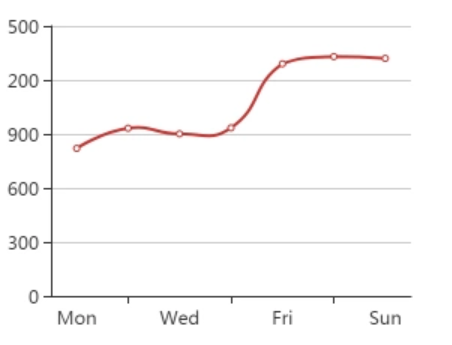
                            data: ['Mon', 'Tue', 'Wed', 'Thu', 'Fri', 'Sat', 'Sun']
                        },
                        yAxis: {
                            type: 'value'
                        },
                        series: [{
                            data: [820, 932, 901, 934, 1290, 1330, 1320],
                            type: 'line',
                            smooth: true
                        }]
                    };

                    this.chart.setOption(optionData);
                },
            }
        }
    }
})
}

export default {
    install
}
4.在创建一个ECharts.vue文件
<template>
  <div class="hello">
    <div id="chart1"></div>
  </div>
</template>

<script>
export default {
  name: 'HelloWorld',
  data () {
    return {
    }
  },
  mounted() {
    this.$chart.line1('chart1');
  }
}
</script>

<style scoped>
  #chart1 {
    width: 300px;
    height: 300px;
  }
</style>
5.效果如下:
第二种
1.先npm安装echarts
npm install echarts --save
2. 在main.js中引入echarts
import myCharts from './comm/js/myCharts.js'
Vue.use(myCharts)
3.创建一个ECharts.vue文件
<template>
<div id="chartPie" class="pie-wrap"></div>
</template>

<script>
import * as echarts from 'echarts';
require('echarts/theme/macarons');//引入主题

export default {
data() {
  return {
    chartPie: null
  }
},
mounted() {
  this.$nextTick(() => {
    this.drawPieChart();
  })
},
methods: {
  drawPieChart() {
    let mytextStyle = {
      color: "#333",
      fontSize: 18,
    };
    let mylabel = {
      show: true,
      position: "right",
      offset: [30, 40],
      formatter: '{b} : {c} ({d}%)',
      textStyle: mytextStyle
    };
    this.chartPie = echarts.init(document.getElementById('chartPie'),'macarons');
    this.chartPie.setOption({
      title: {
        text: 'Pie Chart',
        subtext: '纯属虚构',
        x: 'center'
      },
      tooltip: {
        trigger: 'item',
        formatter: "{a} <br/>{b} : {c} ({d}%)",
      },
      legend: {
        data: ['直接访问', '邮件营销', '联盟广告', '视频广告', '搜索引擎'],
        left:"center",
        top:"bottom",
        orient:"horizontal",
      },
      series: [
        {
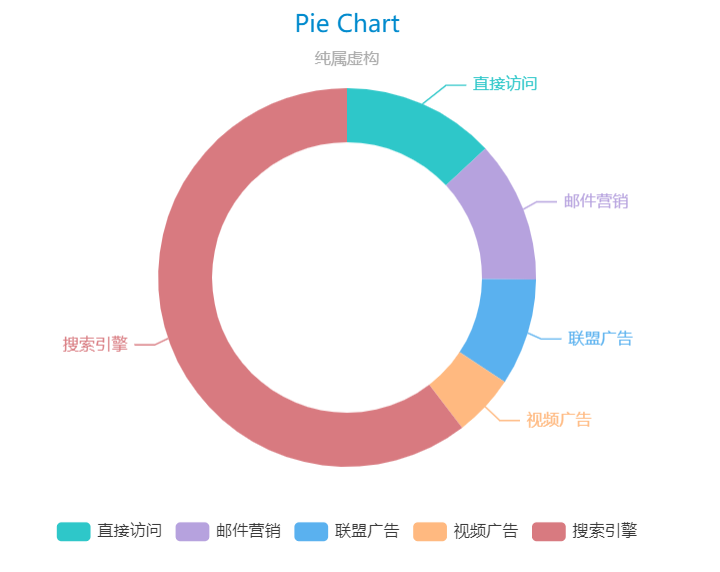
          name: '访问来源',
          type: 'pie',
          radius: ['50%', '70%'],
          center: ['50%', '50%'],
          data: [
            {value: 335, name: '直接访问'},
            {value: 310, name: '邮件营销'},
            {value: 234, name: '联盟广告'},
            {value: 135, name: '视频广告'},
            {value: 1548, name: '搜索引擎'}
          ],
          animationEasing: 'cubicInOut',
          animationDuration: 2600,
          label: {
            emphasis: mylabel
          }
        }
      ]
    });
  }
}
}
</script>

<style lang='scss' scope>
    .pie-wrap{
        width:100%;
        height:400px;
    }
</style>
4.效果如下: